AI integration
Topology Studio is a first-class citizen of TrackMe’s AI Assistant — the assistant doesn’t just know about your topologies, it can reason over them and, with your consent, build and modify them for you.
Note
Like every AI capability in TrackMe, this is opt-in: it requires the AI Assistant to be enabled and at least one AI provider configured. Without it, Topology Studio is fully functional — the AI entry points simply don’t appear.
The topology chat context
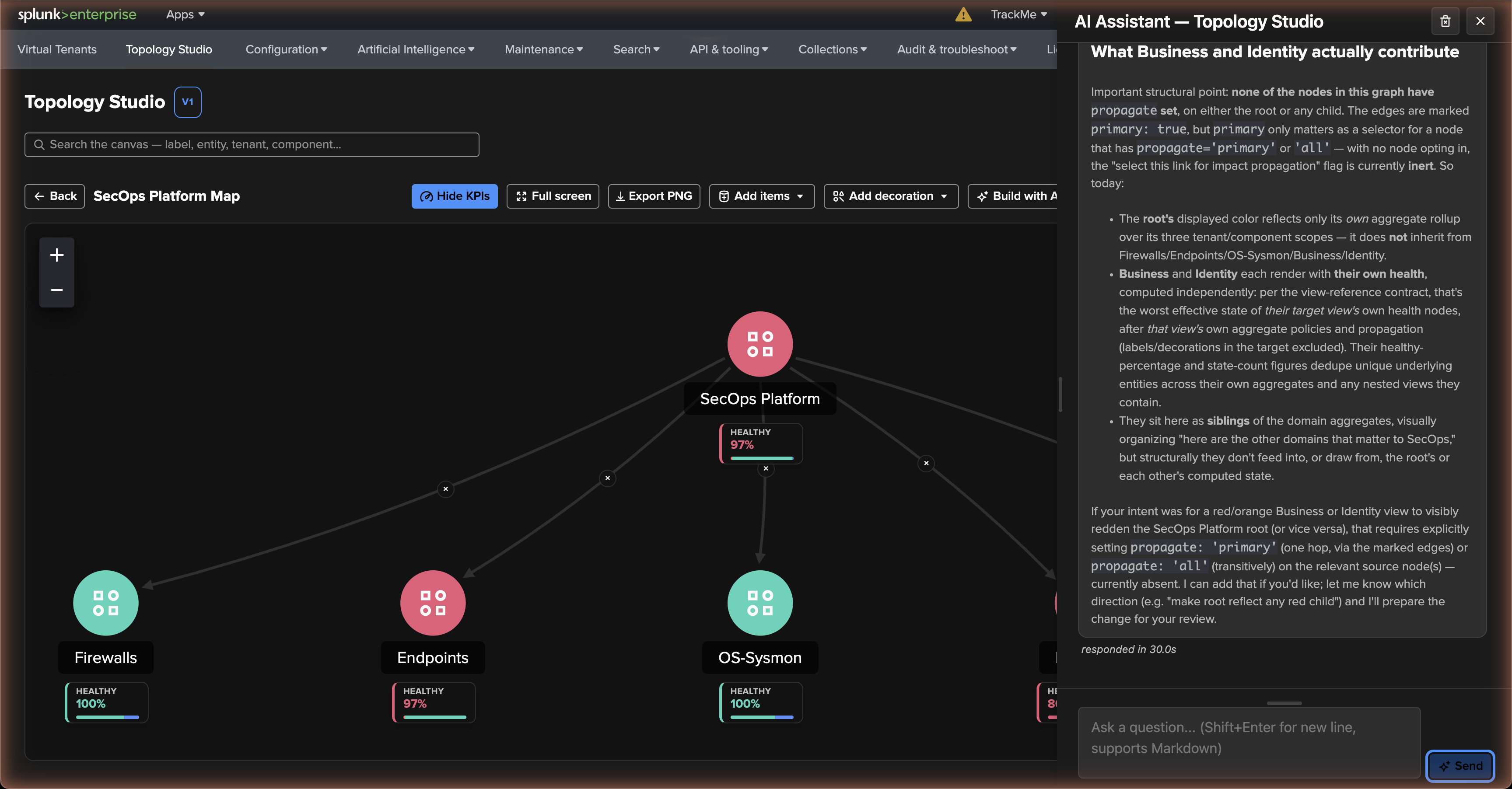
The AI Assistant on the Topology Studio page runs in a dedicated topology context, scoped to where you open it:
on the views browser, the badge reads Topology Studio — all views and the assistant sees every view your roles can read, with a bounded sample of recent graphs and alerts;
on an open view, the badge names that view and the conversation is isolated to it: the assistant sees the view’s full graph, its alerts and, since TrackMe 2.4.15, the saved views it may reference.
In both cases it sees only what your permissions allow and it understands the topology contracts — what a valid graph looks like, what aggregates and filters can express, how health rolls up, how alerts behave. The context is stored configuration, not live status: the assistant explains how a view is built and evaluated, it does not claim to know the current colour of a node. Pick the AI provider from the selector at the top of the panel.
Ask it things like:
“Which of my views cover the firewall data sources?”
“Explain how this view determines aggregate health.”
“How would an auto aggregate combine these views without repeating their filters?”
“What would be a good alert configuration for this map?”
Build with AI — a topology from a description
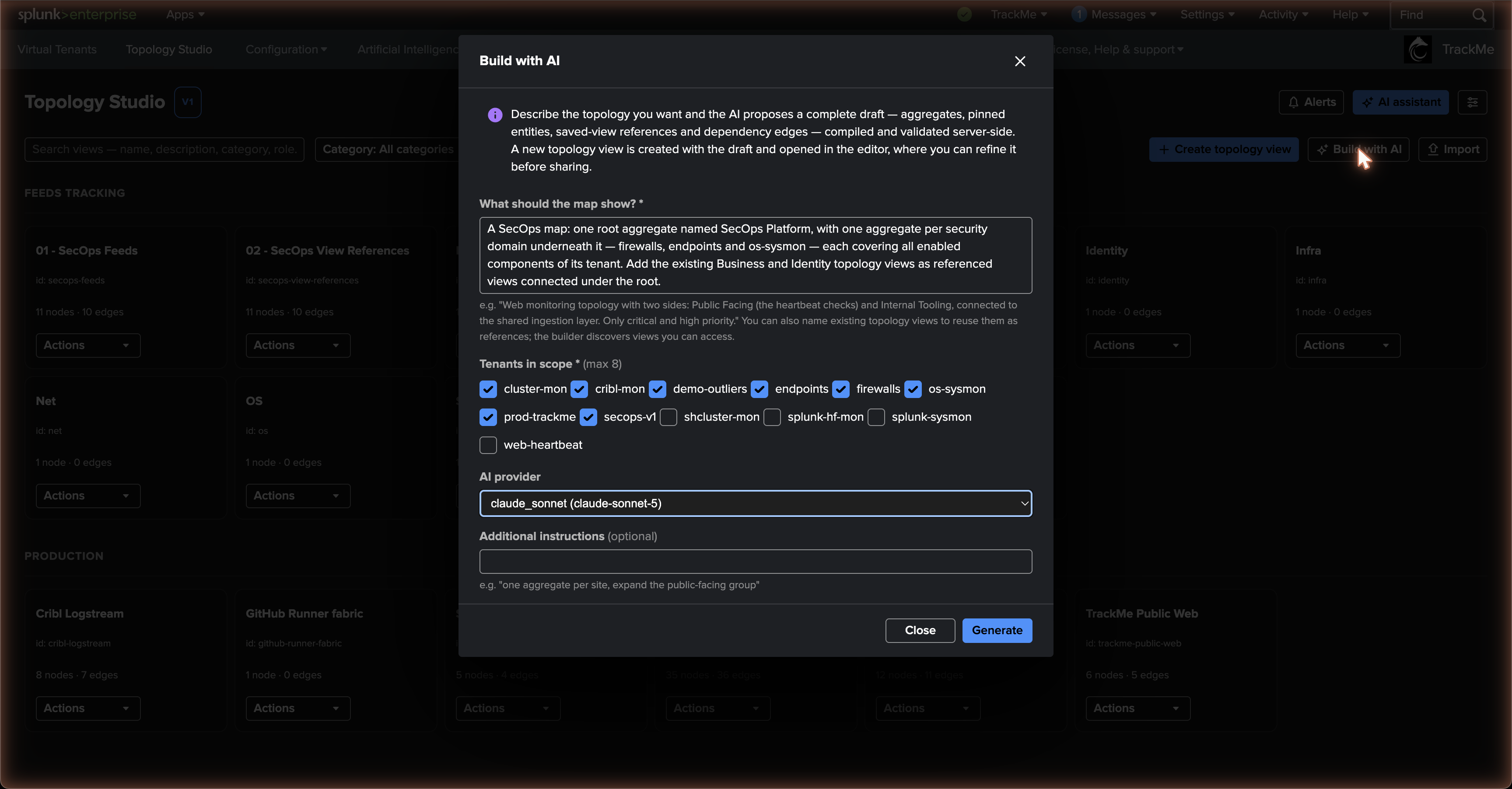
Build with AI (TrackMe 2.4.13+) turns a plain-language description into a complete topology draft. It runs as a dedicated AI Builder agent rather than the chat assistant, which makes it fast and reliable across all supported providers, and it is available from three places:
the views browser — preview and refine a draft before creating the view;
the editor toolbar of a writable view — the draft lands on the open canvas as one pending change;
the empty-canvas guide of a brand-new view.
The dialog asks for four things: what the map should show, in your own words; the tenants in scope (up to eight, pre-selected from those you can see); the AI provider; and optional additional instructions such as “one aggregate per site, expand the public-facing group”. Generation streams its progress, and the result is a proposed topology with a summary and the builder’s notes — which tenant and component each aggregate was mapped to, what was left unfiltered and why.
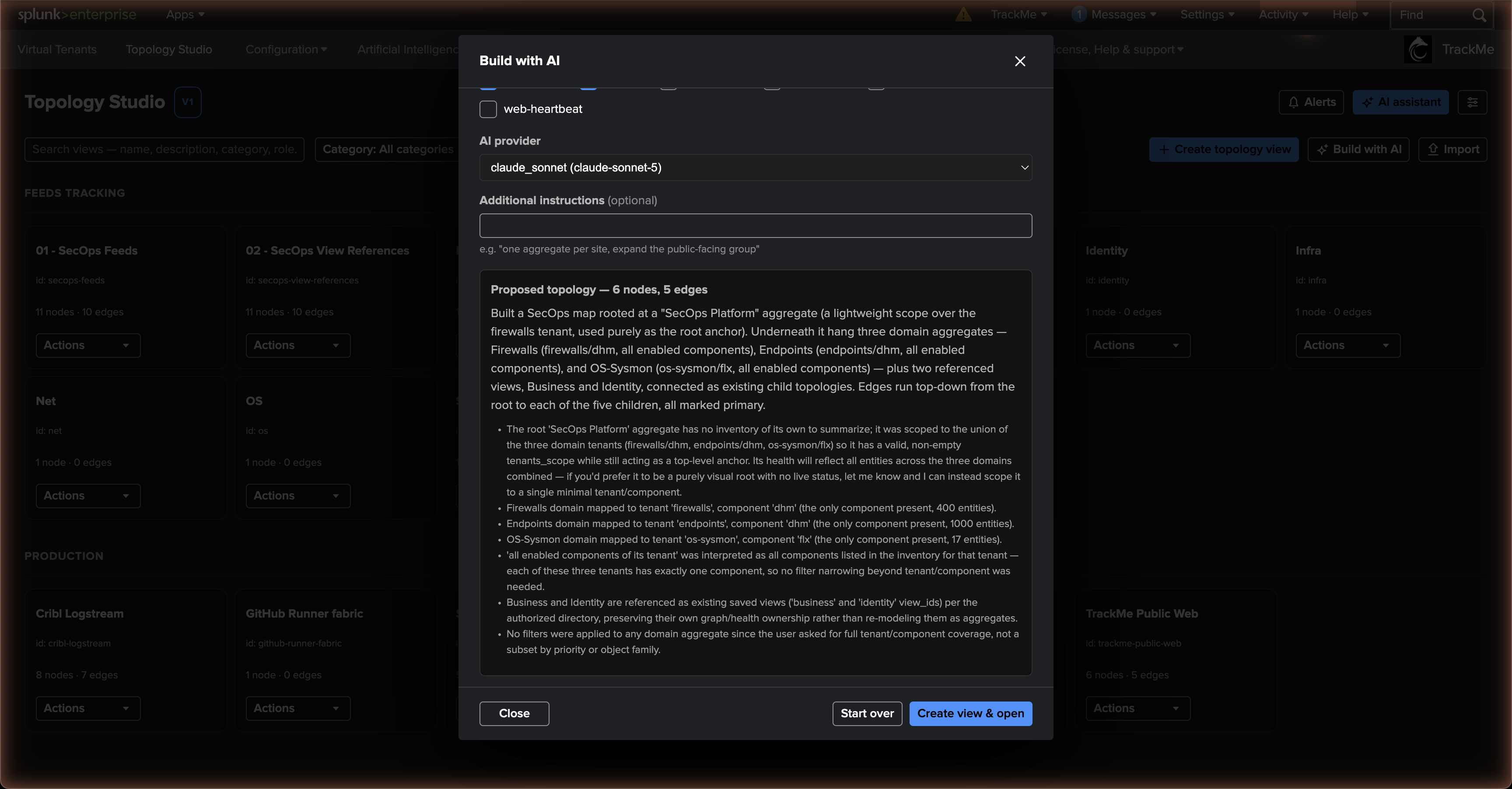
What the builder can place:
scoped aggregates with tenant scopes and filters — a scope-based building block, since a scope needs no entity identities;
auto aggregates (TrackMe 2.4.18+) — health parents combining incoming entities, aggregates or view nodes without duplicated scopes and filters;
pinned entities, drawn only from your real inventory — the builder never invents an identity;
dependency edges, with auto-aggregate membership directed child → parent even when the parent is laid out above its children;
since TrackMe 2.4.15, view nodes — it discovers the saved views you are allowed to reference and composes them alongside aggregates and entities; a draft that names a view outside that directory is rejected as a whole.
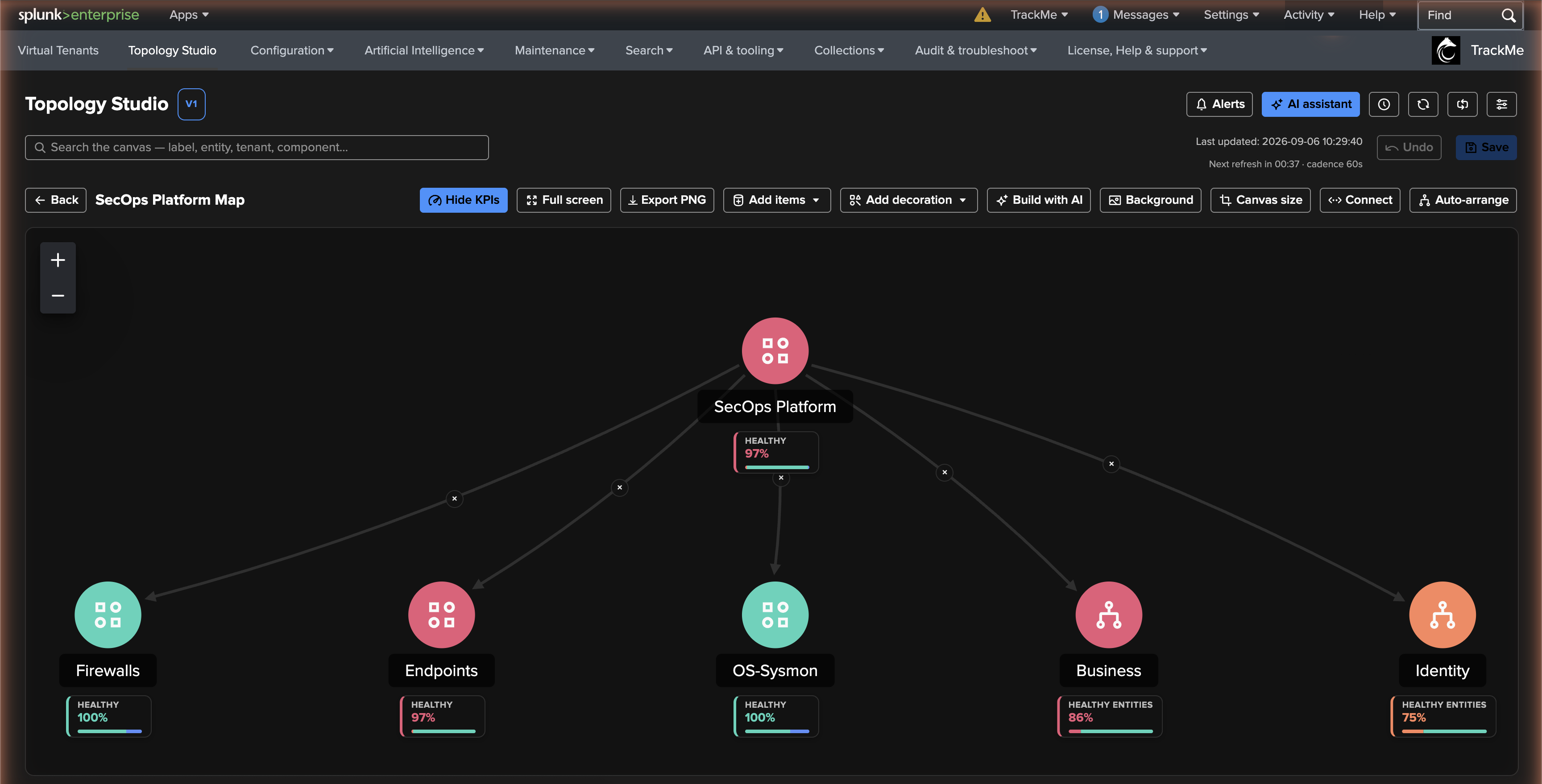
Every draft is validated server-side before it reaches the canvas, by the same validators as a hand-authored save. From the views browser, Create view & open saves the view and opens it in the editor; on an open view, the draft is applied as one undoable pending change — review it, adjust it, undo it — and nothing is stored until you Save, where the normal version history applies and permissions and cycles are re-checked. Start over discards the proposal and returns to the description.
Note
Build with AI is interactive only and requires a configured AI provider. Automation users have a REST surface for it, documented in the REST API Reference.
AI-modified topologies through the assistant
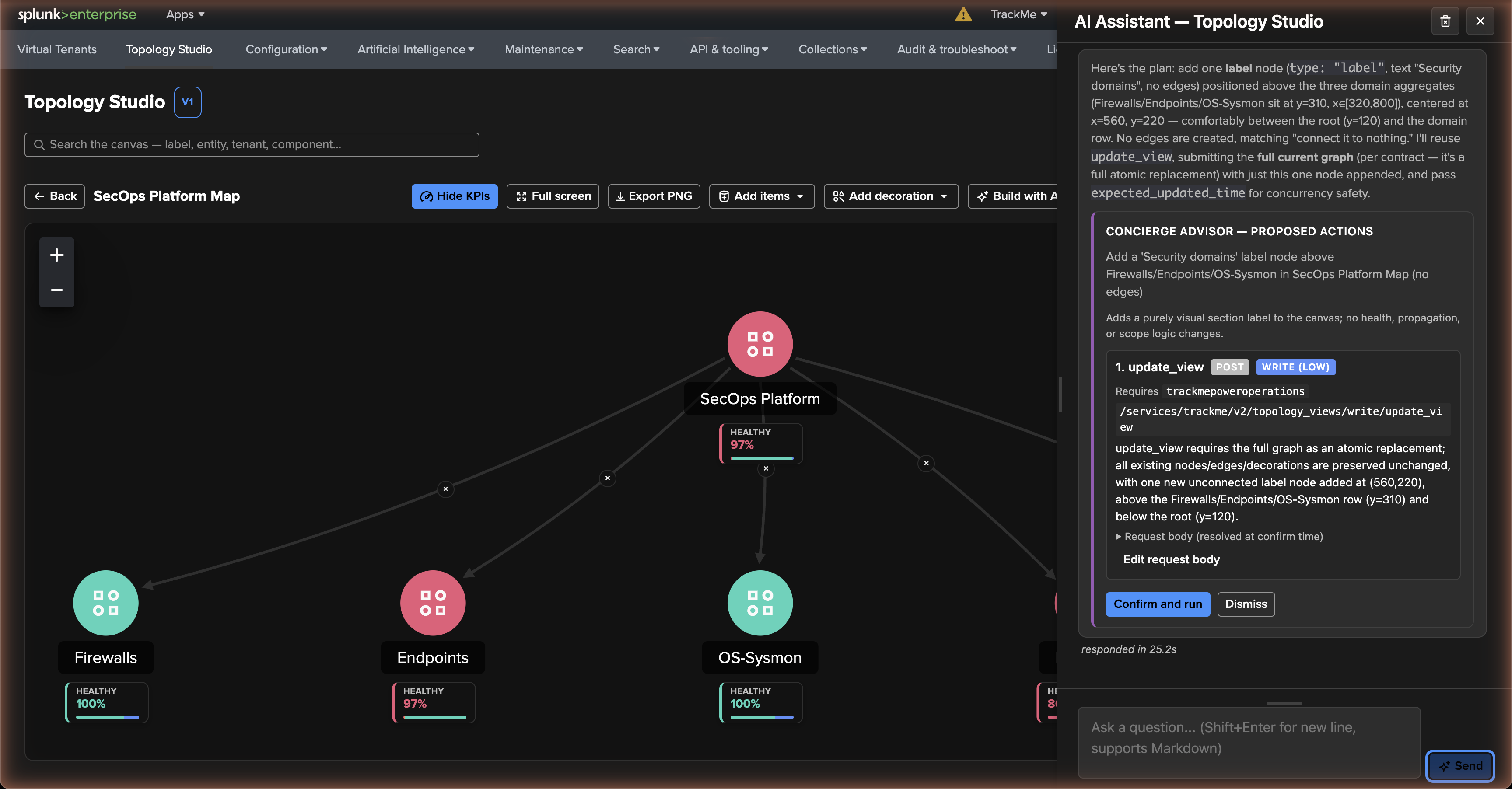
The assistant can also change a view in conversation: “add the linux hosts tenant’s DHM entities as an aggregate under the ingestion tier”, “add a label above the three domain aggregates” — and, for recovery, “roll this view back to how it was before the last change” through the view’s version history. It knows your tenants and which components each has enabled, and on an open view it knows the real entities behind it.
Every write goes through the consent-card flow: the assistant presents exactly what it intends to do — the endpoint, the write level, the request body — and nothing touches your view until you Confirm and run. The proposal is validated by the same server-side validators as any hand-authored save, so the AI cannot produce a graph a human could not, and your tenant permissions bound what it can see, exactly as they bound the canvas. Since 2.4.15 the assistant also preserves existing view nodes when it edits a graph, and only references views from the directory it was given.
Auto aggregates in generation and refinement
Both the Assistant and Builder understand auto aggregates: membership follows incoming connections, health follows the worst effective child state, and the KPI counts unique underlying entities rather than averaging child percentages. This is separate from expanding a scoped aggregate into automatically displayed entity nodes.
For a new map, ask Build with AI to “Create three domain aggregates and combine them under one auto aggregate; keep the filters on the children.” For existing saved maps, ask for “An auto aggregate over these three saved views, using view references rather than copying their definitions.”
In the full-screen preview, Refine this draft applies follow-up instructions to the latest successful draft. For example: “Replace the scoped root with an auto aggregate fed by the existing children. Preserve their health policies and member KPIs.” Review the incoming links, contributors and live health before Create view & open, or before applying to an existing editor. Failed or cancelled refinement keeps the previous draft.
For a small change to a saved view, ask the Assistant to “Convert this label into an auto aggregate and retain its incoming connections.” The Assistant preserves existing membership, child policies and links during unrelated edits, and proposes the change through the usual consent card. It explains configured health rules; the canvas preview supplies current live health.
Generated and refined graphs pass the normal permission, cycle and composition checks. The Builder supports 40 scoped and auto aggregates combined in a draft; this is separate from the manual canvas composition limits.
Per-alert Ask AI
Each Topology Alert carries an Ask AI action: the assistant receives the alert’s definition and recent run history and helps you interpret it — why it opened, whether the schedule and scope make sense, what the run-history pattern suggests.
Hint
The assistant’s knowledge of the topology contracts is kept in lock-step with the product by continuous integration — when Topology Studio evolves, the assistant’s understanding evolves in the same release.