Broker client API
Important
The client API is disabled by default. Installing or upgrading TrackMe leaves it
off, and nothing changes until an administrator enables it under
Configuration → System settings → TrackMe Broker → Enable the broker client API,
or with POST /services/trackme/v2/broker/client/admin/settings and
{"enabled": true}.
An independent Splunk app can submit an HTTPS request to TrackMe on its search head. A paired broker inside the destination network pulls the request, calls the API, and returns the response. The app needs no TrackMe Python imports and never connects directly to the private API. Broker wire protocol 1 is unchanged.
The example app’s search command demonstrates this flow:
| apiexample account="example_api" operation="list"
| apiexample account="example_api" operation="echo" message="hello"
See Use the example app.
Configure a separate client pool
Use the splunkd-only administration endpoints under
/services/trackme/v2/broker/client/admin/ with trackmeadminoperations:
Operation |
Body |
|---|---|
|
|
|
|
|
Account policy, as below |
{
  "account": "example_api",
  "broker": "example-client",
  "origin": "https://api.example.com:8444",
  "path_prefix": "/v1",
  "methods": ["GET", "POST"],
  "roles": ["broker_api_example"],
  "enabled": true
}
The new pool has immutable usage=third_party. Native TrackMe accounts cannot
submit into it. Add and pair a separate connection on each participating HF using
the normal pairing code and fingerprint check. Preserve existing native
connections. Declare the destination independently in each HF’s target allowlist,
with certificate verification and a trusted CA.
Separate connections on existing HFs support functional testing. They share CPU, memory and restart failure domains; they do not demonstrate isolation under load. Use small bounded test loads and verify native calls before, during and after.
The stack checks the HTTPS origin, path-prefix boundary and allowed methods. It rejects encoded paths, dot segments, repeated slashes, routing/method-override headers and hop-by-hop headers. Query strings pass through. Destination credential permissions remain necessary even when a path is allowed.
Turn the client API on
Turn it on last, once the broker is paired, the client pool and its accounts exist, and every forwarder of the pool declares the API as a target.
Open Configuration → System settings, section TrackMe Broker, card Client API.
Set Enable the broker client API to Yes.
Select Save changes. As for every setting on this page, the change stays pending until it is saved.
This writes [broker] client_api_enabled = 1 in trackme_settings.conf,
which a search head cluster replicates with the rest of that file. The
settings operation of the administrative API changes the same switch. The
info operation then answers "accepting": true.
Set it back to No to stop new calls. A caller can still collect a call that was already accepted, and pools and accounts are kept.
Use the example app
TrackMe provides an example app on request: the Broker API Example app. Use version 0.2.4 or later. Its Accounts and Try the API pages demonstrate account ownership and the round trip without requiring users to put credentials in a search. The app uses the neutral UCC default icons. Account registration remains available from its navigation; opening the app does not require completing Splunk’s setup gate.
First configure and pair the separate client pool, declare the API target on each HF, and enable the client API. The example app does not enable the client API or modify native broker connections for you.
Open Broker API Example → Accounts as an administrator:
Enter an account name, such as
example_api, and the private API’s HTTPS origin, such ashttps://api.example.com:8444. Omit a path: the reference command uses fixed endpoints under/v1.Select a third-party broker pool. Native pools do not appear in this selector.
Enter the API’s bearer token. The app stores it in its own Splunk credential store and clears it from the form after submission. It is not returned by the account-list endpoint.
Expand Splunk connection and check this stack’s HTTPS management URL, retained for standalone client configuration. The SPL command uses the local SDK connection and caller session supplied by Splunk; it does not send the search session through the public management address.
Select Register account. A new configuration refers to its own credential identity and a TrackMe policy permitting GET/POST under
/v1.
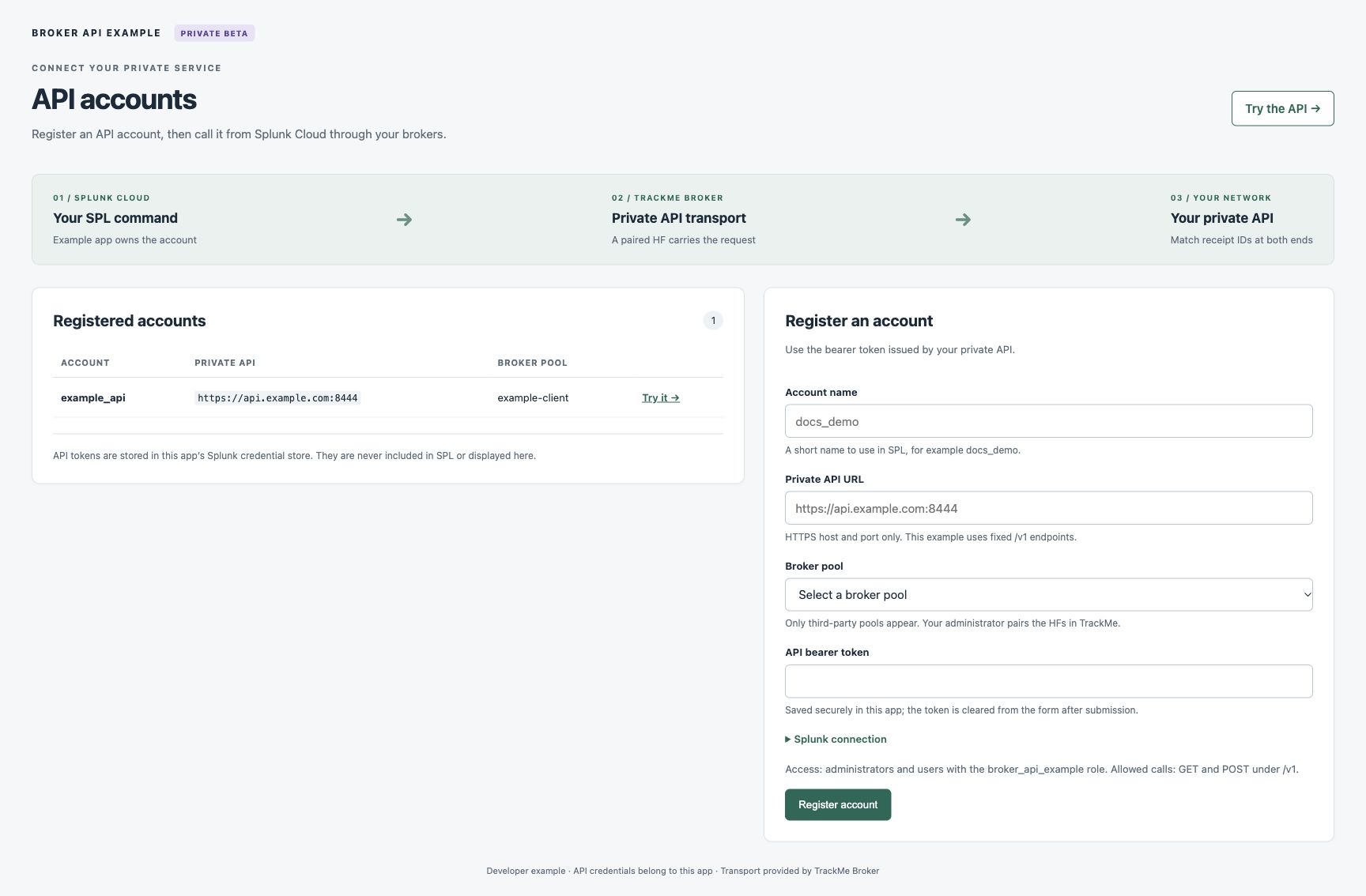
Accounts page rendered with synthetic documentation values. The surrounding Splunk navigation is omitted from this preview.
Registration uses the administrator’s current Splunk session. It requires both
brokerapiexampleadmin and trackmeadminoperations; the example handler does
not receive a system authentication token. The app grants its own setup/use
capabilities and trackmebrokerclient to admin and sc_admin. It does not
grant TrackMe administrator or tenant permissions. New account policies allow
administrators and the broker_api_example role. Assign that role to users
who should run the example command, and retain restrictive credential object ACLs.
The Accounts page registers new accounts; it does not overwrite existing ones. If registration fails, refresh the list before retrying: an ambiguous server reply may have saved the account. Partial setup can leave an unused credential or policy for administrator cleanup. Do not infer that a failed UI response rolled back every configuration write.
Existing accounts remain readable when optional administrator pool discovery is unavailable. In that case, the Accounts page explains the problem and disables new registration until discovery succeeds; the demo does not request pool discovery.
Open Try the API, choose an account and select List example items, Echo a message, or Show API receipts. The page displays the exact SPL before running it through Splunk’s search-job SDK. The search executes on the search head and calls the private API only through the broker transport. Results include the HTTP status, broker request ID and API receipt ID. Use Open in Search to inspect normal Splunk search messages when no rows are returned.
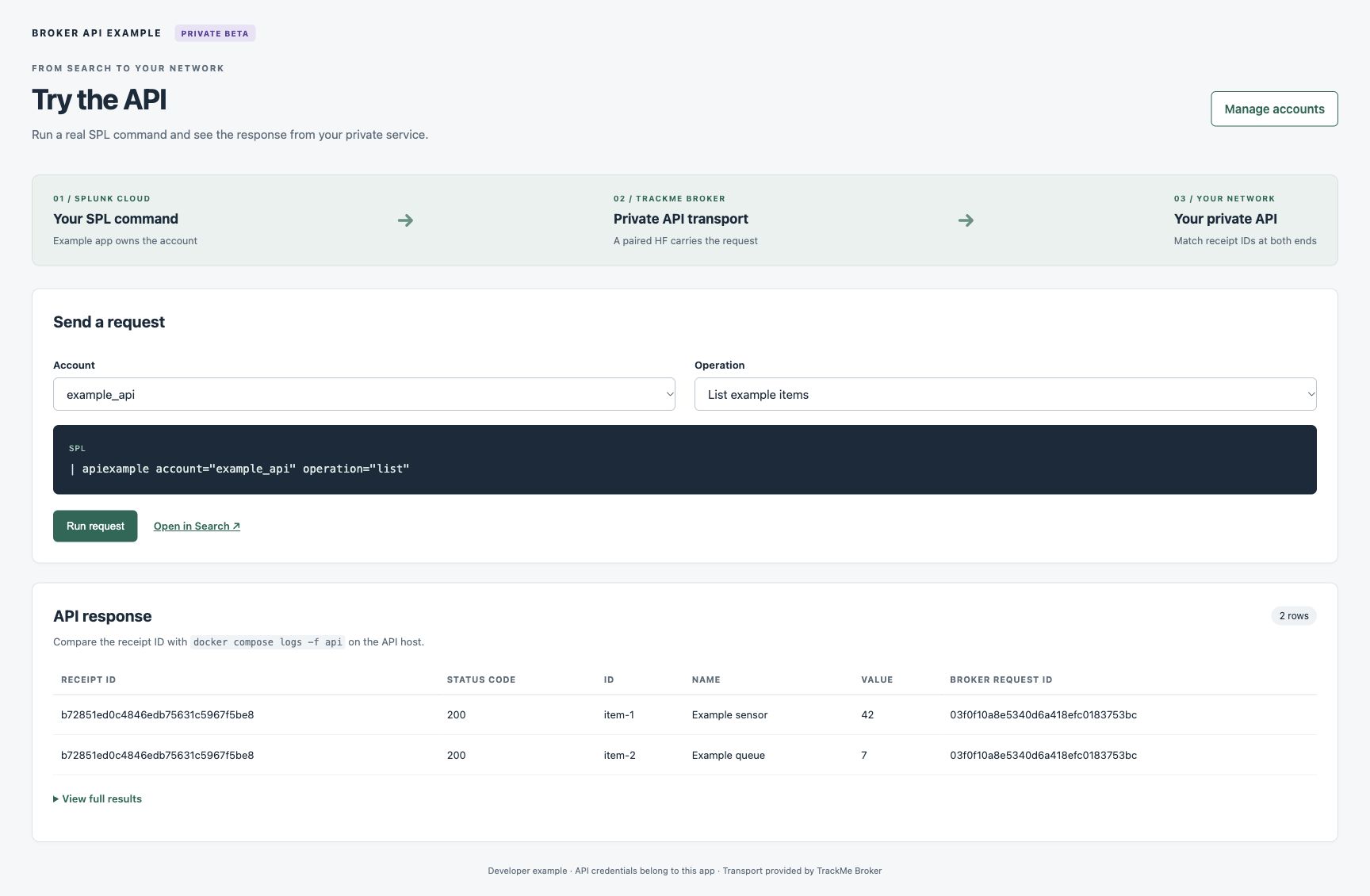
Demonstration of the result layout using synthetic response data.
On the private API host, observe the other end with:
docker compose logs -f api
Each response produces a JSON stdout event containing UTC time, a fixed operation
name, method, HTTP status, duration in milliseconds and receipt_id. Match the
receipt ID to the SPL result. Health checks and authentication refusals are logged
too. Raw URLs, query values, headers, tokens and bodies are excluded; unknown paths
appear only as unknown. A recorded HTTP status is the server’s chosen response,
not proof that the caller received it. Docker retains three log files of up to
10 MiB each. The API’s separate receipt ring retains at most 256 entries in memory
and resets when the container restarts.
Exchange contract v1
Call /services/trackme/v2/broker/client/v1/ over verified HTTPS to splunkd.
Use the caller’s Splunk session token or an appropriately scoped bearer token.
The client endpoint is not exposed through Splunk Web’s proxy.
Method |
Operation |
Behavior |
|---|---|---|
GET |
|
Returns the contract version, admission state and limits. |
POST |
|
Accepts account, optional application label and envelope; HTTP 202 returns the request ID and deadline. |
POST |
|
Nonblocking state lookup using account and request ID. |
POST |
|
Reads one numbered chunk of a completed exchange. |
POST |
|
Marks the exchange cancelled; it cannot interrupt a destination request already executing. |
POST |
|
Deletes a terminal exchange’s retained payload and frees admission capacity. |
Example enqueue:
{
  "account": "example_api",
  "application": "example_app",
  "envelope": {
    "method": "GET",
    "url": "https://api.example.com:8444/v1/items",
    "headers": [],
    "body_b64": "",
    "timeout_seconds": 30,
    "response_limit": 8388608,
    "retry_safe": false
  }
}
The app adds its destination authentication headers from its protected credential
store. Header values and request bodies are never required in diagnostic output.
Unknown envelope fields are rejected. Subsequent operations use
{"account":"example_api","request_id":"<returned-id>"}; a chunk read also
supplies integer chunk, starting at zero.
States are queued, claimed, done, failed, expired and
cancelled. A completed destination HTTP 401 or 500 is still done: inspect
status_code. A done result also includes response headers, chunk count and
elapsed time. Each chunk contains base64 bytes of the gzip stream. Concatenate
decoded chunks in order, then decompress with the declared response limit; an
empty stream represents an empty response. Reject excess chunks, oversized
decoded data, invalid base64 and trailing compressed streams. Release only after
the complete response is safely received.
Successful handler responses contain contract_version=1 and success=true.
Refusals contain success=false and a fixed reason. Common categories are
invalid input (400), account/destination permission (403), inaccessible request
(404), active/not-ready state (409), oversized request (413), capacity/rate limits
(429), and disabled/offline/unavailable service (503). Splunk can reject a request
before the handler; platform responses need not use this JSON format.
Retry and side effects
Never automatically enqueue again after a lost reply. The destination may have
received the first request, even if the caller did not receive its ID. Default
retry_safe is false. Only choose true when the application can tolerate a
worker retry after a lost lease. It is not an exactly-once guarantee.
Poll the same request ID at the advertised interval, adding jitter. Back off on
client-busy or rate-limit responses without extending the original deadline.
Retrying a result or chunk read does not submit another destination request.
Cancellation, an expired deadline or failed cleanup does not prove that a remote
side effect did not happen. Treat not_sent conservatively; false or an absent
field gives no such proof. The reference client never retries enqueue or falls
back to direct networking.
Bounds and operational limits
Resource |
Bound |
|---|---|
Configured client accounts |
32 |
Retained exchanges |
32 globally; four per account |
Decoded request body / response body |
1 MiB / 8 MiB |
Incoming JSON HTTP body |
1,500,000 bytes, enforced by splunkd before Python |
Request headers |
32 headers and 16 KiB combined |
Exchange timeout |
At most 120 seconds |
Response chunks |
At most 11; each base64 chunk at most 1 MiB |
Compressed response bytes |
Response limit plus 64 KiB, at most 8 MiB plus 64 KiB |
Enqueue calls per second |
Eight globally; two per authenticated principal |
Result/chunk/cancel/release calls per second |
32 globally; eight per authenticated principal |
Rate state has bounded principal maps in two fixed rows. Account authorization
precedes accounting; info does not consume the exchange budgets. Enqueue
traffic cannot consume draining capacity. Multiple authorized callers can still
collectively exhaust a global budget.
Client payloads live in separate KV collections. Native pulls do not scan them. A non-expiring KV mutex serializes client writers and cleanup across search heads. Ambiguous writes keep the mutex and admission capacity occupied. This deliberately halts client traffic instead of reclaiming space behind a potentially delayed writer. It does not stop the native broker queues.
Do not remove an old lock based on its age. Releasing it is an administrator’s
decision: client/admin/status reports the held lock (owner, age, poisoned), and
client/admin/reset_writer with {"expected_owner": "<owner>"} removes it once
no writer is running, then releases the reservations no request backs. The lock is
never released automatically. Normal retention cleanup removes exchanges after
their deadline plus 15 minutes; a poisoned mutex stops that cleanup too.
Limits
Client accounts and pools are deleted, and a pool’s sealing key replaced, through the administrative API:
delete_account,delete_poolandrotate_pool_key. Both deletions are refused while one of the exchanges is active; cancel it first.A held client writer lock is released by an administrator with
reset_writer, never automatically.TrackMe has no client management page yet: client accounts and pools are managed through the administrative REST API. On the Manage TrackMe Brokers page, Delete and Rotate key also work on a client pool.