Schema migrations
Once TrackMe has been upgraded through the standard Splunk process (Splunk Enterprise or Splunk Cloud, search head cluster or standalone), TrackMe automatically verifies and performs the additional upgrade procedures each Virtual Tenant needs. This mechanism is the schema version: an automated, per-tenant, forward-only migration chain that creates, updates or deletes TrackMe knowledge objects and KVstore collections depending on the origin version and the state of the tenant. This page describes how it works, how to follow it, and what runs between releases.
The schema marker
The schema version is versioning information stored in the KVstore record of each Virtual Tenant. It
corresponds to the TrackMe version without the dots, with a two-digit patch number: version 2.1.0 is schema
2100, version 2.3.4 is 2304, version 2.4.14 is 2414.
| inputlookup trackme_virtual_tenants | eval keyid=_key
| fields keyid, tenant_id, schema_version, schema_version_mtime
The required schema version derives from the running application version. The
trackmetenantstatus command returns both, together with the derived updated / pending status, for every
tenant the user can access:
| trackmetenantstatus output="tenants"
| table tenant_id, tenant_status, schema_version, schema_version_required, tenant_updated_status, schema_version_mtime
The Tenants Update statuses screen
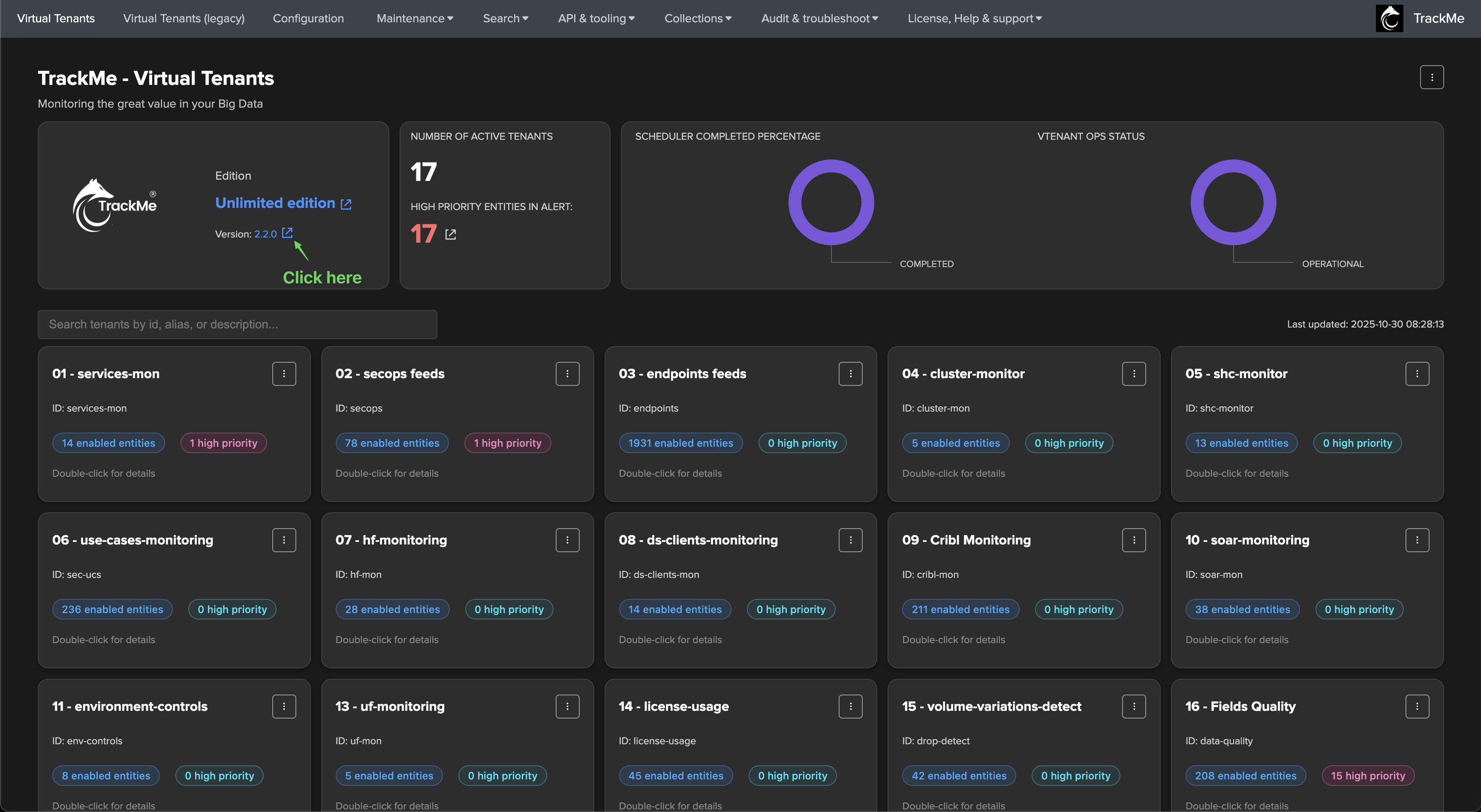
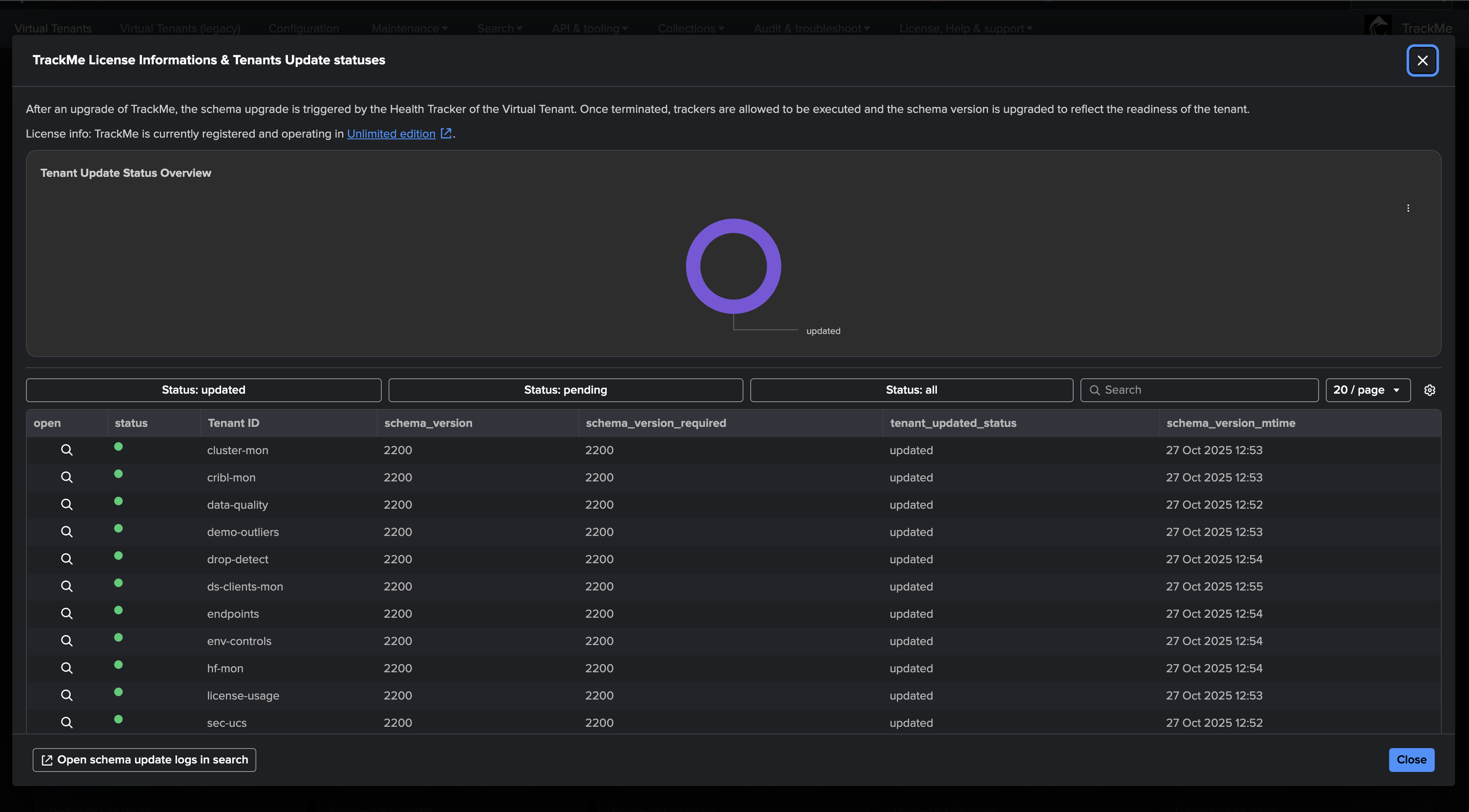
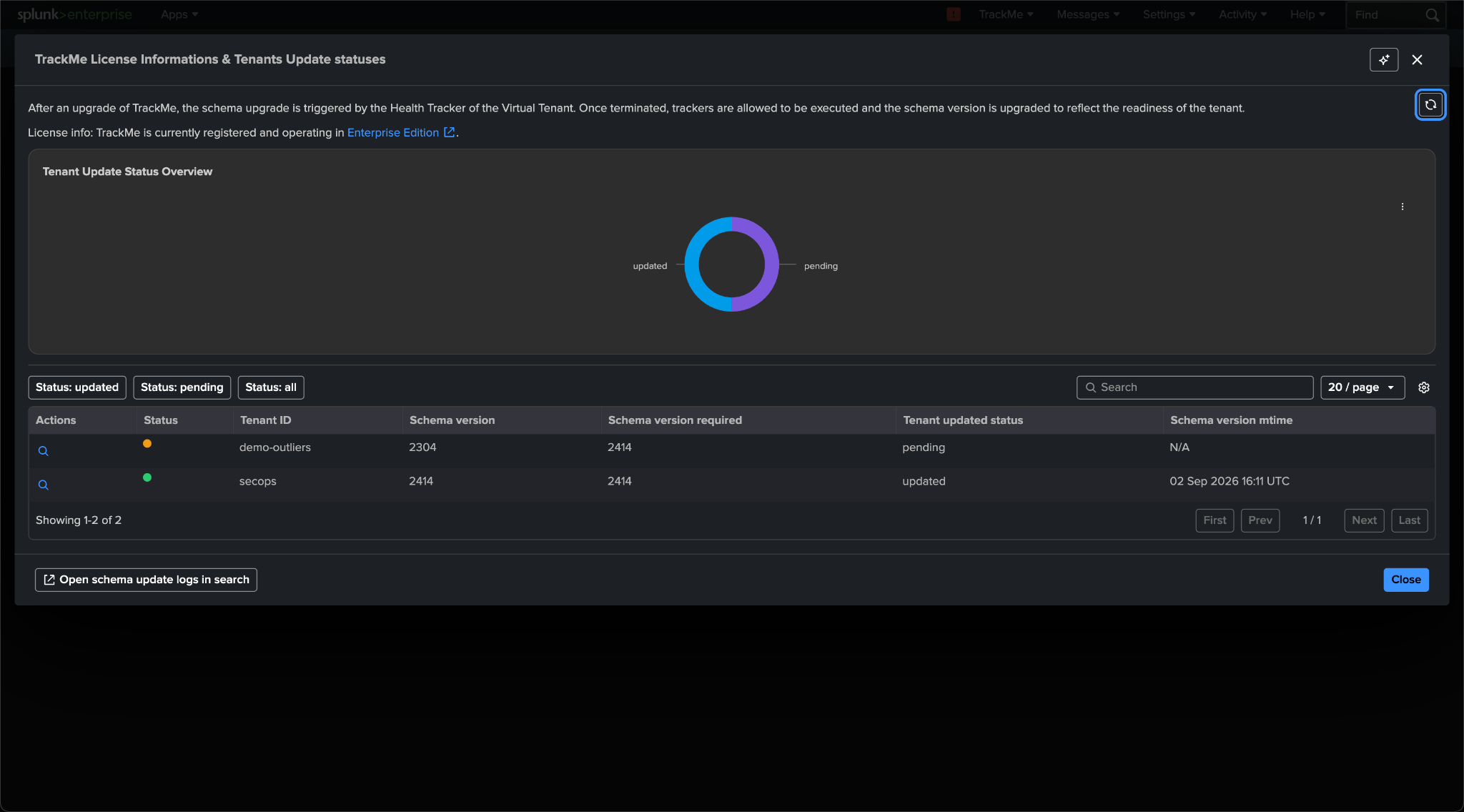
On the Virtual Tenants page, the version number in the header is a link. It opens the Tenants Update statuses screen, the authoritative progress view of a migration:
a donut of tenants updated vs pending;
one row per tenant with Schema version, Schema version required, Tenant updated status and Schema version mtime;
a per-row action and a global Open schema update logs in search button, both landing on the migration log of the tenant.
Who runs the migration
The schema verification is handled by the Health tracker of the Virtual Tenant. When a tenant is created, TrackMe creates a dedicated health tracker for it, responsible for administration tasks such as detecting issues in the tenant’s trackers, and for running the schema verification:
trackme_health_tracker_tenant_<tenant_id>
The health tracker runs every 5 minutes. When it detects that the stored schema version is behind the required one, it runs every migration between the two, in order, and advances the marker after each one. Migrations therefore run on the health-tracker cycle, not at package installation time: allow one to two cycles per tenant before judging anything, and more on large tenants, since some migrations touch every entity record.
Disabled Virtual Tenants
Disabled Virtual Tenants are not migrated as long as they are disabled (their health tracker does not run).
If a tenant is re-enabled, its migration is processed automatically within the next 5 minutes.
Search head clusters
The migration of a tenant runs on whichever member runs the tenant’s health tracker. The KVstore is replicated, so the result is visible on every member.
The automatic safety backup
Before the first migration of a chain runs, TrackMe executes a backup job automatically. The run appears in API & tooling → Backup & Restore with the comment Backup initiated for schema migration from version X to Y (on releases with the multi-archive backup format, one archive per enabled tenant plus one global archive). The backup is deduplicated per required version and day, so several tenants migrating in the same window share one safety backup. See Backup & restore.
| inputlookup trackme_backup_archives_info
| table backup_run_id, archive_scope, tenant_id, status, mtime, comment
| sort - mtime
Reading the migration log
The logs of the health tracker and of every migration are available through the navigation bar shortcut Audit & troubleshoot → Logs - TrackMe custom commands and match:
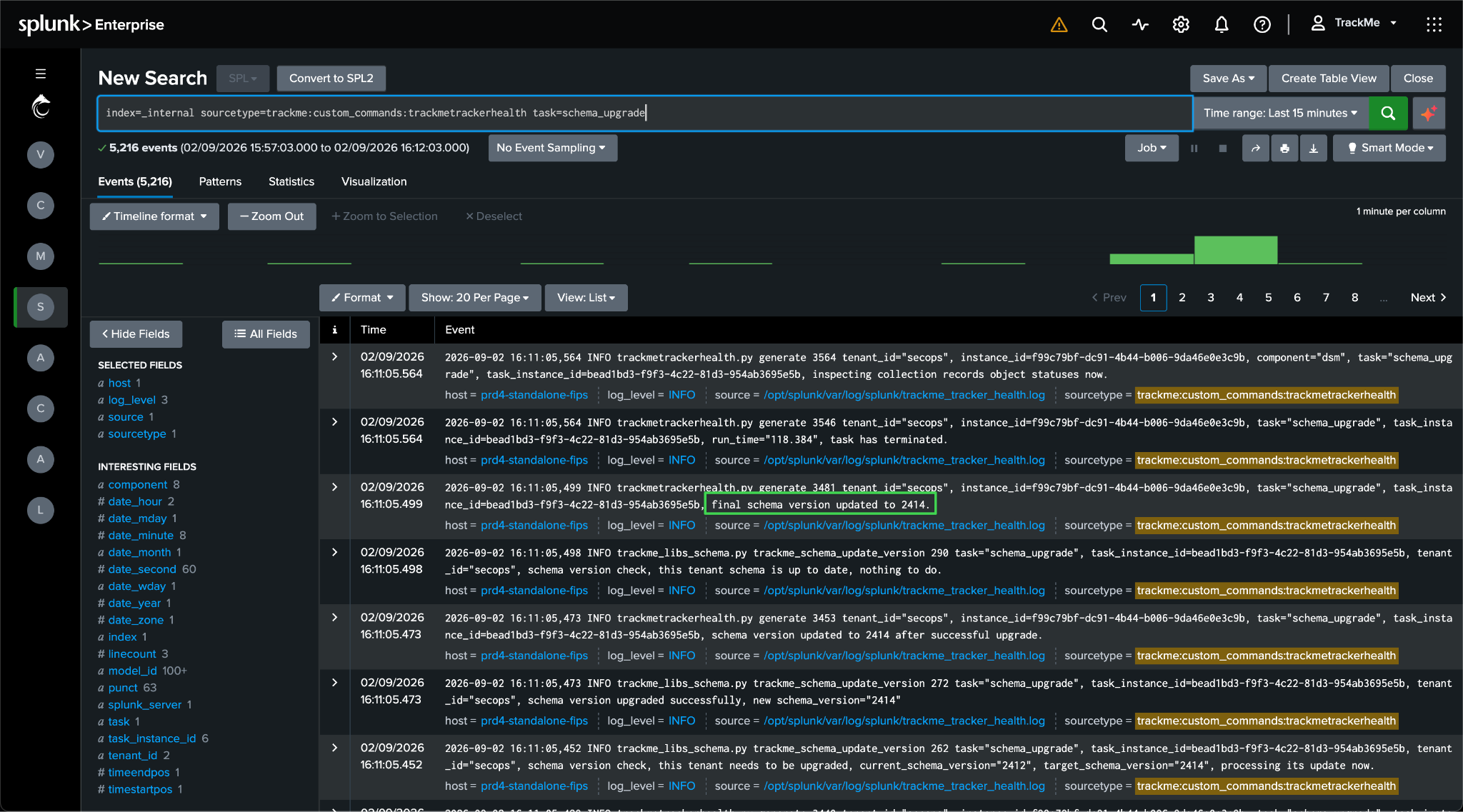
index=_internal sourcetype=trackme:custom_commands:trackmetrackerhealth task="schema_upgrade"
Every task carries a task_instance_id so that one run can be followed end to end. The run time of every
health-tracker task can be tracked with:
index=_internal sourcetype=trackme:custom_commands:trackmetrackerhealth instance_id=* task_instance_id=* task=* run_time=* tenant_id=*
| table _time tenant_id instance_id task task_instance_id run_time _raw
| sort 0 - _time
Before an upgrade, the health tracker only logs routine verifications:
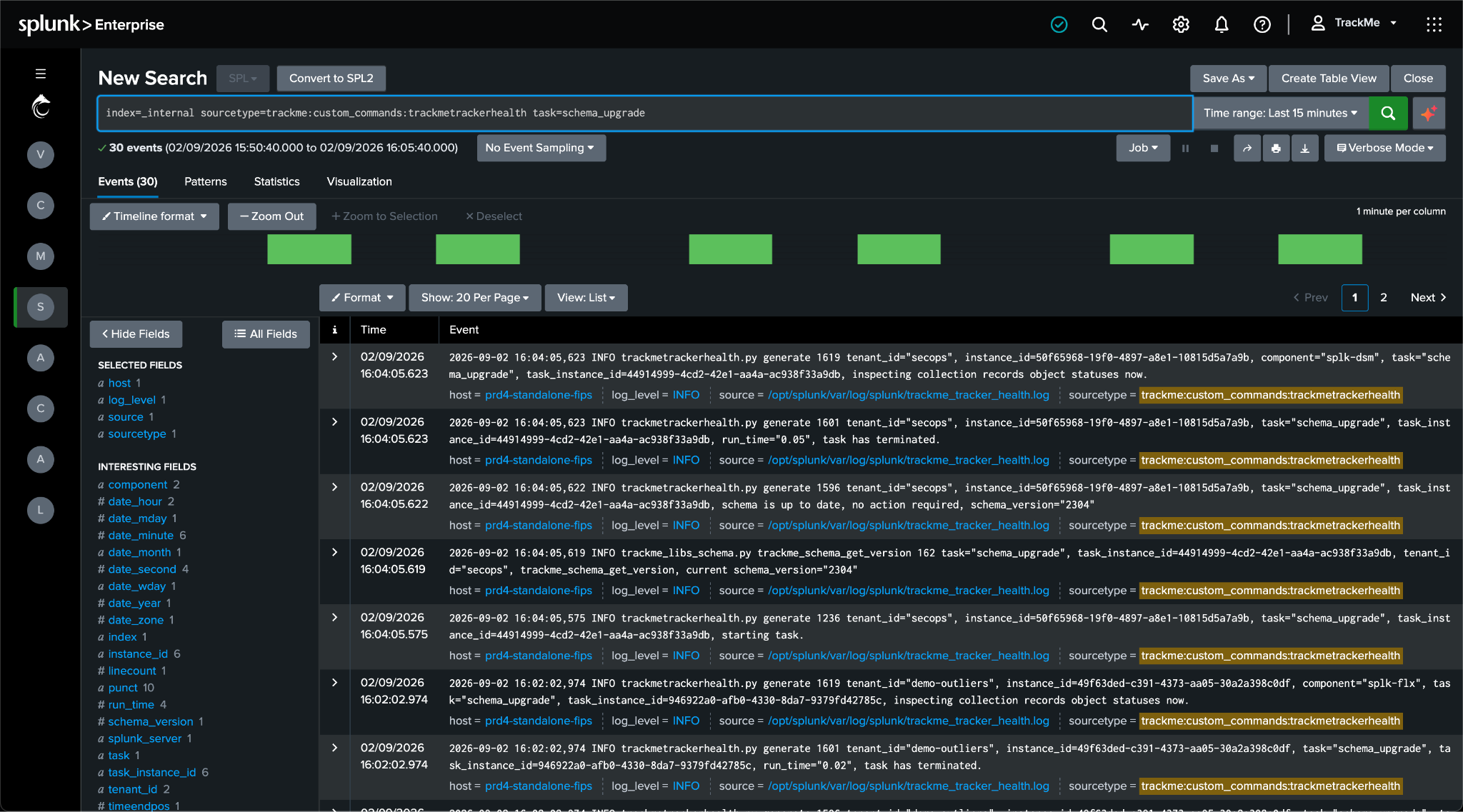
When the tracker runs, it verifies the schema version:
INFO trackmetrackerhealth.py generate tenant_id="feeds-tracking", instance_id=879a5021-..., task="schema_upgrade", task_instance_id=80a9366d-..., starting task.
INFO trackme_libs_schema.py trackme_schema_get_version task="schema_upgrade", task_instance_id=80a9366d-..., tenant_id="feeds-tracking", trackme_schema_get_version, current schema_version="2097"
If an upgrade is required, the following message is logged:
INFO trackmetrackerhealth.py generate tenant_id="feeds-tracking", ..., task="schema_upgrade", ..., detected migration required for schema version 2098, schema_version="2097", schema_version_required="2100", processing now.
The safety backup is executed:
INFO trackmetrackerhealth.py generate tenant_id="feeds-tracking", ..., task="schema_upgrade", ..., backup post call executed successfully
Each migration then runs in order and logs its actions:
INFO trackme_libs_schema.py trackme_schema_upgrade_2098 task="schema_upgrade", ..., Starting function trackme_schema_upgrade_2098, tenant_id="feeds-tracking"
INFO trackme_libs_schema.py trackme_schema_upgrade_2098 task="schema_upgrade", ..., schema migration 2098, tenant_id="feeds-tracking", successfully deleted transform definition, transform="trackme_dsm_tenant_feeds-tracking"
Once every migration has completed, the marker is updated and the task terminates:
INFO trackme_libs_schema.py trackme_schema_update_version task="schema_upgrade", ..., tenant_id="feeds-tracking", schema version upgraded successfully, new schema_version="2100"
INFO trackmetrackerhealth.py generate tenant_id="feeds-tracking", ..., task="schema_upgrade", ..., final schema version updated to 2100.
INFO trackmetrackerhealth.py generate tenant_id="feeds-tracking", ..., task="schema_upgrade", ..., run_time="26.2", task has terminated.
Errors and the fail-soft rule
index=_internal sourcetype=trackme:custom_commands:trackmetrackerhealth task=schema_upgrade log_level=error
Migrations are written to be fail-soft: per-item work (a record backfill, a transform refresh, a saved search update) is caught, logged and skipped, the chain continues, and the schema version still advances. A single bad record or knowledge object cannot wedge the chain. The bootstrap of a migration (the connection to splunkd and the initial KVstore read) is deliberately not guarded, so that a transient outage propagates and the tracker simply retries on its next cycle without advancing the marker.
Important
updated means the chain ran, not that every item succeeded.
Because of the fail-soft rule, a tenant can report updated while one record or knowledge object was skipped with an error. The update-status screen is therefore the progress view, and the error search above is part of the completion criteria: review every error logged during the migration window before signing off the upgrade checkpoint.
TrackMe also runs reconciliation logic on regular cycles (the longest every 24 hours) that repairs the vast majority of skipped items on its own, and the Configuration Guardian surfaces persistent inconsistencies with remediation steps (see Configuration Guardian). Handle each logged error as follows:
Self-healed: the same item is processed successfully by a later cycle, or the Guardian raises no alert for it after 24 hours. Record the error and its resolution; nothing else to do.
Persistent: the error repeats, a Guardian alert names the item, or a tenant stays DEGRADED because of it. Apply the Guardian’s remediation steps or, for a record that cannot be reconciled, re-run the migration’s effect through the corresponding management action (for example a model retrain, a policy re-apply, a tracker re-creation from the tenant’s management screen).
Unclear: share the error lines with TrackMe Support (see Support) and keep the checkpoint open until they are confirmed as benign or resolved.
What runs between releases
Every release may ship at most one migration, numbered with its schema version. A migration is never modified after it ships; robustness fixes and new fields go into a later one. A chain from an old release therefore runs every migration between the two versions, in order. The condensed catalogue below covers the 2.1 line onward; the full detail of each release is in the Release notes.
Schema |
Effect (condensed) |
|---|---|
2121 to 2132 |
2.1 line: tenant configuration reconciliation (new tenant-level preferences with defaults), remote-account preferences, transform refreshes; the FQM component initialised disabled on existing tenants; FLX drilldown-search collections; WLK workload trackers moved to the new index. Mechanical, no behaviour change. |
2300 to 2314 |
2.3 line: main-collection transform refreshes; stateful alerts rewritten to use the |
2315 |
Native ML engine migration. Creates the per-tenant native-models KVstore collection and transform;
rewrites every Outliers model’s |
2316 to 2322 |
Shadow read cache and score cache collections; health-tracker state; labels; policy tracker cadence reduced from every 15 minutes to twice daily; outlier result transforms; tenant-level ML settings backfill. |
2400 to 2406 |
Tenant schema reconciliation; AI advisor saved searches created (seeded unscheduled, inert unless AI features are enabled); Smart Status decommission; threshold intent-lock collections; labels backfill; WLK execution-errors collection. |
2408 to 2414 |
DSM |
Two timing consequences for validation
Migrations run on the health-tracker cycle, not at installation time. The update-status donut moves from pending to updated as tenants complete; do not judge anything before it is fully updated.
Migration 2315 resets model searches to
pendingandlast_execto 0: that is the migration working, not a failure. Models refit on the following mltrain cycles, and a missing native model is also trained automatically the first time the entity is opened.
What the marker does on a downgrade
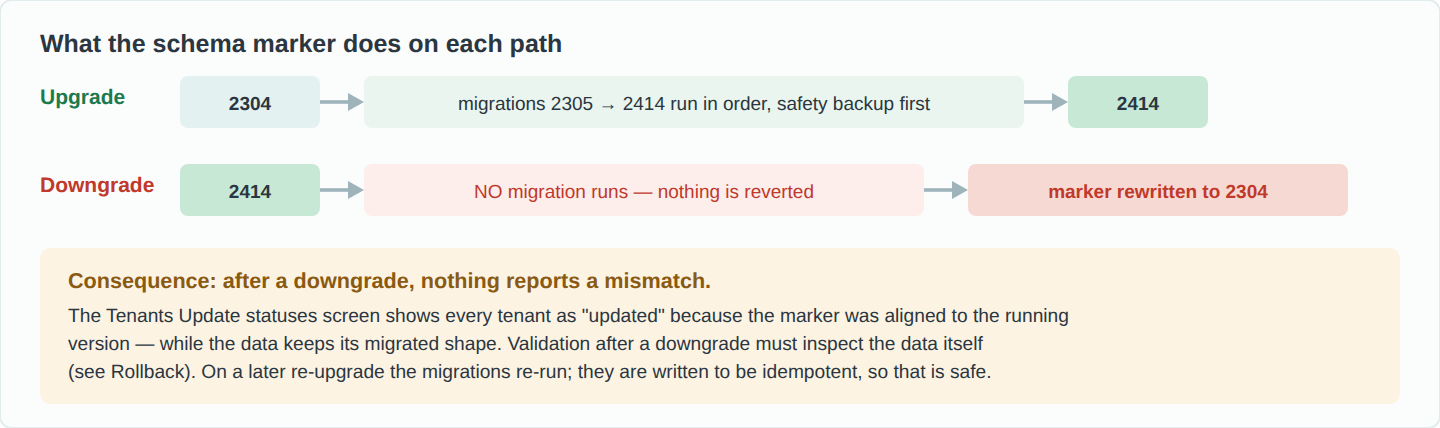
Migrations are forward-only. If an older package is reinstalled over migrated data, no migration runs, nothing is reverted, and the health tracker silently realigns the marker down to the running version. The Tenants Update statuses screen then shows every tenant as updated while the data keeps its migrated shape. This is why a rollback is a restore of the pre-upgrade backups and never a re-install of the older package, and why post-downgrade validation must inspect the data itself: see Rollback. On a later re-upgrade the migrations run again; they are idempotent, so that is safe.