AI Agents for findings
Overview
TrackMe 2.4.19 introduces the AI Agent: an agentic operator for the dedicated findings
tenants. Where the AI Advisors tune the configuration of monitored
entities, the AI Agent works on findings. It triages them the way an operator would: it
reads the evidence TrackMe holds, assesses each finding, recommends a decision and, when the
tenant allows it, applies that decision itself, for example marking a Finding group
investigating, dismissing it for a bounded time or resolving it once a recovery is proven.
It keeps one current [AI Agent] note on every finding it reviewed and records every
decision in a decision log.
Tenant type |
AI Agent |
|---|---|
UAM AI Agent. It replaces the UAM Findings Advisor of TrackMe 2.4.18; on upgrade, an enabled advisor’s settings are carried over to the agent. |
|
Cribl Stream AI Agent |
|
Cribl Edge AI Agent |
The three agents run on one shared framework: the same identity, the same inspect / act contract, the same settings, the same scheduling, the same decision log and the same user interface. Each tenant type brings what is specific to it: its evidence, its assessments and the decisions it may take.
Note
The AI Agent is part of the findings model shared by User Activity Monitoring, Cribl Stream and Cribl Edge. The product guide covers it from the tenant’s point of view in Findings AI Agents; this page is the reference from the AI side.
How the AI Agent differs from the other AI features
AI Advisors and AI Agents automation |
AI Agent |
|
|---|---|---|
Works on |
Entities of the monitoring components (DSM, DHM, FLX, FQM, WLK, MHM, VOL) and their configuration: models, thresholds, delays, dictionaries |
Findings and Finding groups of a User Activity Monitoring, Cribl Stream or Cribl Edge tenant |
Decides |
Configuration changes, with your consent or within the automation policy |
Triage decisions on findings, within the decisions the tenant allows |
Acts as |
The user who launched it (interactive) or the tenant owner (scheduled) |
Its own actor, AI Agent, shown in the finding history; the decision log also records who asked |
Schedule |
Nightly batch (AI Agents automation) |
Hourly scheduled triage, per tenant |
Where to follow it |
The entity’s audit changes, the AI Advisor audit dashboards |
The AI Agent tab of the workspace, the finding history and notes, the same audit dashboards |
How it works
Every review follows the same five steps, whether you ask the agent about one finding or the hourly triage reviews the open findings of the tenant.
Select. One finding per Finding group, the most severe first. A scheduled run skips the findings it reviewed recently, unless something changed since.
Gather the evidence. TrackMe computes the facts about the finding on the server, from what it already holds, and gives them to the agent: the finding, its episodes and its history, the policy, and the object it names. For UAM, that is the account, its class and where the class comes from, and its activity. For Cribl Stream, that is when the object was first seen, whether it is disabled in Cribl or gone from the Inventory, which Routes reference it, its traffic and its traffic ML model. For Cribl Edge, that is the node or the Fleet as the node directory last published it: connected and disconnected nodes, versions and configuration drift, the node’s state, version, disk and the health of its Sources and Destinations, and whether the node or Fleet is still in the directory.
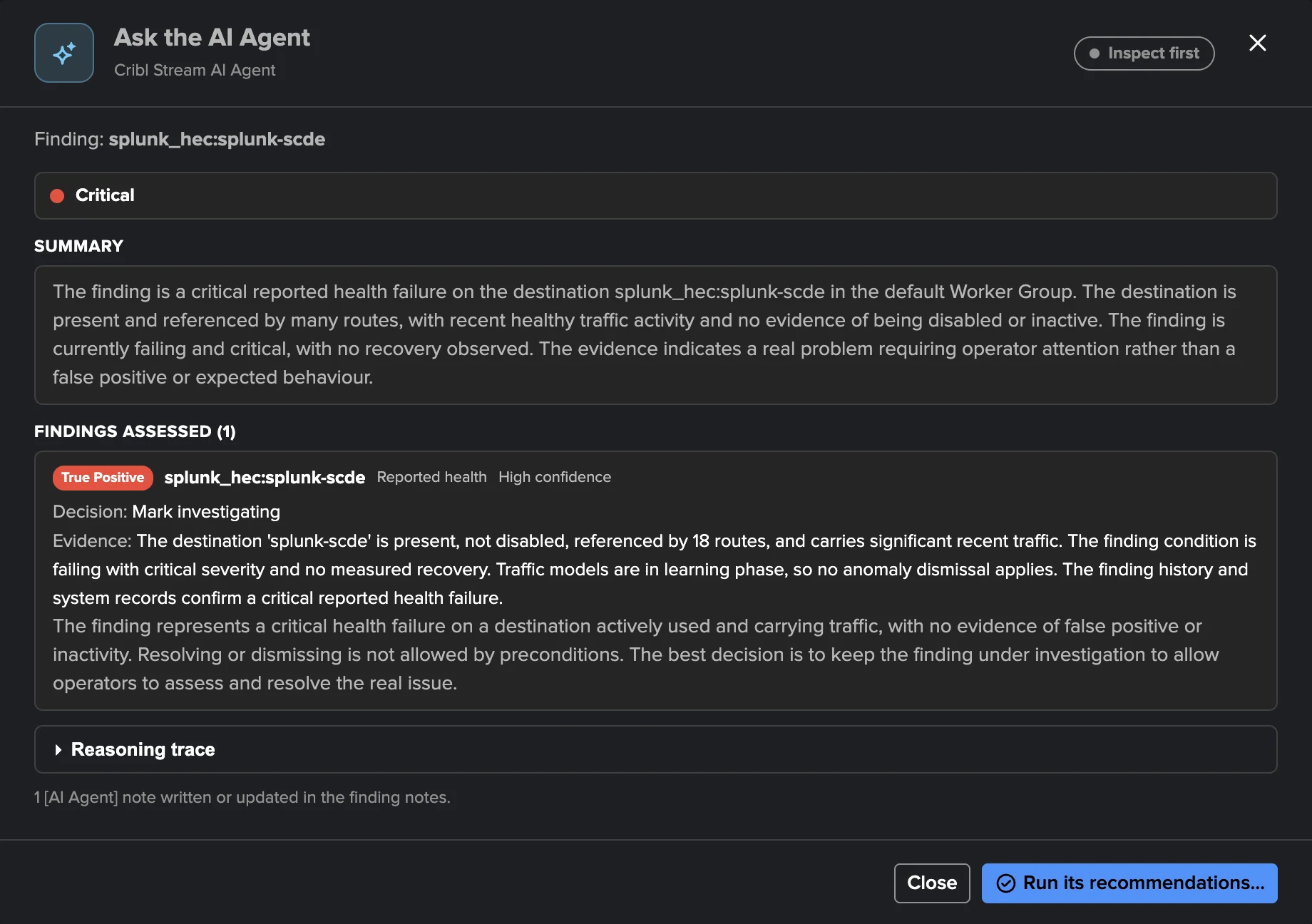
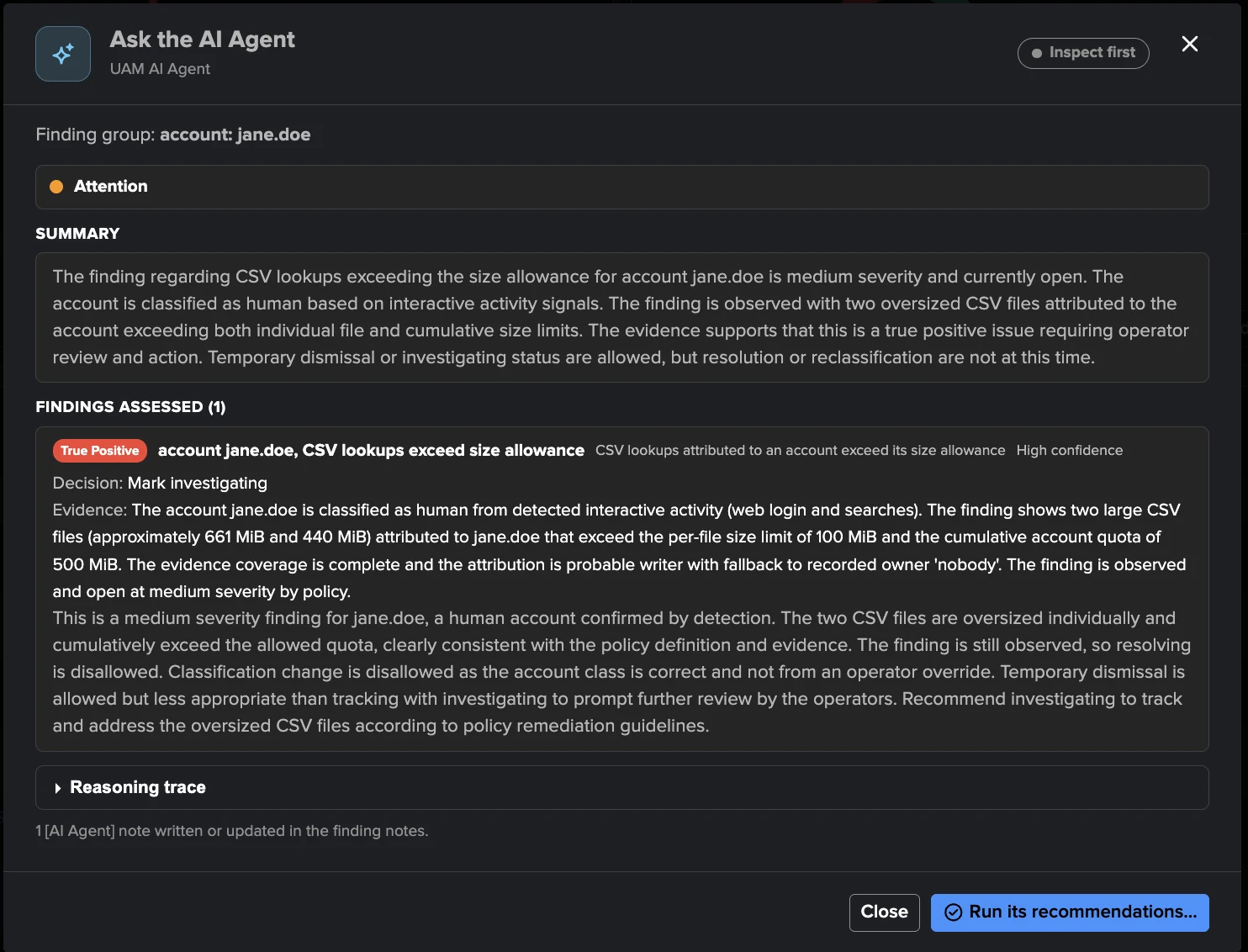
Assess. The agent classifies the finding and gives its confidence (high, medium or low).
Decide. It recommends one decision. In act mode it applies it, and the server checks again, at that moment, that the decision is allowed and that its preconditions hold, whatever the model wrote. A decision that fails these checks is refused and recorded as such.
Record. It writes or refreshes its
[AI Agent]note on the finding, the decision appears under the actor AI Agent in the history, and the review lands in the decision log and the audit trail.
Deterministic evidence first, the LLM second. The agent reasons on facts TrackMe checked, not on guesses, and it cannot dispatch searches of its own: the Cribl Stream agent reads the newest certified interval, the traffic models and the incident’s own record; the Cribl Edge agent reads the newest publication of the node directory; the UAM agent reads bounded activity records (at most 50 events per read). Proofs such as “this object has had no traffic for 7 days” are computed by TrackMe, never inferred by the model.
Assessments
Assessment |
Meaning |
|---|---|
True positive |
The condition is real and needs an operator. |
Likely false positive |
The evidence points to a detection that does not reflect a real problem. |
Expected behaviour |
The condition is real but expected, for example a seasonal or planned pattern. |
Needs investigation |
The evidence is not enough to conclude. |
Object not in use (Cribl Stream) |
The object is disabled, removed or never carried traffic. |
Node or Fleet not in use (Cribl Edge) |
The node or Fleet is retired: gone from the node directory, or a Fleet the tenant no longer collects. |
Misclassified account (UAM) |
The finding comes from an account classified as the wrong type (human or service). |
Inspect and act
Mode |
What it does |
|---|---|
Inspect |
Assesses and recommends. It writes one current |
Act |
Inspects, then applies the decisions the evidence supports and the tenant settings allow. Act must be chosen explicitly. |
The decisions act may take, each with its own setting:
Decision |
Default |
UAM |
Cribl Stream |
Cribl Edge |
|---|---|---|---|---|
Mark investigating |
On |
Yes |
Yes |
Yes |
Dismiss for a time (7 days at most by default, up to 90) |
On |
Never a critical or high finding still observed |
A critical failing finding only with proof that the object is disabled, missing or inactive |
A critical or high finding still failing only when its node or Fleet is gone from the node directory, and never across the nodes of a Finding group |
Not an anomaly (a traffic outlier) |
On |
— |
Yes |
— |
Resolve |
Off |
Only a finding its policy no longer observes |
Only after a measured recovery |
Only after a measured recovery |
Classify an account (human or service) |
Off |
Only an account without a class set by an operator |
— |
— |
Stop monitoring an object |
Off |
— |
Only with proof of inactivity (7 days by default) |
— |
The agent never dismisses permanently, assigns or unassigns, changes a severity, or changes a policy, a model or a setting (on Cribl Edge, the node selection or the collected Fleets): these decisions do not exist in its vocabulary. On Cribl Stream it may recommend Forget this object for an object removed from Cribl, but only a TrackMe administrator of the tenant can do it.
Asking the AI Agent
Ask the AI Agent… is in the finding and Finding group menus, the investigation view and the AI Agent tab of the workspace, with optional instructions for the review. The agent always inspects first: you read its assessment, its evidence and its rationale, then choose Run its recommendations… to let it act on that inspection, with optional instructions, within 30 minutes.
The AI Assistant of the workspace can also propose an AI Agent review in the chat, as a consent card you confirm, the same way it proposes an AI Advisor (see AI Assistant).
Who can ask:
User Activity Monitoring: the TrackMe administrators of the tenant ask the agent and let it act; the tenant’s power roles can read its settings and decision log.
Cribl Stream and Cribl Edge: the tenant’s power and admin roles, the roles that can triage, ask the agent and let it act; the settings belong to a TrackMe administrator of the tenant.
Asking needs the AI Assistant to be enabled and at least one AI provider configured, on Splunk 10.2.x or later (the AI Agent is built on the Splunk Agent SDK, like the AI Advisors).
Scheduled triage
The AI Agent can review the open and investigating findings of its tenant every hour on its own. Scheduled triage is off by default. Its report only runs when all of the following hold:
the AI Assistant is enabled and at least one AI provider is configured;
the tenant is enabled and its AI Agent is enabled (workspace Settings → AI Agent);
the tenant owner is a real account, not
nobodyorsplunk-system-user. The Guardian checkai_automation_owner_is_system_userwarns otherwise. On Cribl Stream and Cribl Edge the owner must also be a Splunk administrator.
Saving the AI Agent settings schedules or unschedules the report at once; the tenant health tracker checks these conditions every five minutes and follows any other change, such as a provider added or removed.
Each run:
reviews up to 10 findings (1 to 50), one per Finding group, the most severe first, within a time budget that fits the hourly cadence;
skips a finding reviewed within the review interval (1 day by default), unless a new episode started or the Finding group changed;
never overrides a person: a finding or Finding group that an operator decided on, or that has an assignee, is left to the operators;
applies the shared filters of the automated AI reviews, with the finding severity as the priority: by default only critical and high findings are selected. The filter expression applies too, and so do the shared custom instructions of the tenant, which apply to scheduled runs only (see AI Agents automation); the agent’s own custom instructions apply to every run (see Custom instructions and Evaluate).
A run never makes more than one decision per finding and Finding group, and every decision belongs to its run, its tenant and its scope.
Settings
In the workspace Settings → AI Agent. Every findings AI Agent also appears in Manage AI Agents automation (AI Agents automation), with its tenant’s row: enabling, mode, provider, review interval, runtime and custom instructions; the allowed decisions stay in the workspace.
Setting |
Default |
Notes |
|---|---|---|
Enabled |
Off |
Scheduled triage only; asking the agent needs only AI to be available. |
Mode |
Inspect |
Inspect or act, for scheduled runs. |
AI provider |
First available |
|
Review interval (days) |
1 |
A finding is not reviewed again within this interval unless it changed. |
Maximum runtime (seconds) |
3000 |
Fits the hourly cadence. |
Findings per run |
10 |
1 to 50. |
Custom instructions |
Empty |
At most 4000 characters; see Custom instructions and Evaluate. |
Allowed decisions and longest dismissal |
See Inspect and act |
Per decision; Cribl Stream adds the days of proven inactivity before stop monitoring. |
Allowing more (enabling the agent, act mode, a decision, a longer dismissal) needs a licence that allows changes; restricting it never does.
Custom instructions and Evaluate
Custom instructions are plain English that the tenant’s administrators write for their
agent, in Settings → AI Agent → Custom instructions (also in Manage AI Agents automation
and in the Configure tenant dialog). The agent follows them on every run, asked or
scheduled: what to treat as expected, what to look at first, how to word its
recommendations. For example: “The accounts named svc_* are service accounts.” or “The
nodes named lab-* are lab machines: their disk usage up to 80% is expected.”
At most 4000 characters; line breaks are kept.
They never widen what the agent may do. The allowed decisions of the tenant and the checks TrackMe makes before every decision still decide: an instruction to dismiss a critical finding that is still failing is refused by TrackMe like any other.
They come after the provider’s custom prompt and, for scheduled runs, after the tenant’s shared custom instructions of AI Agents automation (which apply to scheduled runs only): the agent’s own instructions are the most specific.
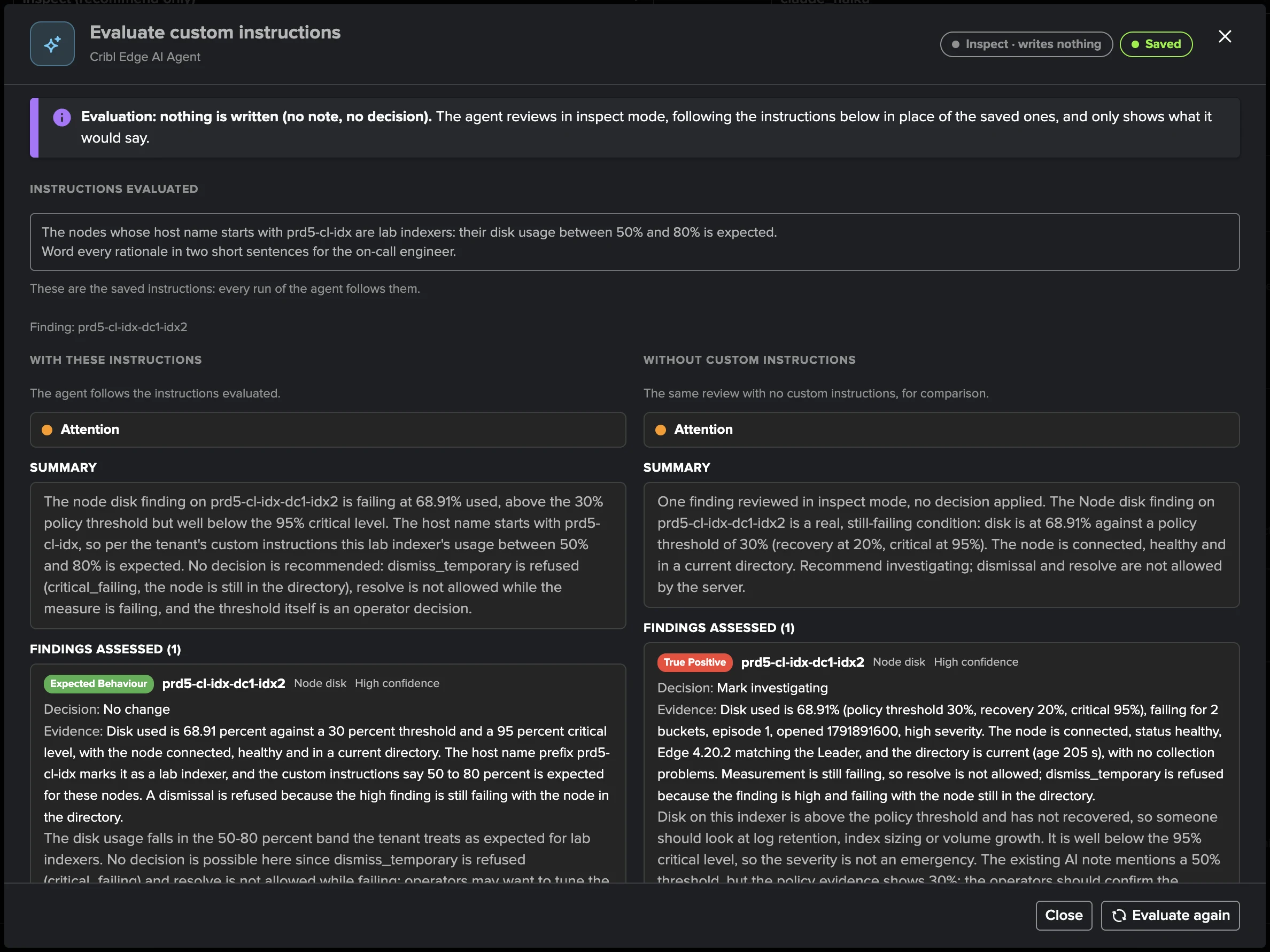
Evaluate…, next to the field, tries a draft before you save it. It runs the agent in inspect mode with the draft in place of the saved instructions, on one open finding or on a review of the open findings (at most 10, the most severe first), and can run the same review without custom instructions side by side, so you see what the instructions change.
An evaluation writes nothing: no [AI Agent] note, no decision, no entry in the decision
log. It is recorded in the audit with the status evaluation, and TrackMe refuses any
decision or review from an evaluation run, whatever the model writes.
What the AI Agent did
Everything the agent does can be followed from four places:
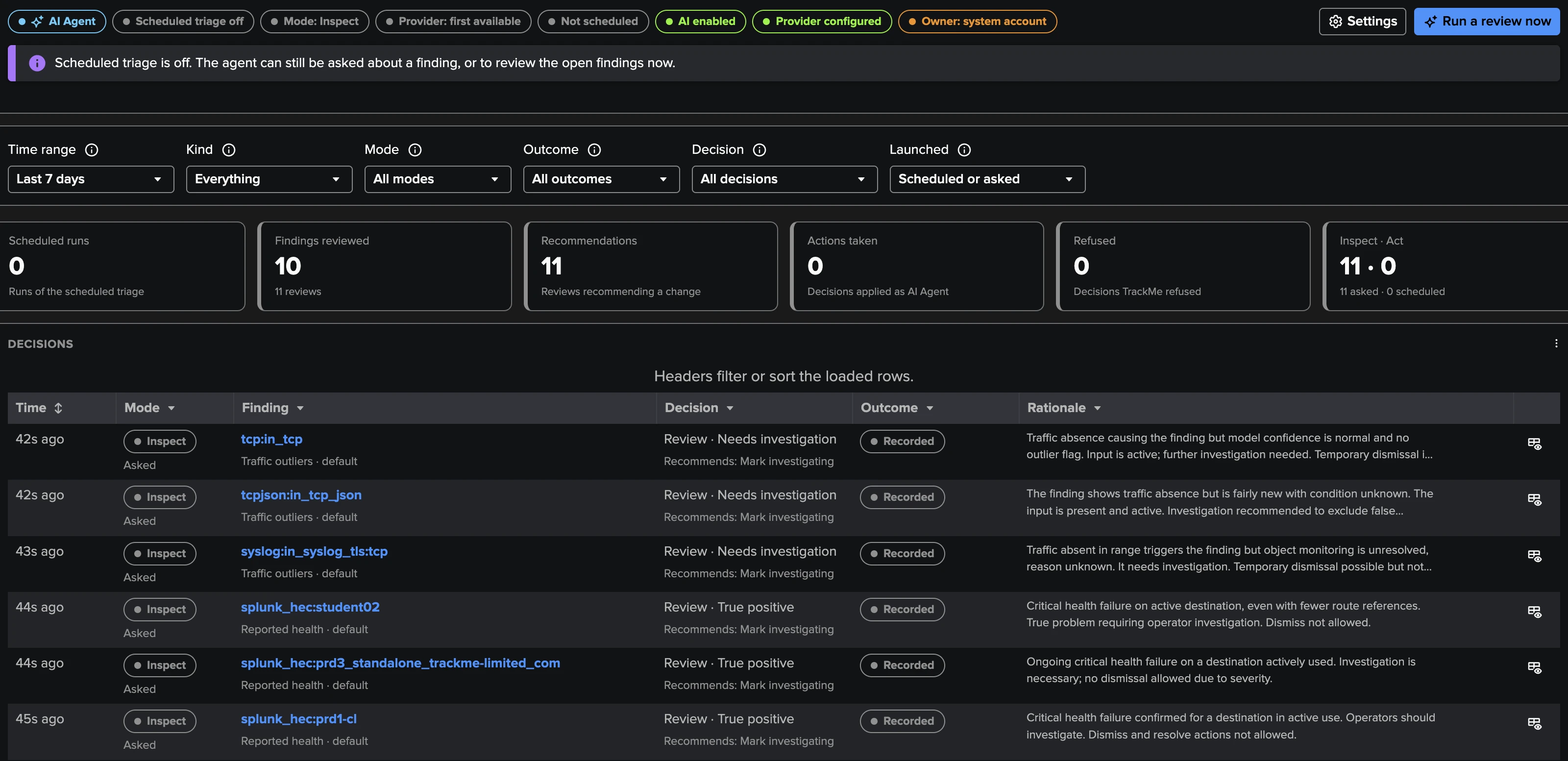
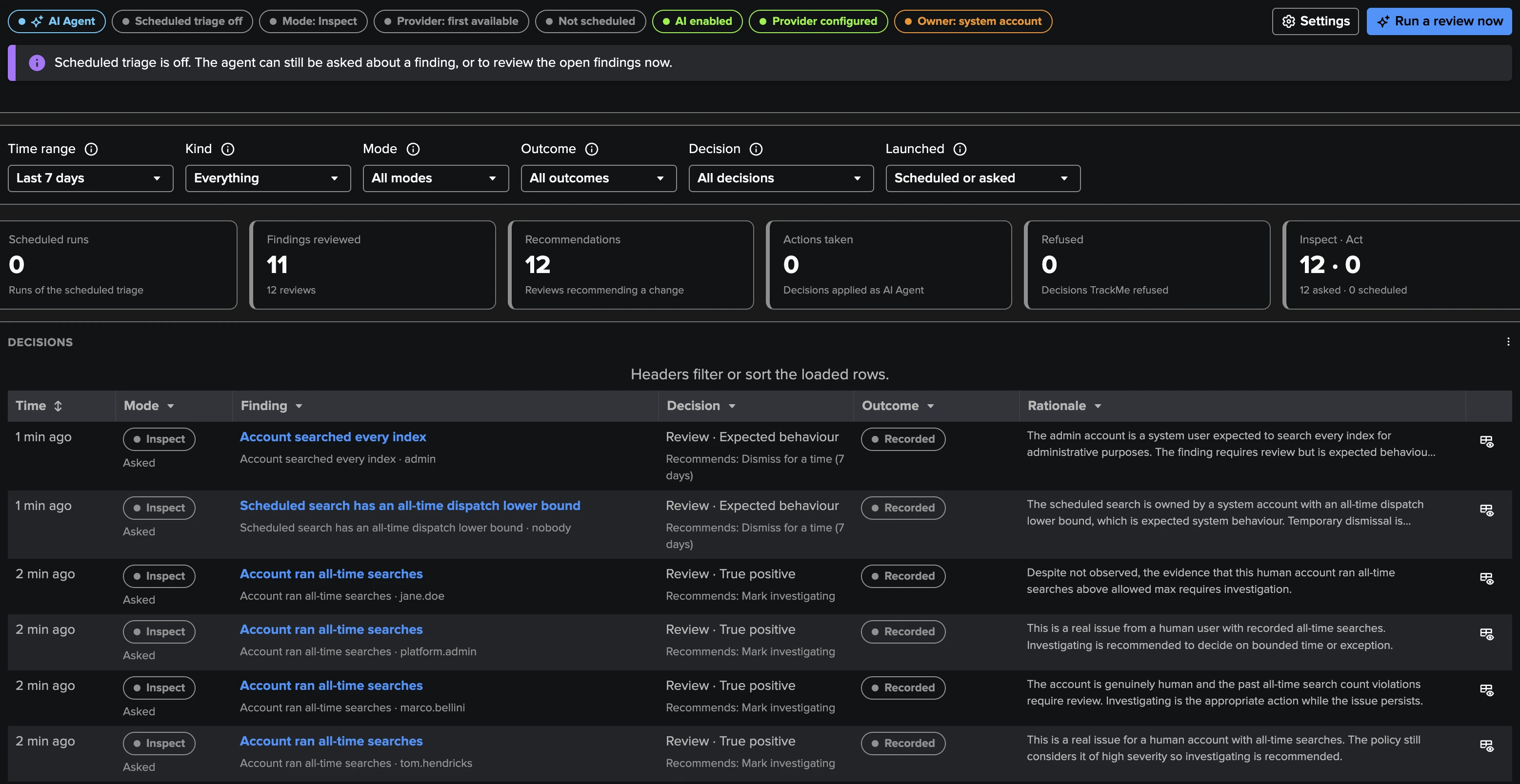
The AI Agent tab of the workspace: whether it can run and why, its totals (scheduled runs, findings reviewed, recommendations, actions taken, decisions TrackMe refused, inspect and act), Run a review now, and the decision log with its filters. Each row opens the investigation of that decision: the facts the agent read and its rationale.
The finding itself: its history shows each decision under the actor AI Agent, and its notes hold the current
[AI Agent]assessment.The audit dashboards of Auditing AI activity: Review AI Advisor activity and Review Scheduled AI Advisor activity include the three agents, labelled UAM AI Agent, Cribl Stream AI Agent and Cribl Edge AI Agent.
SPL: every run is indexed to the tenant summary index with the sourcetype
trackme:ai_agent:uam_agent:<inspect|act>,trackme:ai_agent:cribl_agent:<inspect|act>ortrackme:ai_agent:cribl_edge_agent:<inspect|act>, withlaunched_by(UI, AI Assistant or automation),automatedand the chat session that triggered it, next to the per-tool events oftrackme:ai_agent:tool_call.
index=trackme_summary sourcetype="trackme:ai_agent:*_agent:*"
| table _time, sourcetype, tenant_id, launched_by, automated, status
Data and privacy
The AI Agent follows the same rules as the rest of the AI layer (see AI Compliance, Privacy and Data Governance): nothing is sent to an LLM until an administrator configures a provider, and the agent sees only what its tools return, pinned to its tenant and its run.
The evidence is computed by TrackMe from what the tenant already holds. No credentials, connection details or secrets are part of it.
Cribl Stream: the agent cannot run searches and never calls Cribl; its facts come from the inventory, the traffic snapshots and the traffic models TrackMe already collected.
Cribl Edge: the agent cannot run searches and never calls Cribl; its facts come from the node directory and the findings TrackMe already holds.
User Activity Monitoring: the evidence never carries the text of a search. The agent may read a search text only when it needs it to conclude, and only for searches collected while the tenant’s Store SPL search setting was on.
The anonymisation of entity and index names in the AI settings does not apply to the AI Agent: account and object names are part of its evidence, so choose your AI provider accordingly.