Personal preferences
Each user can tailor the TrackMe interfaces to their own taste from the Settings panel. These preferences are private: changing them never affects anyone else, and they never change tenant data, access control or monitoring behaviour. Administrators set the defaults that apply until a user makes their own choice (see Application-wide defaults below).
Note
One theme choice: Light or Dark
TrackMe’s interfaces are native Splunk UI (React) components, and the colour scheme is a
single Light or Dark choice. Earlier releases styled their entity tables with the
Tabulator JavaScript library, which offered named table themes (Dark Site,
Dark Midnight, Light Site, Light Modern) and a separate icon theme. That component
and those preferences no longer exist, and neither does the old trackme_theme_default
system setting: the application default is now default_theme (see below).
Opening the Settings panel
Click the settings icon (the sliders button, Open settings) at the top right of the Virtual Tenants page, of any Tenant Home or of Topology Studio. The panel slides in from the right and every change applies immediately — there is no Save button.
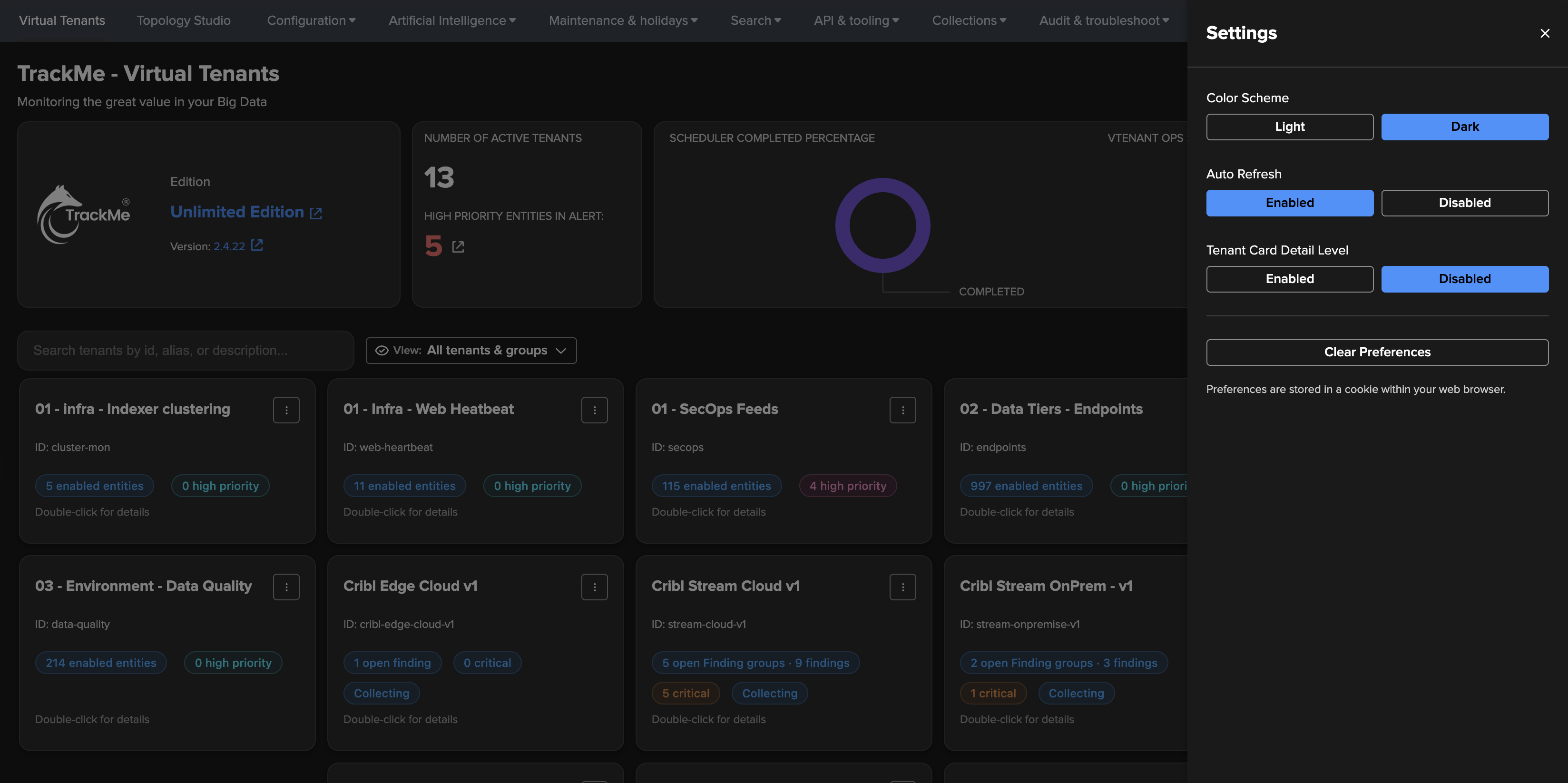
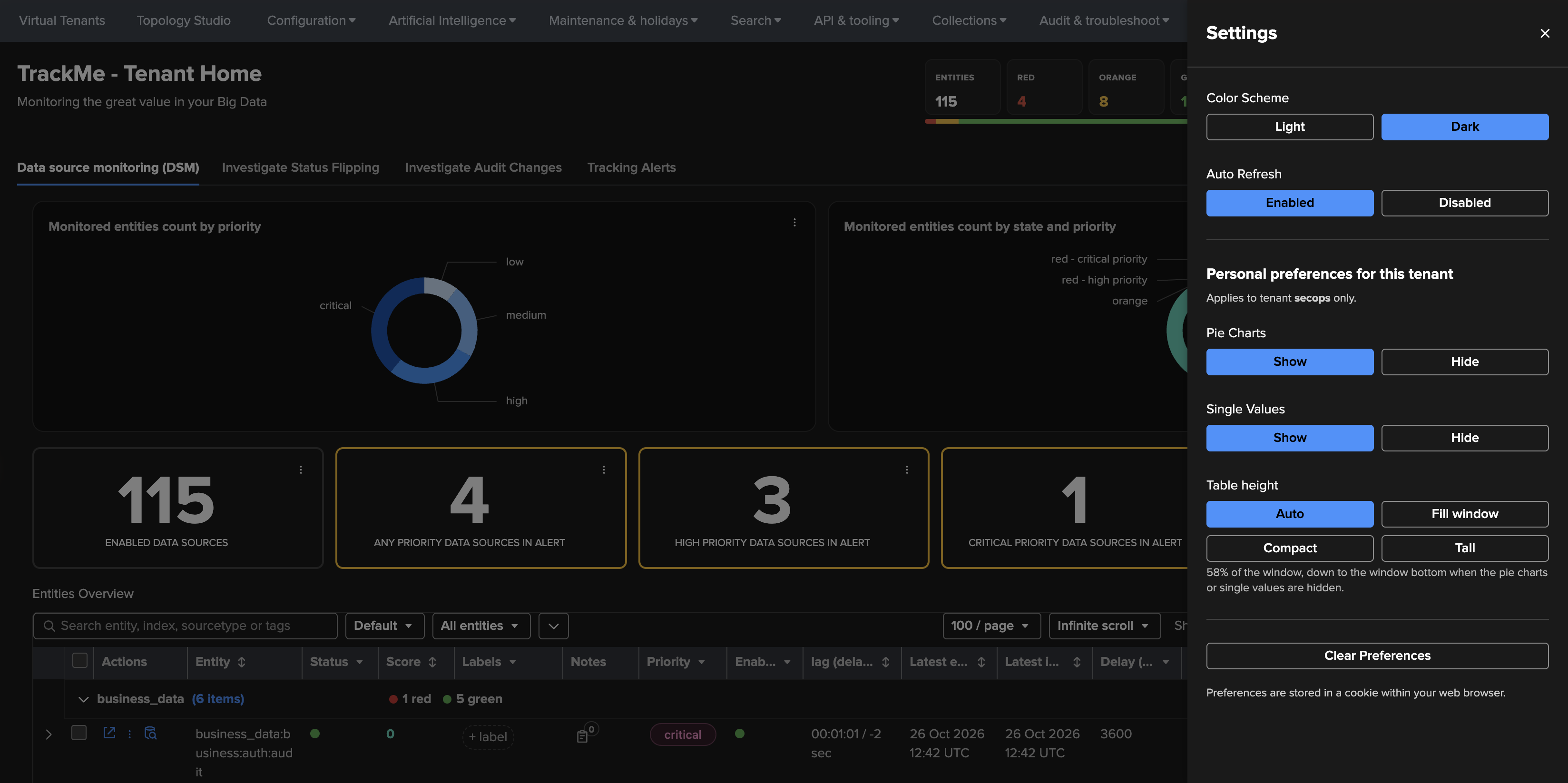
Left: the panel on the Virtual Tenants page. Right: the panel on a Tenant Home, with its per-tenant section.
What you can set
Preference |
Where |
Effect |
|---|---|---|
Color Scheme |
All three |
Light or Dark. The choice is global: it applies to every TrackMe interface, including embedded views, the AI assistant and notifications. |
Auto Refresh |
All three |
Enabled or Disabled. Whether the page refreshes its data automatically (on Topology Studio, the live-status polling of the canvas). Until you choose, the system default applies. |
Tenant Card Detail Level |
Virtual Tenants |
Enabled shows the priority breakdown (low, medium, high, critical) on each tenant card; Disabled keeps the compact cards. |
Virtual Tenants visibility |
Virtual Tenants |
Appears once you have hidden at least one tenant (tenant menu → Hide this tenant). True shows your hidden tenants again; False keeps them out of your grid. Hiding is personal and never restricts access (see Managing tenants). |
Personal preferences for this tenant
On a Tenant Home, the panel adds a section that applies to that tenant only (it names the tenant). The controls depend on the kind of tenant:
Tenant |
Controls |
|---|---|
Entity tenants (DSM, DHM, MHM, FLX, FQM, WLK, VOL) |
Pie Charts and Single Values (Show / Hide) — the priority and state charts and the KPI tiles above the entities table. Table height — Auto (58 % of the window, down to the window bottom when the pie charts or single values are hidden), Fill window, Compact (40 %) or Tall (75 %). |
User Activity Monitoring |
Collection monitors, Single stats and Charts (Show / Hide) — see User Activity Monitoring. |
Cribl Stream, Cribl Edge and Splunk HEC |
Workspace context, Single stats and Charts (Show / Hide), and Rows per page (25, 50 or 100) for the workspace tables. Hiding a layer never stops collection, findings or safety warnings. |
Other choices TrackMe remembers
A few selections made elsewhere in the interfaces are kept with your preferences too: the Saved View selected on the Virtual Tenants page (see Saved Views), the list of tenants you have hidden, the display mode of the Topology Studio views browser (see Views browser and display modes) and the Policies layout (cards, compact or list) of the UAM and Cribl workspaces.
Where preferences are stored
Preferences live in a single browser cookie, trackme_user_preferences, and are read and
written by every TrackMe interface. As a consequence:
they follow your browser, not your Splunk account: another browser or another device starts from the system defaults;
the cookie holds UI state only — no personal data, no tenant data;
deleting the site’s cookies in your browser resets them.
Clearing your preferences
Clear Preferences, at the bottom of the panel, asks for confirmation, then deletes the whole cookie and reloads the page: every choice above — colour scheme, auto-refresh, per-tenant layouts, hidden tenants, the selected Saved View — returns to the system defaults. A few views remember purely local display options (for example chart options in the VOL views) in the browser’s local storage; Clear Preferences leaves those untouched.
Application-wide defaults
Administrators set the defaults for all users from Configuration → System settings → User
interfaces, the [trackme_ui_defaults] stanza of trackme_settings.conf. Like every
Configuration interface, this page is reserved for Splunk admins (see
Configuration).
Setting |
Key |
Default |
Notes |
|---|---|---|---|
Default theme |
|
|
|
Auto-refresh |
|
|
Auto-refresh on ( |
Action progress refresh rate |
|
|
Seconds between progress refreshes while an action runs (creating a tenant, running a tracker, training models). 5–300; raise it on slow systems. |
Tenant Card Detail Level |
|
|
Show the priority breakdown on tenant cards ( |
High-scale shadow page size |
|
|
Records fetched per batch when large entity tables load from shadow collections. 5,000–50,000. |
Topology default entity count |
|
|
Member entity nodes drawn when the topology graph view opens. 10–10,000; analysts can adjust it per view. |
Topology maximum entity count |
|
|
Ceiling on the member entity nodes an analyst can request. 100–100,000. |
Entity table max visible labels |
|
|
Label chips shown per entity before the rest collapse into +N. 1–10. |
The precedence is always the same: a user’s own choice wins, then the system default, then a built-in fallback. Changing a default affects users who have not made their own choice; it never overwrites a personal one. The deployment-wide default display mode of the Topology Studio views browser is set in the Topology Studio section of the same page.
Per-tenant table defaults
How a tenant’s entity tables load and group is a tenant setting, not a personal one. Tenant administrators set it from the tenant menu → Configure tenant (see Configuring a tenant):
Priority & Pagination — the table pagination mode (Local, client-side, the default; or Remote, server-side for very large entity sets) and size (
10000records per page). New tenants inherit both from System settings → General (pagination_mode,pagination_size).User Interface Preferences — the default time range, the minimum width of the object column, whether metric rows open expanded, and the order of the Tenant Home tabs.
Group-By Settings — per component, the field or fields the entities table is grouped by when it opens (for example
data_indexfor DSM,overgroupfor WLK,groupfor FLX and VOL). Users can still regroup on the fly with the table’s Group by selector.
Note
The group-by settings keep their historical keys in trackme_vtenants.conf
(splk_dsm_tabulator_groupby, splk_flx_tabulator_groupby and so on). The word
tabulator in the key is a leftover of the former table component; the setting drives
the grouping of today’s entity tables.
See also
Navigating the TrackMe UI — in depth — a visual tour of the interfaces, in dark and light mode.
Managing tenants — hiding a tenant from your grid, and configuring a tenant.
Configuration — in depth — every System settings section.