Field Quality Monitoring
Field extraction success and CIM compliance measured per field: CIM data models, AI-generated dictionaries for custom sourcetypes, sampling, and the field-quality advisors.
about 40 minutes · 35 slides. Each slide is followed by a description of what it shows — read top to bottom, this page is the walkthrough.
Overview
Field Quality Monitoring (FQM) follows two feeds down two paths. A CIM firewall feed, Cisco ASA logs, is checked against the Network_Traffic data model with a dictionary generated from CIM. A raw JSON business feed, e-commerce orders, has no CIM model: its data dictionary is drafted, tightened and reviewed by the AI Advisors. Both start from a brand new tenant, field-quality, and end with 89 monitored fields.
Every screen was captured on TrackMe 2.4.18. The walkthrough closes with what a mature FQM tenant looks like after several months of history.
Why availability monitoring is not enough
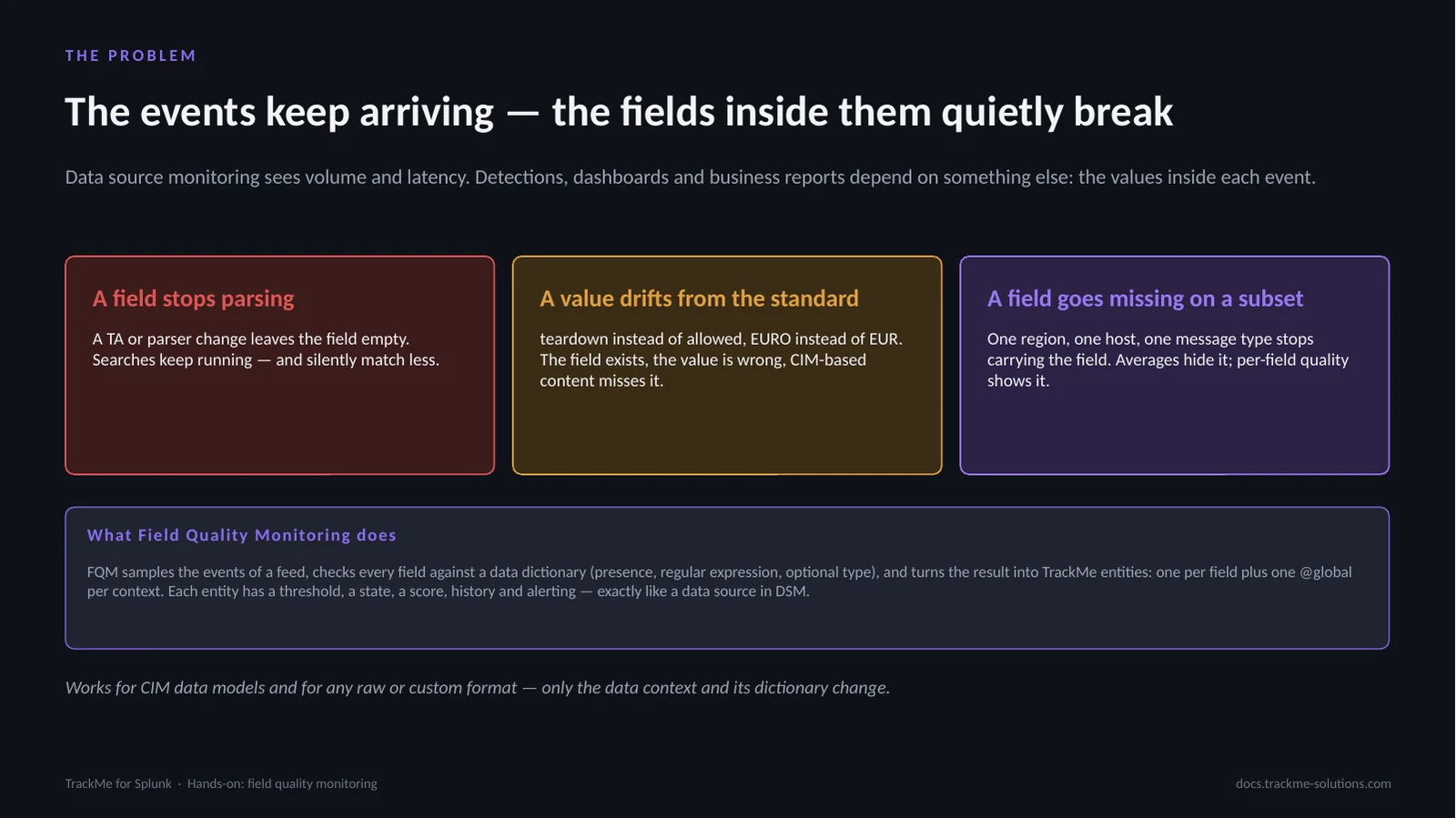
Data source monitoring sees volume and latency; detections, dashboards and business reports depend on the values inside each event. A field stops parsing when a TA or parser change leaves it empty. A value drifts from the standard, EURO instead of EUR: the field exists, the value is wrong. A field goes missing on one region or one message type; averages hide it, per-field quality shows it.
FQM samples the events of a feed, checks every field against a data dictionary (presence, regular expression, optional type) and turns the result into TrackMe entities: one per field plus one @global per context, each with a threshold, a state, a score, history and alerting.
Dictionary, collect job and monitor job
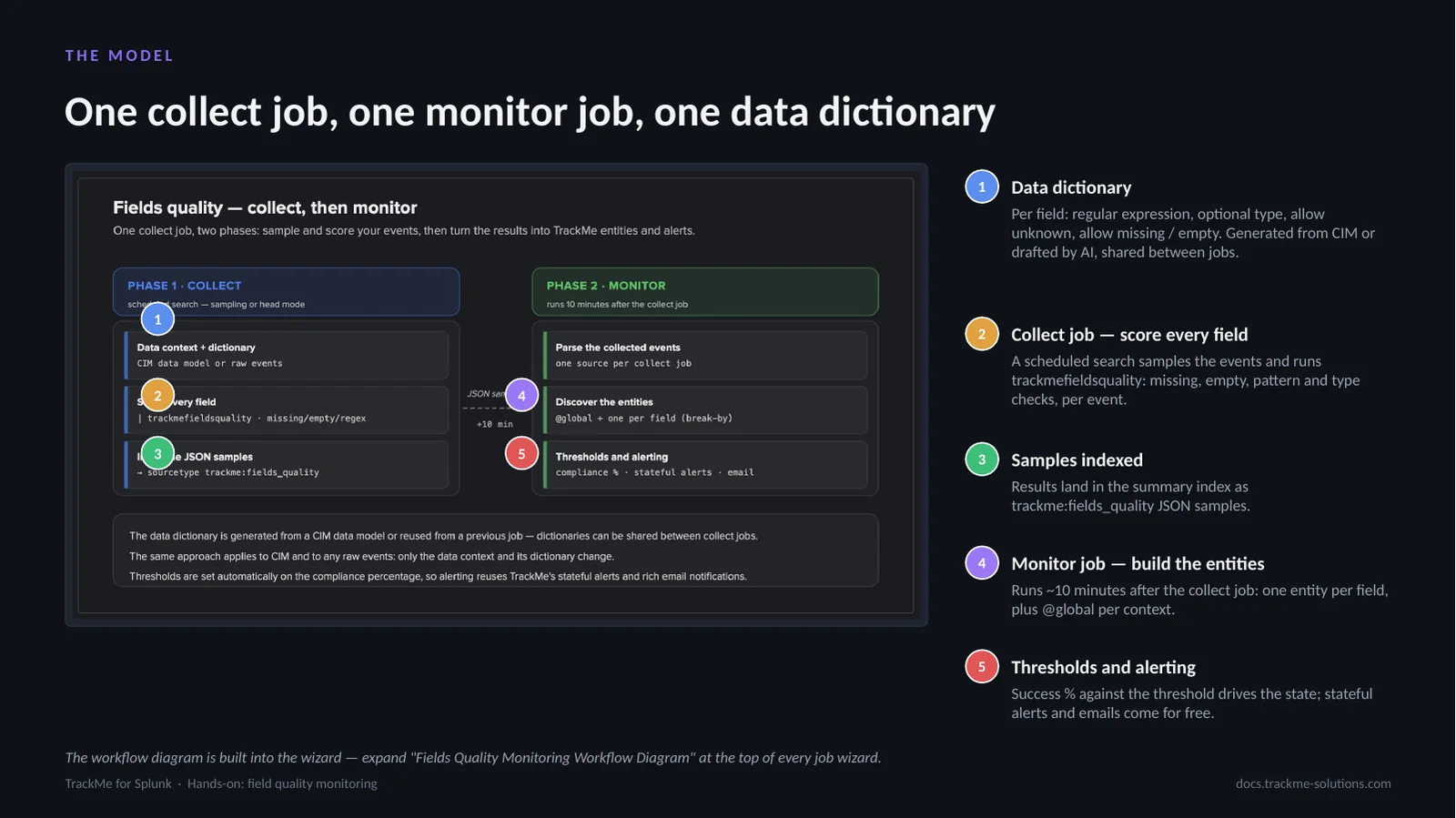
The Data dictionary (callout 1) holds, per field, a regular expression, an optional type, allow unknown and allow missing / empty; it is generated from CIM or drafted by AI. The Collect job (callout 2) is a scheduled search that samples the events and runs trackmefieldsquality against the dictionary. The samples (callout 3) land in the summary index as trackme:fields_quality JSON. The Monitor job (callout 4) runs about 10 minutes later and builds one entity per field plus @global per context. Thresholds and alerting (callout 5): the success % against the threshold drives the state; stateful alerts and emails follow.
Both jobs are created and scheduled by the wizard; the dictionary is reusable across trackers that share a format.
Two feeds, two dictionary strategies
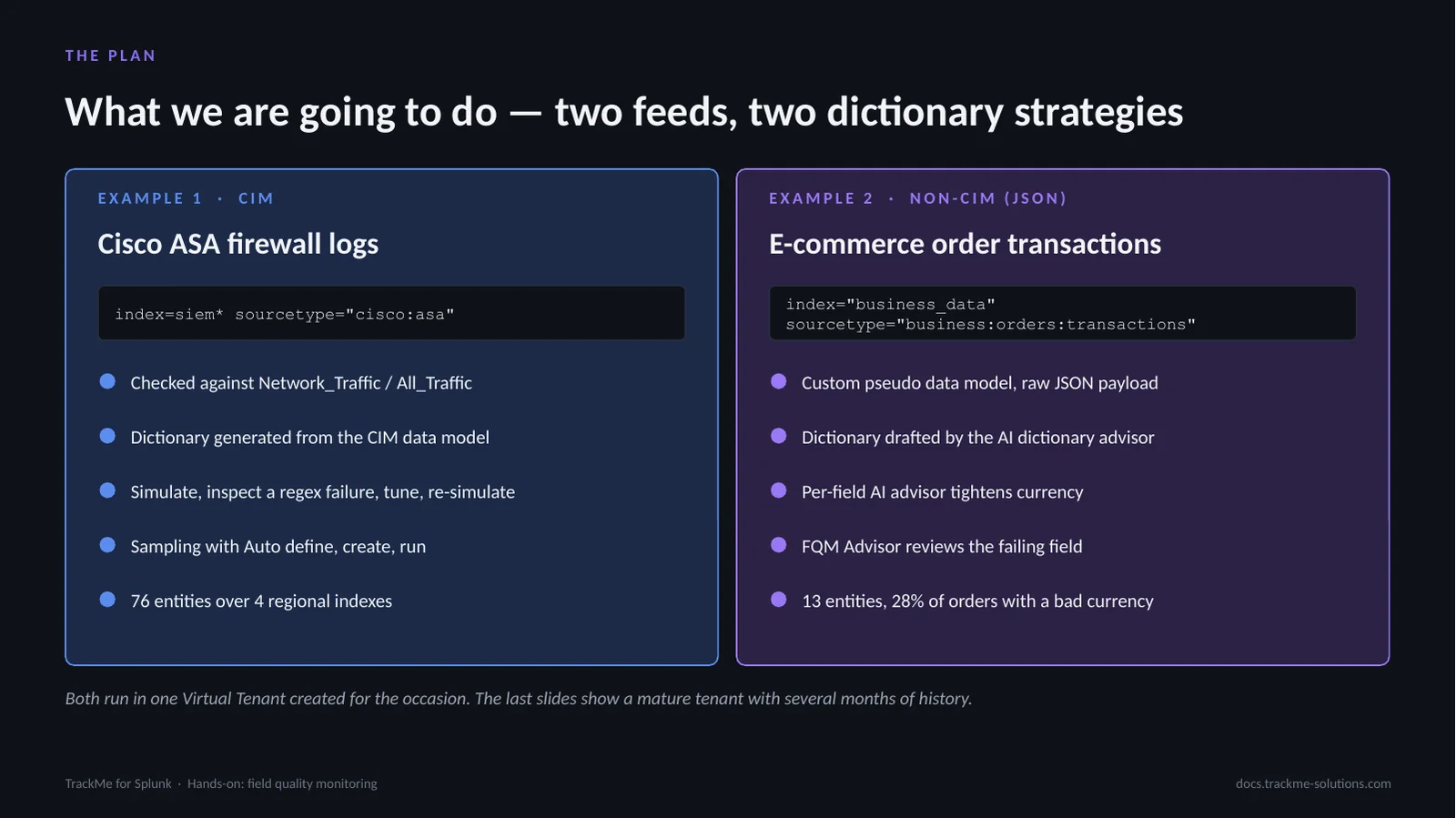
Example 1 is the CIM path: Cisco ASA firewall logs, index=siem* sourcetype=”cisco:asa”, checked against Network_Traffic / All_Traffic. The dictionary is generated from the CIM data model; the flow is simulate, inspect a regex failure, tune, re-simulate, then sampling with Auto define, create and run. The result is 76 entities over 4 regional indexes.
Example 2 is the non-CIM path: e-commerce order transactions, index=”business_data” sourcetype=”business:orders:transactions”, a custom pseudo data model over a raw JSON payload. The AI dictionary advisor drafts the dictionary, a per-field AI advisor tightens currency, and the FQM Advisor reviews the failing field. The result is 13 entities, with 28% of orders carrying a bad currency. Both run in one Virtual Tenant created for the occasion.
Creating the Field Quality tenant
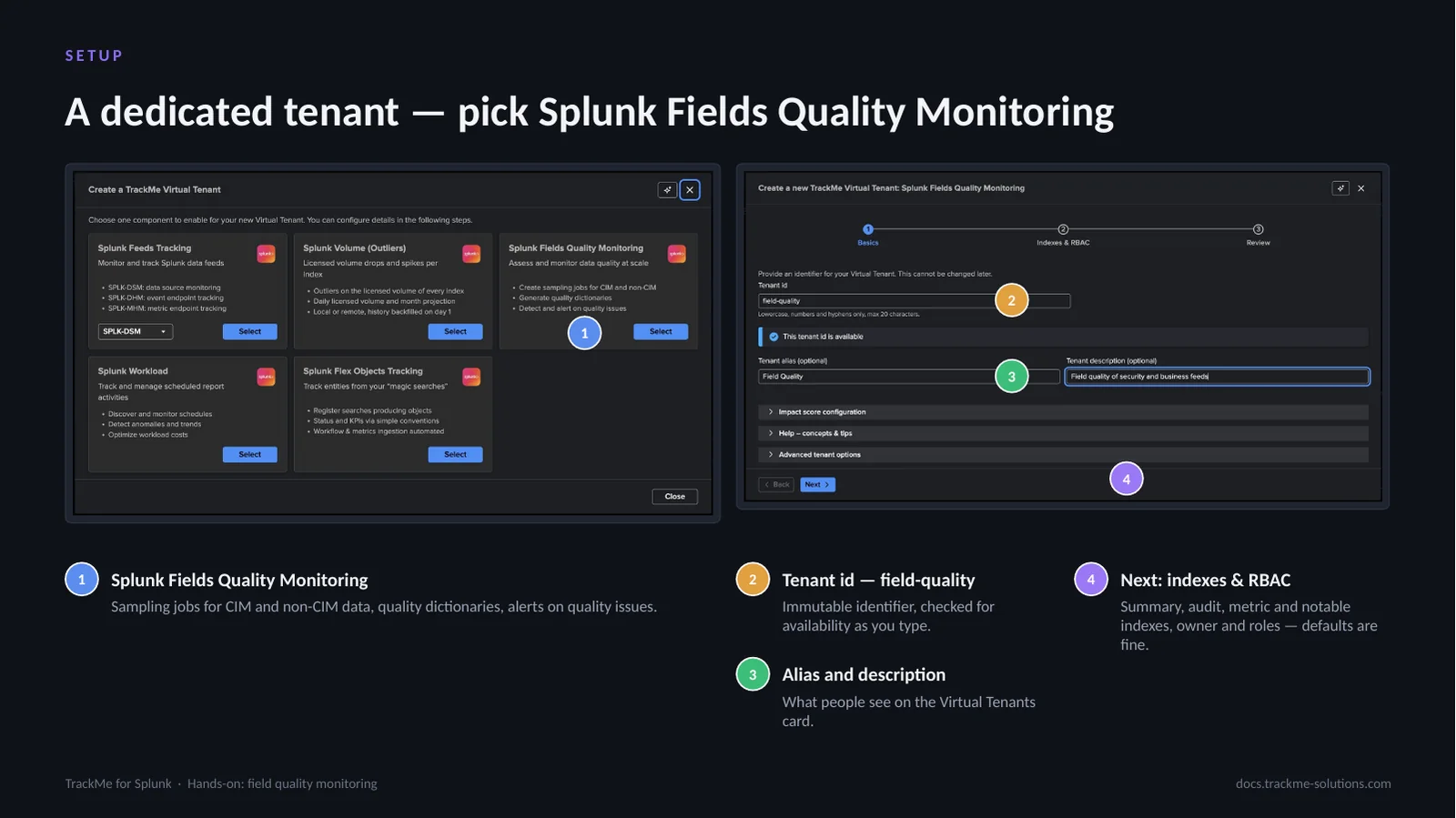
Virtual Tenants → Actions → Create a tracking tenant opens the component chooser. Splunk Fields Quality Monitoring (callout 1) is its own card: sampling jobs for CIM and non-CIM data, quality dictionaries and alerts on quality issues. The tenant id (callout 2), field-quality, is an immutable identifier checked for availability as it is typed. Alias and description (callout 3) are what people see on the Virtual Tenants card. Next: indexes & RBAC (callout 4) covers the summary, audit, metric and notable indexes, the owner and the roles; the defaults are fine.
The wizard asks three things, basics, indexes and RBAC, and review; TrackMe then creates the KV collections, lookups and health tracker for the tenant in seconds.
FQM actions in Tenant Home
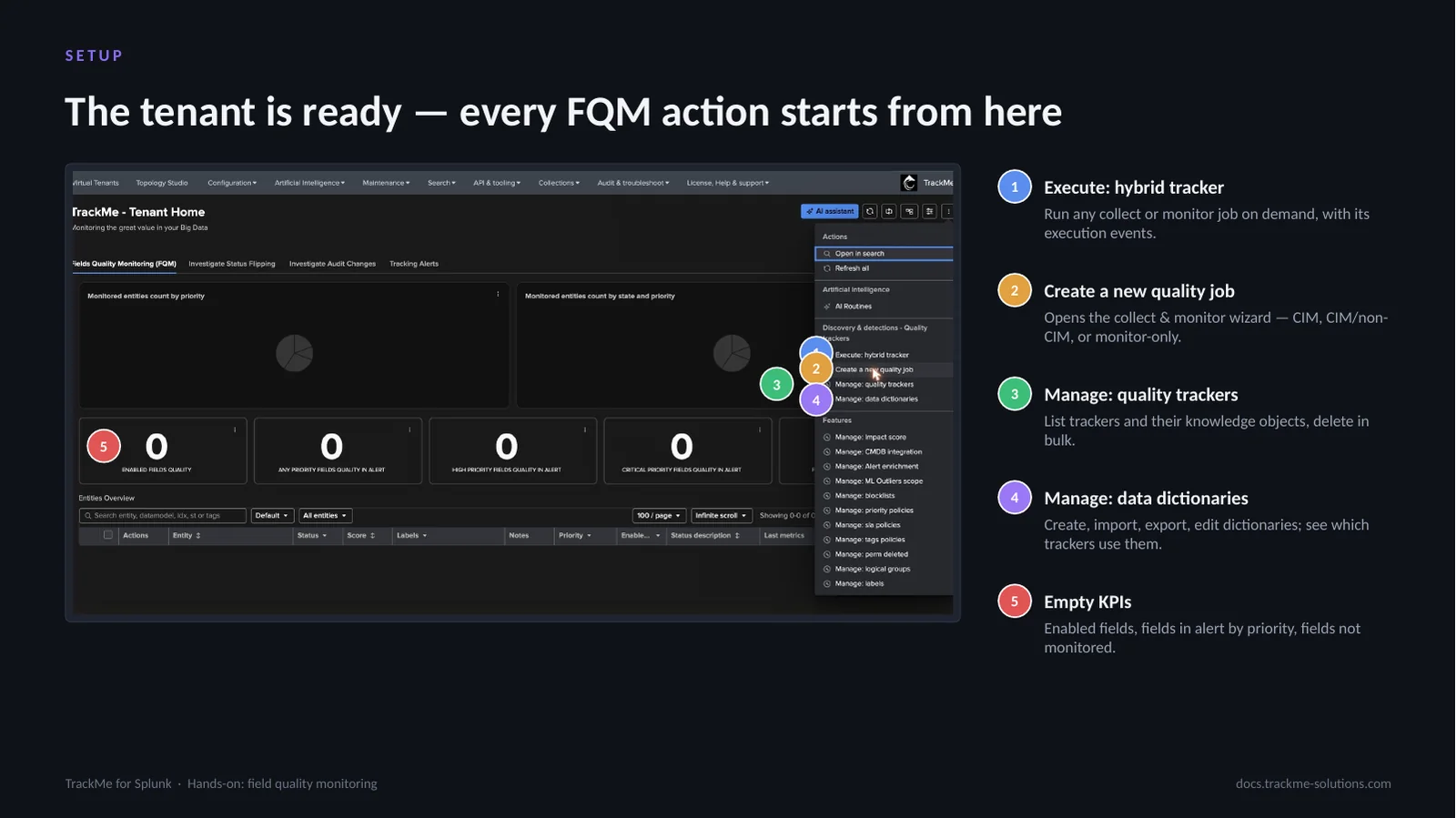
Tenant Home is where FQM lives, and the kebab menu at the top right carries every FQM action. Execute: hybrid tracker (callout 1) runs any collect or monitor job on demand and shows its execution events. Create a new quality job (callout 2) opens the collect & monitor wizard for CIM, CIM/non-CIM or monitor-only jobs. Manage: quality trackers (callout 3) lists trackers and their knowledge objects and deletes them in bulk. Manage: data dictionaries (callout 4) creates, imports, exports and edits dictionaries and shows which trackers use them. The KPIs (callout 5), enabled fields, fields in alert by priority and fields not monitored, are still empty on a new tenant. The first step is Create a new quality job.
Example 1 — A CIM data source
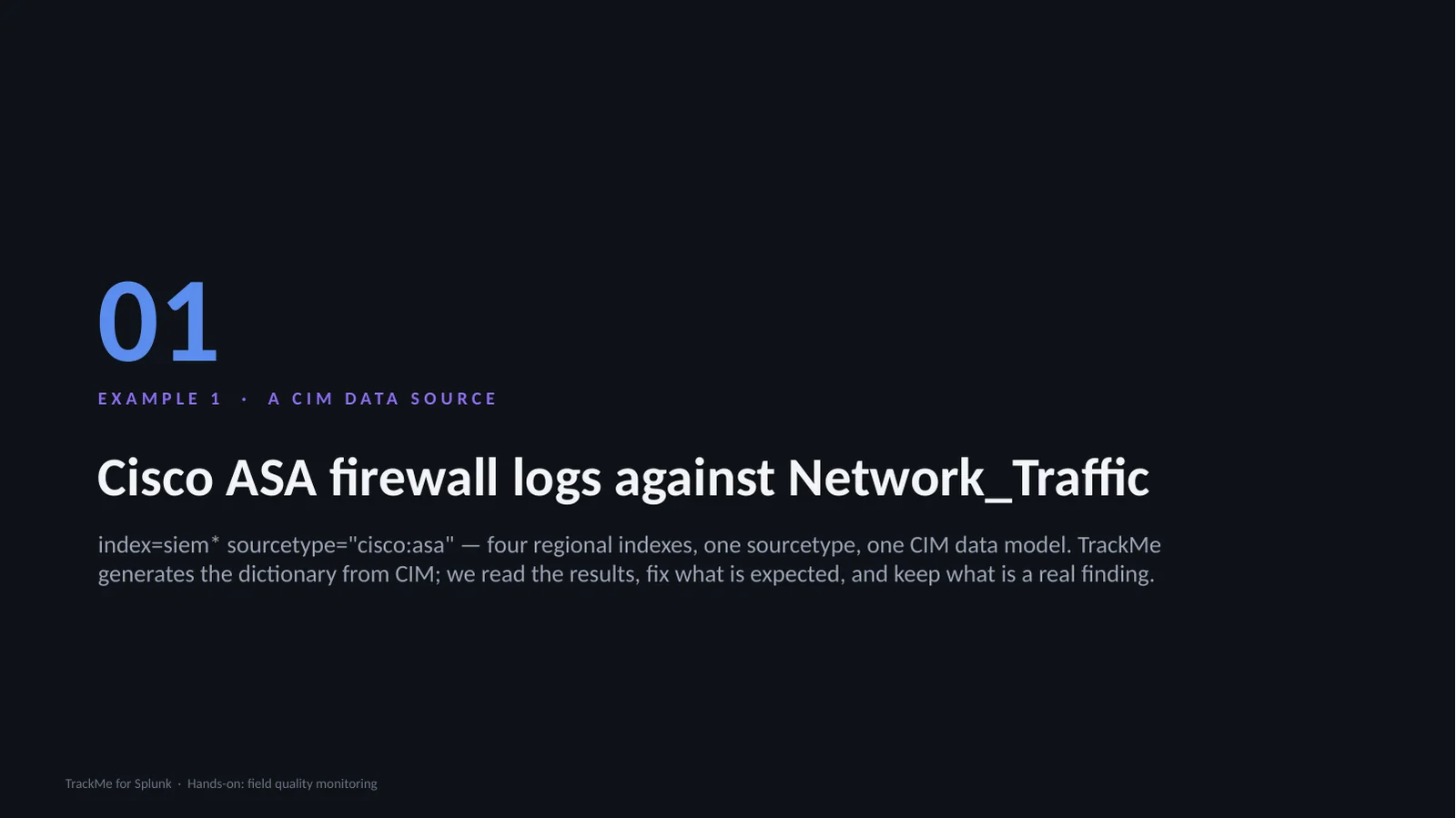
The first example is a CIM source: index=siem* sourcetype=”cisco:asa”, four regional indexes, one sourcetype, one CIM data model. TrackMe generates the dictionary from CIM, so the interesting part is interpreting the first results: which failures are real CIM compliance problems, and which are simply fields that only exist on some message types. Expected gaps are fixed in the dictionary; real findings are kept.
Choosing the tracker type
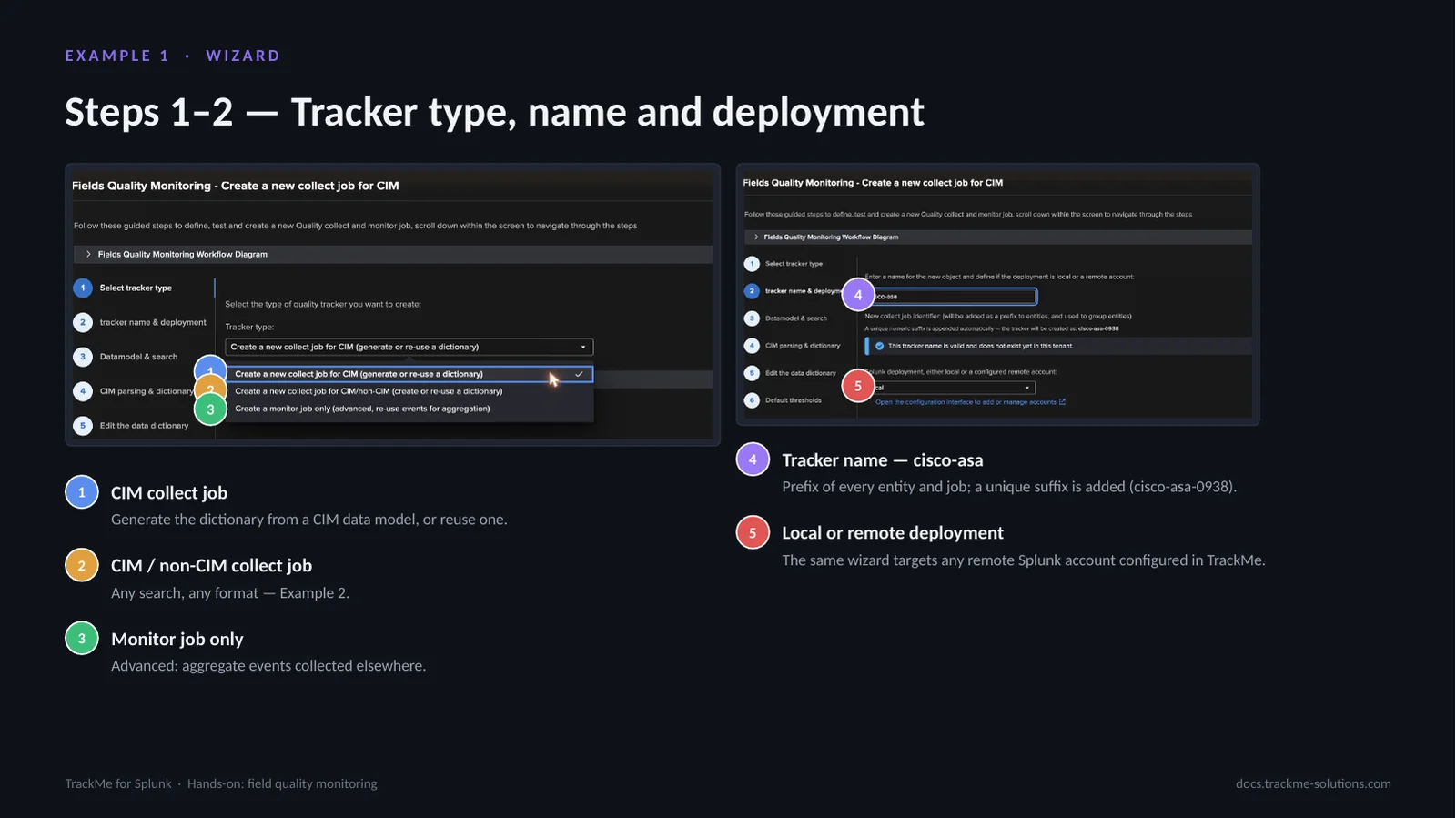
Steps 1 and 2 of the wizard offer three tracker types. CIM collect job (callout 1) generates the dictionary from a CIM data model or reuses one. CIM / non-CIM collect job (callout 2) takes any search and any format, used in Example 2. Monitor job only (callout 3) is advanced: it aggregates events collected elsewhere. Tracker name (callout 4), cisco-asa, is the prefix of every entity and job; TrackMe appends a short unique suffix (cisco-asa-0938). Local or remote deployment (callout 5): the same wizard targets the local deployment or any remote Splunk account configured in TrackMe.
Break-by fields and the source search
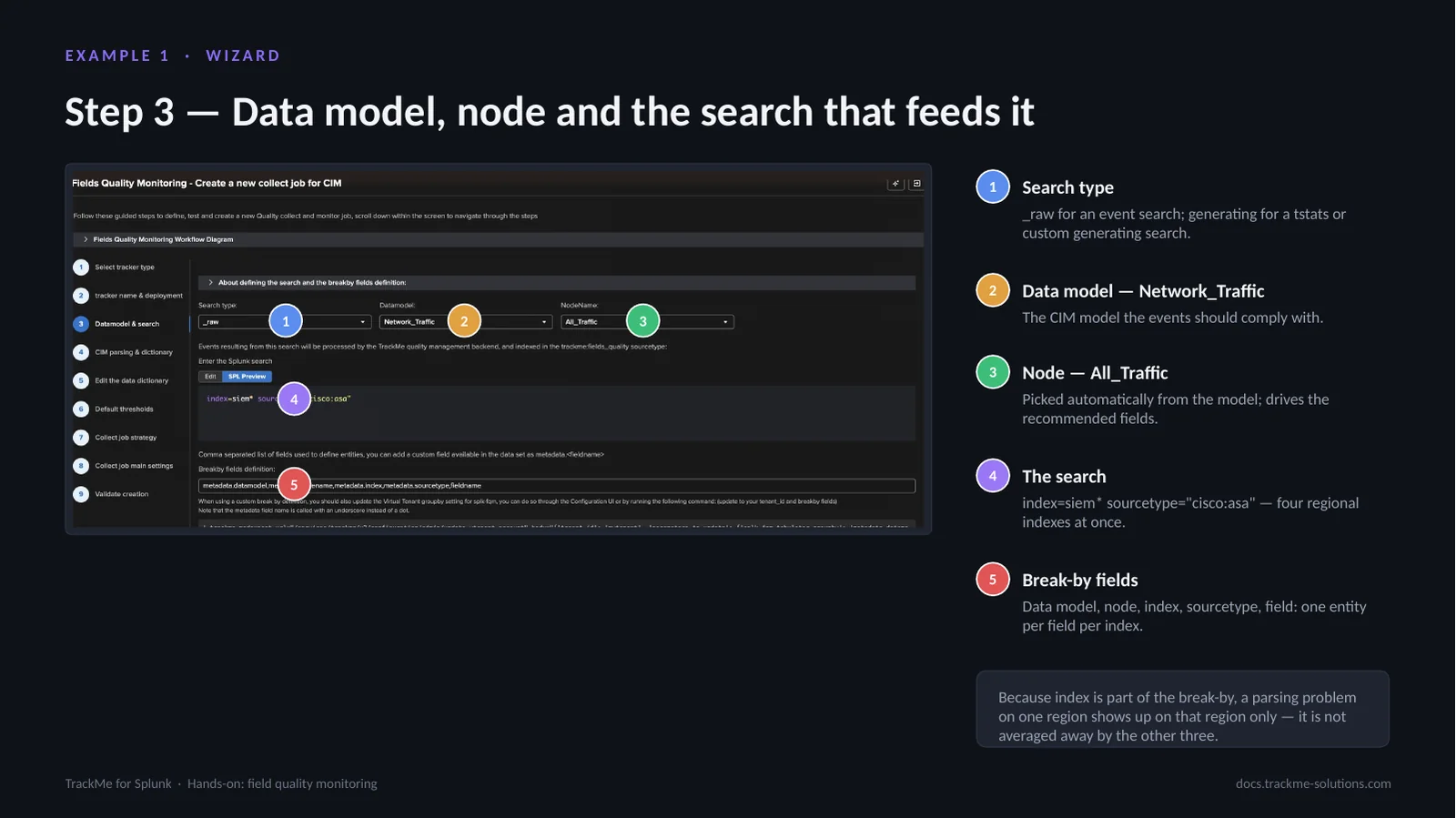
Search type (callout 1) is _raw for an event search or generating for a tstats or custom generating search. Data model (callout 2) is Network_Traffic, the CIM model the events should comply with. Node (callout 3), All_Traffic, is picked automatically from the model and drives the recommended fields. The search (callout 4), index=siem* sourcetype=”cisco:asa”, covers four regional indexes at once. Break-by fields (callout 5) are data model, node, index, sourcetype and field: one entity per field per index.
The break-by is the identity of the entities. Because index is part of it, a parsing problem on one region shows up on that region only and is not averaged away by the other three.
Simulation settings
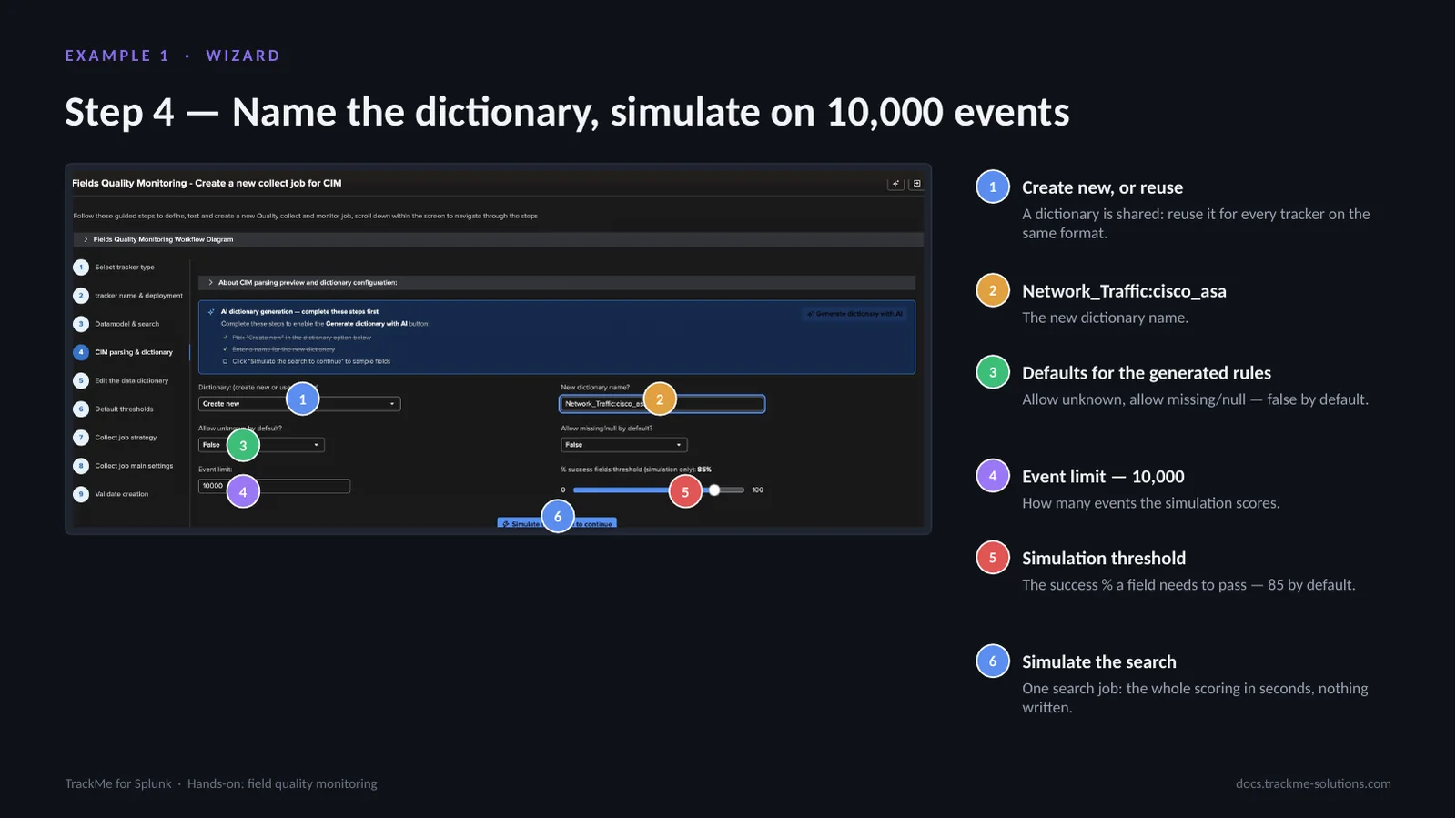
Step 4 names the dictionary and runs a simulation. Create new, or reuse (callout 1): a dictionary is shared and can be reused for every tracker on the same format. The new dictionary is named Network_Traffic:cisco_asa (callout 2). Defaults for the generated rules (callout 3), allow unknown and allow missing/null, are false by default. Event limit (callout 4) sets how many events the simulation scores, 10,000 by default; 100,000 also works well. Simulation threshold (callout 5) is the success % a field needs to pass, 85 by default. Simulate the search (callout 6) runs the real collect logic, scoring in seconds and writing nothing.
The simulation is the loop to iterate on.
Reading the first simulation
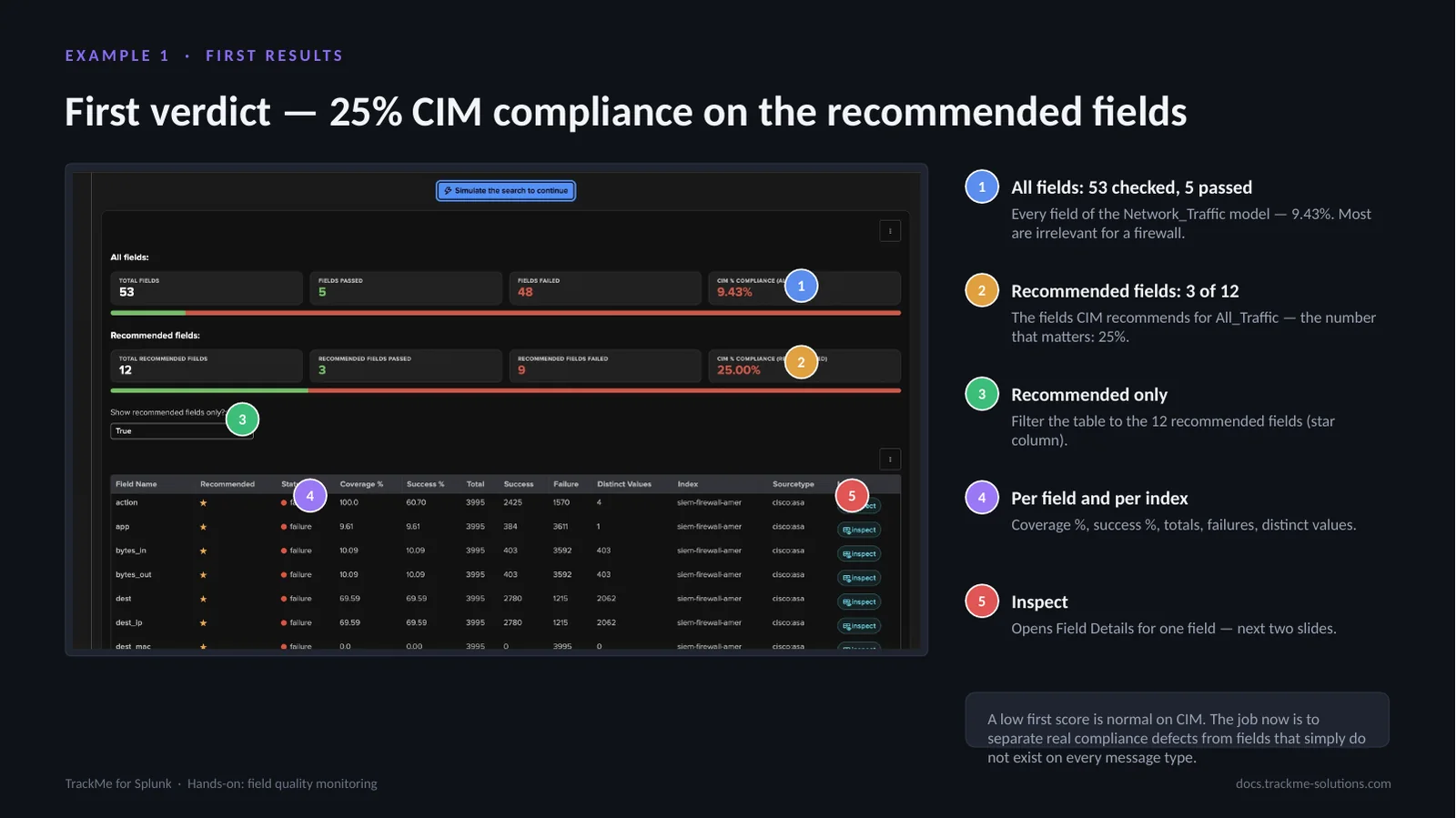
All fields (callout 1): 53 checked, 5 passed, 9.43%, across every field of the Network_Traffic model, most of which are irrelevant for a firewall. Recommended fields (callout 2): 3 of 12, the fields CIM recommends for All_Traffic, and the number that matters, 25%. Recommended only (callout 3) filters the table to those 12 fields, marked in the star column. The table (callout 4) shows, per field and per index, coverage %, success %, totals, failures and distinct values. Inspect (callout 5) opens Field Details for one field.
A low first score is normal on CIM: the model lists every possible field, and a Cisco ASA feed mixes connection builds, teardowns and translations that carry different fields.
A genuine compliance defect: action
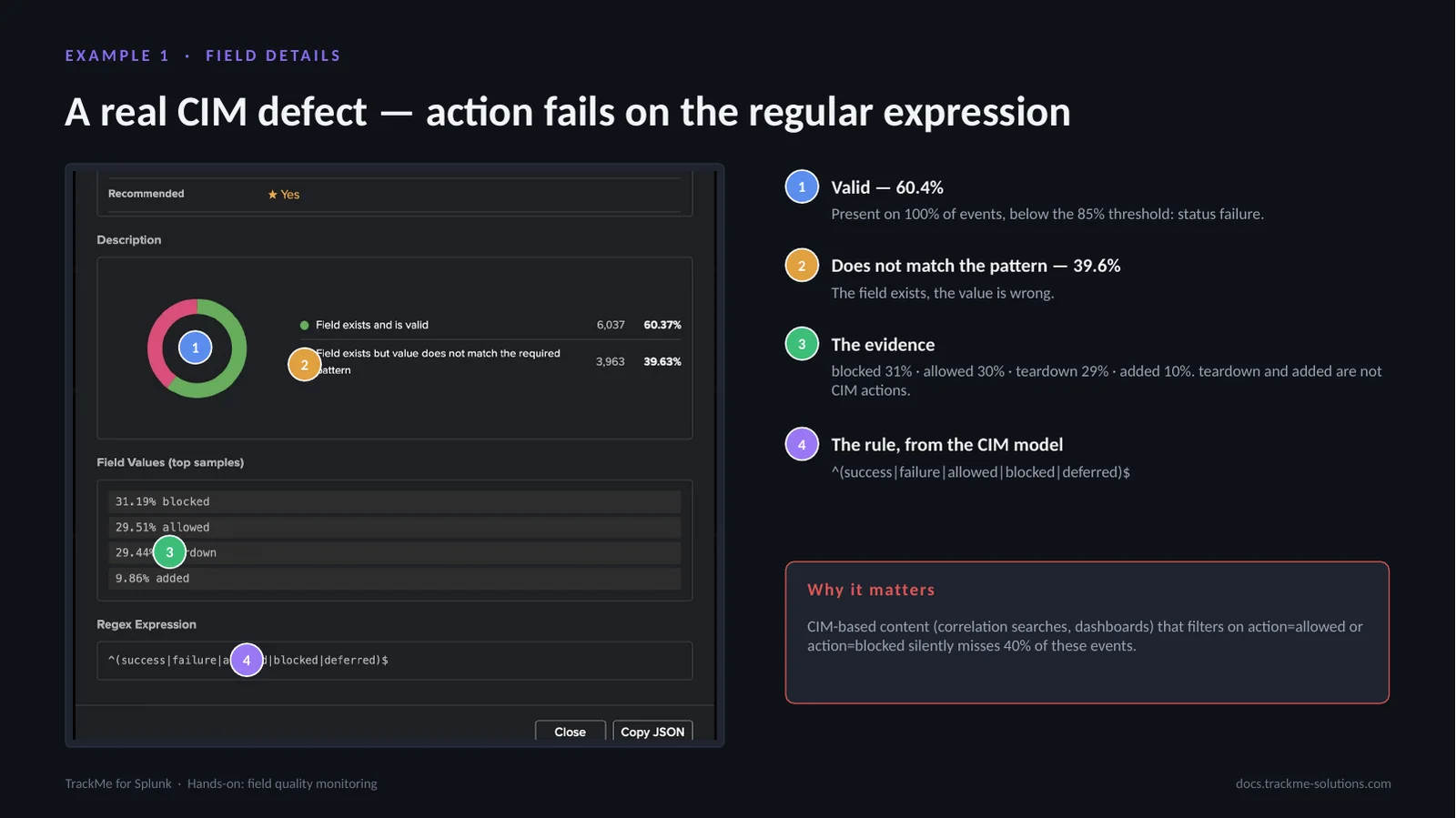
Field Details for action, opened from the simulation with Inspect. Valid (callout 1) is 60.4%: the field is present on 100% of events but below the 85% threshold, so its status is failure. Does not match the pattern (callout 2) is 39.6%: the field exists, the value is wrong. The evidence (callout 3) is the top values: blocked 31%, allowed 30%, teardown 29%, added 10%; teardown and added are not CIM actions. The rule (callout 4), from the CIM model, is ^(success|failure|allowed|blocked|deferred)$.
This is a genuine CIM compliance issue in the field extraction. CIM-based content that filters on action=allowed or action=blocked silently misses 40% of these events, so the rule is kept strict.
An expected gap: bytes_in
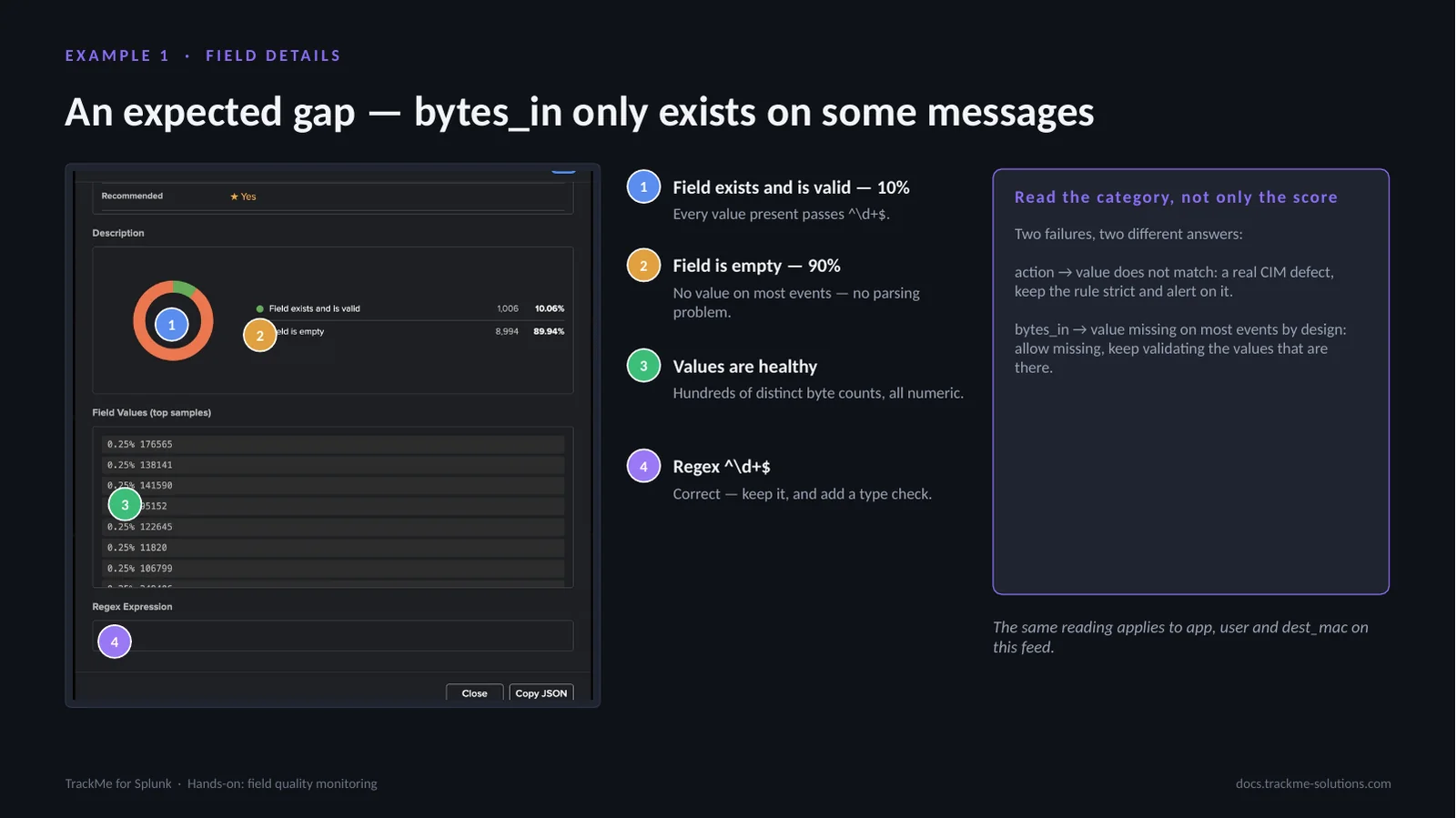
bytes_in reads differently. Field exists and is valid (callout 1) is 10%, and every value present passes ^d+$. Field is empty (callout 2) is 90%: no value on most events, because only connection teardown messages carry byte counts; this is not a parsing problem. Values are healthy (callout 3): hundreds of distinct byte counts, all numeric. The regex ^d+$ (callout 4) is correct; it is kept, and a type check is added.
Two failures call for two answers. action fails because the value does not match: a real CIM defect, so the rule stays strict and alerts. bytes_in fails because the value is missing on most events by design: allow missing, and keep validating the values that are there.
Editing rules in the dictionary editor
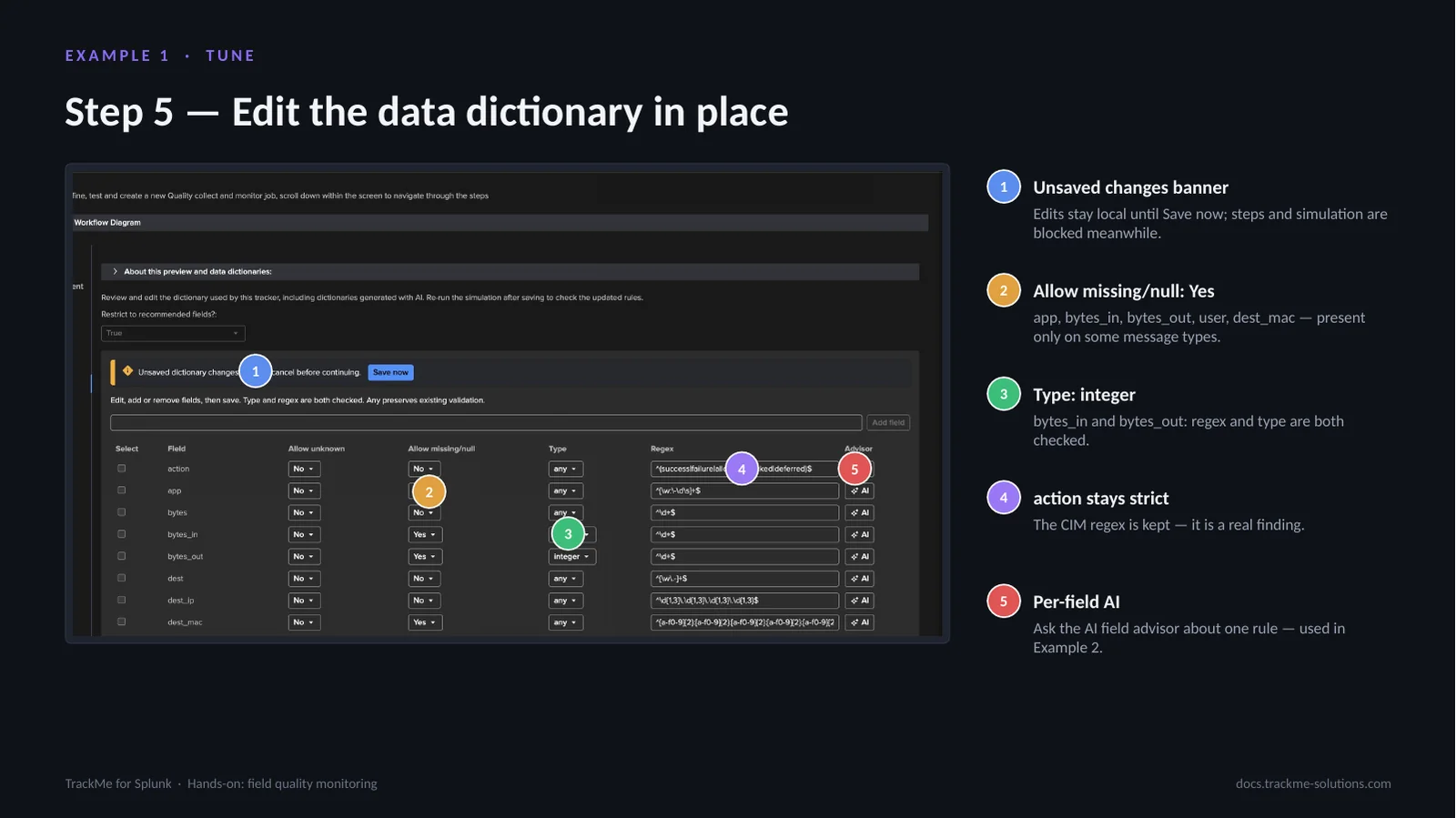
Step 5 edits the dictionary in place. The unsaved changes banner (callout 1) shows that edits stay local until Save now; steps and simulation are blocked meanwhile. Allow missing/null: Yes (callout 2) is set on app, bytes_in, bytes_out, user and dest_mac. Type: integer (callout 3) is set on bytes_in and bytes_out, checking regex and type. action stays strict (callout 4): the CIM regex is kept, a real finding. Per-field AI (callout 5) asks the AI field advisor about one rule.
Every rule is editable, with allow unknown, allow missing or empty, an optional type (integer, numerical, alpha, alphanumeric, boolean) and the regex. Save writes the whole dictionary at once and checks nobody changed it in between.
Compliance after tuning
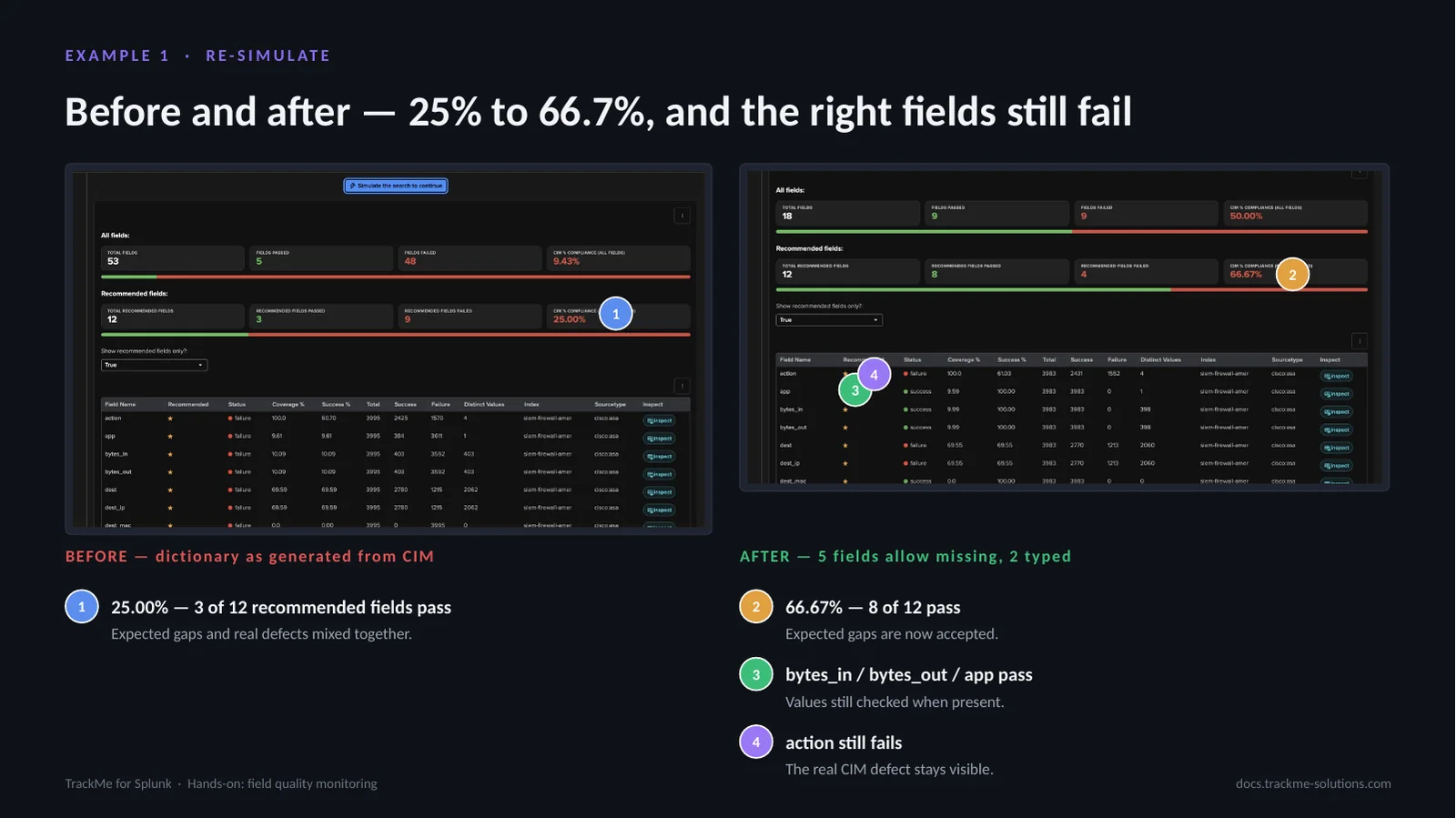
The same data, re-simulated with the new dictionary. Before (callout 1), with the dictionary as generated from CIM, 25.00% of the recommended fields passed, 3 of 12, with expected gaps and real defects mixed together. After (callout 2), with 5 fields allowing missing and 2 typed, 66.67% pass, 8 of 12: the expected gaps are now accepted. bytes_in, bytes_out and app pass (callout 3), their values still checked when present. action still fails (callout 4): the real CIM defect stays visible.
What remains red is meaningful: action with its non-CIM values, and dest, dest_ip and protocol, missing on about 30% of events, worth raising with the TA owner.
Thresholds and impact score
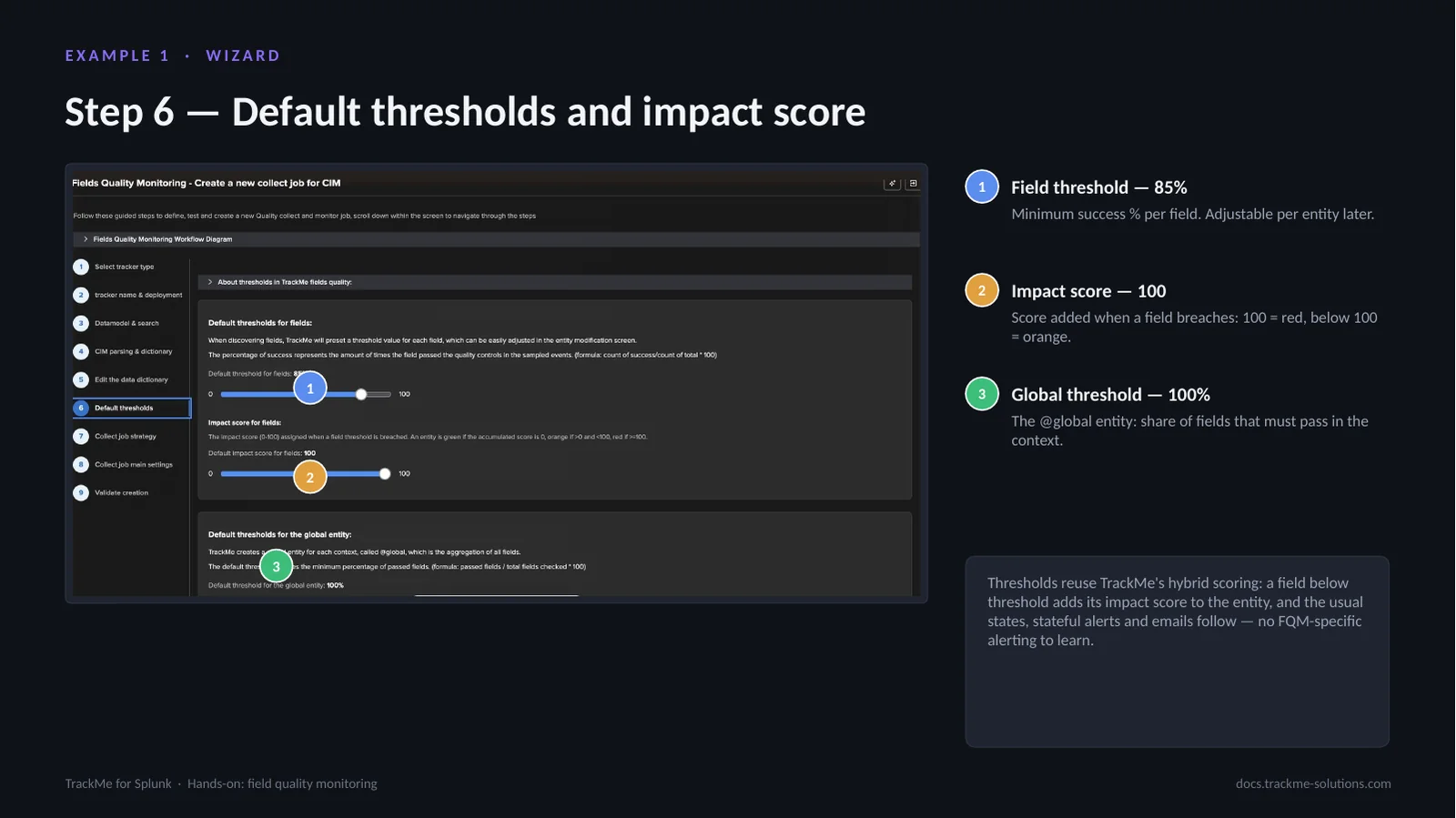
Step 6 sets the default thresholds. Field threshold (callout 1), 85%, is the minimum success % per field, adjustable per entity later. Impact score (callout 2), 100, is the score added when a field breaches: 100 makes the entity red, a lower value makes it orange. Global threshold (callout 3), 100%, applies to the @global entity, the share of fields that must pass in the context; at 100% any failing field turns it red.
Thresholds reuse TrackMe’s hybrid scoring: a field below threshold adds its impact score to the entity, and the usual states, stateful alerts and emails follow, with no FQM-specific alerting to learn. Lowering the impact score makes quality issues show orange rather than red.
Sizing the sample with Auto define
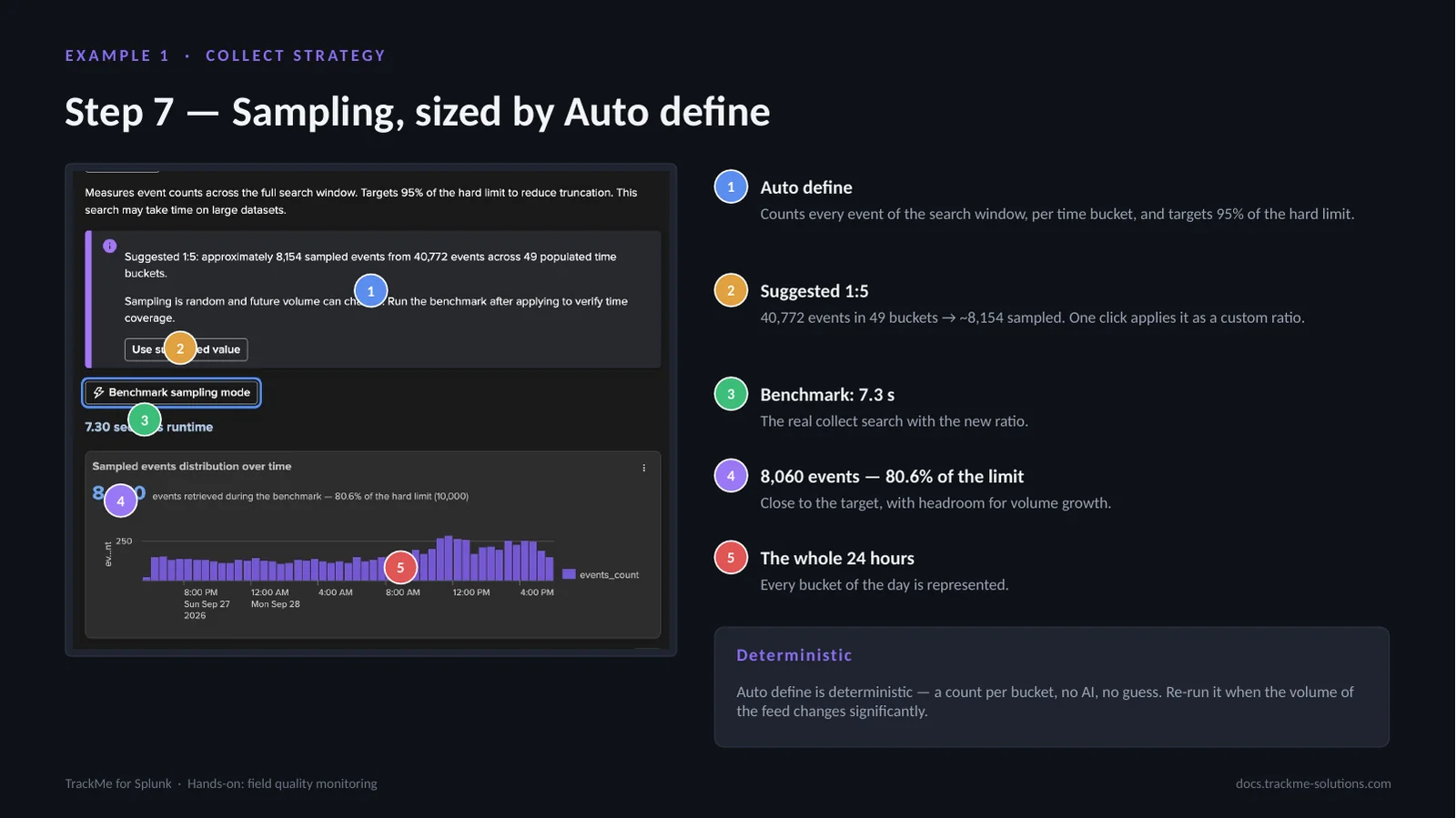
Step 7 sizes the sample. Auto define (callout 1) counts every event of the search window per time bucket and targets 95% of the hard limit. The suggestion (callout 2) is 1:5: 40,772 events in 49 buckets give about 8,154 sampled events, applied as a custom ratio in one click. Benchmark (callout 3) runs the real collect search with the new ratio in 7.3 s. It retrieves 8,060 events (callout 4), 80.6% of the limit, with headroom for volume growth, spread over the whole 24 hours (callout 5) so every bucket of the day is represented.
Auto define is deterministic, a count per bucket, no guess; it should be re-run when the volume of the feed changes significantly.
Head mode versus sampling
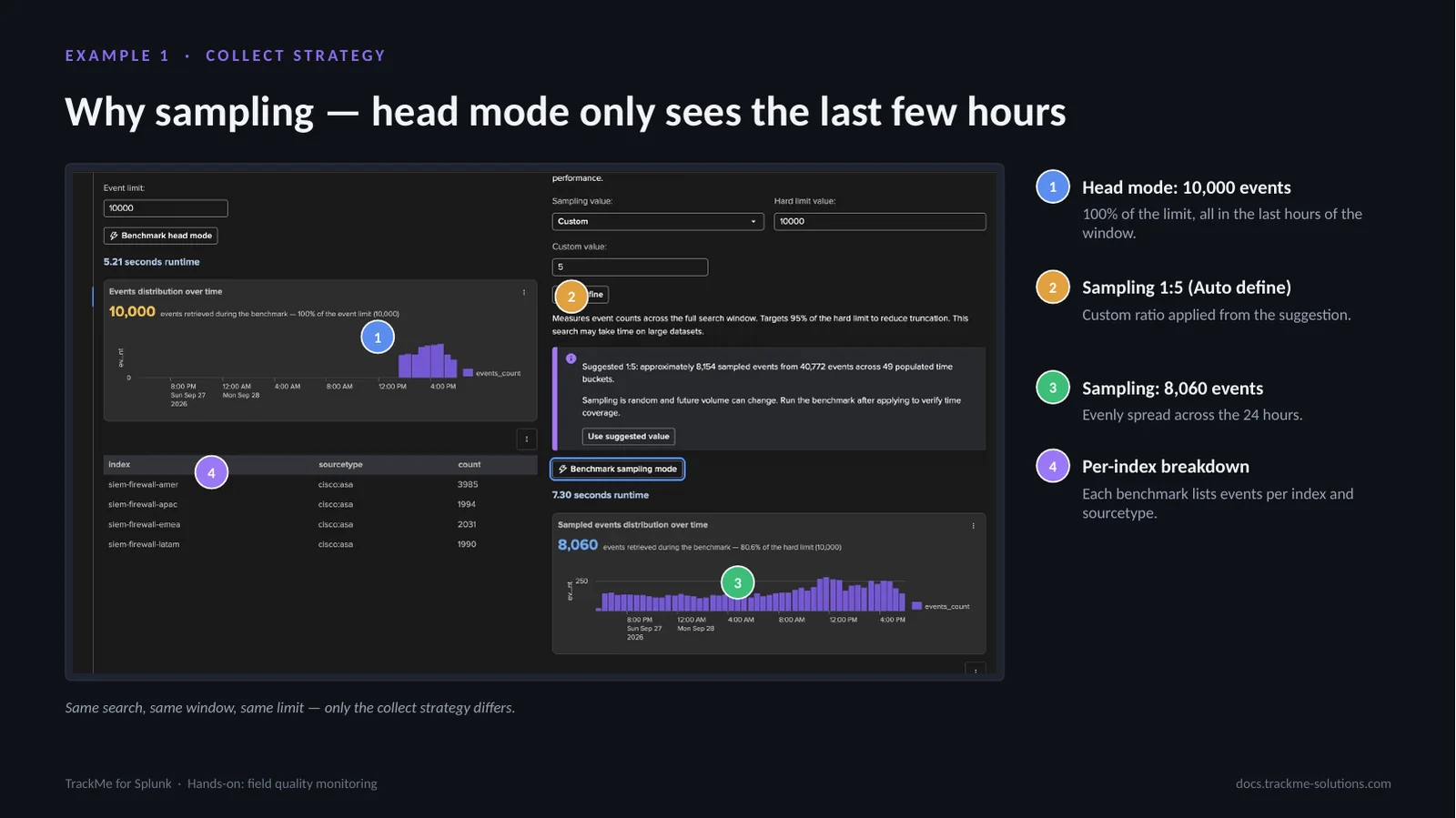
Same search, same window, same limit; only the collect strategy differs. Head mode (callout 1) returns the first 10,000 events the search yields, which on Splunk means the most recent: 100% of the limit, all inside the last few hours of the window. Sampling 1:5 (callout 2) is the custom ratio applied from the Auto define suggestion. It retrieves 8,060 events (callout 3), evenly spread across the 24 hours. The per-index breakdown (callout 4) lists events per index and sourcetype for each benchmark.
For quality measurement, representative beats recent: a parsing problem at 3 AM is invisible to head mode.
Review and job creation
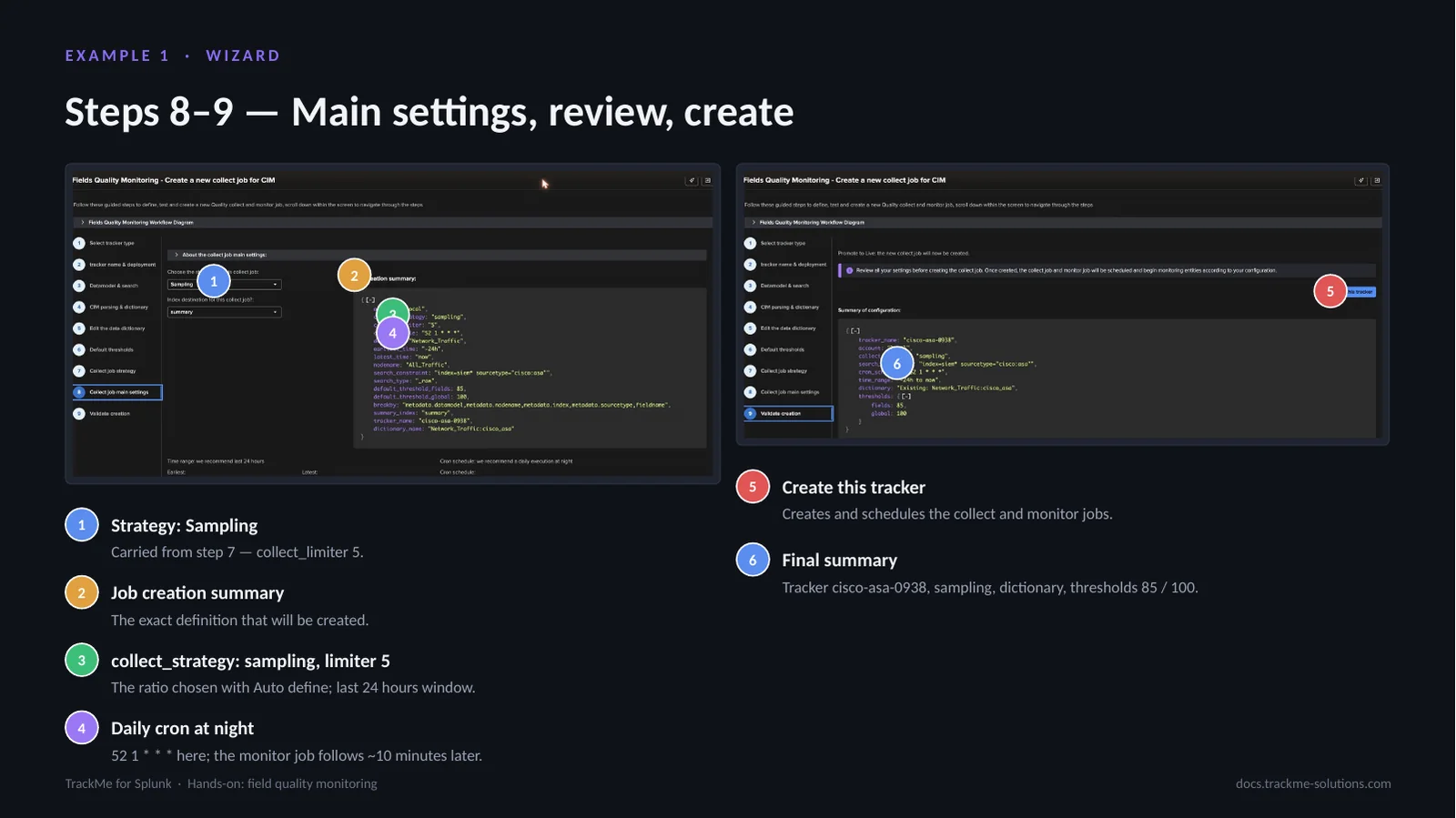
Step 8 confirms the settings. Strategy: Sampling (callout 1) is carried from step 7 with collect_limiter 5. The job creation summary (callout 2) describes tracker cisco-asa-0938 with sampling, the dictionary and thresholds 85 / 100; it is the exact payload sent to TrackMe. collect_strategy: sampling, limiter 5 (callout 3) is the ratio chosen with Auto define over a last-24-hours window. The daily cron (callout 4) runs at night as recommended, 52 1 * * * here, and the monitor job follows about 10 minutes later. Create this tracker (callout 5) creates and schedules both the collect and monitor jobs, and the final summary (callout 6) shows the configuration that will be created.
Running the jobs on demand
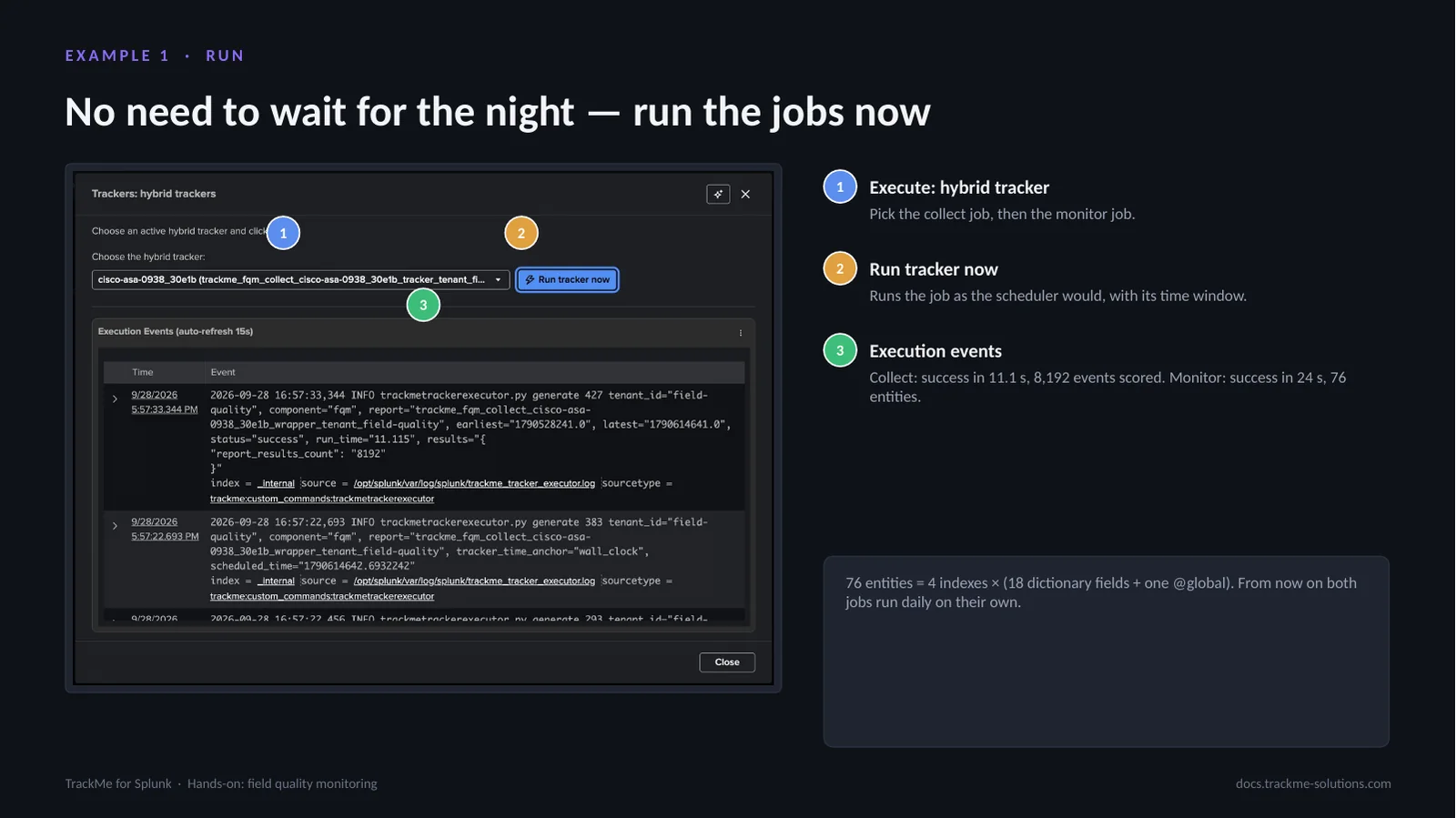
In production the jobs run on their cron; for a first validation they can be run on demand from the Tenant Home menu. Execute: hybrid tracker (callout 1) picks the collect job, then the monitor job. Run tracker now (callout 2) runs the job as the scheduler would, with its time window. Execution events (callout 3) stream from the executor: the collect job succeeds in 11.1 s with 8,192 events scored, and the monitor job succeeds in 24 s with 76 entities.
76 entities is 4 indexes × (18 dictionary fields + one @global). From now on both jobs run daily on their own.
The field entities in Tenant Home
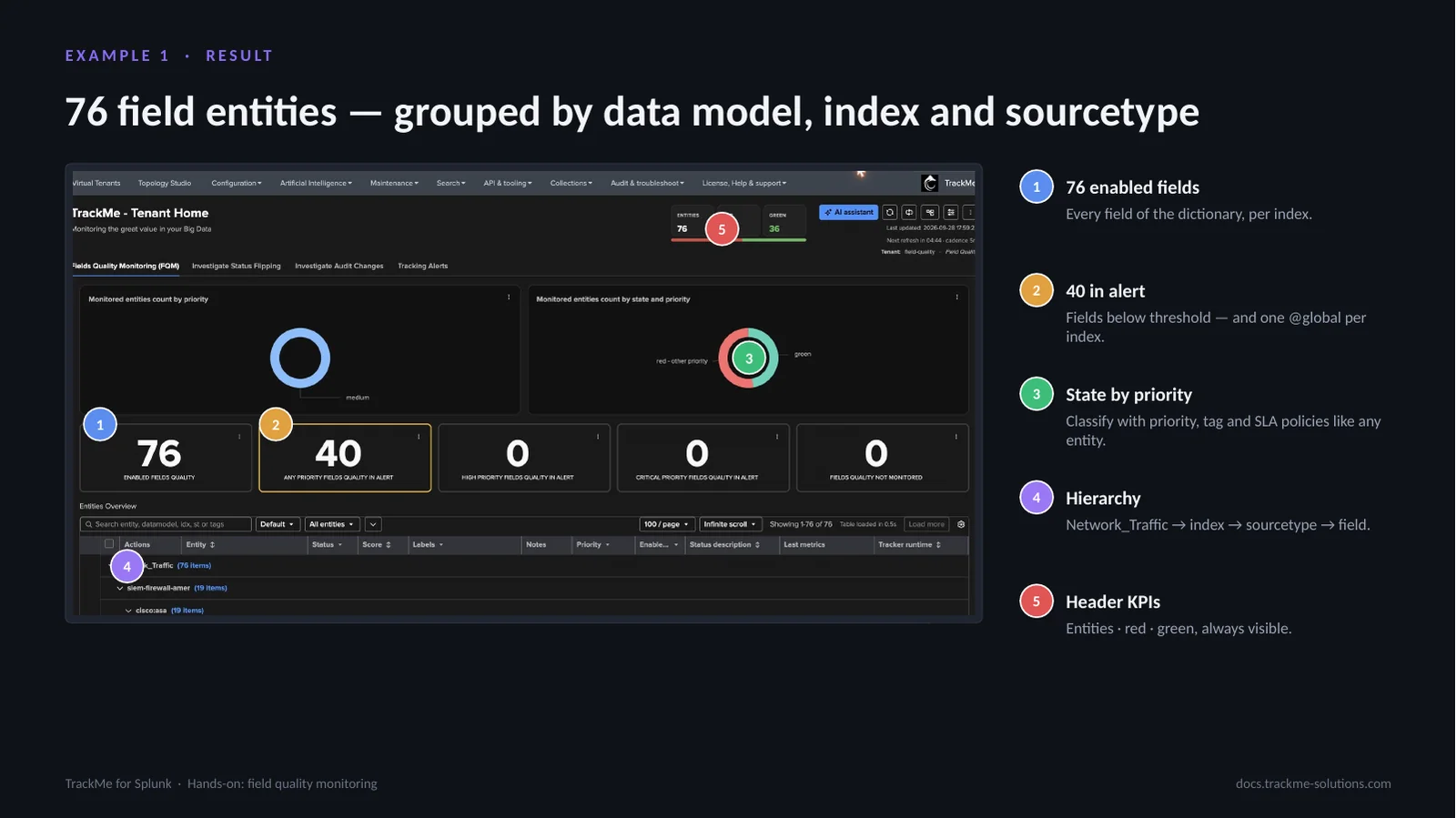
The tenant now holds 76 enabled fields (callout 1), every field of the dictionary, per index. 40 are in alert (callout 2): fields below threshold, plus one @global per index. State by priority (callout 3) classifies them with priority, tag and SLA policies like any entity. The hierarchy (callout 4) follows the break-by: Network_Traffic → index → sourcetype → field. Header KPIs (callout 5) show entities, red and green, always visible.
FQM entities are regular TrackMe entities: priority, tags, SLA, labels, logical groups, acknowledgments, maintenance and stateful alerting all apply.
Inspecting the @global entity
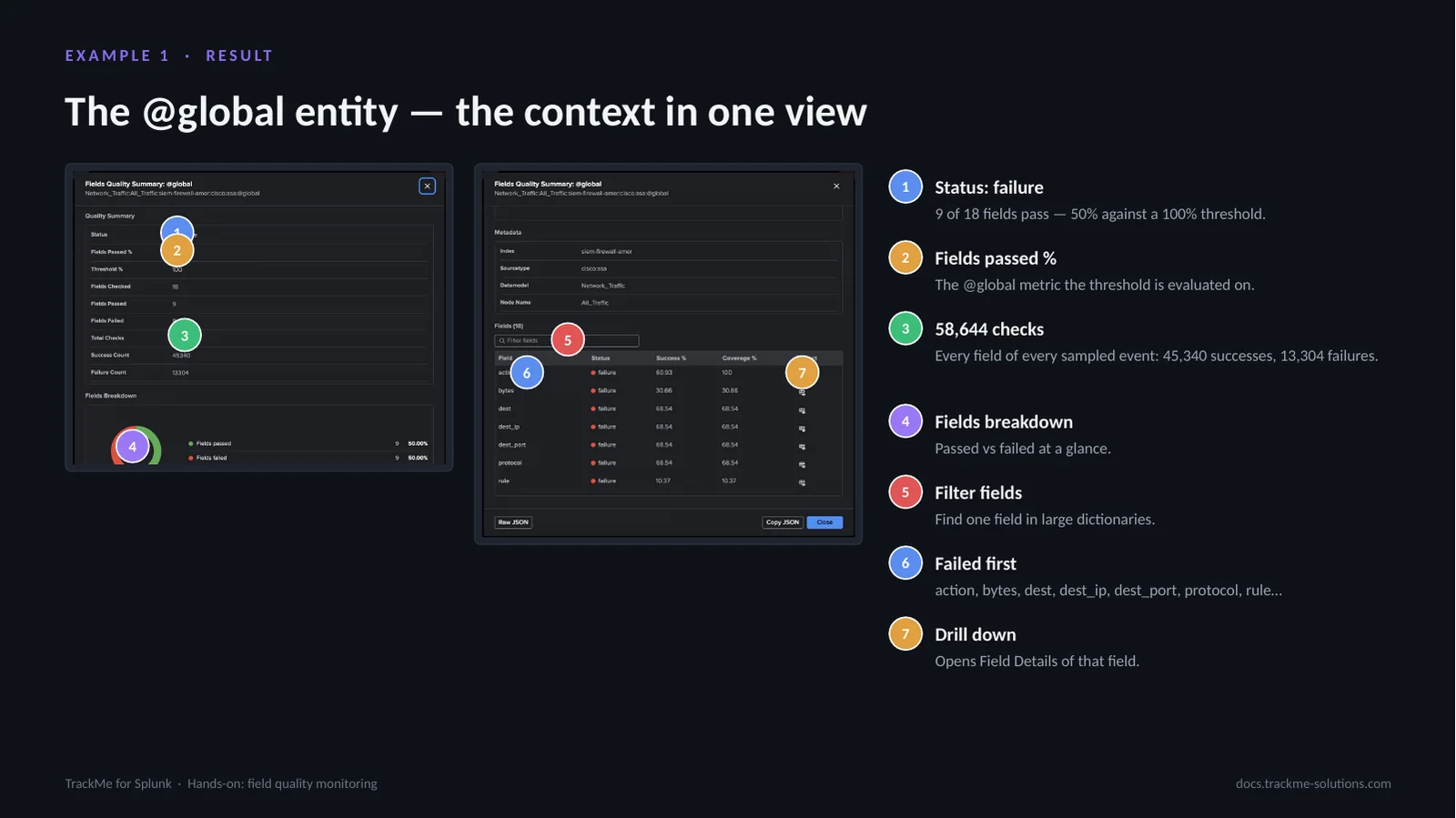
@global aggregates every field of one context, here Network_Traffic / All_Traffic / siem-firewall-amer / cisco:asa. Status: failure (callout 1): 9 of 18 fields pass, 50% against a 100% threshold. Fields passed % (callout 2) is the @global metric the threshold is evaluated on. 58,644 checks (callout 3) cover every field of every sampled event: 45,340 successes and 13,304 failures. The fields breakdown (callout 4) shows passed against failed at a glance. Filter fields (callout 5) finds one field in large dictionaries. Failed first (callout 6) lists action, bytes, dest, dest_ip, dest_port, protocol, rule and so on. Drill down (callout 7) opens the Field Details of that field, with a Back to @global link.
The action entity over time
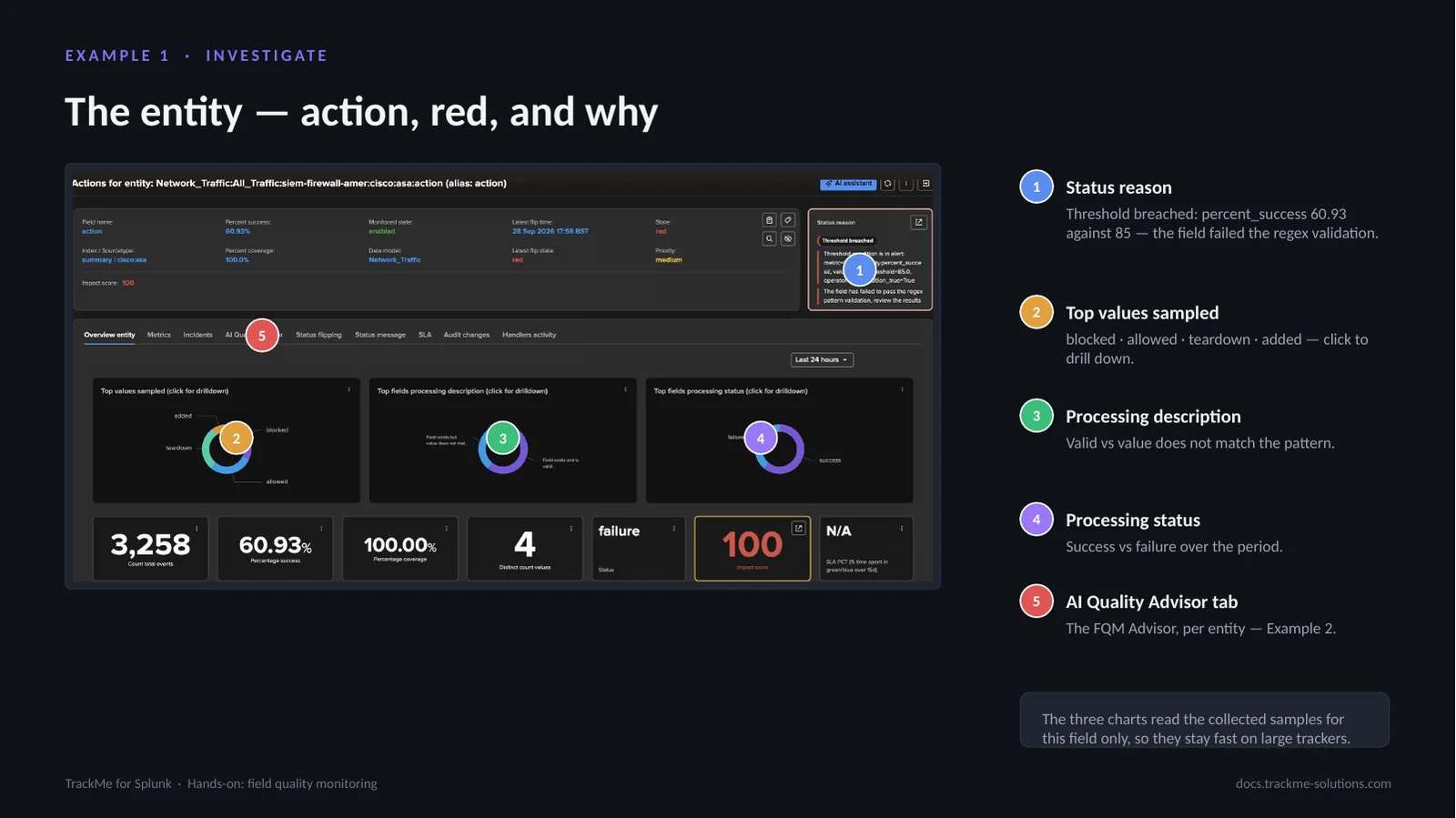
Opening the action entity gives the same evidence as the wizard, now over time. The status reason (callout 1) is written in plain language: threshold breached, percent_success 60.93 against 85, the field failed the regex validation. Top values sampled (callout 2), blocked, allowed, teardown and added, each drill down on click. Processing description (callout 3) splits valid values from values that do not match the pattern. Processing status (callout 4) shows success against failure over the period. The AI Quality Advisor tab (callout 5) hosts the FQM Advisor for this entity, used in Example 2.
The three charts read the collected samples for this field only, so they stay fast on large trackers.
Example 2 — A non-CIM data source
The second example is a business feed with no CIM model behind it: index=”business_data” sourcetype=”business:orders:transactions”, JSON order events. This is where the AI Advisors do the heavy lifting: they turn the sampled fields into a starter dictionary, tighten one rule on request and review the verdict. The analyst stays in control of every change.
Pseudo data model and fields summary
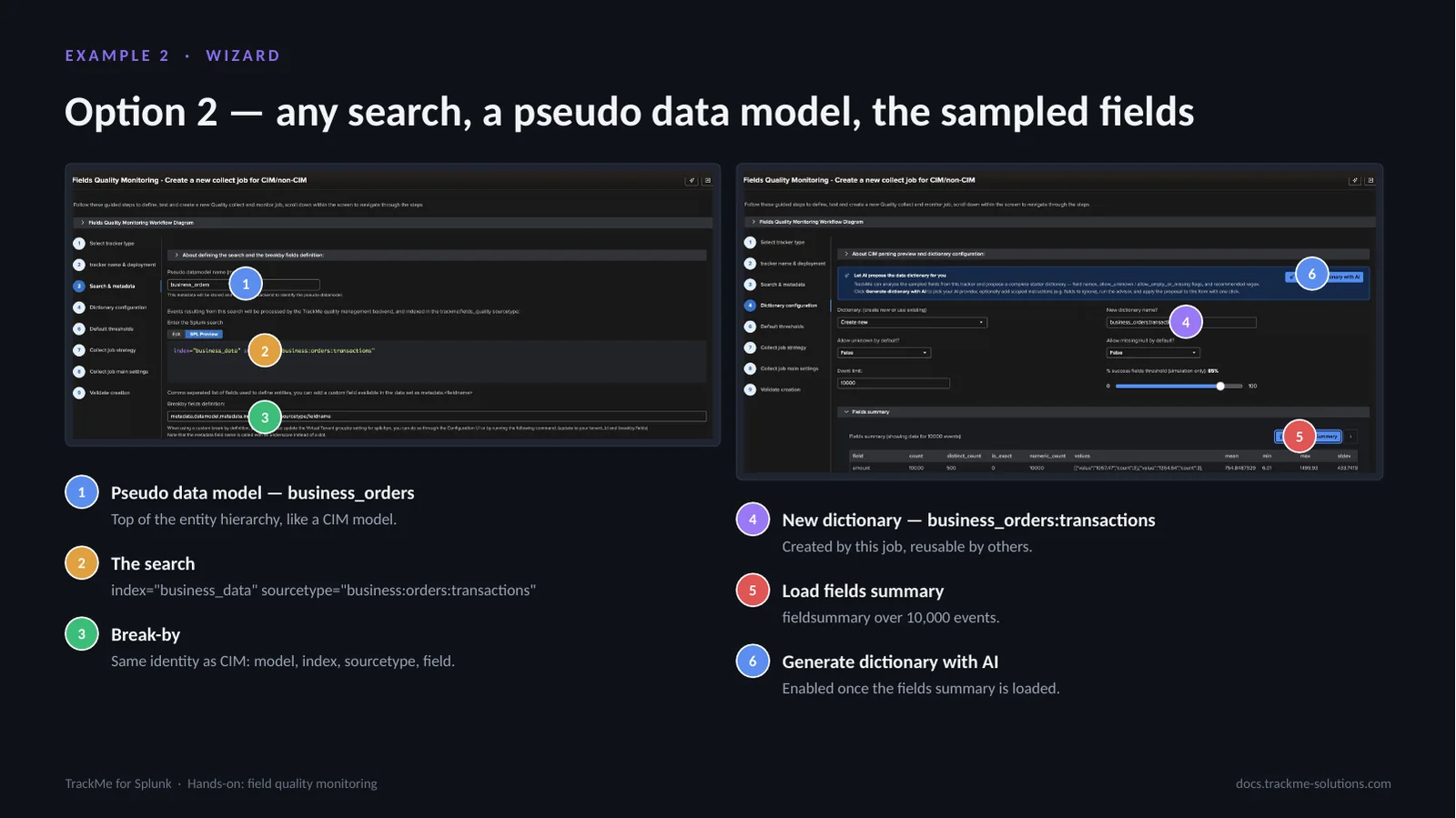
The tracker type is CIM/non-CIM. Pseudo data model (callout 1), business_orders, is the top of the entity hierarchy, like a CIM model, and groups the entities. The search (callout 2) is index=”business_data” sourcetype=”business:orders:transactions”. Break-by (callout 3) keeps the same identity as CIM: model, index, sourcetype and field. New dictionary (callout 4), business_orders:transactions, is created by this job and reusable by others. Load fields summary (callout 5) runs fieldsummary over 10,000 events: the fields found, with counts, distinct values and statistics. Generate dictionary with AI (callout 6) is enabled once the fields summary is loaded; that summary is what the AI dictionary advisor analyses.
Starting the AI dictionary advisor
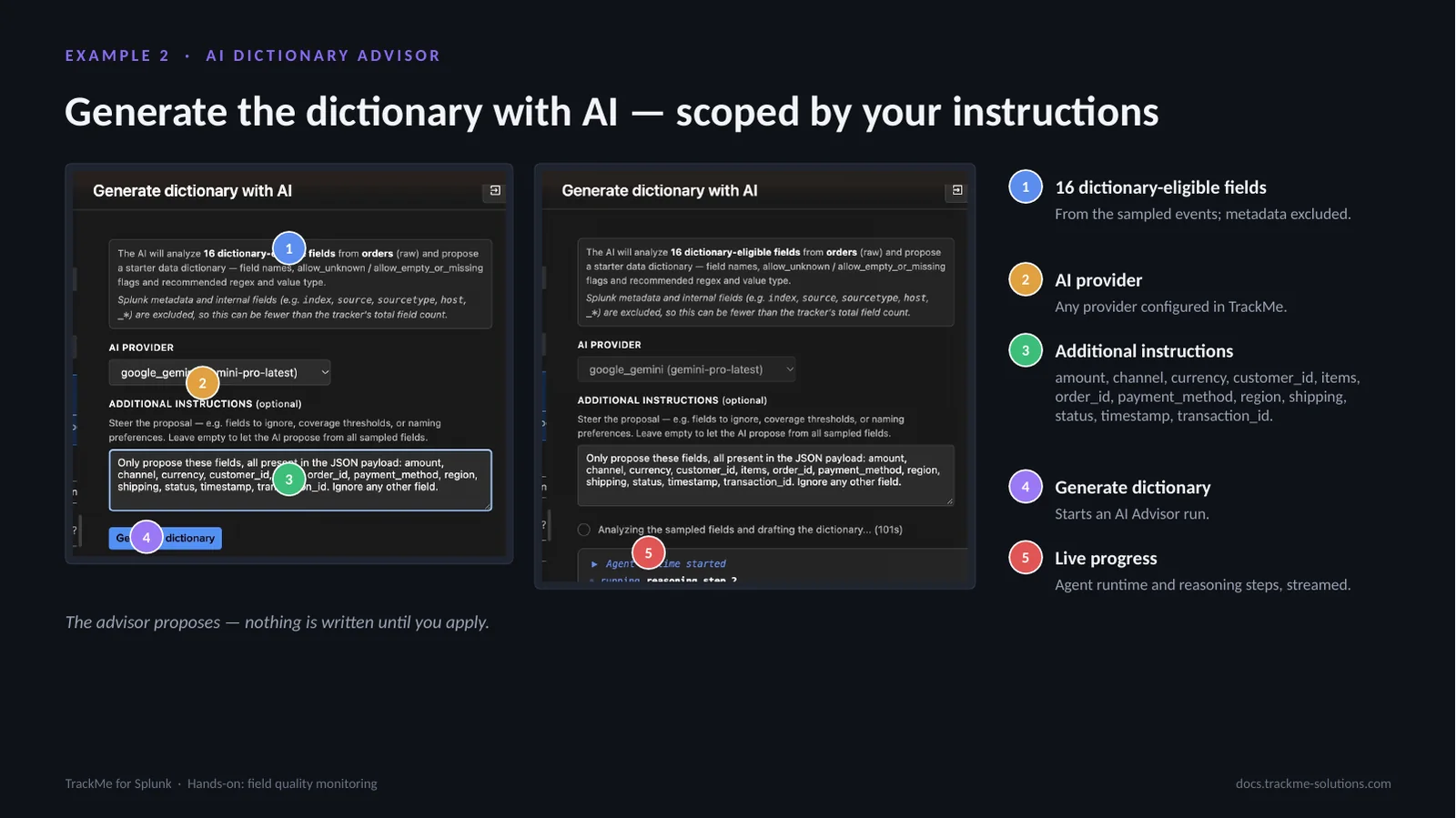
The AI dictionary advisor analyses the 16 dictionary-eligible fields (callout 1) of the sampled events; Splunk metadata and internal fields are excluded. AI provider (callout 2) is any provider configured in TrackMe. Additional instructions (callout 3) steer the advisor; here they list the business fields of interest: amount, channel, currency, customer_id, items, order_id, payment_method, region, shipping, status, timestamp and transaction_id. Generate dictionary (callout 4) starts an AI Advisor run, whose live progress (callout 5), agent runtime and reasoning steps, is streamed in the panel.
The advisor proposes a complete starter dictionary: field names, allow flags, a recommended regex and a value type. Nothing is written until it is applied.
Applying the proposed dictionary
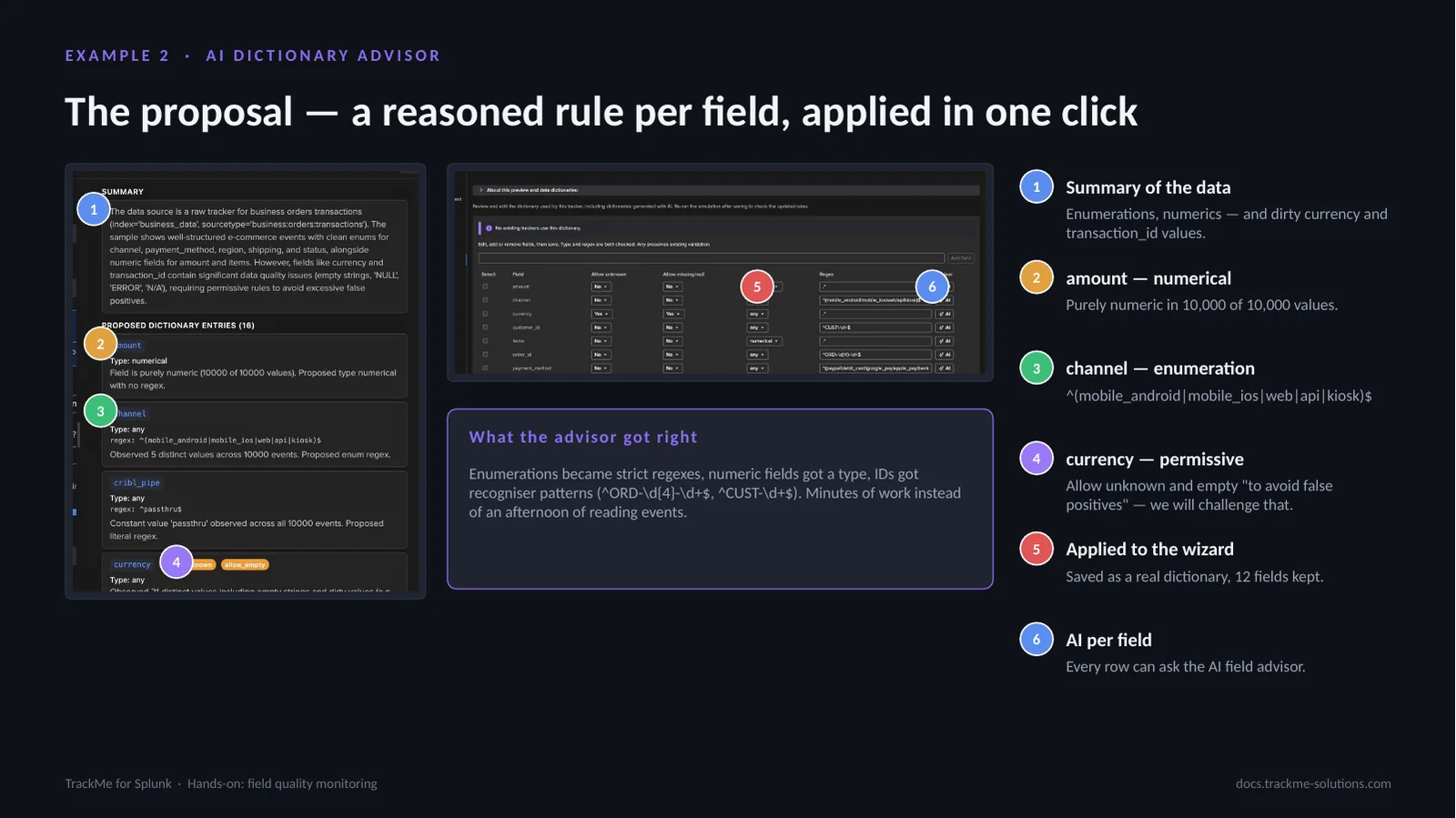
The summary of the data (callout 1) reports clean enumerations for channel, payment_method, region, shipping and status, numeric amount and items, and dirty currency and transaction_id values. amount (callout 2) is typed numerical, numeric in every sampled value. channel (callout 3) becomes the enumeration ^(mobile_android|mobile_ios|web|api|kiosk)$. currency (callout 4) is left permissive, allowing unknown and empty “to avoid false positives”. Applied to the wizard (callout 5) saves it as a real dictionary with 12 fields kept; four ingestion pipeline fields are removed in the editor. AI per field (callout 6) lets every row ask the AI field advisor.
Enumerations became strict regexes, numeric fields got a type and IDs got recogniser patterns; each entry explains its rule.
Tightening the currency rule
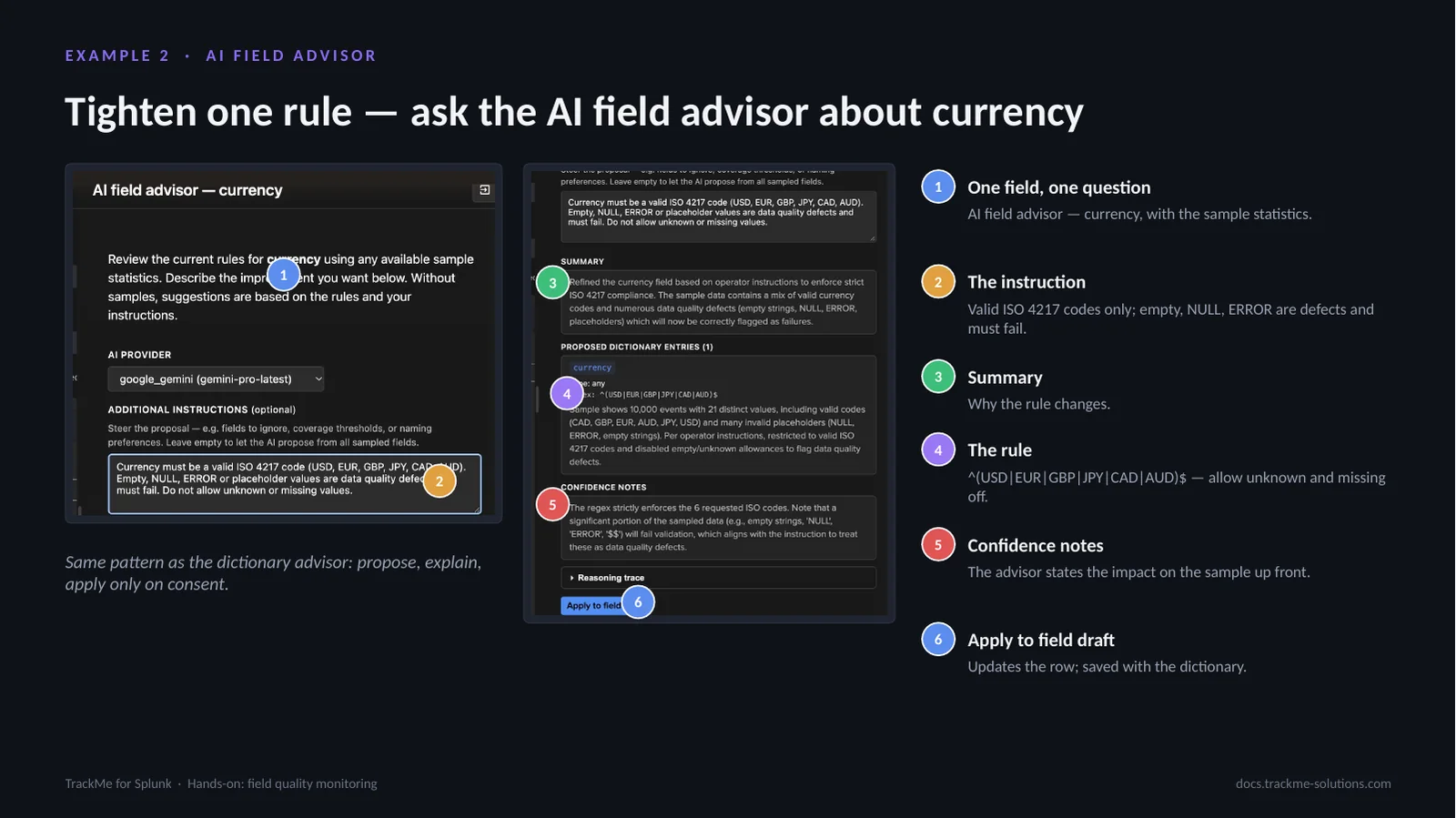
The permissive currency rule is the wrong call for a quality monitor: the dirty values are precisely what should be caught. The AI field advisor (callout 1) reviews one field, currency, with the sample statistics. The instruction (callout 2): valid ISO 4217 codes only; empty, NULL and ERROR are defects and must fail. The summary (callout 3) explains why the rule changes. The rule (callout 4) becomes ^(USD|EUR|GBP|JPY|CAD|AUD)$ with allow unknown and missing off. Confidence notes (callout 5) state the impact on the sample up front: a significant share will fail. Apply to field draft (callout 6) updates the row, saved with the dictionary.
Same pattern as the dictionary advisor: propose, explain, apply only on consent.
Simulation with the tightened rule
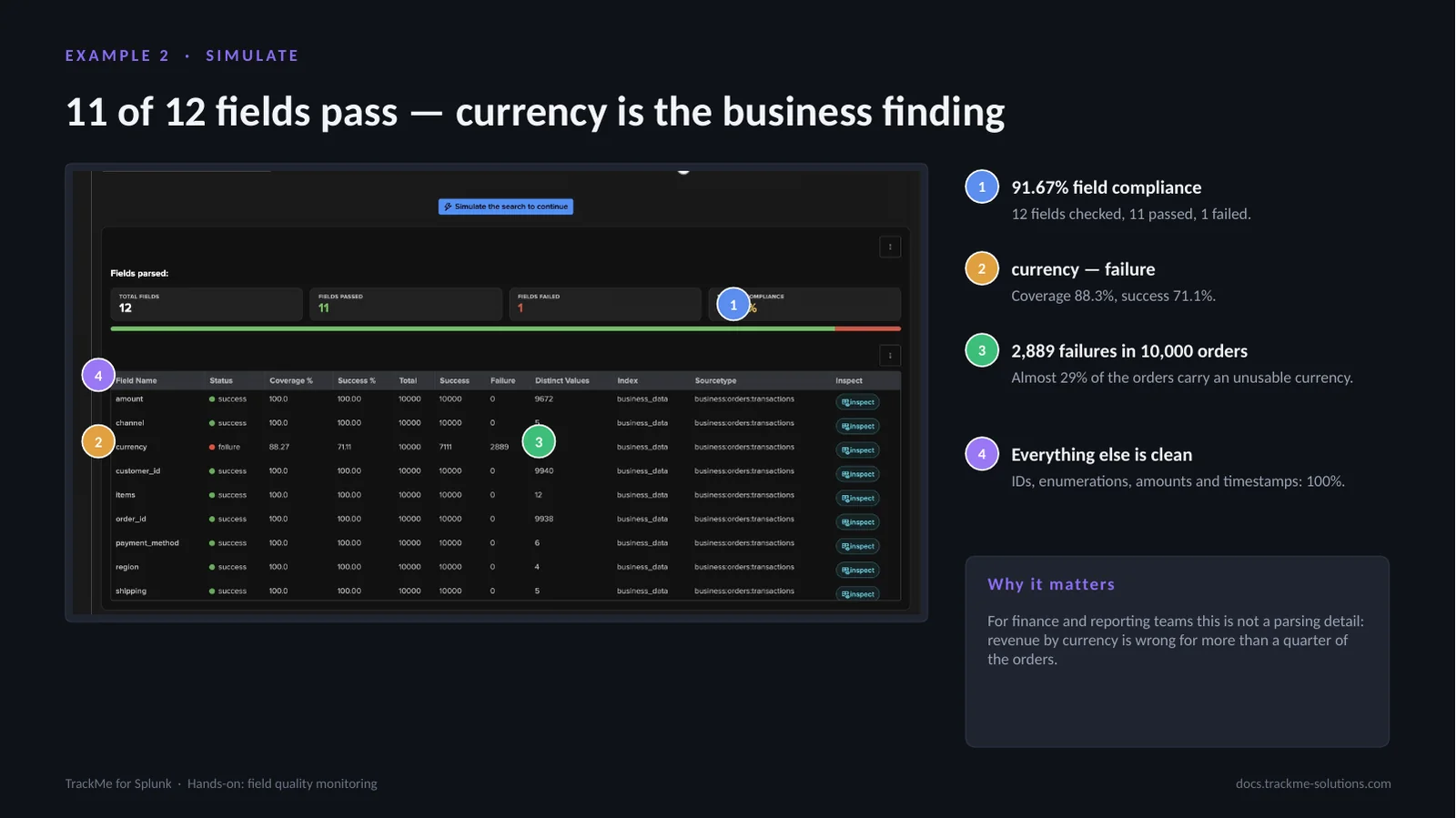
With the tightened rule, the simulation isolates exactly one problem. Field compliance (callout 1) is 91.67%: 12 fields checked, 11 passed, 1 failed. currency (callout 2) fails with coverage 88.3% and success 71.1%. 2,889 failures in 10,000 orders (callout 3): almost 29% of the orders carry an unusable currency. Everything else (callout 4) is clean: IDs, enumerations, amounts and timestamps at 100%.
For finance and reporting teams this is not a parsing detail: revenue by currency is wrong for more than a quarter of the orders. The failure is a genuine data quality issue in the source application.
The failing currency values
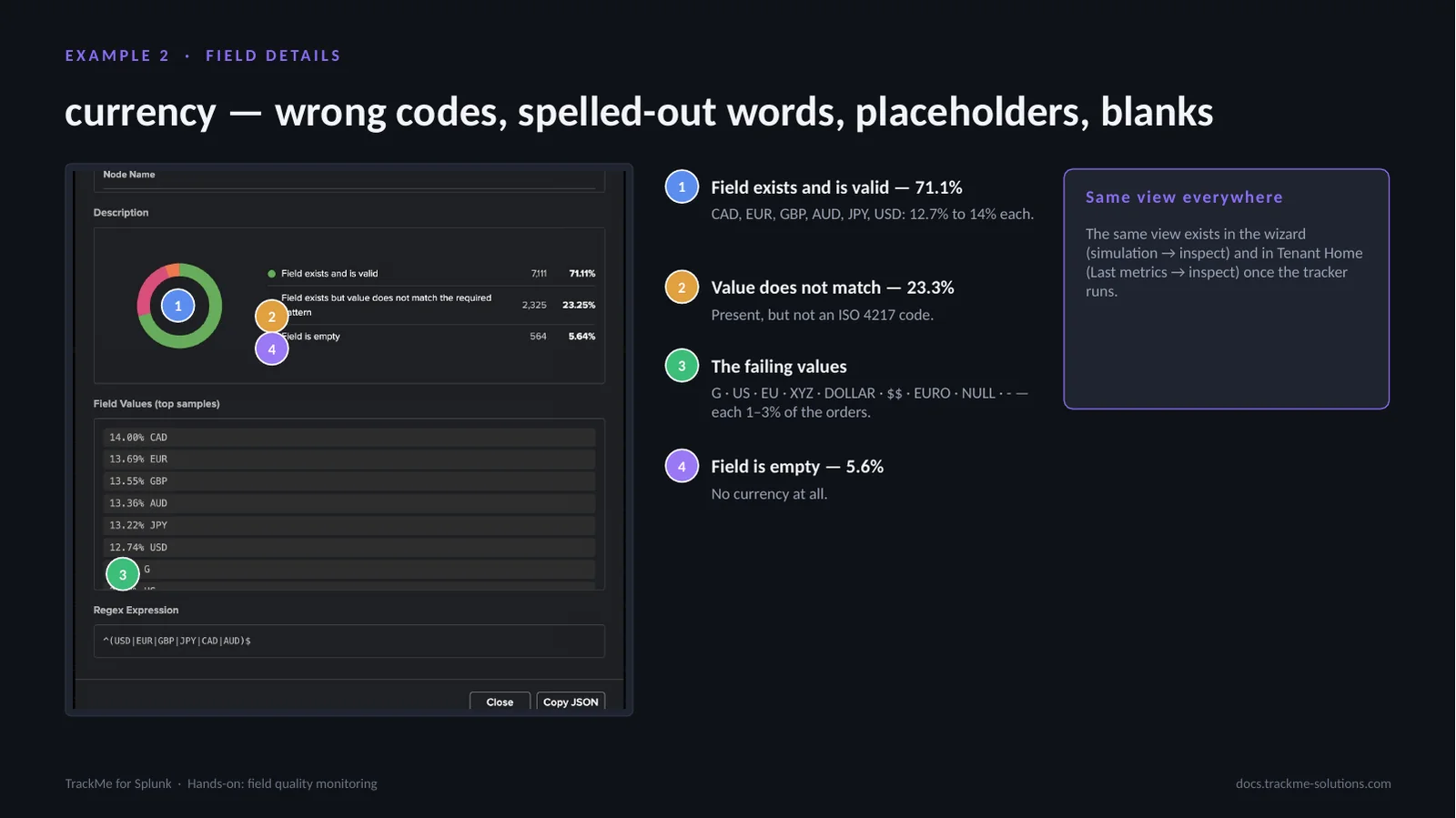
Field Details for currency. Field exists and is valid (callout 1) is 71.1%: CAD, EUR, GBP, AUD, JPY and USD at 12.7% to 14% each. Value does not match (callout 2) is 23.3%: present, but not an ISO 4217 code. The failing values (callout 3) are G, US, EU, XYZ, DOLLAR, $$, EURO, NULL and -, each 1–3% of the orders: truncated codes, spelled-out words, symbols and placeholders. Field is empty (callout 4) is 5.6%, no currency at all.
The top values are the evidence to forward to the application team. The same view exists in the wizard (simulation → inspect) and in Tenant Home (Last metrics → inspect) once the tracker runs.
Creating and running the orders tracker
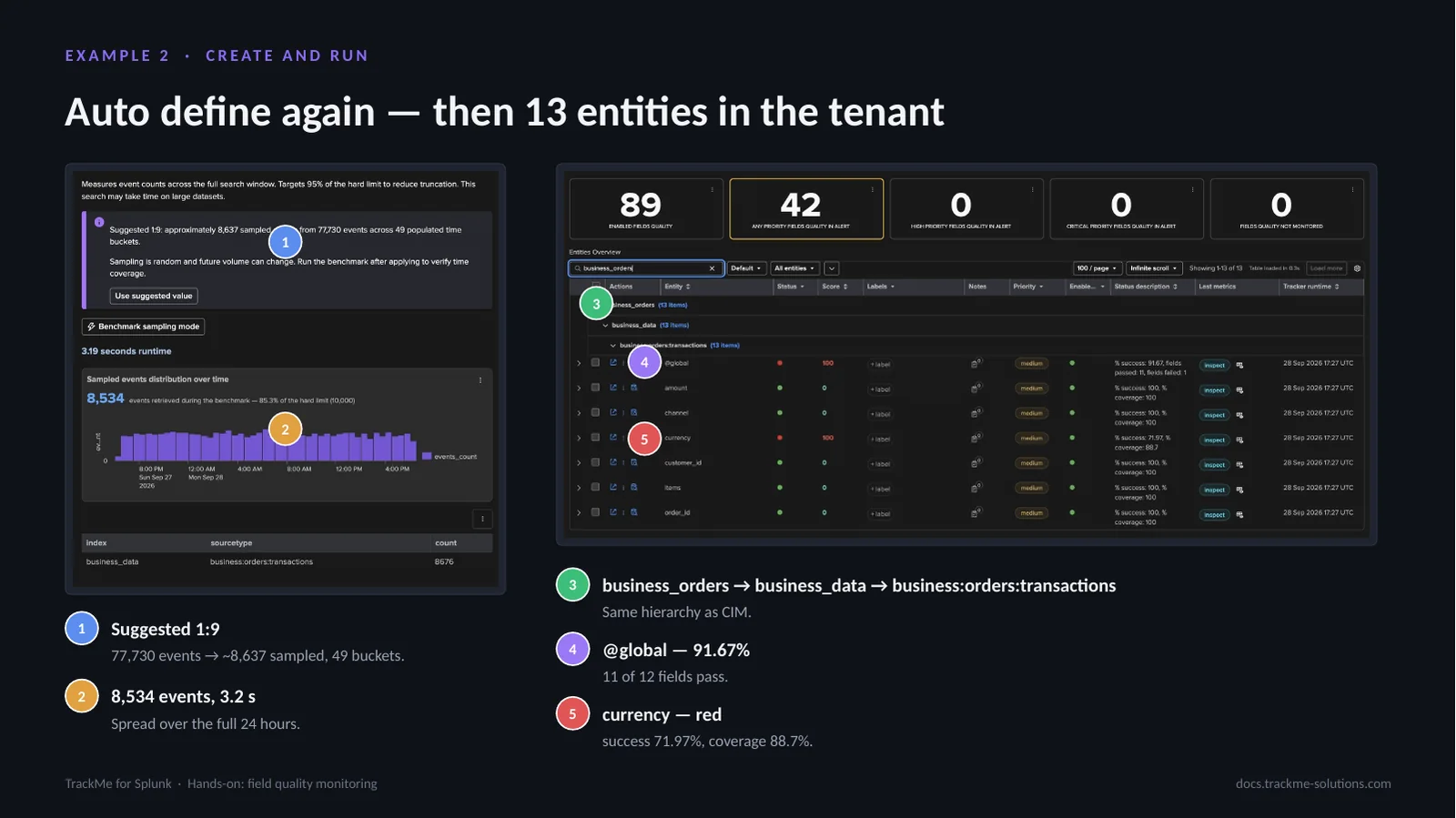
Step 7 again sizes the sample. Auto define suggests 1:9 (callout 1): 77,730 events in 49 buckets give about 8,637 sampled events. The benchmark (callout 2) retrieves 8,534 events in 3.2 s, spread over the full 24 hours. After creation and a first run, the hierarchy (callout 3) reads business_orders → business_data → business:orders:transactions, the same as CIM. @global (callout 4) is at 91.67%, 11 of 12 fields pass. currency (callout 5) is red with success 71.97% and coverage 88.7%.
The tenant now has 13 new entities: 12 fields and the @global. currency and @global are red, everything else green.
From the AI Assistant to the FQM Advisor
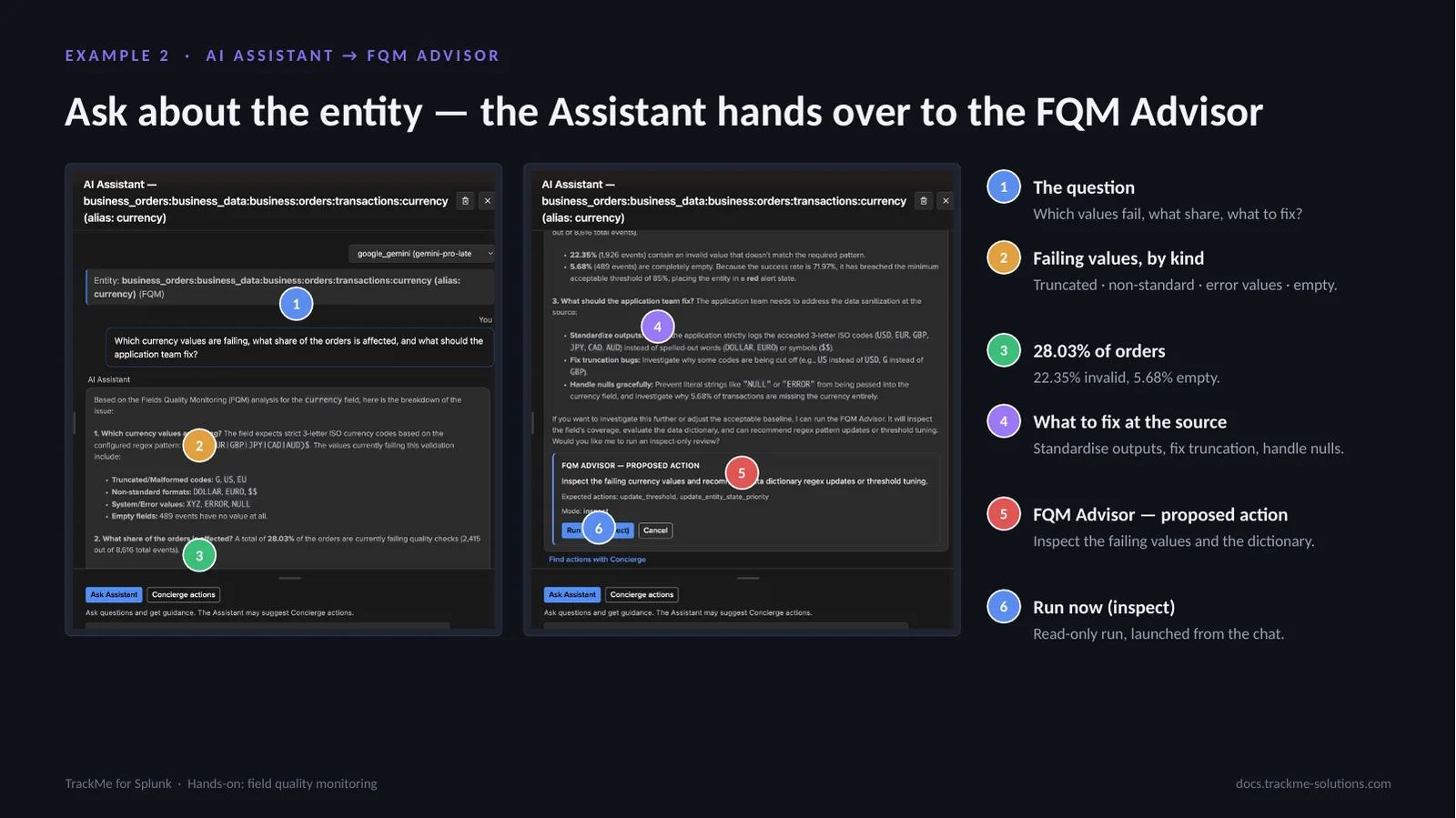
On the currency entity, the AI Assistant is asked which values fail, what share of orders is affected and what to fix (callout 1). It answers from the entity data. Failing values, by kind (callout 2): truncated, non-standard, error values and empty. 28.03% of orders (callout 3) are affected: 22.35% invalid and 5.68% empty. What to fix at the source (callout 4): standardise outputs, fix truncation, handle nulls. The Assistant then proposes the right specialist, an FQM Advisor proposed action (callout 5) to inspect the failing values and the dictionary, as an action card. Run now (inspect) (callout 6) launches a read-only run from the chat in one click.
The advisor’s inspect verdict
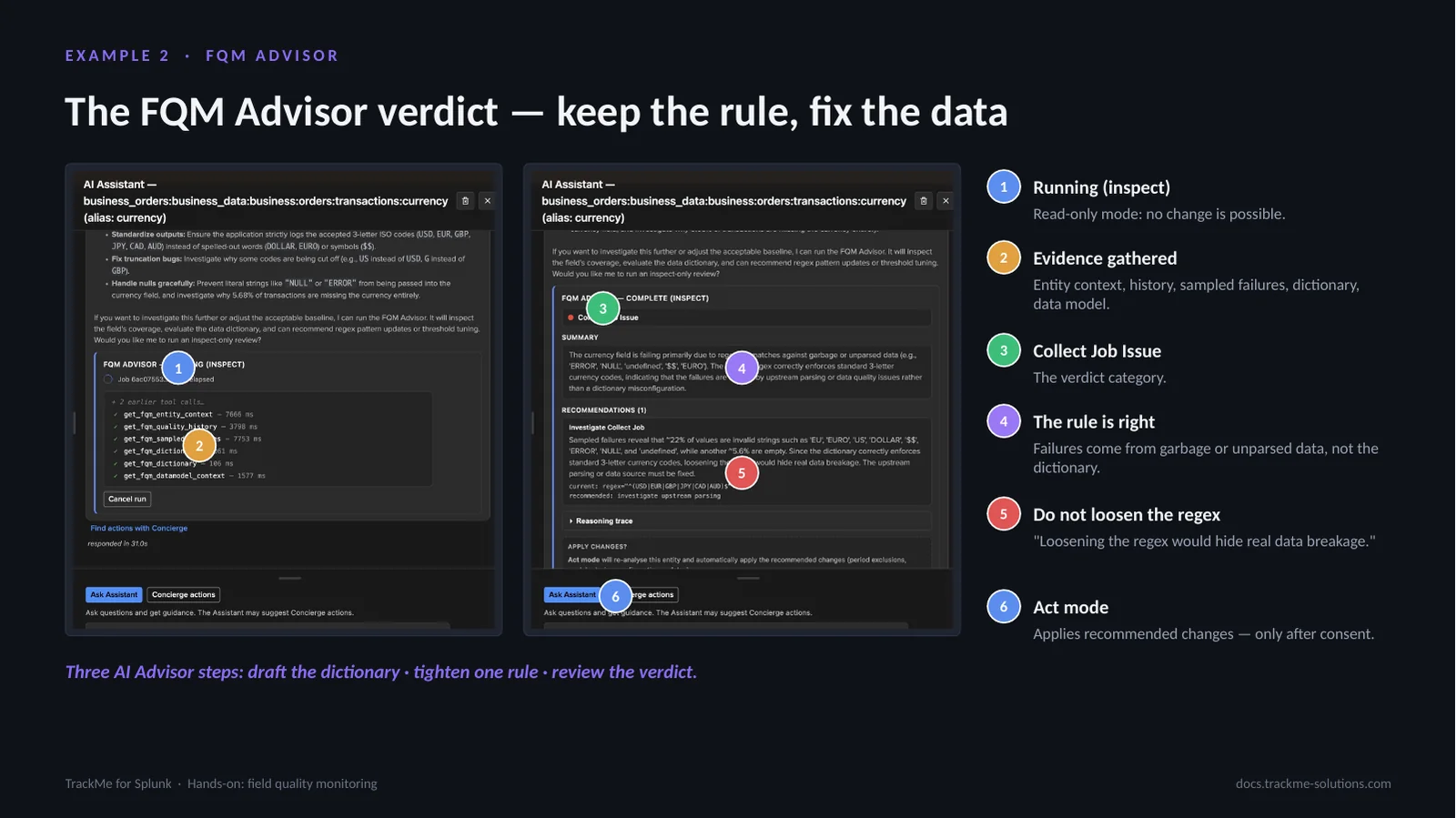
The FQM Advisor runs as an agent with read tools. Running (inspect) (callout 1) is read-only mode: no change is possible. Evidence gathered (callout 2) covers the entity context, quality history, sampled failures, the dictionary and the data model; the live feed shows each call. The verdict category (callout 3) is Collect Job Issue. The rule is right (callout 4): the failures come from garbage or unparsed data, not from the dictionary. Do not loosen the regex (callout 5), because “loosening the regex would hide real data breakage.” Act mode (callout 6) applies recommended changes, only after consent.
Three AI Advisor steps cover the example: draft the dictionary, tighten one rule, review the verdict.
A mature tenant and its topology
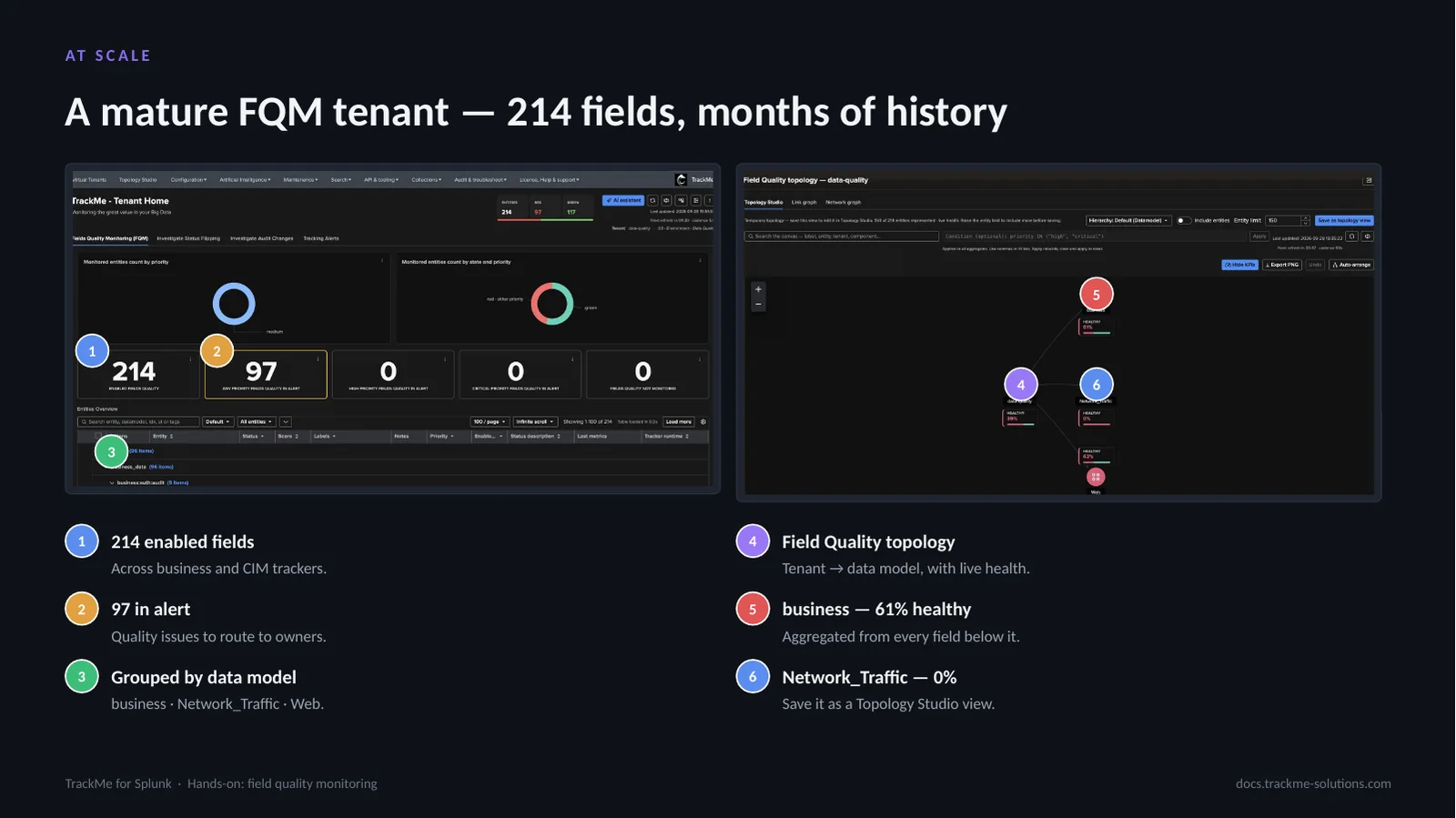
The same model on an established tenant with several business and CIM trackers. 214 enabled fields (callout 1) span business and CIM trackers, with months of history. 97 in alert (callout 2) are quality issues to route to owners. Grouped by data model (callout 3): business, Network_Traffic and Web. The Field Quality topology (callout 4) shows tenant → data model with live health. business (callout 5) is 61% healthy, aggregated from every field below it; Web is at 62%. Network_Traffic (callout 6) is at 0%. The topology can be saved as a Topology Studio view.
Every entity keeps its history, flips, incidents and SLA like any TrackMe entity, and stateful alerts notify the owners.
Where we are
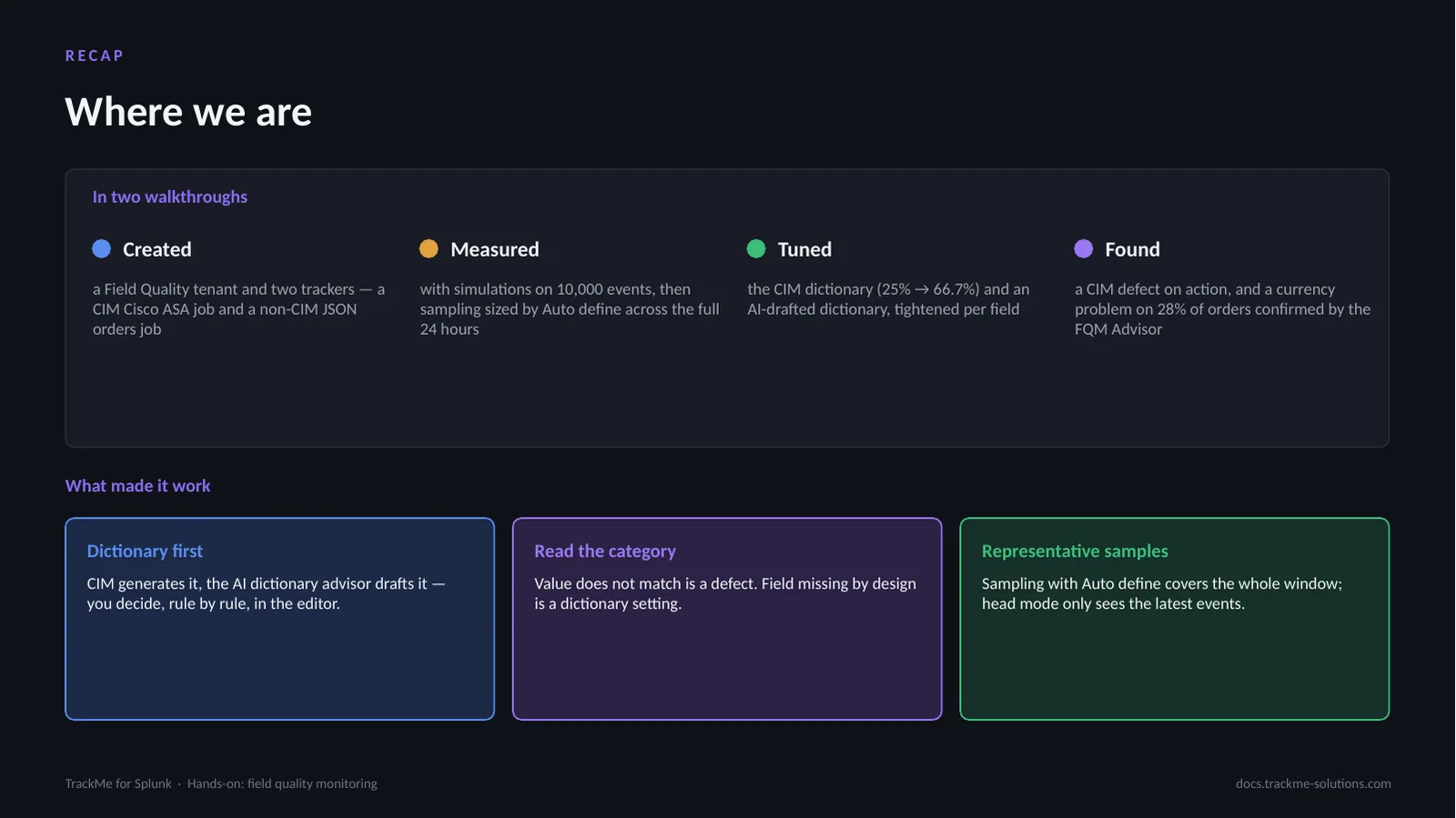
Two feeds, two dictionary strategies. Created: a Field Quality tenant and two trackers, CIM Cisco ASA and non-CIM JSON orders. Measured: simulations on 10,000 events, then Auto define sampling across the full 24 hours. Tuned: the CIM dictionary from 25% to 66.7%, and an AI-drafted dictionary tightened per field. Found: a CIM defect on action, and a currency problem on 28% of orders confirmed by the FQM Advisor.
What made it work: dictionary first, CIM generates it, the AI dictionary advisor drafts it, the analyst decides. Read the category: value does not match is a defect, field missing by design is a dictionary setting. Representative samples: Auto define covers the whole window, head mode only the latest events.