Validating after an upgrade
The Upgrade procedure covers what matters on the day. This page is the reference behind it: the built-in screens that answer most checks, the behaviour changes to brief operators on, the exhaustive checklist for formal validation records, the evidence searches, and a record template.
The built-in validation cockpit
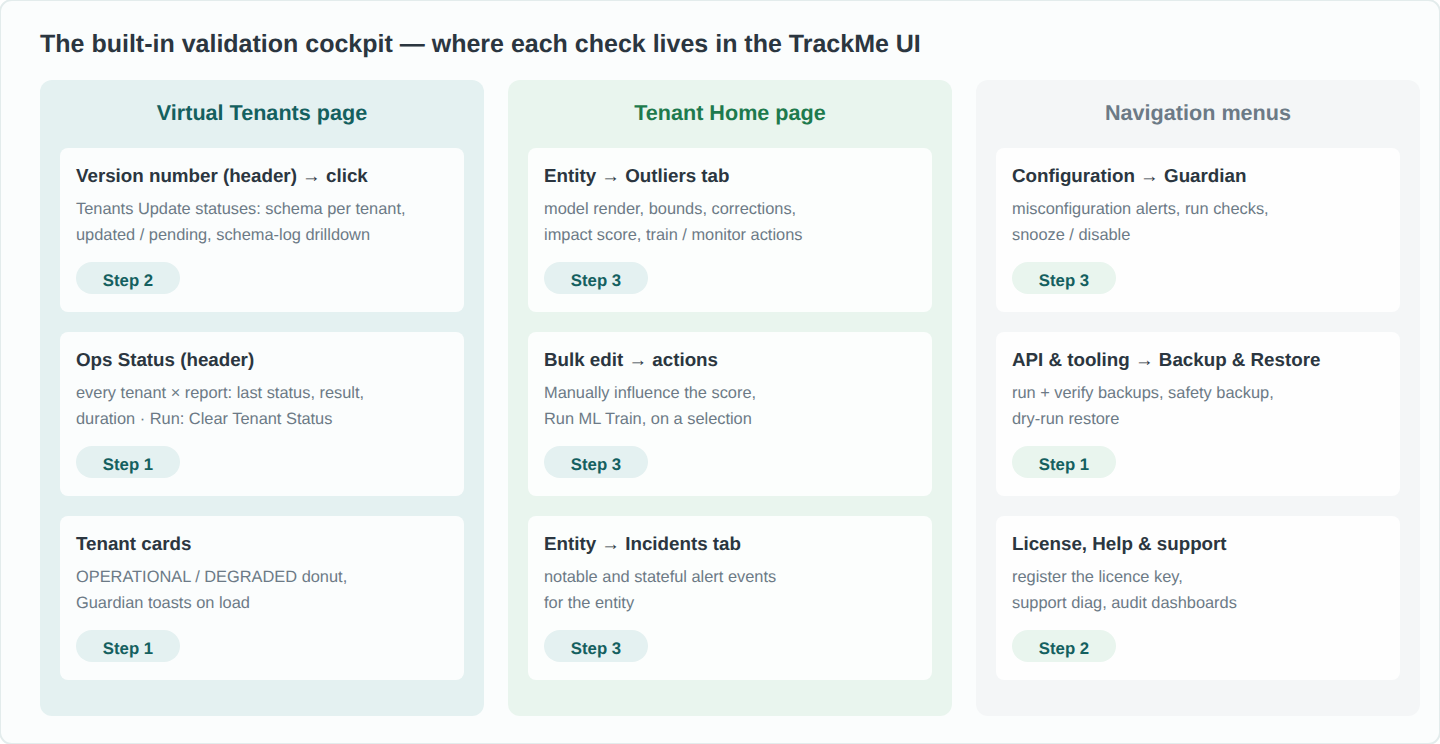
Most of the validation is executed from TrackMe’s own screens. Use them first; capture screenshots as evidence; fall back to the searches at the end of this page when you need an export or a before/after diff.
Surface |
What it tells you |
Use it for |
|---|---|---|
Tenants Update statuses (Virtual Tenants → click the version number) |
Donut of tenants updated vs pending; one row per tenant with schema version, required version, status and mtime; per-row and global links to the migration log. |
Steps 1.4, 2.2, 2.3 |
Ops Status (Virtual Tenants → header) |
Every tenant × report (tracker) with status, last result, last execution and duration; success / failure filters. Run: Clear Tenant Status resets the execution summary so a failure recorded before the upgrade does not keep a tenant DEGRADED afterwards. |
Steps 1.1, 3.1 |
Tenant cards (Virtual Tenants grid) |
OPERATIONAL / DEGRADED per tenant; Configuration Guardian alerts raised as toasts on page load. |
Steps 1.1, 3.1 |
Configuration Guardian (Configuration menu) |
Persistent misconfiguration alerts with remediation steps; per-check enable / snooze; on-demand run.
Upgrade-relevant checks include |
Step 3.1 |
Backup & Restore (API & tooling menu) |
Run and verify backups; the automatic pre-migration safety backup appears with a schema migration comment; restore with a mandatory dry-run preview. See Backup & restore. |
Step 1.2, rollback |
License (License, Help & support menu) |
Edition in force, registration, expiry. |
Step 2.4 |
Entity → Outliers tab (Tenant Home) |
Per model: rendered bounds over the KPI, corrected-bounds counters, outliers counters, impact score; false-positive and management actions. |
Steps 1.3, 3.3 |
Bulk edit (Tenant Home entity table) |
Category Impact Score → Manually influence the score; category Outliers Detection Actions → Run ML Train, on any selection of entities. |
Steps 3.2, 3.3 |
Audit & troubleshoot (navigation menu) |
Audit - Operational Statuses, Audit - Trackers Performance DeepDive, Audit - KVstore Collections, Audit - Logs Inspector interface (ERROR / WARN across TrackMe components), Support - generate diags (see Support diagnostics). |
Whenever a check fails |
Behaviour changes to brief operators on
None of the changes below modifies stored entities or models destructively, but several change what alerts fire and when, which is exactly what operators should be told before an upgrade rather than discover after it. The 2.1 and 2.2 lines, and the 2.3 line up to 2.3.4, bring mechanical changes and user-interface modernisation; the alerting behaviour changes cluster from 2.3.5 onward. The Release notes carry the full detail per release.
Since |
Change |
What operators observe |
|---|---|---|
2.2.0 |
Splunk 9.1.1 or later required |
No compatibility with Splunk 9.0.x and earlier from the 2.1 line onward; see Compatibility. |
2.3.0 |
User interfaces rebuilt on Splunk UI native React |
Every main interface changes layout; the information is the same, its place on screen is not. Brief users before the upgrade. |
2.3.5 |
Impact scoring introduced |
The single biggest change. Entity colour is no longer a direct rule outcome but a weighted score: 0 = green, below 100 = orange, 100 and above = red. Alert volumes and severity distribution shift; tuning weights replaces tuning booleans. See Impact scoring & thresholds. |
2.3.5 |
Score-based outliers |
An outlier no longer turns an entity red on its own; it contributes its model’s score (seeded at 36 by default). Isolated blips stop alerting; sustained anomalies still escalate. Low-confidence models emit no score at all. |
2.3.15 |
Native ML engine (migration 2315) |
Models move from MLTK |
2.3.16 |
Shadow cache and score cache |
Faster UI at scale; false-positive and manual score edits take effect on the next evaluation. |
2.3.19 |
Policy tracker cadence |
SLA, tags and priority policy re-evaluation drops from every 15 minutes to twice daily; policy changes apply with hours, not minutes, of latency. |
2.3.22 to 2.4.1 |
ML training regression (fixed 2.4.2) |
In these builds model training silently stops for every component. Never land on them. |
2.4.0 |
Per-entity maintenance mode |
Entities can be forced BLUE for a window, taking precedence over acknowledgements and other protections; alerting suppressed until expiry. |
2.4.0 |
AI advisor scheduled searches |
New per-tenant saved searches appear, created unscheduled; they only activate if AI features are enabled. Their presence is expected, not a fault. |
2.4.1 |
Threshold intent lock |
The per-entity adaptive-delay and lagging-class override controls are replaced by a single Threshold lock; locked entities show a lock marker and adaptive mechanisms respect it. |
2.4.1 |
Adaptive delay on the native engine |
No MLTK dependency; a historic bug silently flooring bounds to zero is fixed, so adaptive thresholds may legitimately differ from earlier values. |
2.4.7 |
Configuration Guardian management UI |
Guardian alerts gain a dedicated page, snooze and disable controls and email notifications; the DEGRADED signal has a persistent, tunable surface. |
2.4.9 |
Search-driven diagnostics and backups |
Long-running diagnostics and backups run in search processes; backup archives can be downloaded and imported from the UI. |
2.4.10 |
Alert enrichment |
Optional per-tenant SPL enrichment merges custom fields into stateful alerts and notables, a supported carrier for downstream ticket references. |
2.4.14 |
Policy apply at scale; SLA contract repair |
Priority, tags and SLA policies are applied inside the tracker process (no cut-off on very large tenants). Migration 2414 returns entities that SLA policies had frozen to policy evaluation; their SLA class may legitimately change on the next policy cycle. |
Warning
Expect the alert-volume profile to change, by design.
Comparing raw incident counts before and after an upgrade that crosses 2.3.5 compares two different alerting models (boolean rules against impact scoring). Use the baselines below to understand the delta, not to demand that it be zero: fewer one-off blips and unchanged-or-better detection of sustained anomalies is the expected signature.
Extended validation checklist
Organised in phases for formal validation records. Each table gives the built-in screen first and the evidence
search (E-numbered, at the end of this page) second.
P0 — Platform
Check |
Where to look / method |
Expected |
|---|---|---|
Running version is the target |
Virtual Tenants header; E1.1 |
The target release |
Schema migration completed |
Tenants Update statuses; E1.2 |
Donut 100% updated; every enabled tenant at schema version = required version |
Migration log clean |
Open schema update logs in search; E1.3 |
final schema version updated per tenant; errors reviewed and sent to Support |
Safety backup was taken |
Backup & Restore archives list; E1.4 |
A backup run with a schema migration comment, status success |
Licence in force |
License page |
Edition registered, expiry recorded |
P1 — Tenant operations
Check |
Where to look / method |
Expected |
|---|---|---|
Every tenant OPERATIONAL |
Tenant cards; Ops Status with the failure filter; E4.1 |
All reports |
Health tracker executing per tenant |
E4.2 |
Successful cycle within the last 30 minutes for every enabled tenant |
Guardian is clean |
Configuration Guardian page (run checks on demand) |
No |
No new errors in TrackMe components |
Audit - Logs Inspector interface, level ERROR, last 4 hours |
No recurring error tied to a tracker or REST handler; one-off warnings during the migration window are acceptable |
P2 — Scheduled searches and data
Check |
Where to look / method |
Expected |
|---|---|---|
Tracker inventory matches the pre-change export |
E3.1 re-run, diff |
Same set per tenant, plus the expected additions of the new release (for example AI advisor searches, unscheduled); no tracker lost its schedule |
Trackers actually firing |
Audit - Trackers Performance DeepDive; E3.2 over the first 24 hours |
Each enabled tracker shows recent scheduled runs; no persistent skips attributable to TrackMe |
KVstore collections intact |
Audit - KVstore Collections; E6 |
Record counts per main entity collection unchanged (plus or minus normal discovery churn); new collections present and small |
Custom knowledge objects still work |
Open your own TrackMe-based dashboards and reports |
They render; a field renamed by a migration is the usual cause of a broken panel |
P3 — ML Outliers (where in use)
Check |
Where to look / method |
Expected |
|---|---|---|
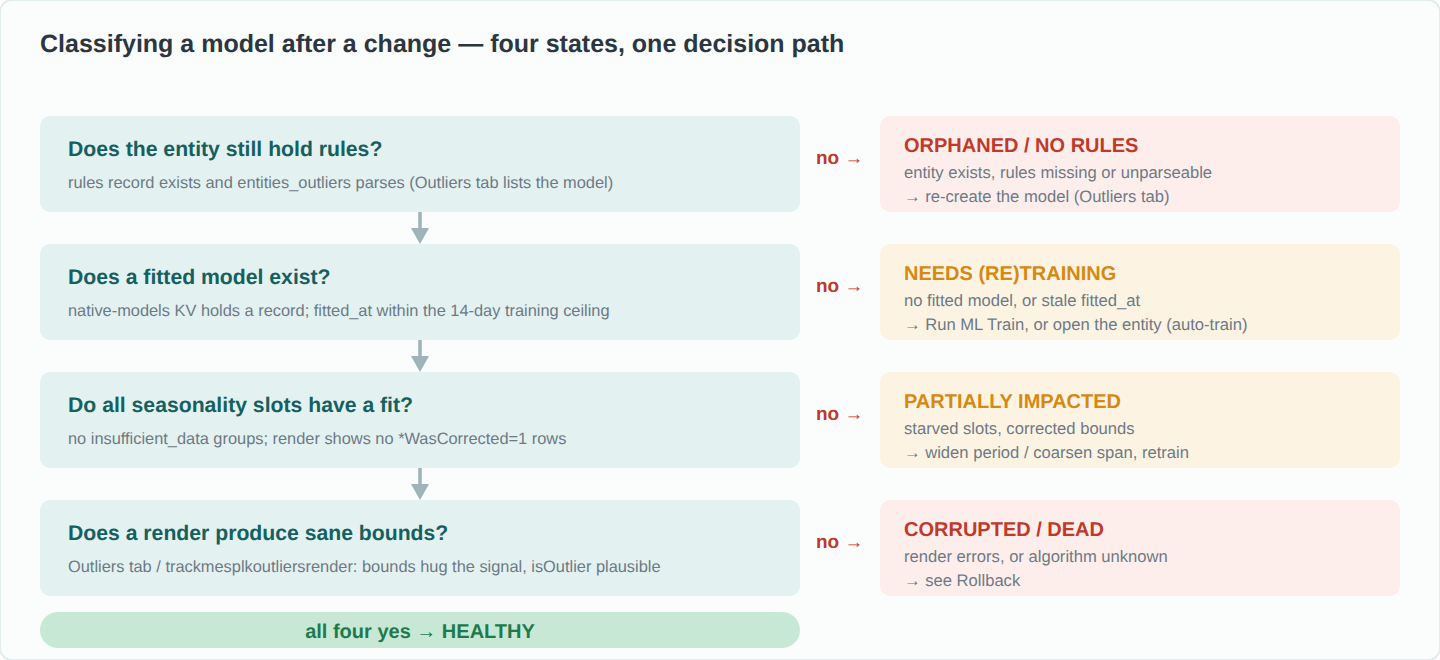
Definitions migrated |
E2.1 (algorithm column) |
Every model |
Retraining backlog drained |
E2.3 |
No enabled rules record with |
Fitted models present |
E2.2 |
One record per model with a recent |
Charts render |
Outliers tab on the witness and on priority entities |
Bounds hug the signal; the Corrected counters are zero or rare (a cluster of corrected bounds means models starved of history: lengthen the calculation period and retrain; see Outlier detection) |
Training history preserved |
E2.4 |
Per-entity training events before and after the window; |
P4 — Alerting pipeline and the downstream hand-off
Check |
Where to look / method |
Expected |
|---|---|---|
Notables emitted |
Entity Incidents tab (step 3.2); E5.2 over the test window |
Notable records carry tenant, object, state, score, anomaly reasons, priority and drilldown fields. See Notable events |
Stateful alert lifecycle |
Step 3.2 open → close on the test entity; E5.3 |
Lifecycle events indexed ( |
Alert actions ran without error |
Navigation → Logs - TrackMe alert actions |
No ERROR from |
Email delivery accounts still valid |
Configuration → email accounts → test; credentials in |
Test email received |
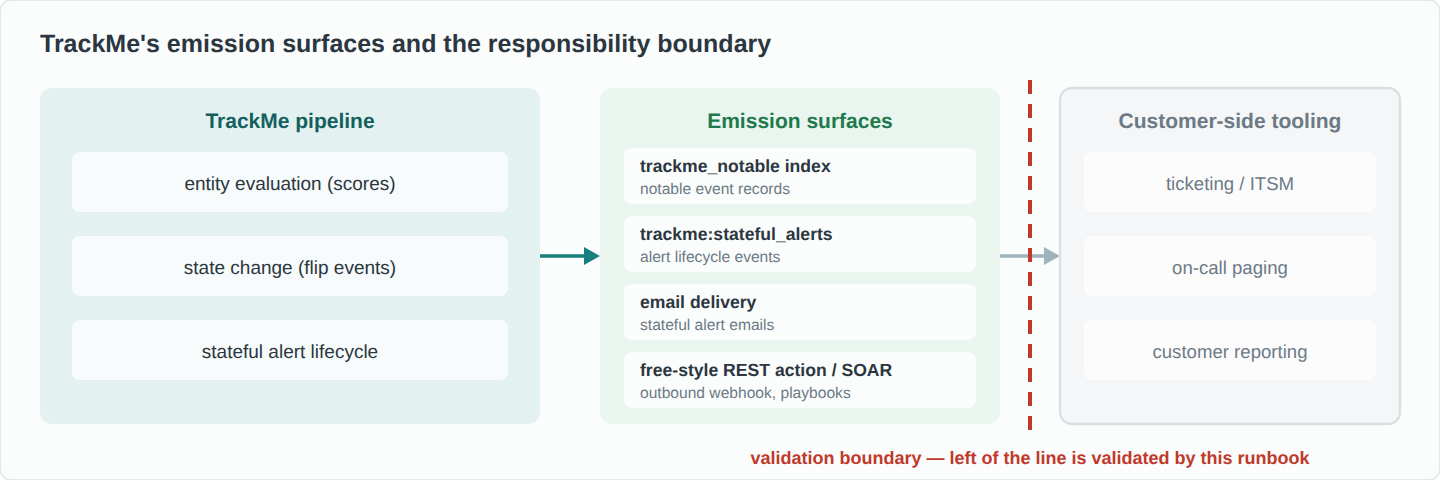
Downstream hand-off |
The step 3.2 forced alert |
Your ticket, page or email is produced from the notable or stateful alert, confirmed by its owner |
TrackMe’s responsibility ends at its emission surfaces: the notable index, the stateful-alert events, email delivery, the free-style REST action and the SOAR integration. Downstream ticketing and paging consume those surfaces; the validation contract at the boundary is the emitted payload, which the forced-alert test of step 3.2 produces on demand. From 2.4.10, alert enrichment can merge custom fields into notables and stateful alerts; a stable correlation key (tenant, entity, alert identifier) as an enriched field gives the downstream pipeline a deterministic join key.
Evidence searches
Each block is one standalone search: run it on its own and export the result to CSV. Running the same searches before and after the change produces the comparison. Index names are the defaults; replace them if the tenant uses custom indexes.
E1 — version, schema, migration log, safety backup
E1.1 Running application version
| rest /services/apps/local/trackme | table label version
E1.2 Schema state, all tenants in one search (the data behind the Tenants Update statuses screen)
| trackmetenantstatus output="tenants"
| table tenant_id, tenant_status, schema_version, schema_version_required, tenant_updated_status, schema_version_mtime
E1.3 Schema migration log
index=_internal sourcetype=trackme:custom_commands:trackmetrackerhealth task=schema_upgrade tenant_id="<tenant_id>"
| table _time, log_level, _raw
E1.4 Backup archives, including the automatic pre-migration safety backup
| inputlookup trackme_backup_archives_info
| table backup_run_id, archive_scope, tenant_id, status, mtime, comment
| sort - mtime
E2 — ML Outliers inventory (where in use)
E2.1 Model definitions per entity (per component)
| inputlookup trackme_<component>_outliers_entity_rules_tenant_<tenant_id>
| rex max_match=0 field=entities_outliers "\"(?<model_id>model_\d+)\":"
| rex max_match=0 field=entities_outliers "\"algorithm\": \"(?<algorithm>[^\"]+)\""
| table object, model_id, algorithm, confidence, confidence_reason, last_exec, is_disabled
E2.2 Fitted native models (per tenant, 2.3.15 and later)
| inputlookup trackme_native_ml_models_tenant_<tenant_id>
| table _key, feature_name, fitted_at, group_count, training_mode, mtime
E2.3 Retraining backlog
| inputlookup trackme_<component>_outliers_entity_rules_tenant_<tenant_id>
| where is_disabled=0 AND last_exec=0
E2.4 Training history, one event per entity per training run (audit index)
index=trackme_audit sourcetype=trackme:handler tenant_id="<tenant_id>"
    handler="trackme_<component>_outliers_mltrain_tracker_tenant_<tenant_id>" earliest=-30d
| stats count as training_runs, min(_time) as first_trained, max(_time) as last_trained by object
| convert ctime(first_trained), ctime(last_trained)
E3 — scheduled searches
E3.1 Tracker inventory
| rest /servicesNS/-/trackme/saved/searches search="trackme_*_tenant_<tenant_id>"
| table title, is_scheduled, disabled, cron_schedule, dispatch.earliest_time, dispatch.latest_time
E3.2 Scheduler activity, last 24 hours
index=_internal sourcetype=scheduler app="trackme" savedsearch_name="trackme_*_tenant_<tenant_id>" earliest=-24h
| stats count by savedsearch_name, status
E4 — tenant operations
E4.1 Per-report execution status (the data behind Ops Status)
| trackmetenantstatus tenant_id="<tenant_id>"
E4.2 Health-tracker task state
| inputlookup trackme_health_tracker_state where tenant_id="<tenant_id>"
| table task_name, execution_count, last_execution_status, last_execution_time, last_execution_duration
E5 — alert-flow baselines (7 days)
E5.1 State-change (flip) volume, summary index
index=trackme_summary sourcetype=trackme:flip tenant_id="<tenant_id>" earliest=-7d
| timechart span=1d count by object_category
E5.2 Notable volume
index=trackme_notable sourcetype=trackme:notable tenant_id="<tenant_id>" earliest=-7d | timechart span=1d count
E5.3 Stateful alert lifecycle events
index=trackme_summary sourcetype=trackme:stateful_alerts tenant_id="<tenant_id>" earliest=-7d
| timechart span=1d count by object_state
E6 — KVstore record counts (repeat per collection of interest)
| inputlookup trackme_<component>_tenant_<tenant_id> | stats count as entities
Validation record template
One record per deployment: the header from the step 0 inventory, then one row per check with the evidence reference. This is the artefact to retain as validation evidence.
Step |
Check |
Result |
Evidence ref |
Notes |
|---|---|---|---|---|
0 |
Platform readiness (Splunk version, KVstore, indexes, package, key) |
checklist |
||
1.1 |
All tenants operational, none degraded |
screenshot / trackme_ops_status |
||
1.2 |
TrackMe backup (and on Splunk Enterprise: application directory and KVstore backups) taken |
archive names |
||
1.3 |
Outliers: model count exported; witness screenshot (if used) |
CSV + screenshot |
||
1.4 |
Update statuses: all updated at the source schema |
screenshot |
||
2.1 |
Package installed in place; splunkd restarted |
package name |
||
2.2 |
Version = target |
screenshot |
||
2.3 |
All tenants updated at the required schema; final log line present; errors sent to Support |
screenshot / E1.3 |
||
2.4 |
Licence registered or verified, expiry recorded |
screenshot |
||
2.5 |
splunkd restarted after the migration completed |
time of restart |
||
3.1 |
Every tenant / component loads; Guardian reviewed |
screenshots |
||
3.2 |
Forced alert → notable → downstream incident → cleared |
Incidents tab + ticket reference |
||
3.3 |
Outliers: no legacy model left; backlog drained; witness renders (if used) |
E2.3 + screenshot |
||
3.4 |
Record archived; operators informed |
|||
P1 |
Health tracker current; no new errors (Logs Inspector) |
E4.2, screenshot |
||
P2 |
Tracker inventory matches; trackers firing; KVstore counts stable; custom knowledge objects work |
E3.1 diff, E3.2, E6 |
||
P4 |
Alert actions clean; email delivery test |
logs, test email |