VOL — Volume Outliers
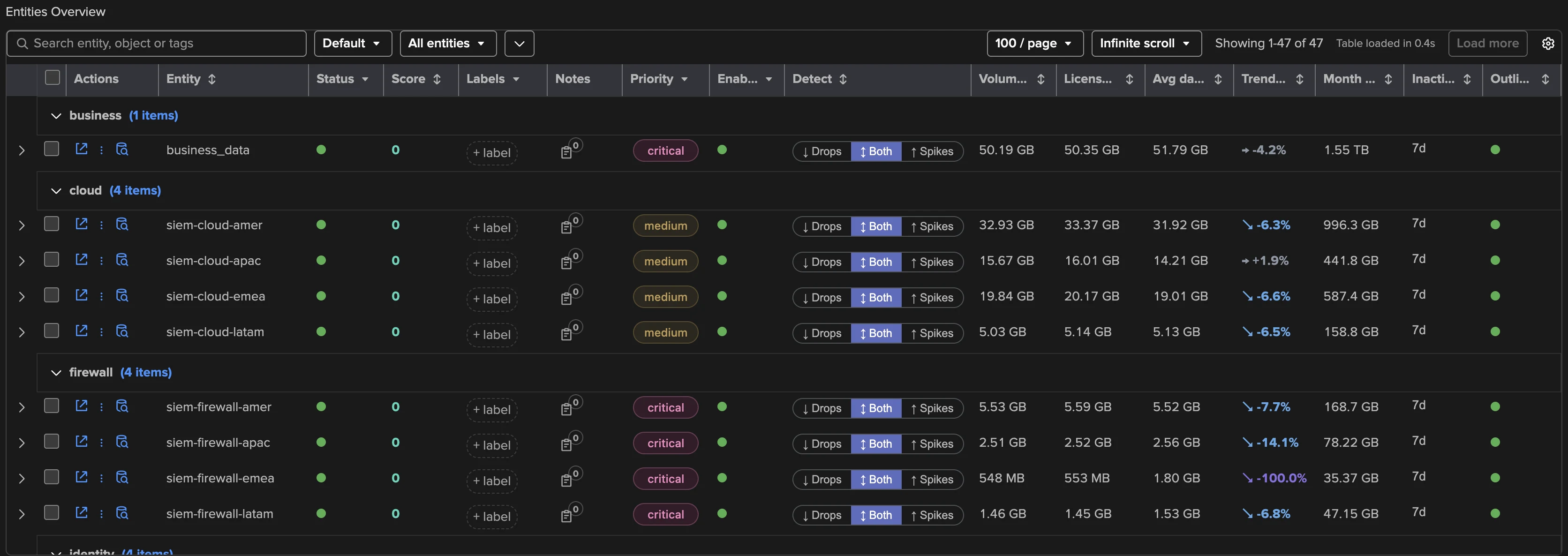
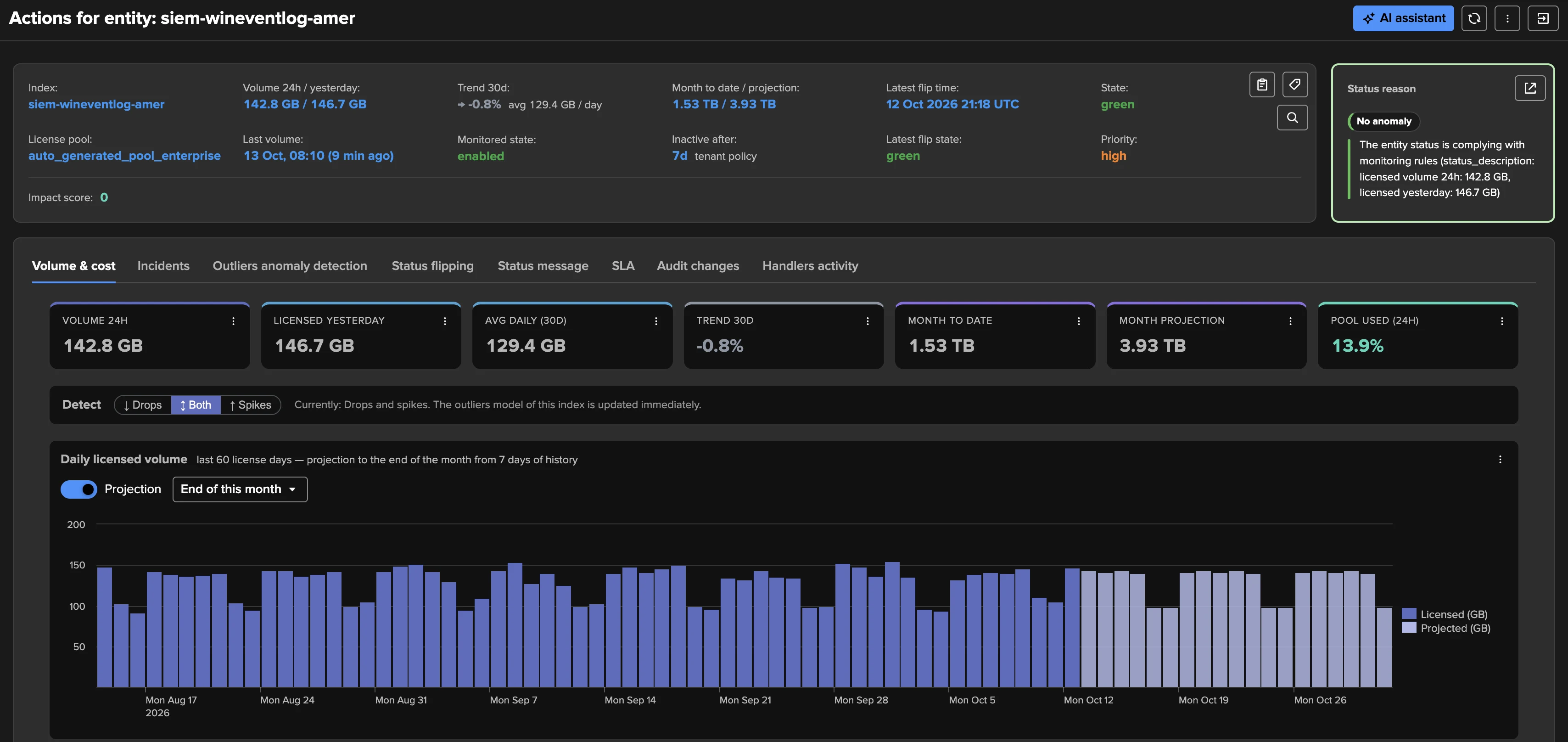
Volume Outliers tracks the licensed volume of every Splunk index — the volume you pay for — and answers a question the other components leave open: is my license volume normal? Each entity is one index; its state comes from ML outlier detection on the rolling volume (abnormal drops and / or spikes) and from inactivity (an index that silently stops consuming license). On top of the detection, VOL records the daily licensed volume per license day, a 30-day trend and a month projection, per index and for the whole environment.
Where DSM watches feeds arrive on time, VOL watches how much arrives, from one source that is authoritative, cheap to read and identical on every Splunk deployment: the license usage log. One tenant covers a whole Splunk deployment — local or remote, Splunk Enterprise or Splunk Cloud — in a few clicks, with the history backfilled automatically: detection and the cost trend are usable as soon as the replay completes, not weeks later.
Volume detection has always been part of TrackMe: per feed with the DSM volume models, per index with the Flex Objects license usage templates. VOL is its standardised, first-class form at scale: one entity per index, the licensed volume read incrementally, outliers on drops and spikes, and a purpose-built UI. It is the seventh monitoring component, next to DSM, DHM, MHM, FLX, FQM and WLK, and on top of the detection it answers the license questions people otherwise build dashboards for: who consumes, how the trend goes, how the month will end, which days went over quota, what a working day costs and which team pays for what.
What VOL tracks
Signal |
What it means |
|---|---|
Volume outliers |
Each index has its own ML model on its rolling 24-hour licensed volume (the shorter windows — 60 min, 4 h, 12 h — can be modelled too). A value outside the learned range is a drop (lower bound) or a spike (upper bound). The detection direction — drops, spikes, or both — is chosen per index; the tenant sets the default. Outliers are the state of the component, not an option. |
Inactivity |
An index whose last licensed volume is older than the threshold in force turns red. The threshold is a tenant policy — static, or variable by day of week and hour of day (by default 1 day during working hours, 7 days for nights and week-ends) — and can be overridden per index. |
Daily licensed volume |
The volume of each license day (the day rolls at the license manager’s local midnight, whatever your search head’s time zone), the figure your license is measured on. Reported per index and summed for the environment. |
Trend and projection |
A 30-day trend, the month-to-date volume and a month projection that follows the weekday pattern of the index — recomputed every 5 minutes, per index and for the whole environment. Both are built on medians, so a one-off spike or outage does not dominate them. |
Pool usage |
On Splunk Enterprise, the share of the license pool consumed over the last 24 hours; the entity’s group is its license pool. On Splunk Cloud a pool has no limit, so no pool usage is reported. |
Every index is a regular TrackMe entity: priority, tags, labels, SLA, logical groups, the disruption queue, acknowledgments, notes, maintenance, stateful alerting and the AI Assistant all apply. VOL has no thresholds to configure and no delay / latency — there is nothing to tune before it delivers value.
How it collects
One tracker per tenant runs every 5 minutes and reads only the new events of the license
usage log — one bounded search, whatever the number of indexes — into 5-minute buckets
per index. The rolling KPIs, the daily volumes and the projection are derived from those
buckets, never by rescanning _internal. The tracker writes the trackme.splk.vol.*
metrics with explicit bucket timestamps, so the charts and the ML models see a continuous,
regular series.
At creation the tenant backfills its history: 30 days by default, a choice from 7 to 90 days, or Custom… for any number of days up to 400 (13 calendar months, enough for a year of chargeback statements), always bounded by the retention of the license usage log. The backfill replays the same collection over the past, one license day at a time, and writes the daily licensed volume of every day it covers, so the license view, the daily chart and the projection are complete when it finishes; the outliers models train as soon as it completes. Progress is visible on the tenant card, in the Tenant Home header and in the Manage: volume collection screen. See Backfill for the details.
Global license usage
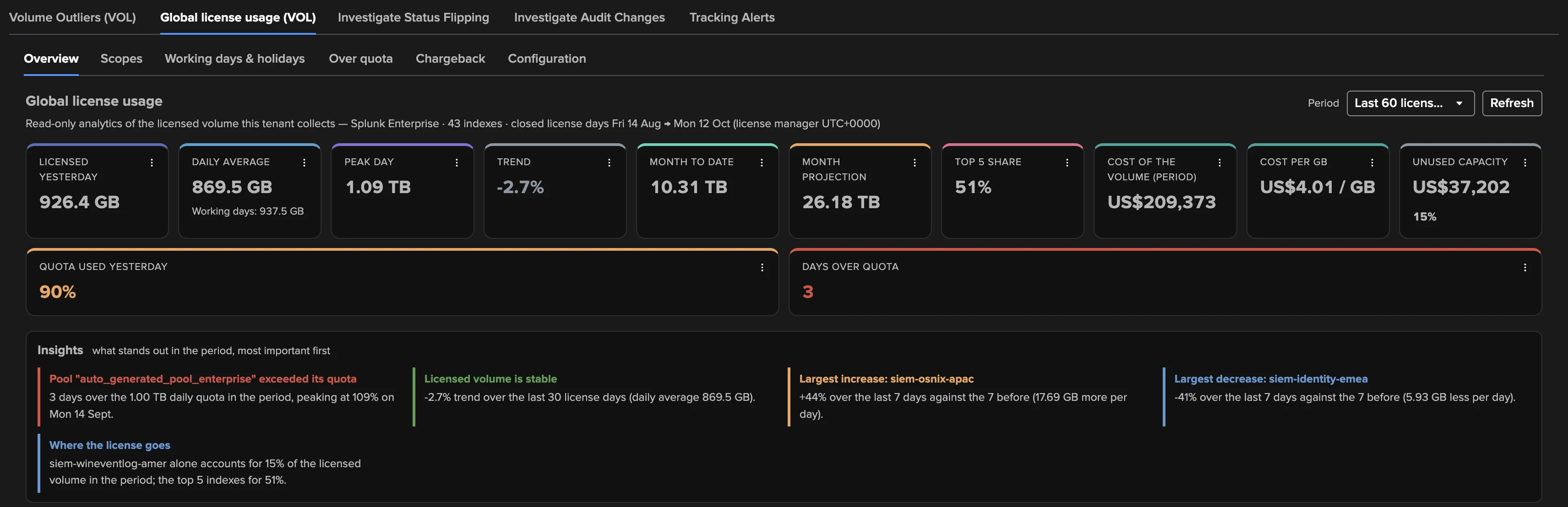
Next to the VOL component tab, Tenant Home offers the Global license usage (VOL) tab: the license consumption of the whole environment, the dashboards people otherwise build by hand. It reads what the tenant already collected, so it adds no search on the license usage log, raises no alert and works the same on a remote deployment. It covers closed license days only, over a period of 30, 60 or 90 days, and every tenant user can open it.
The view has six sub-tabs:
Sub-tab |
What it answers |
|---|---|
Overview |
The key figures (licensed yesterday, daily average and working-day average, peak day, trend, month to date, month projection, top 5 share), insights in plain words, the daily volume stacked by top consumers with the quota line, the whole environment per day with its projection, the consumers table, the week-over-week movers and the license pools. With costs on, the cost of the period, the cost per GB and the unused capacity; with a quota, the days over quota. |
Scopes |
One tab per named scope: a set of indexes analysed together, such as a team, a use case or the indexes of Enterprise Security. A scope is defined by index patterns or follows the CIM datamodel index macros. Each tab shows the scope’s share of the license (or its cost), its daily average, its peak day, the last 7 days against the 7 before, its month projection and its indexes. |
Working days & holidays |
Weekends and public holidays pull a daily average down. This tab shows the working-day, weekend and holiday averages, the average per weekday, and the top consumers and pools on a working day. Holidays come from the Bank Holidays calendars. |
Over quota |
The days a license pool went over its daily quota, over 3, 6 or 12 months: per day against the quota, per calendar month and over a rolling 60 days. What made the day shows, for any day you pick, the pool’s largest indexes against their usual day. |
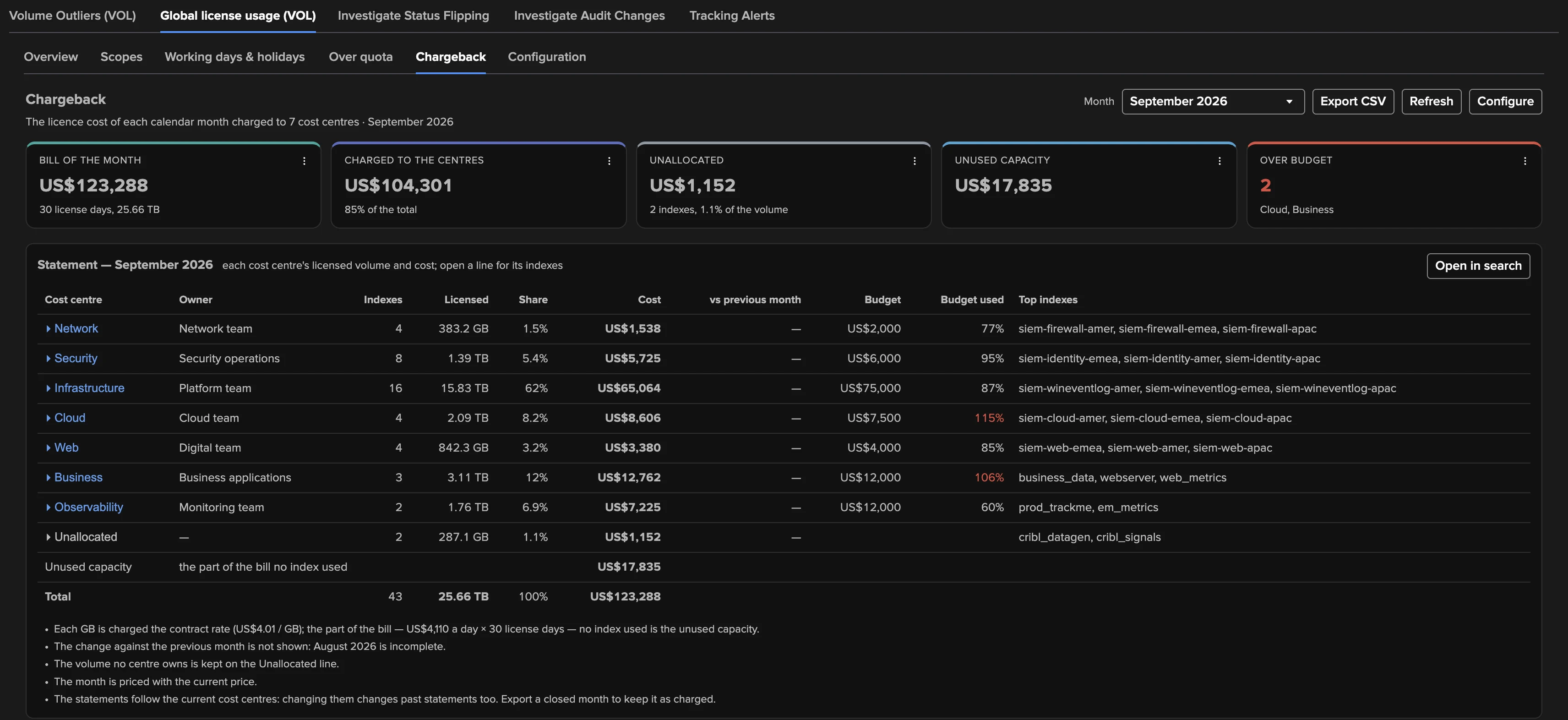
Chargeback |
A monthly statement of the license cost per cost centre, over 13 calendar months: the bill of the month, what each centre is charged, its budget, the unallocated volume, the unused capacity, a 13-month trend and a CSV export. |
Configuration |
The scopes, the working days, a daily quota per pool, the cost centres and the costs with their price history, saved together. |
Everything beyond the overview is opt-in: nothing is priced, scoped or charged until a power or admin user of the tenant configures it. The AI Assistant of Tenant Home switches to this view while it is open: it knows the sub-tab and the figures on screen, and with your consent it can change the configuration for you through the Concierge.
Creating a VOL tenant
Create a tracking tenant and pick the Splunk Volume (Outliers) card.
Basics — the tenant identifier, alias and description.
Volume — the target environment (this Splunk, or a remote account), the default detection direction, the backfill history (up to 400 days with Custom…), which priorities are in scope for outliers, the minimum history a model needs before its confidence is normal, and the default outliers KPIs. Advanced holds the license search constraint and the settle margin.
Inactivity — the tenant’s inactivity policy (static, or variable by day and hour).
Indexes & RBAC — the TrackMe indexes, the roles and the owner, as for every tenant.
Review and create. The first collection runs at once; the backfill follows on its own schedule.
The wizard is walked step by step in Creating a splk-vol tenant, and end to end — from creation to the first alert — in the Volume Outliers white paper.
Tip
Foundation customers get it too. VOL is part of the Foundation edition, next to DSM, DHM and MHM — a Foundation deployment can monitor its license volume out of the box, without Flex Objects. Enterprise and Unlimited include it as well.
Note
Replaces the Flex Objects license-usage recipes. Before 2.4.18, volume outliers on the
license usage were delivered with Flex Objects templates
(splk_license_usage_per_index_*) and, per feed, with the DSM volume models. VOL packages
that recipe as a first-class component: cheaper to run, backfilled, with a purpose-built UI.
The templates remain available for custom needs.
See also
Volume Outliers — in depth — the collector, license days and time zones, the backfill, outliers and inactivity policies, the projection, the Global license usage tab, alerting, REST and metrics.
Volume outliers on the Splunk license usage — the white paper: an end-to-end walkthrough on a live deployment.
Machine Learning — how outlier detection works.
Entity State & Scoring — states and scoring.