Stateful alerting
Stateful alerting is TrackMe’s modern alert path. Instead of re-firing every cycle an entity is in trouble, it keeps one incident record per problem: it opens when the entity first goes into alert, updates while the problem persists, and closes when the entity recovers. The result is rich, context-aware notifications without the spam.
Note
This page is the overview. For the full reference — the stateful-alert wizard step by step, embedded charts, the AI status report, active commands, the anatomy of stateful incident events, worked examples per component, and the third-party integration architectures — see Alerting & third-party integration — in depth.
As an entity moves from a non-alerting state into alert and back, TrackMe maintains a single
persistent incident record in KV-store, emits lifecycle events to its sourcetypes
(trackme:state, trackme:flip, trackme:notable, trackme:sla_breaches), and
drives the opened / updated / closed notifications and active commands from it.
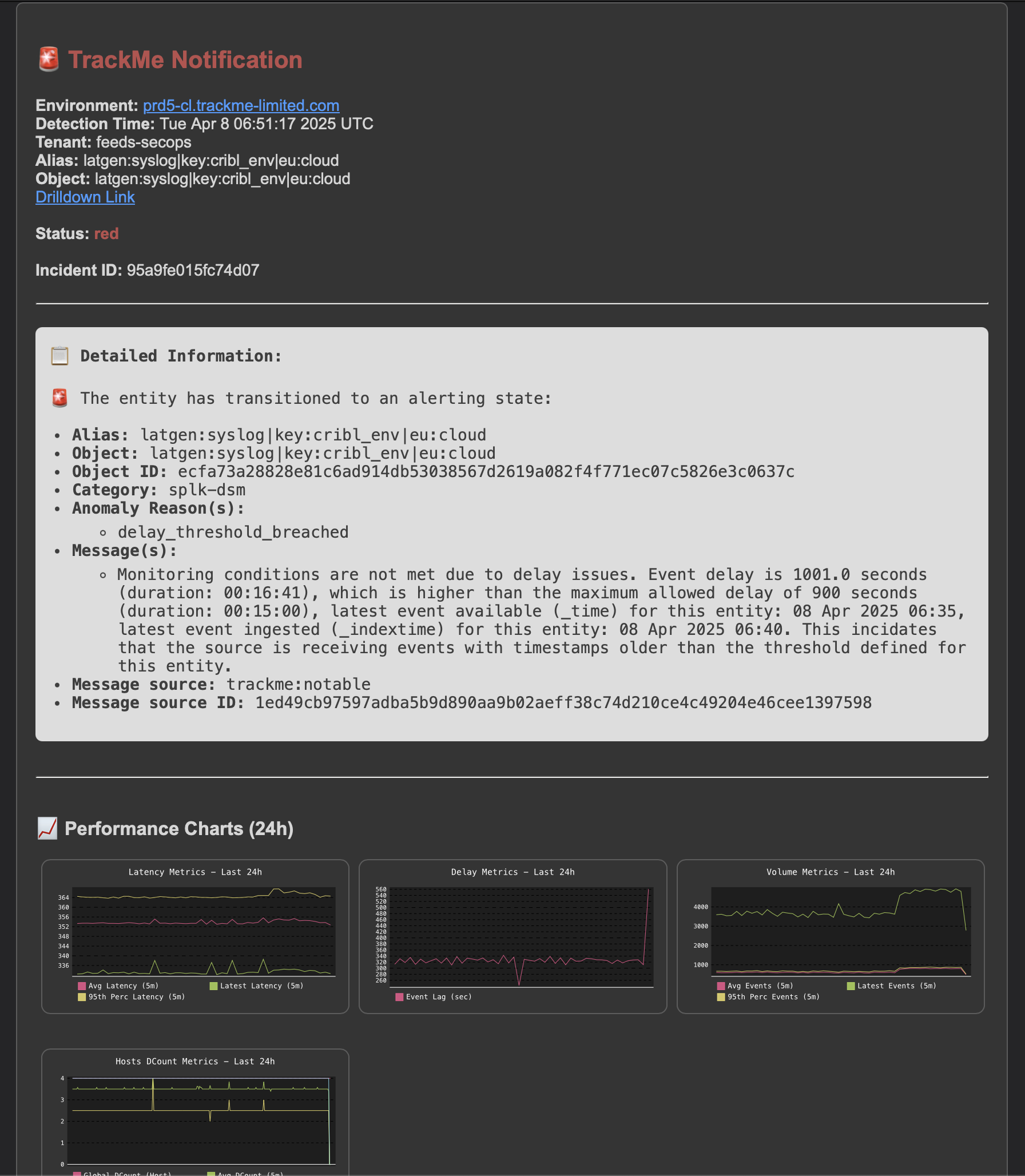
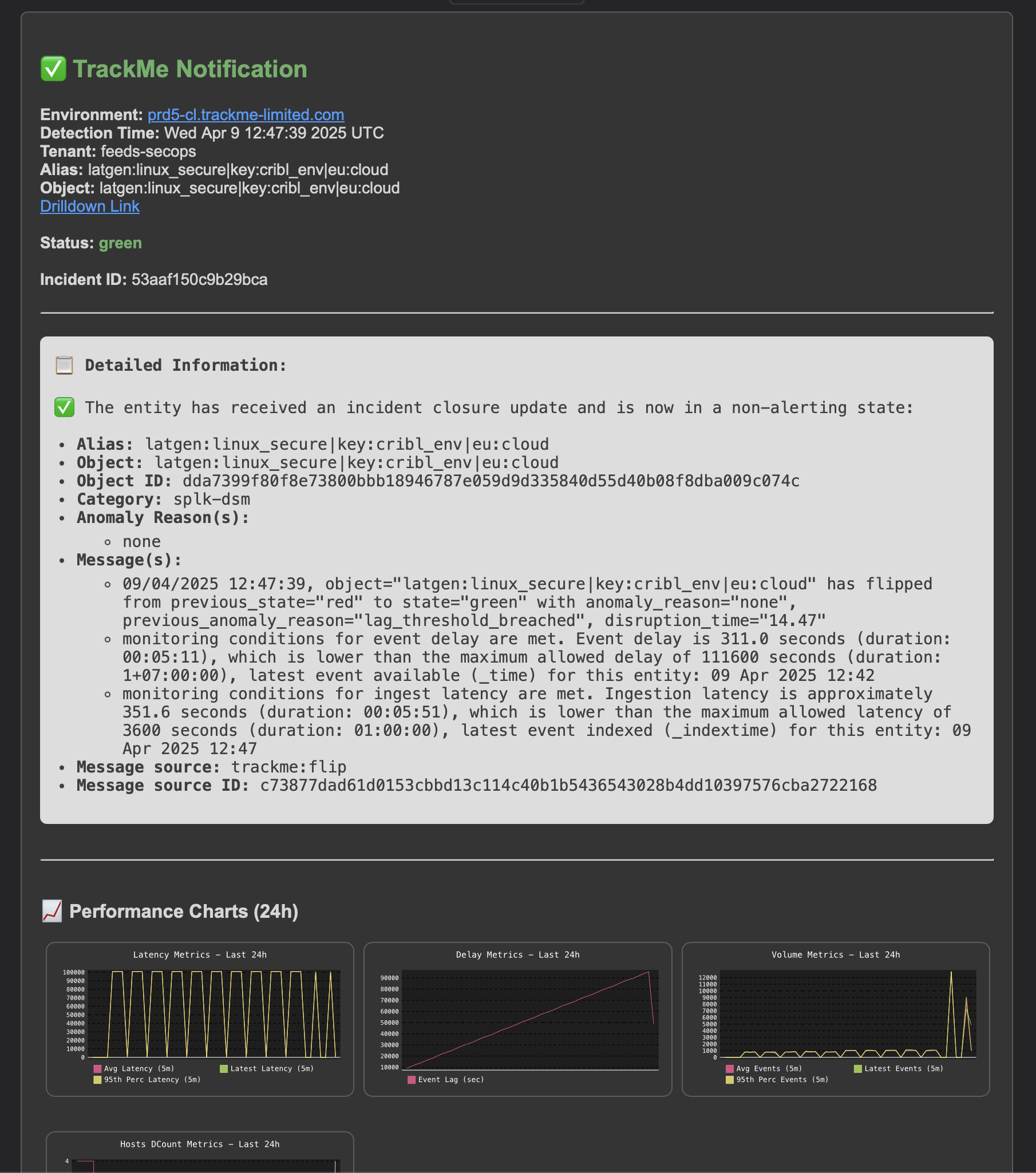
Here is what a pair of those notifications looks like — the opened email when the entity first goes red, and the threaded closed email when it recovers, each carrying the entity’s status, anomaly reason, and the embedded 24-hour incident, flipping and performance charts:
The incident lifecycle
Transition |
What happens |
|---|---|
Opened |
The entity enters an alerting state (red — or orange, if you opt in). An Alert Opened notification is sent. |
Ongoing |
The entity is still in alert on a later cycle. The same record is updated and an optional Update notification is sent — no new incident is created. |
Closed |
The entity returns to a non-alerting state. An Alert Closed notification is sent. |
Because the same rule on the same entity always updates the same record, email notifications thread into a single conversation in your mail client.
Note
Alerting consumes state — it does not compute it. The lifecycle is driven entirely by the entity’s state and score (see The entity state machine). Acknowledgment suppresses notifications but never changes the underlying state.
Delivery channels
One alert can drive any combination of:
Email — themed HTML notifications, threaded, with embedded 24-hour charts and an optional AI status report (see below).
Ingest — a JSON event written to the TrackMe summary index, for ES correlation, historical analysis, or forwarding to a SIEM.
Commands — a saved search dispatched on open / update / close, with the alert context injected as tokens — ideal for ticketing, paging, and custom automation.
The AI status report
When enabled, TrackMe builds the entity’s full context — state, anomaly reason, priority, tags, SLA, recent ack and disruption history, and any visible Guardian alerts — and asks your configured AI provider for a short, 2–3 paragraph investigation summary, embedded in the email.
Important
The AI status report is fail-open: if no provider is configured, or it errors or times out, the email still sends without the AI section. Alerting is never blocked by AI. See the Artificial Intelligence section to configure a provider.
Settings you will reach for
Setting |
Effect |
|---|---|
orange_as_alerting_state |
When on, orange states also open incidents (off by default). Any non-alerting state still closes the incident. |
email_send_update_if_ack_active |
When off (the default), acknowledged entities receive no update emails — the record still updates internally. |
generate_charts / theme_charts |
Embed the 24-hour charts, and choose dark or light. |
ai_status_report / ai_provider_name |
Enable the AI summary and optionally override the provider. |
auto-ack on open |
Automatically acknowledge an entity when an incident opens (see Acknowledgments). |
Note
Embedded email charts require Python 3.9+ and are not available on Splunk 9.1 / 9.2.
If charts cannot render, the email still sends (fail-open) with a placeholder. With
orange_as_alerting_state on, an entity that oscillates green ↔ orange creates many
short incidents — keep it off, or widen the disruption grace.
See also
Alerting & third-party integration — in depth — the full reference: the stateful-alert wizard step by step, active commands, the anatomy of stateful incident events, worked examples per component, and the third-party integration architectures.
Notable events — the notable-events / correlation path.
Acknowledgments — quietening known problems.
The entity state machine — the states that drive the lifecycle.