Administration
Permissions
Topology Studio follows TrackMe’s standard three-role model:
Role |
What it can do |
|---|---|
|
Open and consume shared views (live status, inspector, full-screen, deep links). |
|
Everything above, plus author: create views, edit views they have write access to, and manage Topology Alerts on those views. |
|
Everything, on every view. |
Per-view access — read/write split
Each view carries two role lists:
Read roles — who sees the view on the landing page and can open it.
Write roles — who can edit the canvas, change the view’s settings, and manage its alerts.
The view’s creator always retains access to their own view, and administrators always see everything. Alert management is tied to write access — being able to read a map does not grant the right to change how it alerts.
The views browser reflects this split for every user: a read-only badge on cards, and an Access column (Read & write / Read only) in List mode, computed server-side for the caller — the actions each user sees (Edit, Delete…) follow the same verdict in all three display modes.
Tenant isolation
A topology view can reference entities from many tenants — but viewing a map never extends anyone’s tenant permissions. Live status is enforced server-side, per node, against the caller’s tenant visibility:
Nodes referencing tenants the caller can see behave normally.
Nodes referencing tenants the caller cannot see return a
restrictedmarker only — no entity identity, no state, no counts. The UI renders them as neutral restricted nodes.Scoped aggregates spanning visible and non-visible tenants fold only the visible scopes, and report how many scopes were withheld.
Auto aggregates depend on their contributing nodes and referenced views. Restricted or incomplete contributors do not produce a healthy partial roll-up; the parent is masked or unavailable as appropriate. Composition never grants access to another tenant or view.
Important
This makes cross-team maps safe to share broadly: everyone sees the same topology shape, while the live data each person receives is exactly what their tenant permissions allow — enforced in the backend, not the browser.
Licensing
Topology Studio is available to the Foundation, Enterprise and Unlimited editions alike (and to active trials) — the complete experience, including authoring: creating, editing, duplicating, importing and sharing views, and managing Topology Alerts. Foundation access was opened in TrackMe 2.4.12; earlier 2.4.x releases mistakenly restricted authoring to Enterprise and Unlimited.
The only license gate is TrackMe’s product-wide license read-only mode, entered when the license expires:
Creating, modifying and deleting views and alerts is refused (the REST API answers
HTTP 402).Consuming keeps working — existing views stay listed and open live, with the inspector, full-screen, deep links and exports available as usual.
Export, import and portability
Views are portable:
Export produces a single archive containing the graph, the background image and the view’s alert definitions — everything travels together.
Import recreates the view on any TrackMe instance (staging → production, instance migrations, sharing between deployments), optionally under a new view id. Imports are size-capped and fully re-validated on arrival — an imported view obeys the same rules as one authored in place.
View nodes travel by identifier. An archive keeps every view node as a reference to the child’s
view_idbut does not bundle the child views themselves: import the referenced views first, with the same identifiers, on the destination — an import whose references cannot be resolved is refused.Restricted exports stay honest. When part of a view’s tenants are outside the exporting user’s visibility, the archive is marked as tenant-restricted and omits the alert definitions (they could name withheld entities); such a partial archive is rejected on import rather than silently recreating an incomplete view.
Auto aggregates retain their membership mode and connections. Import them into a version supporting auto aggregates (2.4.18+), with any referenced views already available. Existing scoped aggregates keep their scope-based behavior.
Topology views are stored in global KV store collections, so they are automatically included in TrackMe’s backup & restore cycle.
System-wide settings
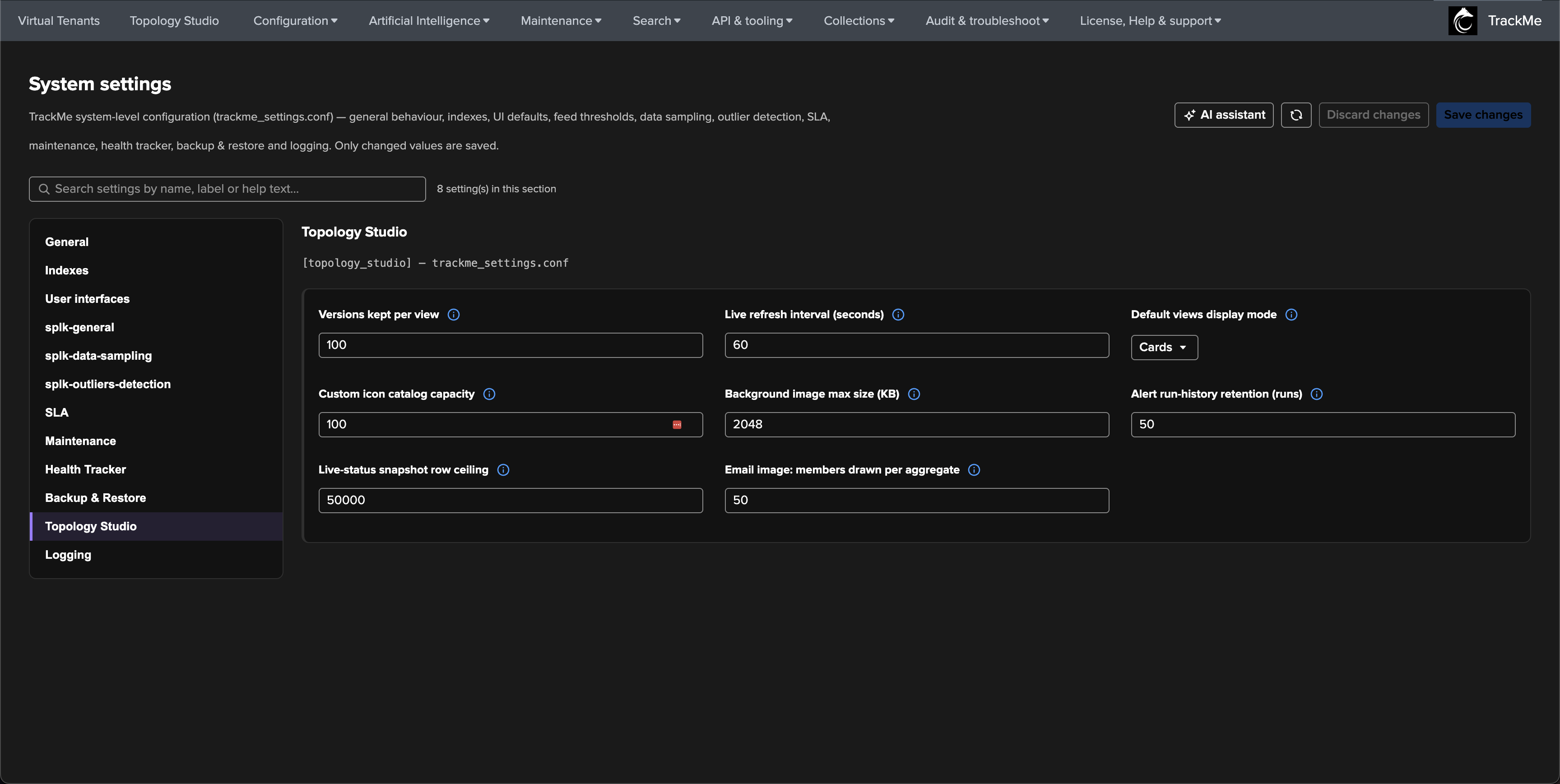
Topology Studio controls are admin-configurable, deployment-wide — under
Configuration → System settings → Topology Studio (the [topology_studio]
stanza of trackme_settings.conf). Six numeric settings were introduced in
TrackMe 2.4.9; TrackMe 2.4.15 adds two more — the default views display mode
and the email image member ceiling — for eight in total:
Setting |
Default |
Controls |
|---|---|---|
|
30 |
Restorable versions kept per view. Every save is a version; older versions beyond this count are pruned on save. |
|
60 |
Base cadence of the canvas live-status refresh. This is the floor, not a fixed rate — the adaptive engine only ever stretches the interval on views that are slow to evaluate. |
|
|
Default views display mode (2.4.15): the initial layout of the
views browser — |
|
100 |
Capacity of the deployment-wide custom icon catalog. |
|
2048 |
Maximum size of an uploaded canvas background image, in kilobytes. |
|
50 |
Evaluations kept per topology alert in the run history, pruned after each run. |
|
50000 |
Maximum entity rows read per (tenant, component) snapshot when resolving live status and evaluating alerts. When a source is capped, aggregates report truncated rather than pretending the roll-up is exact. Raise only on very large estates with KV store capacity to match. |
|
50 |
Email image: members drawn per aggregate (2.4.15). Maximum auto-generated member nodes drawn per expanded aggregate in the topology alert email image, worst state first (range 1–500). The canvas can expand an aggregate to 500 members because the viewer can pan and zoom; an email is a fixed-size picture, so the members beyond this ceiling are summarised by an exact +N more note on the aggregate’s KPI card. Only the email rendering is bounded — the canvas, live status, aggregate health and alert decisions are unaffected, and an aggregate’s own Max entities shown still applies when it is lower. |
Every consumer reads these settings fail-safe: a missing or invalid value falls back to the shipped default, and values are clamped server-side to a sane range — a broken setting can never take Topology Studio down. Each setting also carries its own learn more documentation directly in the System settings page.
Hint
Which settings are read when differs: the refresh interval and the display mode are picked up the next time Topology Studio (or a view) is opened; the email member ceiling is resolved once per alert transition render; the retention and size caps apply on the next save, upload or run.
Operational internals
Auto-aggregate composition is bounded to 100 auto aggregates per graph and 12 levels. These are validation bounds rather than configurable system settings. Evaluation limits or incomplete dependencies produce unavailable health. See Auto aggregates.
For administrators who want to know what’s running under the hood:
Storage — views, background assets, version history, alert definitions, alert state and run history live in dedicated global KV store collections (
kv_trackme_topology_*). Version snapshots are bounded per view and pruned automatically on save; deleting a view cascades its alerts, assets, version history and its integrity finding in Configuration Guardian, and queues a re-check of the views that referenced it.Alert execution — each Topology Alert materializes as its own scheduled saved search running the evaluation command on the alert’s cron schedule. The saved search is owned by the system (
nobody) and kept private, so end-user searches never gain direct access to the Topology KV store collections; the alert’s creator remains the authorization principal — their power permissions, write access to the view and tenant visibility are re-verified on every run, and a creator who lost access skips the run (state untouched) rather than producing a false all-clear. Enable/disable in the UI schedules/unschedules it; per-alert run locks prevent overlapping evaluations (a run now and a scheduled run coordinate rather than collide).Notable events — every alert transition (open / update / resolve) is indexed under
sourcetype=trackme:topology_alertsin the alert’s own configured event index; when left on the deployment default, events land in TrackMe’s summary index ([index_settings] trackme_summary_idx,trackme_summaryunless changed). The TrackMe notable index is reserved for the notable alert action — Topology Alerts never write to it. See Topology Alerts for the event payload and the UI shortcuts that open the events.Email rendering — the emailed topology image is rendered server-side; no browser involved, no external service.
Hint
If an alert’s saved search drifts (deleted or altered outside TrackMe), the scheduling layer detects and self-heals it on the next management-surface interaction.