Cribl Stream & Edge API
See your Cribl deployment in Topology Studio. TrackMe turns Cribl’s internal metrics in Splunk into monitored entities, with live health, traffic trends and alerts across pipelines, sources, destinations and worker infrastructure. Follow the Cribl Stream (Logstream) monitoring guide for the use-case library, setup instructions and topology walkthrough.
To monitor the data sources and hosts whose logs pass through Cribl, see Cribl activity signals for DSM and DHM. That integration uses a dedicated aggregation pipeline rather than Cribl’s internal infrastructure metrics.
Explore Cribl Stream (Logstream) monitoring
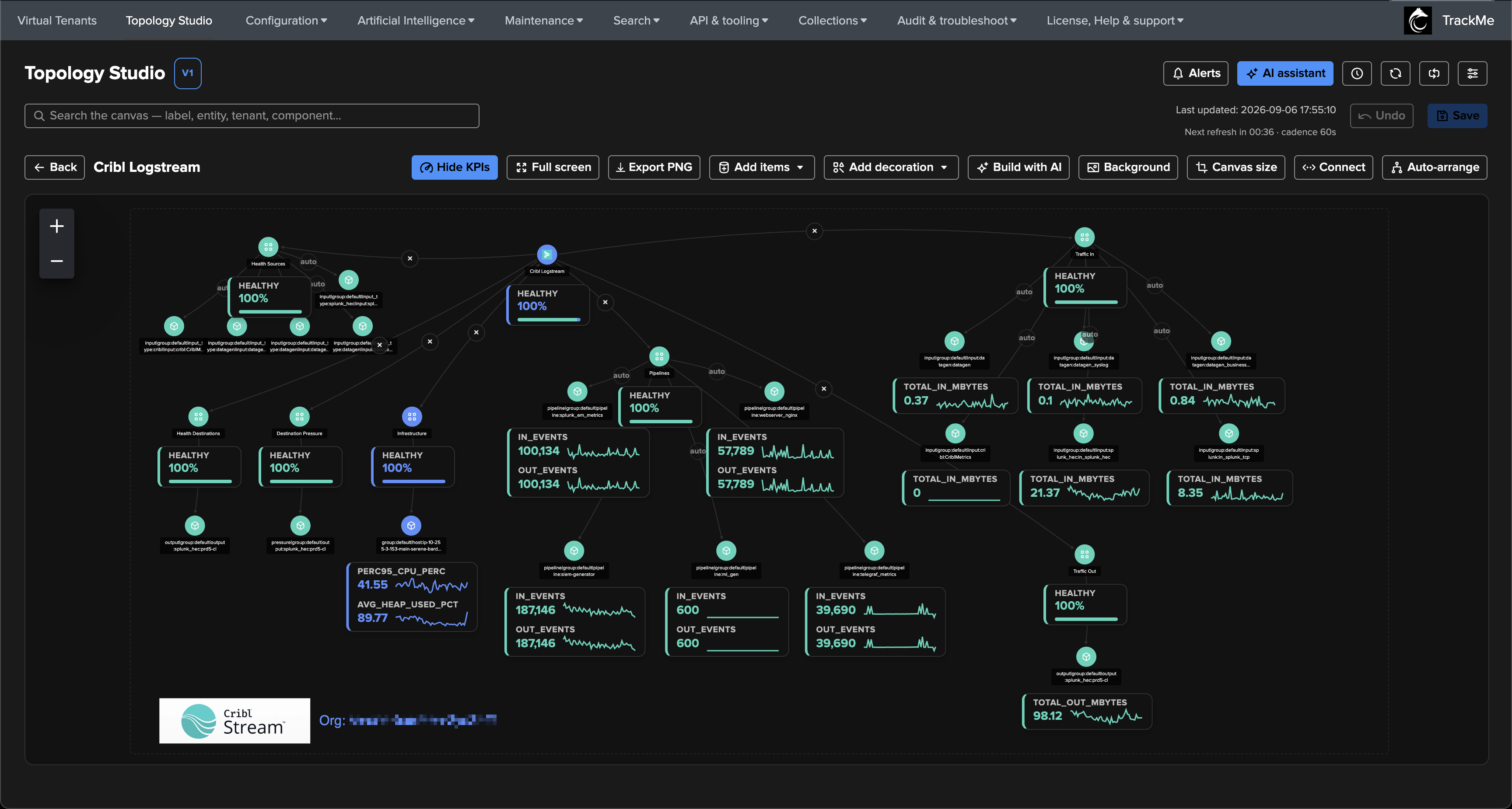
About Cribl Stream & Edge API
TrackMe provides a native integration with Cribl Stream and Cribl Edge, allowing various SPL native commands to be used to interact with the Cribl API.
Overview
The TA-trackme-cribl Splunk Add-on provides seamless API integration between Splunk and Cribl, enabling you to interact with Cribl’s API directly from Splunk using native SPL commands. This integration supports both on-premise Cribl deployments and Cribl Cloud environments, and covers both Cribl Stream (LogStream) and Cribl Edge products.
inputs/outputs details & status:
| cribl account=cribl mode=get url="/api/v1/m/default/system/inputs" | spath
| cribl account=cribl mode=get url="/api/v1/m/default/system/outputs" | spath


workers informations & status:
| cribl account=cribl mode=get url="/api/v1/master/workers?filterExp=info.cribl.distMode%3D%3D%22worker%22" | spath

events capture by Splunk index:
| cribl account=cribl mode=post url="/api/v1/system/capture" body="{'filter': 'index.includes(\'webserver\')', 'maxEvents': 15, 'level': 0, 'duration': 30000}"

Cribl Edge fleet nodes status:
| cribl account=cribl mode=get url="/api/v1/master/workers" cribl_function="get_edge_nodes" | spath

Key Features
Cribl Stream & Edge Support: Full support for both Cribl Stream (LogStream) and Cribl Edge API interactions from a single Add-on
Multi-Environment Support: Configure and manage connections to both on-premise Cribl deployments and Cribl Cloud
Native SPL Integration: Access Cribl API through the built-in
criblcommand in SplunkReal-Time Metrics: Retrieve and chart real-time metrics from Cribl for complex operations like pipeline monitoring
Edge Fleet Management: Built-in functions for Cribl Edge — list Edge fleets, retrieve Edge nodes status, and get Edge fleet configurations
Role-Based Access Control: Implement least-privilege access with granular role permissions
Predefined Functions: Built-in functions for common operations like retrieving pipeline metrics, worker information, Edge fleet/node status, and system statistics
SSL Certificate Support: Configure custom SSL certificates for secure connections
Connectivity Testing: Automated connectivity testing during account creation and editing
Requirements
- Application Dependencies
No dependencies on other Splunk applications required.
- Network Requirements
The Splunk Search Head must have network connectivity to the Cribl API endpoints (typically HTTPS over port 443).
- Authentication
Supports both on-premise (username/password) and Cloud (client_id/client_secret) authentication methods.
Installation
- Installation Target
Install on Search Head(s), standalone or Search Head Cluster.
- Download Page
- Splunk Cloud
Install the application as a private application on the Cloud Search heads, Appinspect vetting will be performed automatically.
Configuration
Account Configuration
Once deployed, access the Configuration UI and create a Cribl API account. The same account works for both Cribl Stream and Cribl Edge API calls — no separate account is needed.
When creating a Cribl account, you’ll need to configure the following parameters:
Parameter |
Description |
|---|---|
Name |
Enter a unique name for this account (default: |
cribl_deployment_type |
The type of Cribl deployment: Cloud or on-premise |
cribl_cloud_organization_id |
Organization ID for Cribl Cloud deployments |
cribl_cloud_workspace |
Workspace name for Cribl Cloud deployments (default: |
cribl_onprem_leader_url |
Leader URL for on-premise deployments (format: |
cribl_client_id |
Username for on-premise or client_id for Cloud |
cribl_client_secret |
Password for on-premise or client_secret for Cloud |
rbac_roles |
Comma-separated list of Splunk roles a user must be a true member of to use this account |
cribl_ssl_verify |
Enable/disable SSL verification (mandatory for Cloud, can be disabled for on-premise testing) |
cribl_ssl_certificate_path |
Path to PEM file for custom or self-signed certificates |
When creating or updating the account, the application automatically tests connectivity and authentication against the Cribl API. If the connection fails, the UI will refuse the operation and return the exception.
Access Control
- Capabilities & Built-in Roles
Capability:
criblapiBuilt-in role:
cribl_api
- Role-Based Access Control
Configure access on a per-account basis using the
rbac_rolesparameter. This is a true membership — the user must be a direct member of one of these roles (not inheriting). Default roles include: admin, sc_admin, trackme_user, trackme_power, trackme_admin.
Usage
General Notes
When working with metrics, the Splunk time range filter is automatically taken into account
The Cribl API allows up to the last 3 hours of metrics with a granular 10-second time window
Beyond 3 hours, Cribl API rolls metrics with a 10-minute span — the
criblcommand handles this automaticallyWhen working with configuration, use
spathto extract fields from the JSON API responseYou can perform
POSTcalls usingmode=postand thebodyoptionAdd
run_test=Trueto any command to report the response time (runtime_sec) and status (success or failure), useful for connectivity validation and monitoring
Cribl Stream API
Testing Connectivity
Test the Cribl API connection:
| cribl account=cribl mode=get url="/api/v1/master/groups?fields=workerCount&product=stream" run_test=True
Event Capture
Capture events by index:
| cribl account=cribl mode=post url="/api/v1/system/capture" body="{'filter': 'index.includes(\'webserver\')', 'maxEvents': 15, 'level': 0, 'duration': 30000}"
Capture events by input ID:
| cribl account=cribl mode=post url="/api/v1/system/capture" body="{'filter': '__inputId==\'splunk_hec:in_splunk_hec\'', 'maxEvents': 15, 'level': 0, 'duration': 30000}"
Worker Information
Get worker count and information:
| cribl account=cribl mode=get url="/api/v1/master/groups?fields=workerCount&product=stream" | spath
Get extended worker stats:
| cribl account=cribl mode=get url="/api/v1/master/workers?filterExp=info.cribl.distMode%3D%3D%22worker%22" | spath
Get worker count summary:
| cribl account=cribl mode=get url="/api/v1/master/summary/workers?filterExp=info.cribl.distMode%3D%3D%22worker%22" | spath
System Configuration
Get groups:
| cribl account=cribl mode=get url="/api/v1/master/groups" | spath
Get groups (Cribl Stream only):
| cribl account=cribl mode=get url="/api/v1/master/groups?product=stream" | spath
Get all groups configuration in a single request (Cribl Stream only):
| cribl account=cribl mode=post url="/api/v1/master/groups?product=stream" cribl_function="get_groups_conf" | spath
Get inputs:
| cribl account=cribl mode=get url="/api/v1/m/default/system/inputs" | spath
Get outputs:
| cribl account=cribl mode=get url="/api/v1/m/default/system/outputs" | spath
Get routes:
| cribl account=cribl mode=get url="/api/v1/m/default/routes" | spath
Get pipelines:
| cribl account=cribl mode=get url="/api/v1/m/default/pipelines" | spath
Get packs:
| cribl account=cribl mode=get url="/api/v1/m/default/packs" | spath
Metrics and Monitoring
Get system metrics:
| cribl account=cribl mode=post url="/api/v1/system/metrics/query" cribl_function="get_global_metrics"
Get pipeline metrics:
| cribl account=cribl mode=post url="/api/v1/system/metrics/query" cribl_function="get_pipelines_metrics"
Get destination metrics:
| cribl account=cribl mode=post url="/api/v1/system/metrics/query" cribl_function="get_destinations_metrics"
Get routes metrics:
| cribl account=cribl mode=post url="/api/v1/system/metrics/query" cribl_function="get_routes_metrics"
System Information
Get system messages:
| cribl account=cribl mode=get url="/api/v1/system/messages" | spath
Get banners:
| cribl account=cribl mode=get url="/api/v1/system/banners" | spath
Get recent actions:
| cribl account=cribl mode=get url="/api/v1/ui/recentActions" | spath
Cribl Edge API
The Cribl Edge API uses the same authentication and account configuration as Cribl Stream. No separate account is needed — the same Cribl account works for both Stream and Edge API calls.
The following built-in functions and API calls allow full interaction with Cribl Edge fleets and nodes.
Get Edge Fleets
List all Edge fleets:
| cribl account=cribl mode=get url="/api/v1/master/groups?product=edge" cribl_function="get_edge_fleets" | spath
Get Edge Nodes Status
This is the main built-in function for retrieving the status of all Edge nodes across all fleets. Each Edge node is returned as an individual Splunk event, making it easy to search, filter, chart, and alert on in Splunk.
Each event contains the full node information including: hostname, GUID, connection status, fleet assignment, last heartbeat, Edge version, config version, sources status, destinations status, and more.
| cribl account=cribl mode=get url="/api/v1/master/workers" cribl_function="get_edge_nodes" | spath
Extract key fields for a table view:
| cribl account=cribl mode=get url="/api/v1/master/workers" cribl_function="get_edge_nodes" | spath | table id, info.cribl.hostname, info.cribl.guid, info.cribl.version, info.cribl.group, info.cribl.os, workerProcesses{}.status
Filter Edge nodes for a specific fleet:
| cribl account=cribl mode=get url="/api/v1/master/workers" cribl_function="get_edge_nodes" | spath | search info.cribl.group="default_fleet"
Get Edge Fleet Configurations
Retrieve all Edge fleet configurations in a single request:
| cribl account=cribl mode=get url="/api/v1/master/groups?product=edge" cribl_function="get_edge_fleets_conf" | spath
Edge Fleet-Specific Configuration
Get inputs for a specific fleet:
| cribl account=cribl mode=get url="/api/v1/m/default_fleet/system/inputs" | spath
Get outputs for a specific fleet:
| cribl account=cribl mode=get url="/api/v1/m/default_fleet/system/outputs" | spath
Get routes for a specific fleet:
| cribl account=cribl mode=get url="/api/v1/m/default_fleet/routes" | spath
Get pipelines for a specific fleet:
| cribl account=cribl mode=get url="/api/v1/m/default_fleet/pipelines" | spath
Get All Workers and Edge Nodes
Retrieve all workers (Stream and Edge) in a single call:
| cribl account=cribl mode=get url="/api/v1/master/workers" | spath
Testing Edge Connectivity
Test Edge API connectivity:
| cribl account=cribl mode=get url="/api/v1/master/groups?product=edge" run_test=True
Troubleshooting
Logs
- Internal REST API Logs
Available at:
index=_internal sourcetype="cribl:rest_api"- Custom Command Logs
Available at:
index=_internal sourcetype="cribl:custom_commands:cribl"
Connectivity Testing
Test connectivity before account creation:
| cribl mode=post url="/services/cribl/v1/test_cribl_connectivity" body="{'cribl_deployment_type': 'cloud', 'cribl_client_id': '<redacted_client_id>', 'cribl_client_secret': '<redacted_client_secret>'}"
Important Notes
Time Range Support: The integration automatically respects Splunk time range filters when working with metrics
API Limitations: Cribl API provides up to 3 hours of metrics with 10-second granularity, beyond which metrics are rolled up to 10-minute spans
JSON Parsing: Use
spathcommand to extract fields from JSON API responsesPerformance Testing: Add
run_test=Trueto any command to get response time and status informationStream & Edge Shared Authentication: The same Cribl account works for both Stream and Edge API calls — no separate configuration needed
License and Support
- License
This application is licensed under the TrackMe EULA. See TrackMe License for details.
- Terms & Conditions
Available at TrackMe Terms & Conditions
- Support
Support information available at TrackMe Support