Bank holidays
Bank holidays tell TrackMe when a quiet feed is expected. You keep calendars: the holidays of a country, a state or a region, plus your own closures. Each tenant uses the calendars that apply to it. While one of its holidays is active, the tenant holds new alerts, and the time counts neither against its SLA nor in its ML models. The findings tenants (User Activity Monitoring, Cribl Stream, Cribl Edge and Splunk HEC) use the same calendars to hold the new findings of the policies you choose.
Bank holidays are built on calendars since TrackMe 2.4.19:
Every country of the holiday catalog: 207 countries and 628 countries, states and regions ship with TrackMe.
Rules, not dates. A calendar holds rules, and TrackMe computes the holidays every year, so floating holidays always land on the right day: Easter Monday, Thanksgiving, the last Monday of May, the substitute day when a holiday falls on a weekend.
Per tenant. Each tenant chooses its calendars and which of its effects apply.
Findings tenants too. User Activity Monitoring, Cribl Stream, Cribl Edge and Splunk HEC tenants take the effects that apply to them, and each of their policies chooses whether it holds new findings on a holiday.
Closures always go through. During a holiday new alerts are held, but an alert that recovers still closes.
The page is under Maintenance & holidays → Manage Bank Holidays. It has two tabs, Calendars and Tenants & settings, and its own AI Assistant. It is meant for TrackMe administrators: everyone can read the calendars, only an administrator can change them.
Calendars
A calendar holds holiday rules, not dates: easter 1 is Easter Monday,
4th thursday in November is Thanksgiving. TrackMe generates the holidays of every year
from these rules, in the calendar’s own time zone, from two years back to two years ahead.
Nobody has to re-import anything when the year changes.
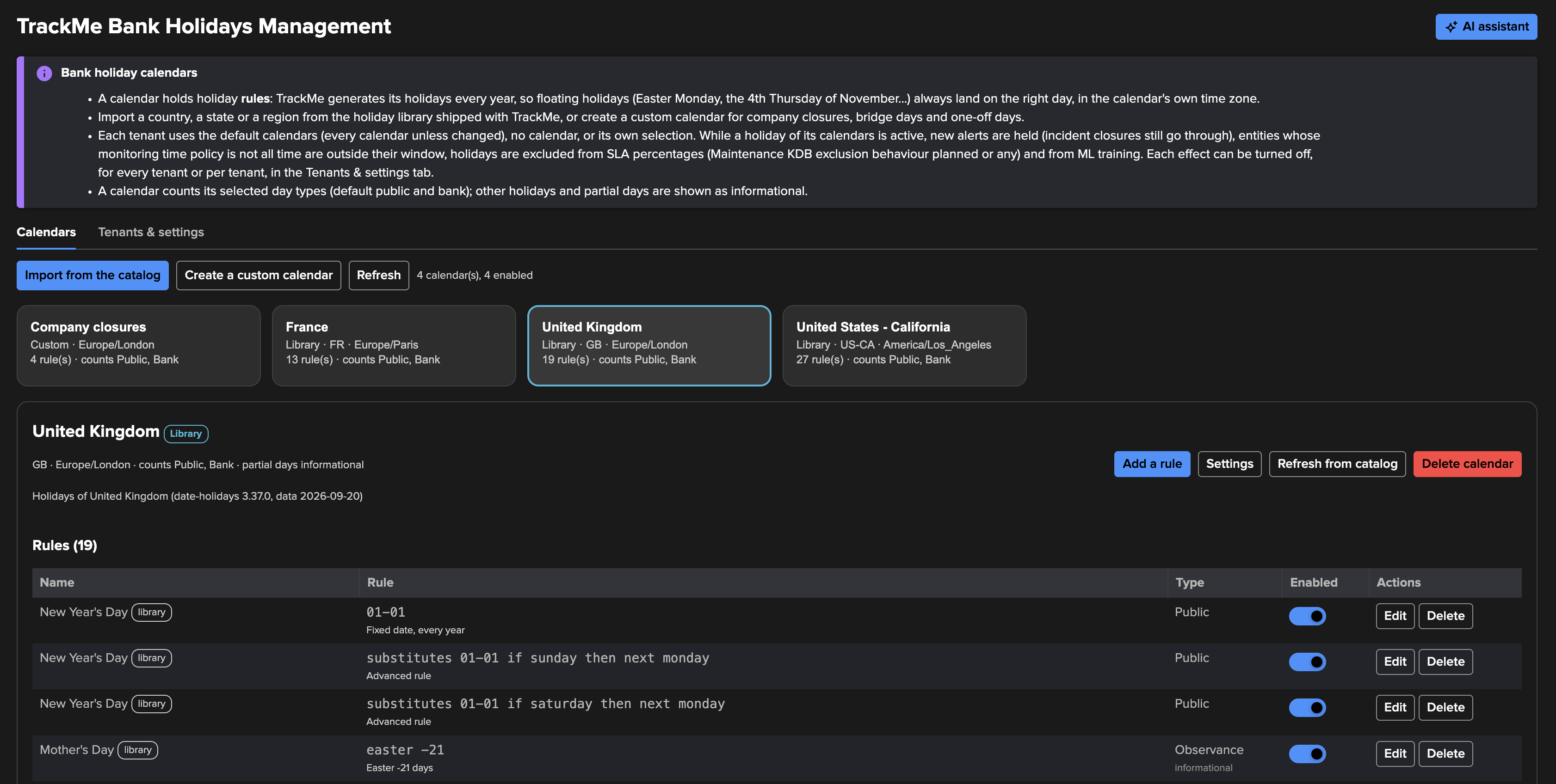
There are two kinds of calendar:
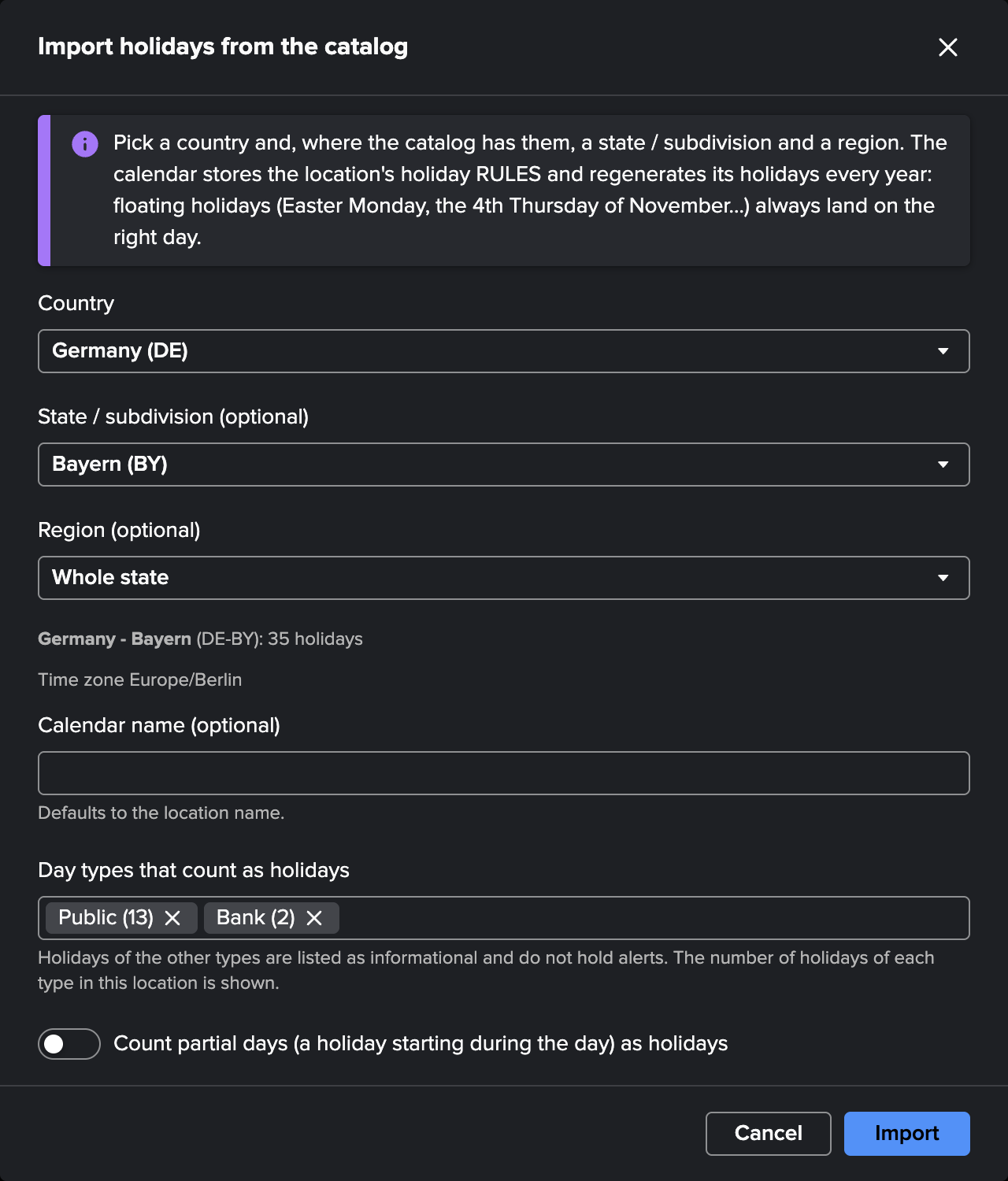
Imported — Import from the catalog picks a country, then optionally a state / subdivision and a region, each level only where the catalog has one (Whole country and Whole state keep the level above). The dialog shows how many holidays the location has, offers a Time zone choice when the location spans several (the United States, for instance), and lists the day types that count as holidays with the number of holidays of each type here. You can also count partial days and give the calendar a name.
Custom — Create a custom calendar for what no country publishes: company closures, bridge days, the closure of one site. A custom calendar has a name, a description, a time zone (UTC by default), the day types it counts, and an optional country code, used for display and grouping only.
What counts as a holiday
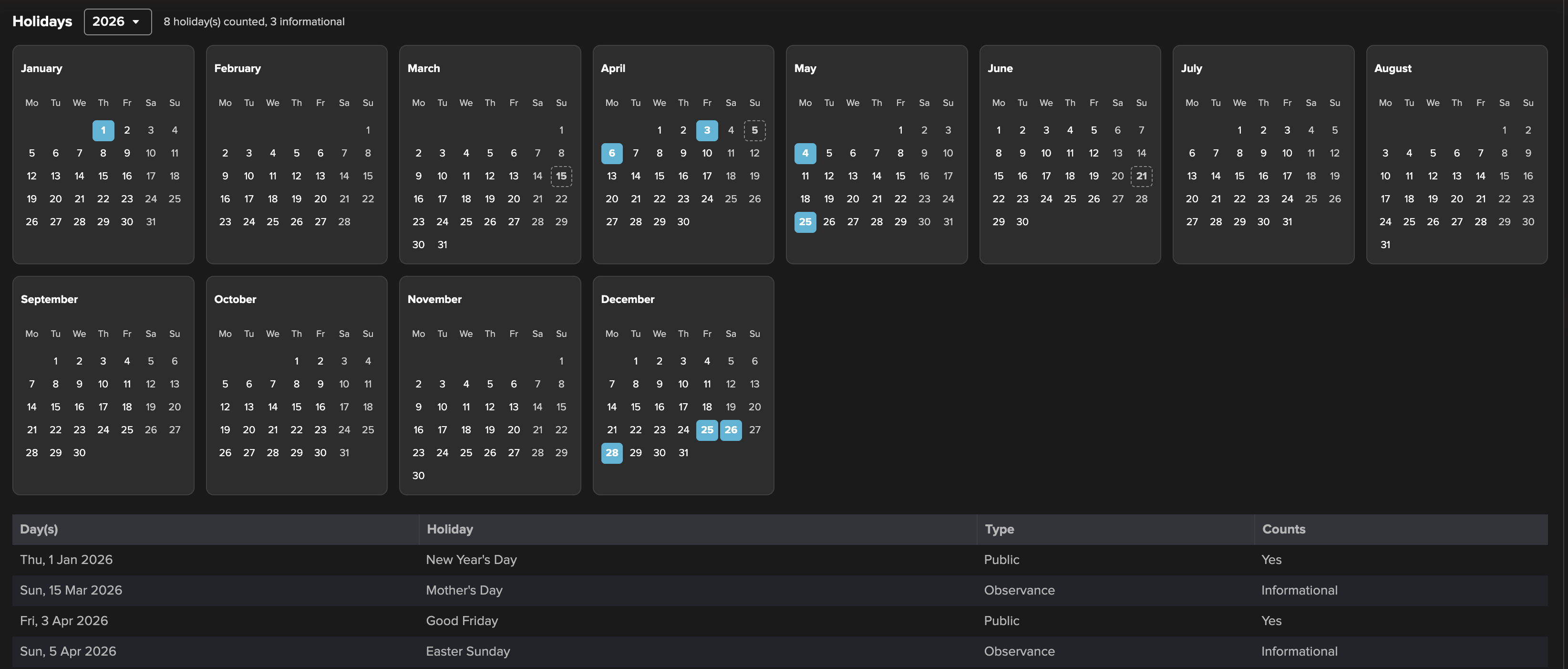
Each calendar counts the day types you choose: Public and Bank holidays by default. The others (Optional, School, Observance) stay listed as informational: greyed out, they change nothing. A partial day, a holiday that starts during the day such as Christmas Eve from 12:00, is informational too, unless the calendar counts partial days.
A holiday runs from midnight to midnight in the calendar’s time zone. Two sites in different time zones need two calendars.
The year view of a calendar shows which days count, and the list below it gives every holiday from two years back to two years ahead. A calendar card shows Holiday today when one of its holidays is active.
Rules
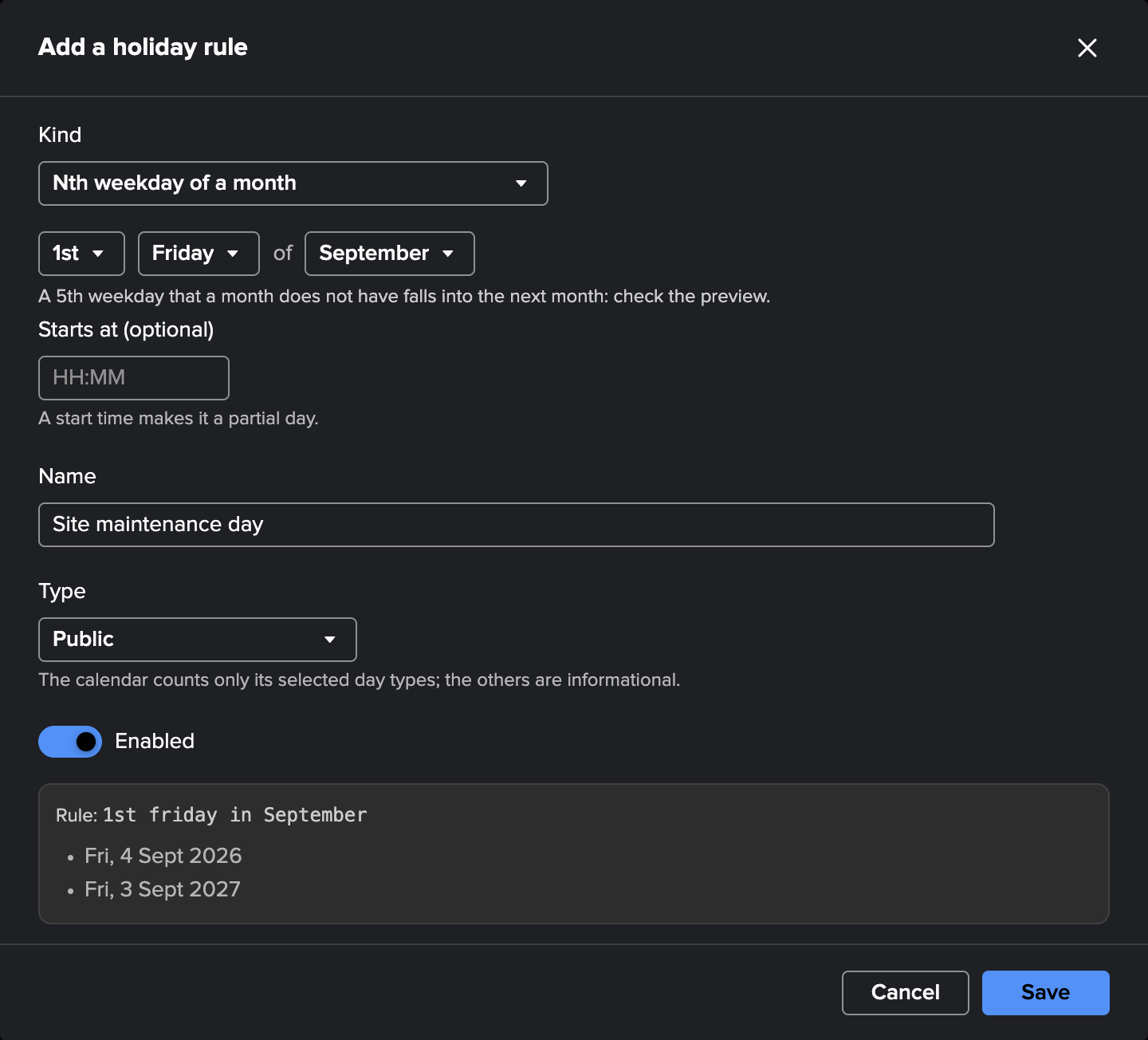
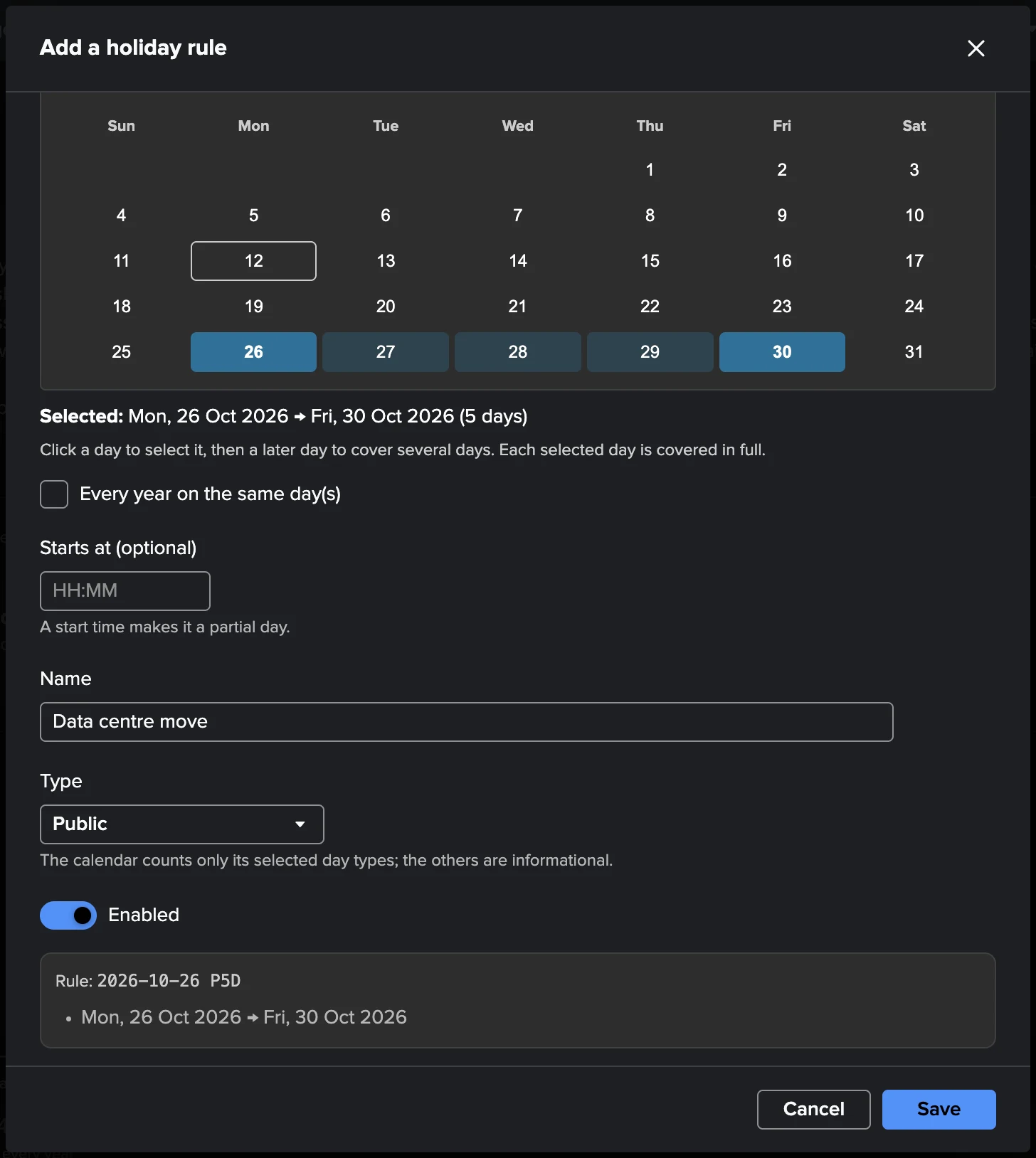
Add a rule builds a rule without writing it, and previews this year’s and next year’s dates before you save:
Kind |
What it gives |
|---|---|
A day or a period |
Pick the days on a month calendar: click a day, then a later day to extend it to a period. Tick Every year on the same day(s) for a yearly holiday. For a single day, On a weekend chooses No change, Moves to the next Monday, or Saturday to Friday, Sunday to Monday, optionally keeping the weekend day as well. |
Relative to Easter |
A number of days from Easter Sunday (or Orthodox Easter). |
Nth weekday of a month |
The 1st to 5th, or the last, weekday of a month. |
Weekday before / after a date |
For instance the Monday after a given date. |
Advanced (rule text) |
A rule in the grammar of the |
An optional Starts at time makes the rule a partial day.
Rule text examples:
Rule |
Holiday |
|---|---|
|
An 8-day year-end closure from 24 December, every year |
|
One day, once |
|
Easter Monday |
|
Thanksgiving |
|
New Year’s Day, moved to Monday when it falls on a Sunday |
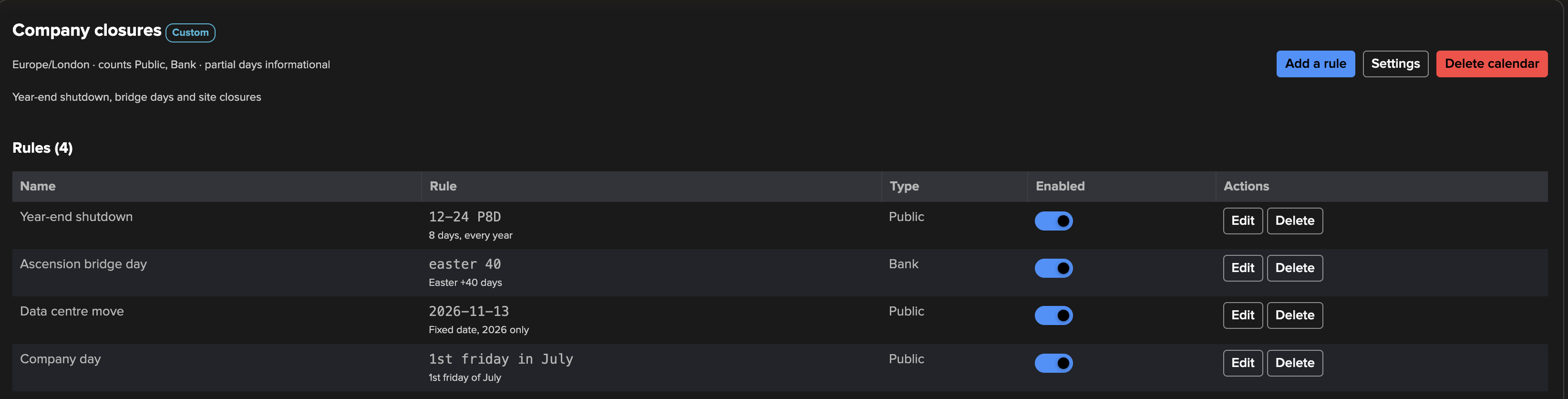
The holidays of an imported calendar come from the catalog: you cannot edit their rule, but you can rename them, change their type, or disable them with the toggle of the rules table. Disable a holiday rather than deleting it: the next Refresh from catalog would bring a deleted one back. Editing a rule changes past holidays too (within the two years kept), and the SLA history of those days follows.
Managing calendars
Settings → Enabled turns a calendar off: it keeps its rules but generates no holiday and applies to no tenant.
Refresh from catalog brings an imported calendar up to date with the catalog shipped with the installed TrackMe. The message names the holidays added and removed; the holidays you disabled stay disabled and your own rules stay. A calendar does not change by itself after an upgrade.
Delete calendar removes it; its holidays stop applying at once.
Limit |
Value |
|---|---|
Calendar name |
120 characters, unique |
Rules per calendar |
1000 |
Length of a period |
366 days |
Tenants
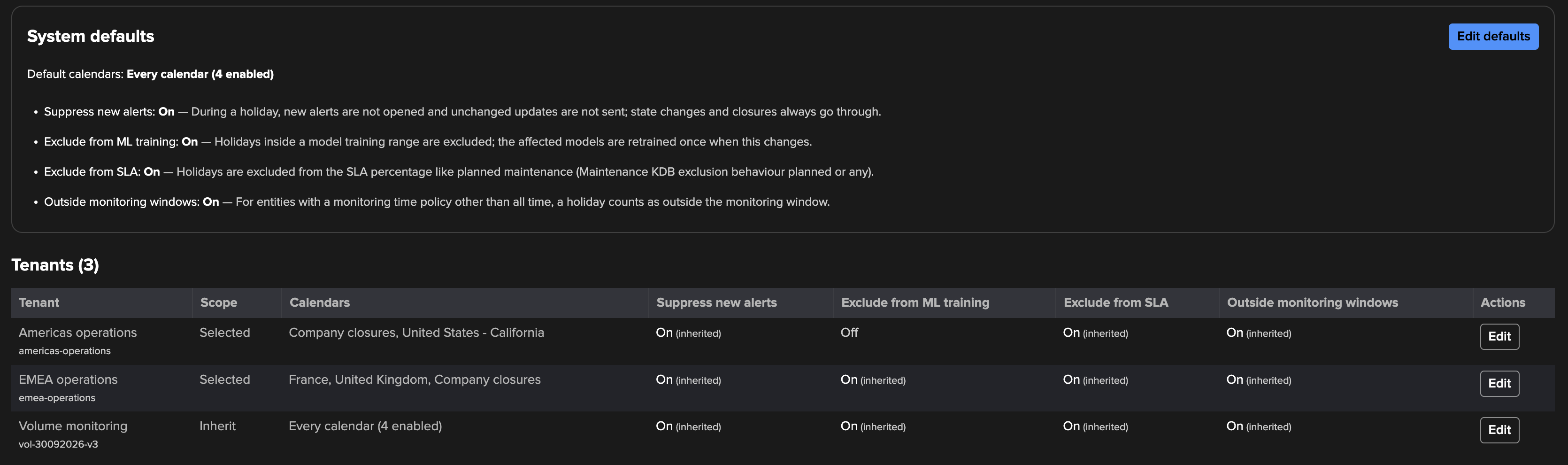
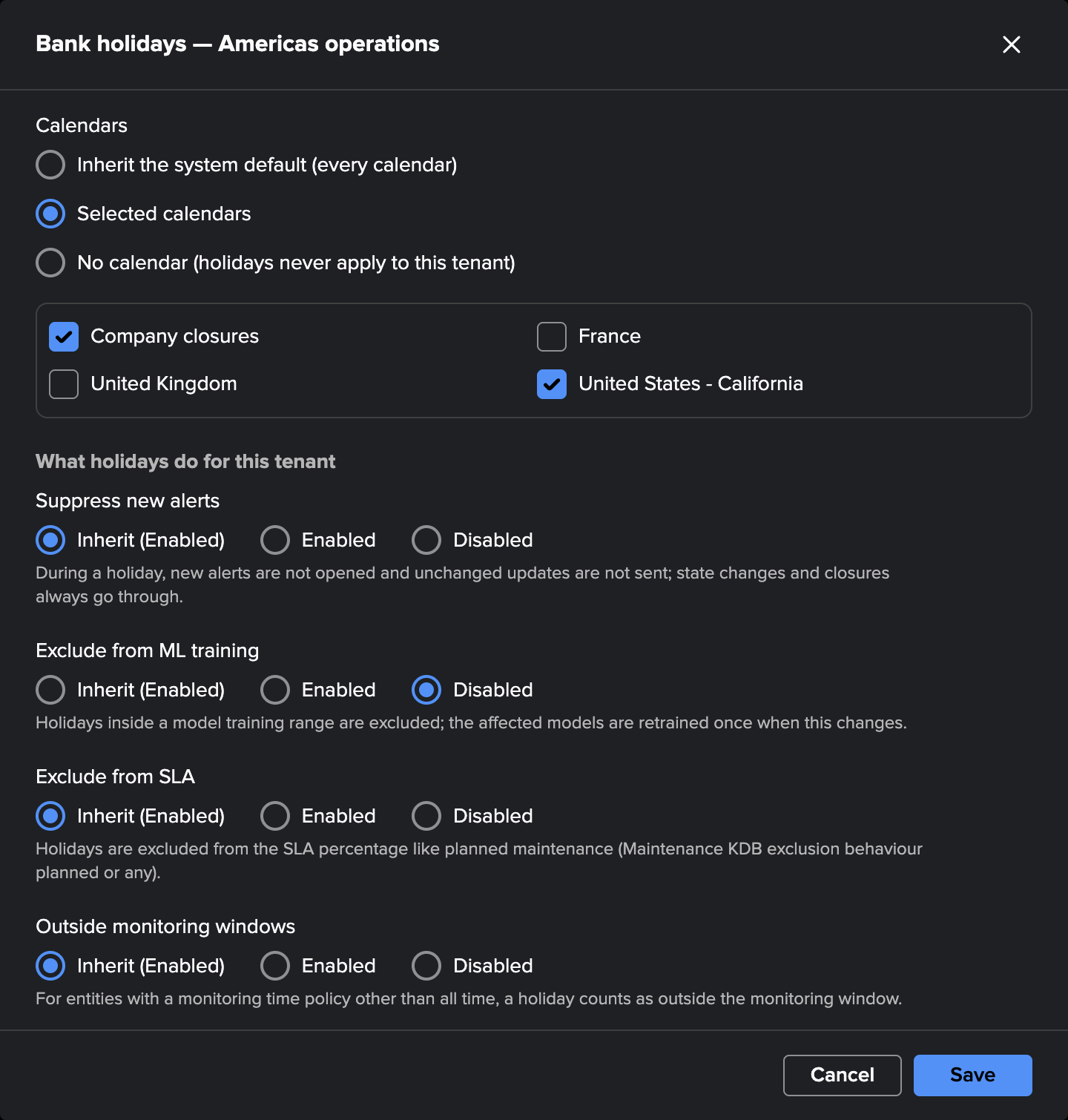
The Tenants & settings tab sets which calendars apply where:
the system defaults: by default every calendar, including the ones you add later;
each tenant either inherits the default calendars, uses selected calendars, or uses none (holidays never apply to it).
The table lists every tenant with its calendars and its effects, each marked as inherited or set for the tenant. A findings tenant is tagged with its type (UAM, Cribl Stream, Cribl Edge or Splunk HEC) and shows “—” for the effects that do not apply to it (see Findings tenants). Edit changes one tenant. The same options are in the tenant’s own configuration: Virtual Tenants → tenant menu → Configure tenant → Bank Holidays.
Note
One tenant, one set of calendars. There is no per-entity calendar, by design: if some entities follow another country’s holidays, they belong in another tenant.
What a holiday does
While a holiday of one of its calendars is active, a monitoring tenant (the DSM, DHM, MHM, FLX, FQM, WLK and VOL components) gets four effects. Each is on by default; turn one off for every tenant in the system defaults, or for one tenant with its Edit button. The findings tenants take only the effects that apply to them: see Findings tenants.
Effect |
What happens during the holiday |
|---|---|
Suppress new alerts |
TrackMe stateful alerts open no new incident and send no unchanged update. State changes and closures still go through, so an incident that recovers is closed as usual. The other alerts built in Tenant Home (component technical alerts, SLA breach alerts) are held during the holiday. |
Exclude from SLA |
The time is excluded from SLA percentages, like planned maintenance, when the
Maintenance KDB exclusion behaviour is |
Exclude from ML training |
Holidays inside a model’s training range are left out of ML outlier training (DSM, DHM, FLX, FQM, WLK and VOL models), so a quiet day does not become “normal”. When a tenant’s calendars or this switch change, the affected models retrain once, automatically, within about 30 minutes. |
Outside monitoring windows |
Entities whose monitoring time policy is not all time (business days, 08h-20h, your own rules) are out of monitoring, like at night or on a weekend. Their status message reads This entity is not currently under monitoring (bank holiday: <name>). Entities monitored all the time are not affected. |
Holidays never change a threshold or a delay.
Alerts benefit from holidays when they chain the maintenance macro, which every alert built
with the Tenant Home alert builder does. A custom alert search must chain the
trackme_apply_maintenance_mode_v2 macro to be held. Topology Alerts are not held by
holidays. The findings of the findings tenants follow their own rule, below.
Findings tenants
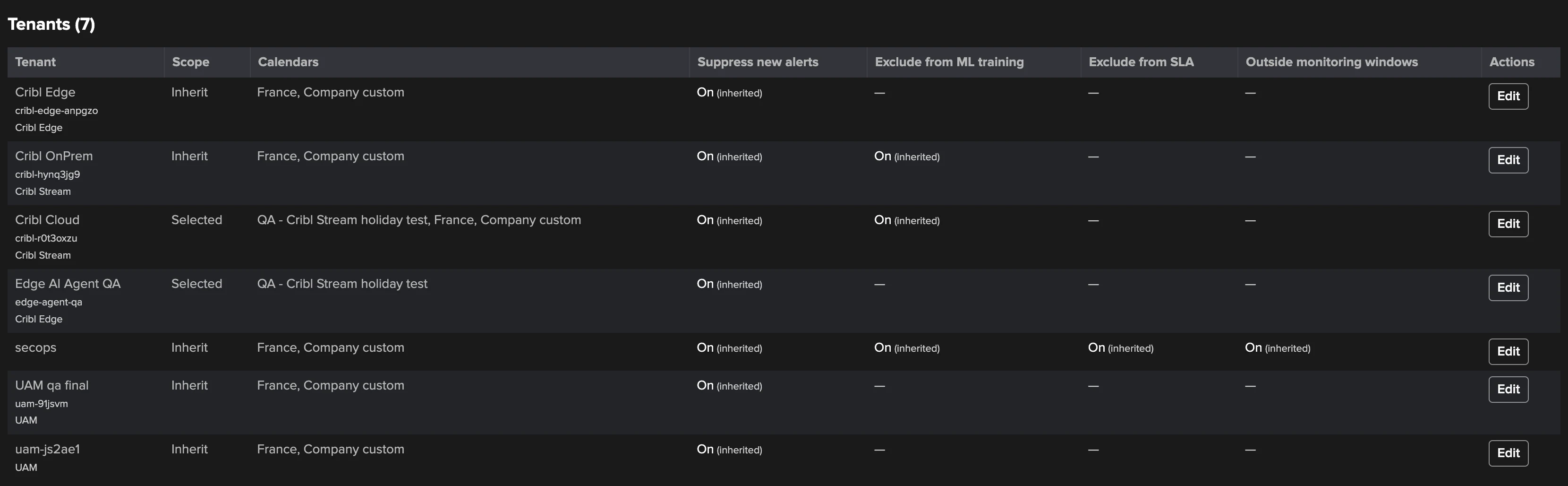
The dedicated findings tenants — User Activity Monitoring (UAM), Cribl Stream, Cribl Edge and Splunk HEC — take their calendars like every tenant: the system default calendars, unless the tenant selects its own or none, in Tenants & settings or in Configure tenant → Bank Holidays. They take only the effects that have something to act on, each on by default and inherited from the system defaults:
Effect |
UAM |
Cribl Stream |
Cribl Edge |
Splunk HEC |
|---|---|---|---|---|
Suppress new alerts (shown as Hold new findings) |
Yes |
Yes |
Yes |
Yes |
Exclude from ML training |
— |
Yes: the traffic ML models |
— |
Yes: the traffic models |
Exclude from SLA, Outside monitoring windows |
— |
— |
— |
— |
The Tenants & settings tab and the tenant’s Configure tenant → Bank Holidays offer only the effects that apply; the others show “—” and are refused, from the API too.
Hold new findings. While a holiday of the tenant’s calendars is active, the policies set to hold open no new finding. Each policy chooses in its editor, under During bank holidays: Hold new findings or Keep opening findings.
A finding already open is still evaluated: it is updated, escalated, and it recovers and closes as on any other day.
A held match does not reopen a resolved or dismissed finding.
After the holiday, a condition that is still there opens its finding as on any other day (on Cribl, once the policy’s consecutive failing checks are counted again).
If the calendars cannot be read, nothing is held: the policies open their findings as usual.
A policy set to keep opening findings is not affected by holidays.
The defaults hold what a holiday itself causes, or what can wait for the next working day:
Tenant |
Holds by default |
Keeps opening findings by default |
|---|---|---|
UAM |
The six inventory policies: the five scheduled search policies and the CSV lookup footprint. Nobody reviews them on a day off, and they are still there the next working day. |
The activity and resource policies (unusual activity on a day off is more telling, not less), and the custom policies unless their definition says otherwise. |
Cribl Stream |
Traffic outliers: traffic on a holiday is expected to differ from its model. |
Every other policy, so an infrastructure failure on a holiday still opens its finding. The Leader policies have no setting. |
Cribl Edge |
Fleet connectivity and Fleet coverage: laptops and desktops switched off for the holiday. |
Node connectivity (the nodes you selected as always connected) and every other policy. Leader availability has no setting. |
Splunk HEC |
Pool traffic drop, Token silence, Pool traffic outlier and Token traffic outlier: traffic on a holiday is expected to differ. |
Every other policy, so an endpoint failure on a holiday still opens its finding. |
The full list and where each run reports what it held are on the component pages: User Activity Monitoring, Cribl Stream, Cribl Edge and Splunk HEC.
Exclude from ML training on a Cribl Stream or Splunk HEC tenant: its traffic models do not learn the hours of its holidays. This applies from the next training run on: a model that learned a holiday before keeps it until it fades or is relearned, and nothing is relearned automatically when the calendars change.
Volume Outliers can also skip holidays in its working-day figures: none, the tenant’s calendars, or calendars you pick. That choice follows the tenant’s calendars, not the four effects, and is set in the Global license usage view (see Global license usage (VOL)).
System defaults
The defaults live in trackme_settings.conf, section [bank_holidays]. Change them in
Tenants & settings → System defaults → Edit defaults, which applies at once, or in
Configuration → System settings → Bank Holidays, which reaches alert suppression within
about 30 minutes.
Setting (UI label) |
Default |
Meaning |
|---|---|---|
|
|
The calendars a tenant inherits: |
|
|
Hold new alerts during holidays; on a findings tenant, hold the new findings of the policies set to hold. |
|
|
Leave holidays out of ML training, and out of the Cribl Stream traffic models. |
|
|
Exclude holidays from SLA percentages. |
|
|
Treat holidays as outside the monitoring windows. |
|
|
Upgraded deployments only, see below. |
Upgrading from an earlier version
Before TrackMe 2.4.19, holidays were a flat list of periods, each copied into the Maintenance KDB, and any active period held every alert of every tenant, closures included. At upgrade:
The periods become calendars automatically, within one health-tracker cycle (about 5 minutes) or at the first visit of the Bank Holidays page. A period on a holiday the country’s catalog calendar knows becomes that calendar; the other periods become custom rules in calendars named
<Country> - additional days,Custom holidays (<cc>)orCustom holidays. Drifted copies of floating holidays are dropped, and unusable periods are removed and reported in the audit trail. There is nothing to do.Same coverage on day one: every tenant inherits every calendar, and the four effects are on. Alerts and SLA keep the holidays they had; closures now go through.
Two effects are new, and on: ML training skips holidays (the affected models retrain once), and entities on a business-hours monitoring policy are out of monitoring on a holiday. Turn them off in the system defaults or per tenant if you prefer.
Stored SLA breach alerts are updated to carry their tenant, so the tenant’s calendars apply to them.
Maintenance KDB copies: the copies of migrated periods were removed. Older copies are kept, so past SLA percentages do not change. The Tenants & settings tab shows how many remain and, with Delete the legacy holiday copies after (days), deletes the copies whose holiday ended more than that many days ago, plus the copies of future days (the calendars cover those). It asks for confirmation: deleting a copy removes the holiday exclusion from the SLA history of that day.
Older API calls:
admin/update,admin/deleteandadmin/delete_allreturn HTTP 410;admin/createstill works and adds a full-day rule to theCustom holidayscalendar;listandcheck_activekeep their response shape.
Configuration Guardian
A few holiday systems are not computed by TrackMe: Islamic, Hebrew, Persian, Chinese,
Korean and Vietnamese lunar, Bengali, and equinox-based holidays. Their dates come from the
catalog, which covers ten years ahead (to 2036 in TrackMe 2.4.19). The
Configuration Guardian check bank_holiday_library_dates_expiring
raises one alert per enabled calendar holding such holidays: a warning when its dates end
within two years (tunable from 1 to 9), critical once they end this year. To resolve it,
upgrade TrackMe and Refresh from catalog, or add the days as custom one-off rules. The
alert clears by itself.
AI Assistant
When the AI Assistant is enabled, the Bank Holidays page has its own chat. It knows the calendars, their rules, the active and upcoming holidays and the system defaults, answers questions on the feature, and proposes changes (import a region, add a closure, disable a holiday) through the Concierge, for an administrator to approve.
Permissions and REST API
Reading calendars and holidays requires the TrackMe user capability
(trackmeuseroperations); changing calendars, rules, defaults and tenant options requires
the TrackMe admin capability (trackmeadminoperations): trackme_power cannot change
Bank Holidays. Calendars are global, so every TrackMe user sees every calendar. Every change
is audited in index=trackme_audit (object category bank_holidays). Bank holidays are
available in every edition.
Everything the page does is available under /services/trackme/v2/bank_holidays/. The
most useful endpoints:
Endpoint |
Purpose |
|---|---|
|
The calendars |
|
The generated holidays, by calendar, year or day range |
|
The holidays active now; with |
|
Import a country ( |
|
Add a rule to a calendar |
|
Set a tenant’s calendars ( |
|
Regenerate the holidays of one calendar or of all, after restoring a backup |
Import the holidays of Bavaria, then add a company day to a custom calendar:
curl -u username https://mysplunk:8089/services/trackme/v2/bank_holidays/admin/import_calendar \
  -X POST -d '{"country": "DE", "state": "BY"}'

curl -u username https://mysplunk:8089/services/trackme/v2/bank_holidays/admin/add_rule \
  -X POST -d '{"calendar_id": "<calendar_id>", "rule": "1st friday in July", "name": "Company day"}'
Limit a tenant to two calendars:
curl -u username https://mysplunk:8089/services/trackme/v2/bank_holidays/admin/update_tenant_scope \
  -X POST -d '{"tenant_id": "emea-operations", "bank_holidays_scope": "selected", "bank_holidays_calendars": "<calendar_id>,<calendar_id>"}'
Check what a tenant sees right now, from a search:
| trackme mode=get url="/services/trackme/v2/bank_holidays/check_active" body="{'tenant_id': 'example'}"
Each endpoint describes its parameters with describe=true; the
REST API page explains how to call them.
Troubleshooting
Symptom |
What to check |
|---|---|
A holiday did not hold an alert |
The tenant’s calendars (Tenants & settings); that the calendar is enabled; that
the holiday’s day type counts and it is not a partial day (greyed out =
informational); that the alert was built in Tenant Home or chains the maintenance
macro. |
A findings tenant opened a finding during a holiday |
That the policy is set to Hold new findings (its editor, During bank holidays) and that the tenant’s Hold new findings effect is on. A finding that was already open is evaluated as usual. The policy’s last run says what it held, or that the holidays could not be read. |
A change in Configuration → System settings is not applied yet |
Allow about 30 minutes for alert suppression; the page’s own Edit defaults dialog applies at once. |
Holidays are missing after restoring a backup |
Run |
A tenant still lists a deleted calendar |
A deleted calendar stays in the tenant’s selection and matches nothing: edit and save the tenant’s options to clean it. |
Time zones of a business-hours entity |
The weekday and hour part of a monitoring time policy uses the search head’s local time; only the holiday test uses the calendar’s time zone. |
See also
Maintenance mode — maintenance windows, the planned counterpart of holidays.
SLA policies — SLA accounting and exclusions.
VOL — Volume Outliers — working days in the Volume Outliers license view.