TrackMe Broker
TrackMe’s integrations make API calls: to a remote Splunk account on a Heavy Forwarder or a Deployment Server, to a self-managed Cribl Leader, to a webhook receiver on your network. From a Splunk Cloud stack those destinations cannot be reached, because the stack cannot connect into your network. A relay would not help: the connection would still start in the Cloud.
TrackMe Broker reverses the direction. A small Splunk add-on on a Heavy Forwarder on your side asks the stack for work, over the stack’s REST API on port 8089, makes the HTTP call locally, and posts the answer back. Every connection starts on your side. Nothing connects in, and you open no inbound firewall rule.
An account simply says how it connects: directly, or through a broker. The code that makes the call does not change.
Note
TrackMe Broker needs TrackMe 2.4.24 or later on the stack and, on the forwarder, Splunk Enterprise 9.4.x or later with the TrackMe Broker add-on 1.1.1 or later. It is compatible with Splunk FIPS mode. This page explains the concept and how to set it up. TrackMe Broker — manage and monitor goes through the two pages, everyday tasks and alerts. TrackMe Broker — in depth follows one call from end to end, with its timeouts, leases and failure codes. TrackMe Broker — security and cryptography covers pairing, key exchange, every cipher and the threat model.
How it works
There is no tunnel. splunkd gives an app request and response only: one reply per request, with no WebSocket and no way to push into an open connection. So work reaches a forwarder as the answer to its own request, and the two sides meet in the stack’s KV store.
A TrackMe feature makes an HTTP call for an account whose Connectivity names a broker. The transport turns that call into an envelope, and TrackMe queues it, encrypted, in the KV store.
The add-on on the forwarder holds a long poll open on the stack, a signed
pull. As soon as a request is queued, the stack answers that poll with it, encrypted for this forwarder alone.The add-on checks that the destination is among the targets declared on this forwarder, then makes the call. While it runs, it renews its claim on the request.
The add-on sends the response back in encrypted chunks. TrackMe reads them, and the feature receives an ordinary HTTP response, or a failure of the kind a direct call would have raised.
The stack’s side is a control plane: it queues, hands over and stores. The HTTP call itself only ever leaves from the forwarder, and only to a destination declared on that forwarder.
What can go through it
Destination |
Set Connectivity in |
What the broker may be asked to reach |
|---|---|---|
Remote Splunk account (a Heavy Forwarder, a Deployment Server, an on-premises search head) |
Configuration → Manage Remote deployment accounts |
The account’s Splunk URLs. A URL without a port stands for both 443 and 8089, as on a direct connection. |
Self-managed Cribl Leader |
Configuration → Manage Cribl connections, for a Self-managed Cribl connection |
The connection’s Leader URL. A Cribl Cloud connection stays direct. |
Webhook receiver |
Configuration → Manage Webhook accounts |
The account’s URL or secret URL, and its OAuth2 token endpoint. |
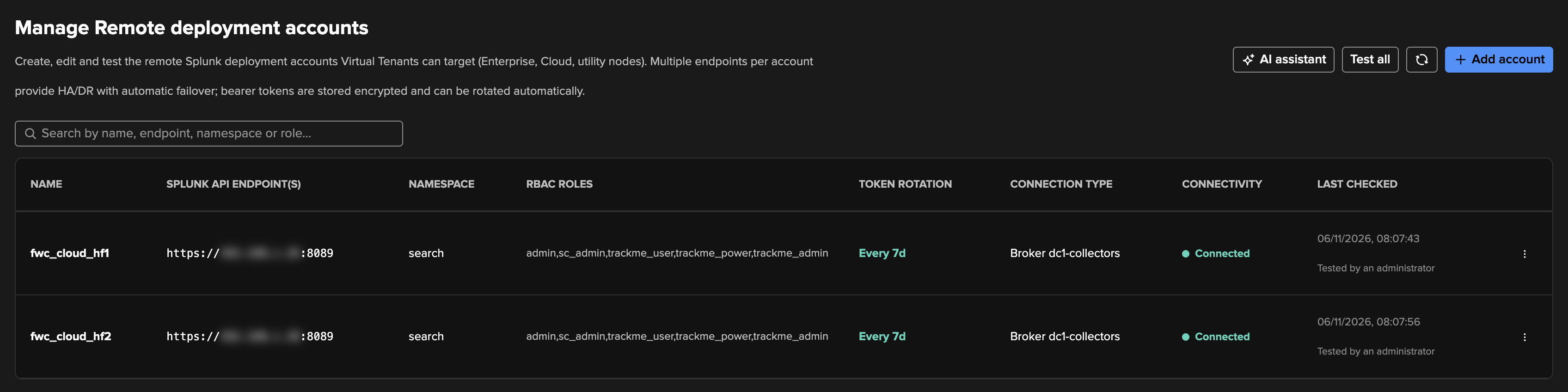
See Remote Splunk deployments, A self-managed Leader the stack cannot reach and A receiver the stack cannot reach for these accounts. The three Manage pages named above also show a Connection type column, reading Direct or Broker and its name. Connectivity in those lists stays the result of the last test.
The pieces
On the stack:
Piece |
What it does |
|---|---|
The transport |
Each account has a |
The store |
Seven KV collections hold the brokers, the forwarders, what they report, the queued requests, the claims, the response chunks and the pairings. Requests and responses are encrypted before they are written. |
The channel |
The operations a forwarder calls on port 8089: |
Manage TrackMe Brokers |
Configuration → Manage TrackMe Brokers. Add broker from a pairing code, see each forwarder with its fingerprint, test a broker, remove a forwarder, and read the exchanges in flight and the recent failures. |
Configuration Guardian |
Two checks, |
On the forwarder:
Piece |
What it does |
|---|---|
The modular input |
One long-running process per connection. Saving a connection creates it, and removing the connection removes it. It is the loop that pulls, and it starts the calls. |
The targets |
What this forwarder may reach: deny by default. Each target also decides TLS verification for its destination. The stack cannot widen the list and never receives it, only a digest and two counts. |
The executor |
Makes one HTTPS call: no redirects, no ambient proxy, bounded in time and size. It checks the address it actually reached before anything is sent. |
Identity and keys |
The forwarder’s own keys, and the stack’s public keys it pinned, in this forwarder’s
|
The add-on’s page |
Connections, the pairing code and fingerprint, targets, and a test for a target. |
What you need
Requirement |
Detail |
|---|---|
A Heavy Forwarder |
We recommend two dedicated instances, see Where to run the broker.
Splunk Enterprise 9.4.x or later, on your side, able to reach both the stack and the destinations. The add-on refuses to
start on a Splunk Cloud instance. It does not package the |
HTTPS to the stack’s management port |
On Splunk Cloud, add the forwarder’s egress address to the stack’s |
A Splunk account on the stack |
Holding only the role |
An HTTPS destination |
Plain HTTP is refused. |
The role trackme_broker holds one capability, trackmebrokeroperations. It imports no other role and has no
index, and the rights Splunk grants every role by default that a broker has no use for are turned off. So the role
is built to reach the channel and nothing else. Behind that capability, every operation is limited to
the broker that the signed call names, and register and pairing_status are the only ones a token alone can
use. The admin and sc_admin roles hold the capability too, but a broker should not run on them.
The token you create starts the connection, and TrackMe then renews it: see The forwarder’s token.
With a token the stack refuses, because it expired or was revoked, the add-on’s page says the stack refused the token, its
log reads disconnected:http_401, and in time Configuration Guardian raises broker_offline. To replace it, edit the connection on the add-on’s page: a
changed token applies within a minute, with no restart.
Where to run the broker
We recommend dedicated Heavy Forwarders: two instances that run the add-on and nothing else. A forwarder that already has another role, such as collecting data or serving as a Deployment Server, can host the add-on too.
In both cases the add-on runs in its own process and sends no events through Splunk’s data pipeline. A blocked forwarding queue does not stop the broker, and a broker that stops does not affect forwarding. What the roles share is the host:
What it affects |
Dedicated forwarders (recommended) |
A forwarder shared with another role |
|---|---|---|
Memory |
The host holds Splunk and the broker. Concurrent requests times Largest response (MB) is what the broker may hold at once: about 1 GB with the defaults of 4 and 256. |
The same amount comes on top of the other role. Check that the host has room, or lower these settings on the connection’s edit dialog. |
Restarts |
Only your maintenance of the broker’s own hosts stops it. |
Anything that restarts Splunk for the other role, such as a configuration push, stops the broker as well. |
Who controls it |
Only the administrators of these two instances decide what the broker may reach. |
Whoever administers the other role’s instance also decides what the broker may reach. |
Targets |
Every target is another host. |
A target can be this forwarder’s own management port, which needs care on a pair: see below. |
Whichever you choose
Use two forwarders. One forwarder is a single point of failure for every account behind the broker, not only for its own role. See Two forwarders, one broker.
Each forwarder must reach every target, including the other forwarder’s management port if an account targets it.
If a Deployment Server delivers the add-on, protect its
localdirectory. The connection, its keys and its token are stored there, ininputs.conf,trackme_broker_stacks.confandpasswords.conf, and the targets intrackme_broker_targets.conf. A Deployment Server update deletes or overwrites what an app generated locally, so the forwarder would lose its connection and have to be set up and accepted again. Exclude the directory inserverclass.conf, as described in Protect content during app updates:[serverClass:<your_class>:app:trackme_broker] excludeFromUpdate = $app_root$/local
Forward its logs to the stack, on a dedicated forwarder too. That is how
sourcetype=trackme:brokerreaches the_internalindex you search when a broker has a problem.Splunk Web must be on while you set up or change the connection, because the add-on’s page is served by it.
A universal forwarder cannot run the add-on, which needs Splunk Enterprise. We have not tested a search head cluster member or an indexer, and do not recommend them.
Set it up
On the stack, allow the forwarder’s address on
search-api, create the Splunk account holding onlytrackme_broker, and create a token for it.Warning
In Splunk’s New User form, untick Create a role for this user. Left ticked, the user gets a role of the same name with five extra capabilities, instead of
trackme_broker. Deleting that role afterwards can remove the user as well, and a token made for that user does not work again on a new user of the same name.On the forwarder, install the TrackMe Broker add-on and open its page. Its releases are on TrackMe Solutions Downloads, and its release notes give each package and its SHA-256.
Select Add connection and fill in:
Field
What to enter
Name
A name for this connection on this forwarder
Stack URL
https://<stack>.splunkcloud.com:8089Splunk token
The token you created. It is stored encrypted
Verify the stack’s certificate
On by default. Keep it on
CA file (optional)
A path on this forwarder, for a stack behind a private CA or a TLS-inspecting proxy
Proxy URL (optional)
Renew the token automatically
On by default. See The forwarder’s token
Renew every (days)
7 by default, from 1 to 365
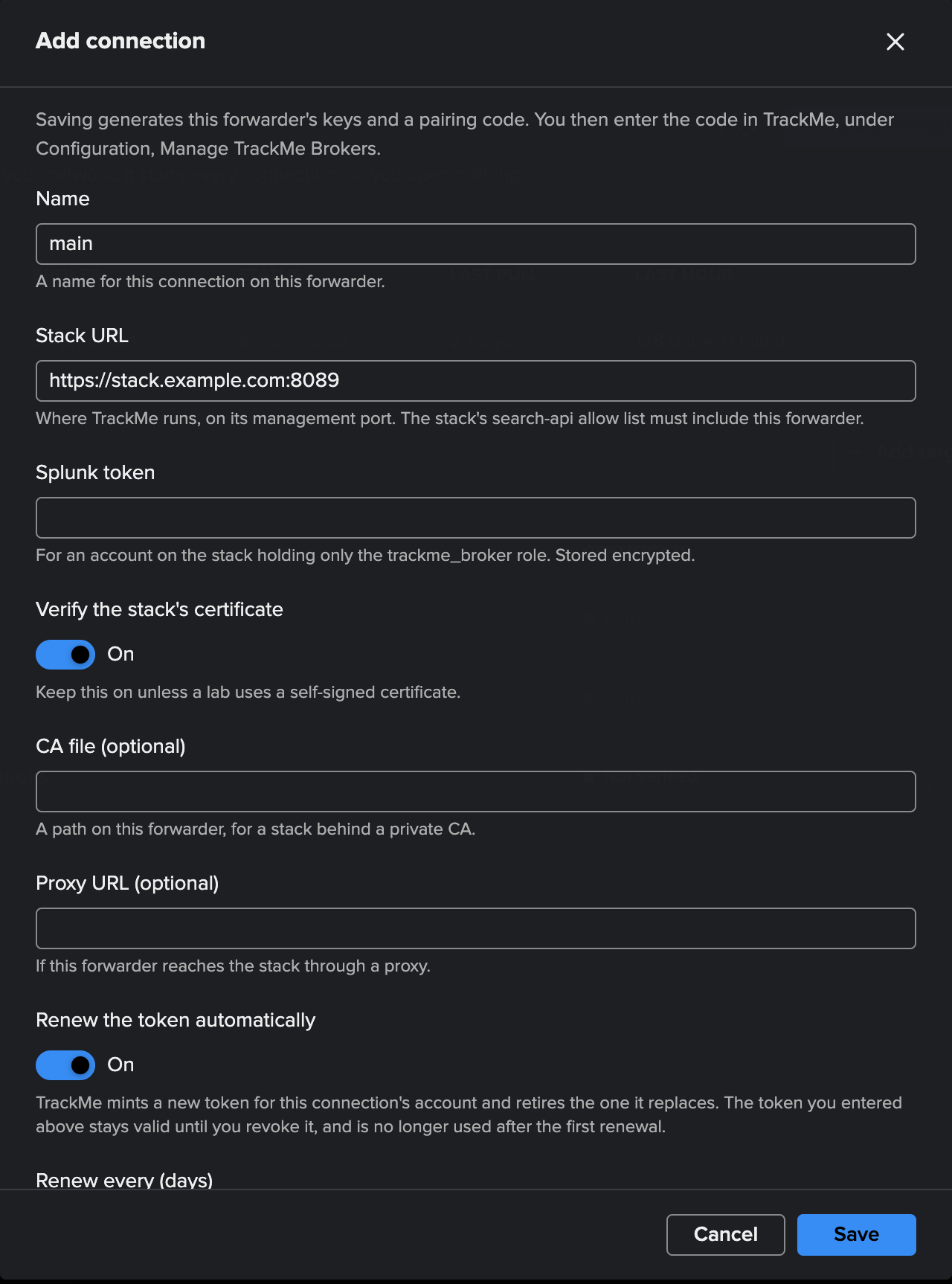
Saving creates the input. It generates the keys, registers them with the stack, and the page shows a pairing code, valid for 15 minutes, and a key fingerprint. A new code replaces the old one when it runs out.
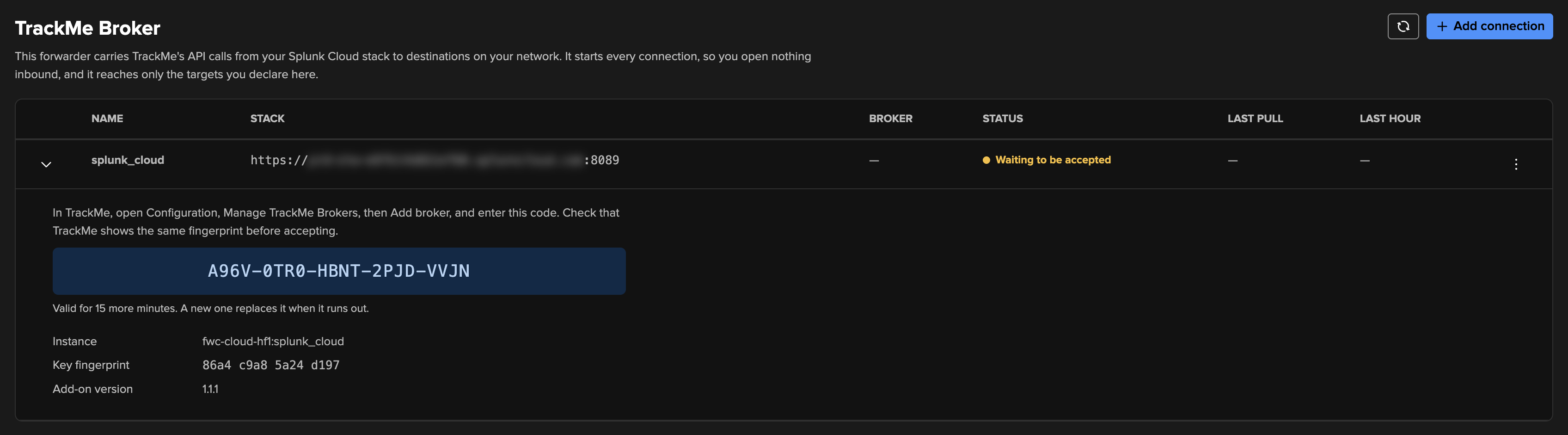
In TrackMe, open Configuration → Manage TrackMe Brokers and select Add broker. Enter the code and select Check code. Case and dashes do not matter.
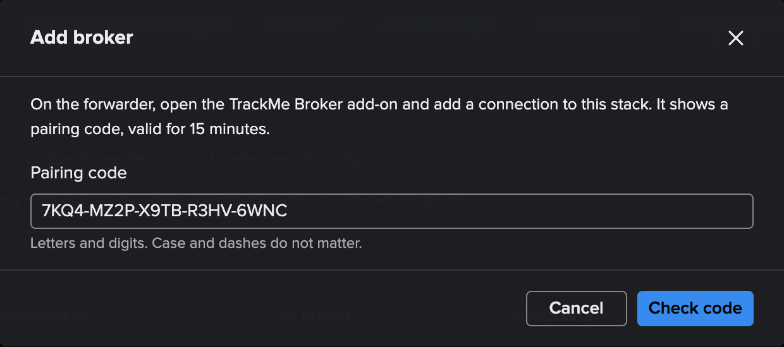
TrackMe shows what is asking to connect: the fingerprint, the instance, the host, the source address, the Splunk account and the add-on’s version. Compare the fingerprint with the add-on’s page. If it differs, stop. Nothing has changed yet. On Splunk Cloud, the source address is the load balancer’s, so do not read it as your forwarder’s.
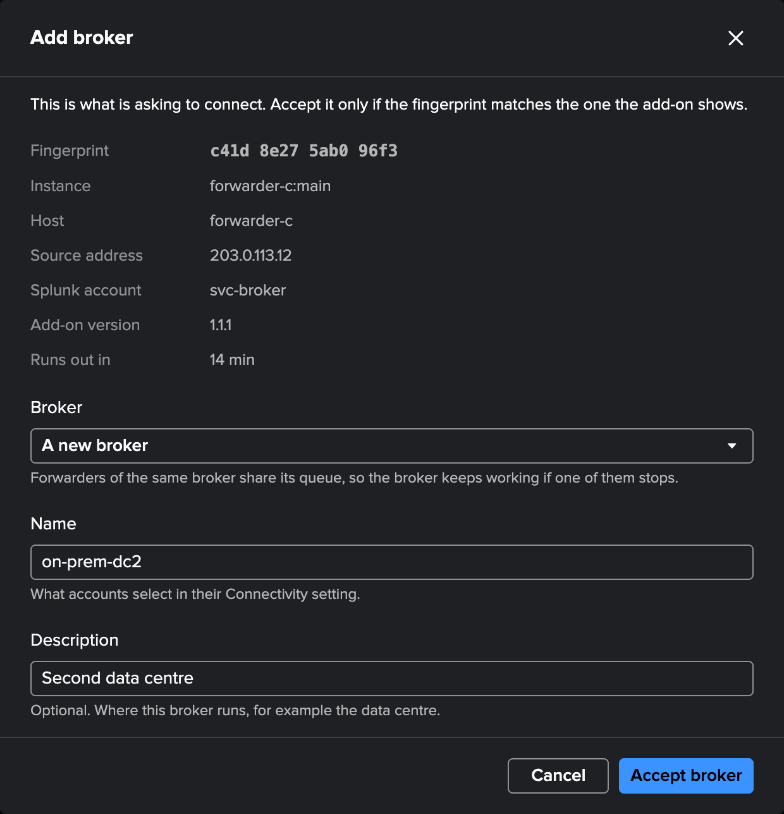
Choose A new broker and name it, or Add to an existing broker to make this forwarder part of a pool. Select Accept broker. The add-on reads Connected at its next check, which comes every 5 seconds. It then renews its token by itself, so the token you created is no longer used: see The forwarder’s token.
On the forwarder, select Add target for every destination this broker may reach. Nothing else is reachable, whatever the stack asks:
Field
What to enter
Name
A name for this destination
URL
https://host:port, optionally with a path. The host may start with*.for any subdomain. A path suits a webhook receiver, such ashttps://hook.example.com:8443/api/hooks. A Splunk or Cribl target covers the whole origin, because their clients start from the root.https://localhost:8089is this forwarder’s own management port, which only suits a broker with one forwarderVerify the certificate
On by default. Off keeps HTTPS and no longer checks who answers, which is for a Splunk management port on its default certificate
CA file (optional)
A path to a PEM file on this forwarder, for a private CA. The Splunk user must be able to read it
Test in the same dialog connects from the forwarder and shows what the destination presents and whether its certificate verifies. It sends nothing but a TLS handshake. A new target applies within a minute, and during that minute a call can read
target_not_allowed.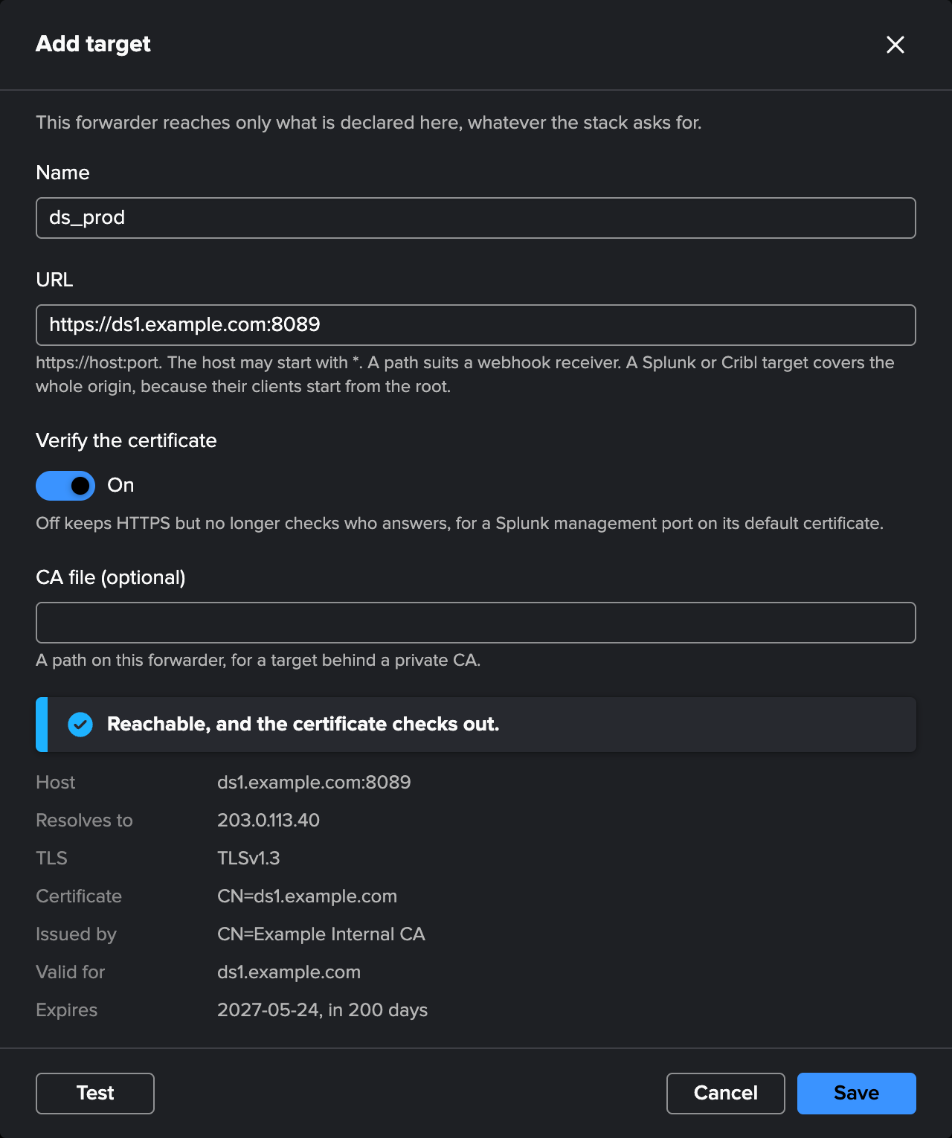
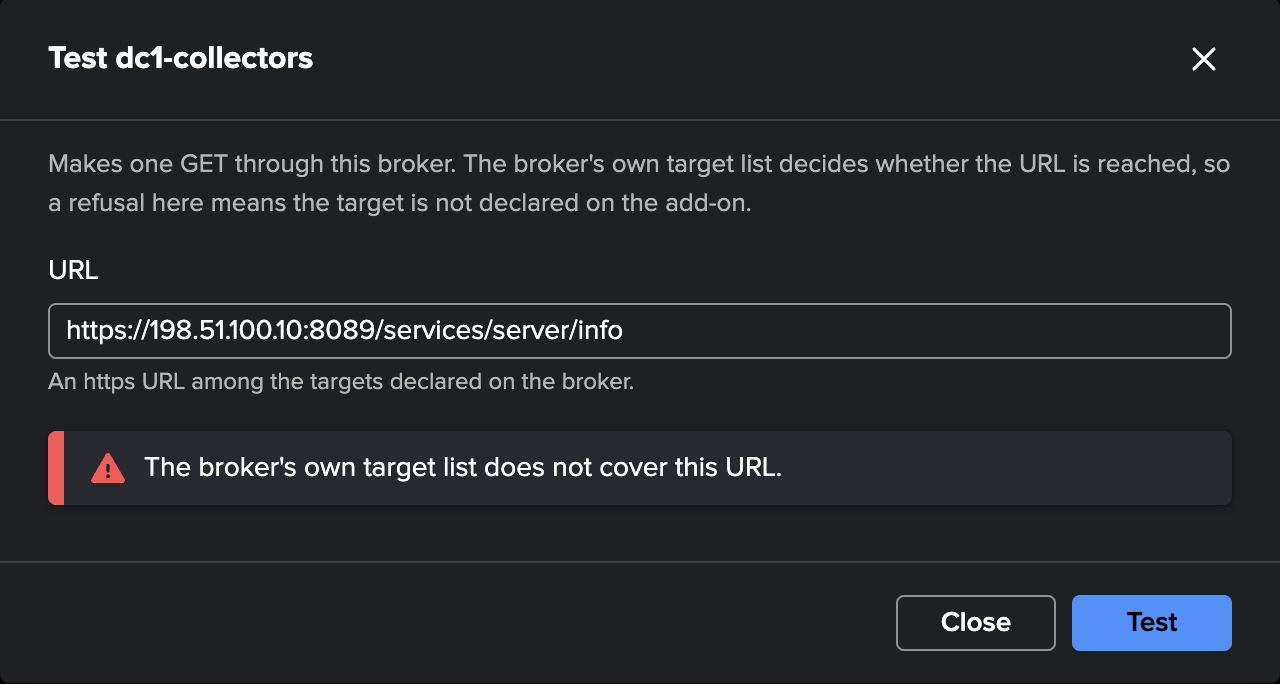
In TrackMe, on the broker’s menu, select Test and enter a URL among the targets. TrackMe makes one GET through the broker, and shows the target’s status, time and size, or a sentence saying why it failed.
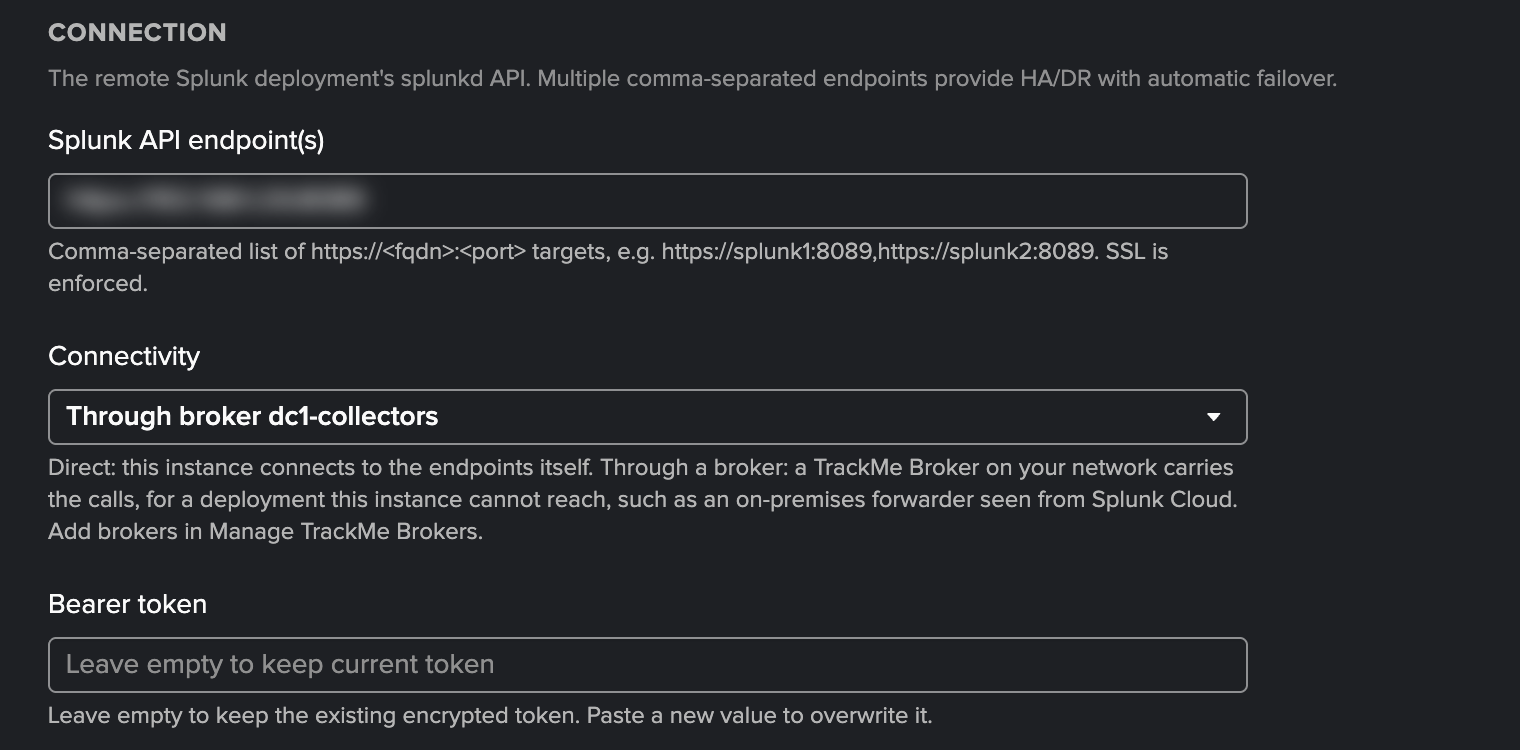
Set Connectivity on the account, and save it. A remote account is tested through the broker as it saves. A Cribl connection has Save and test beside Save. A webhook account is tested as it saves, when it is enabled.
If a call is refused because no target covers it, the add-on’s page lists the destination under Refused in the last hour, by host and port, and offers Add as target for you to confirm.
Important
TLS verification lives on the target. Through a broker, the account’s own TLS, proxy and allowed-destination options are not used, and those pages hide them: only the forwarder sees that destination. The forwarder reports a count of its targets without verification, never the list. Manage TrackMe Brokers shows it on the forwarder’s row, as a note, since verification off is a deliberate choice for a Splunk management port on its default certificate.
Through an egress proxy
Proxy URL on a connection, http://host:port, sends the forwarder’s calls to the stack through that proxy.
Proxies from the environment are never used. The proxy concerns the way to the stack only: calls to targets go
straight from the forwarder.
If that proxy inspects TLS, the forwarder sees the proxy’s certificate instead of the stack’s. Put the proxy’s CA in
the connection’s CA file and keep verification on. With the wrong CA the connection fails and does not fall back:
the add-on logs disconnected:unreachable:SSLError. A proxy that is down reads as
disconnected:unreachable:ProxyError, until it returns.
An inspecting proxy reads the outer call and not its content: see what a TLS-inspecting proxy sees.
Two forwarders, one broker
Repeat the forwarder’s steps on a second forwarder, and choose Add to the same broker. Both pull from the same queue, so both share the work, and when one stops the other carries on with no failover step. An account binds to the broker’s name and never to a host.
Give them the same targets. Each forwarder holds its own list, so a call could otherwise work or fail depending on
which one pulled it. TrackMe compares a digest of the lists, and flags the difference. Name hosts rather than
localhost, which means a different machine on each forwarder.
Keep Largest response (MB) the same too, for the same reason: the lower of the stack’s limit and the forwarder’s wins, and
the caller sees response_too_large. TrackMe does not compare this setting.
Manage TrackMe Brokers shows the state of the pool: Online, or Online, 1 of 2 while one is down. Configuration Guardian warns as well, so a pair does not run on one forwarder unnoticed until the second one fails.
The forwarder’s token
The forwarder’s Splunk token renews itself. TrackMe on the stack mints a new token for the same account, at the signed request of this forwarder, and retires the one it replaces. The role needs no extra capability, and a stolen token alone cannot do this, because renewal needs the forwarder’s signing key.
When it renews |
Where you set it |
|---|---|
Right after pairing, so each forwarder holds a token of its own |
Renew the token automatically, on the connection |
Every 7 days by default |
Renew every (days), on the connection, from 1 to 365 |
When a token that states an expiry has under 30% of its life left |
Renew the token automatically |
When you ask |
Renew token now, in the connection’s menu |
Token renewed, in the connection’s details, says when it last did. A failure at any step leaves the token in use working. It is tried
again every hour, and Token renewal says why it has not worked yet, without the connection reading as failed. TrackMe mints on the stack’s
system token. On Splunk Cloud this works with no capability added to the role: trackme_broker alone is enough. If Splunk ever
refuses, only renewal stops.
Important
You can revoke the token you created after the first renewal. TrackMe never revokes a token you entered: nobody here knows its id, and two forwarders may share it. It stays valid until you revoke it, and it is no longer used once Token renewed shows a time on every forwarder that used it.
Remove on a forwarder’s row in Manage TrackMe Brokers, or deleting its broker, revokes what TrackMe minted for that forwarder, and so does the stack when it drops a forwarder silent for 30 days. Bringing it back then takes a new token in its connection, and then a new code. A forwarder that never renewed still gets a new code by itself. Removing the connection on the add-on’s page does not reach the stack, so when you retire a forwarder, select Remove on the stack as well.
A token that cannot be revoked at that moment stays valid. Manage TrackMe Brokers warns you, and TrackMe keeps trying. If that forwarder may be
compromised, revoke its tokens in Splunk without waiting: their audience starts with TrackMe Broker.
The security page gives each step and what it proves.
Two independent tokens
A remote account through a broker involves two Splunk tokens, on two deployments. Each renews on its own schedule, and rotating one never touches the other.
The forwarder’s token |
The remote account’s token |
|
|---|---|---|
What it is for |
The forwarder reaching the stack’s channel |
TrackMe reaching the destination |
Issued by |
The stack, for the account holding |
The destination, for the account there |
Kept by |
The forwarder, in its connection |
TrackMe, in the stack’s credential store |
On the way |
In the |
Sealed inside the calls made over the first token, so that proxy cannot. The forwarder holds it in memory while it carries the call |
Renewed |
By TrackMe on the stack, at the forwarder’s signed request. The role needs nothing more |
By TrackMe, through the broker, as on a direct account. The account on the destination needs |
Set on |
The connection, on the add-on’s page |
The remote account, see automatic token rotation |
The first one |
Never revoked by TrackMe, yours to revoke |
Never revoked by TrackMe, yours to revoke |
What stays where
The destination’s credentials stay in TrackMe, and pass through the broker for each call.
A queued request and its response are encrypted at rest with the broker’s own key. What stays readable in the KV store is what an operator reads and what runs the queue: broker, method, destination host, status, caller, claim token, failure message.
A stolen token is not enough. Every call is signed with the forwarder’s key, accepted once by an administrator. Requests and responses are encrypted between the stack and the forwarder, including through a TLS-inspecting proxy.
The forwarder’s token renews itself, see The forwarder’s token. The token you entered stays valid until you revoke it.
Who may use an account does not change: the same roles apply as on a direct connection.
The forwarder logs every call in
$SPLUNK_HOME/var/log/splunk/trackme_broker.log, with its id, method, destination host and port, status and time, never a header, a query string or a body. The forwarder sends that file to your_internalindex like its own logs, assourcetype=trackme:broker. The times in the file are UTC, whatever the host’s time zone, and searches in Splunk still show each user’s own zone.
What to expect when something fails
What you see |
What it means |
|---|---|
|
No forwarder has been seen in the last 90 seconds. Calls fail at once rather than waiting. Configuration Guardian raises
|
|
The forwarder has no target covering this destination. A target just added applies within a minute. |
|
The connection to the destination never opened, so nothing was sent. |
|
The forwarder refused the destination’s certificate, at the handshake, so nothing was sent. Use Test on the target. |
|
The queue of 500 requests is full. |
|
The response is above its limit, see Limits. |
|
A forwarder stopped during a call that is not safe to repeat. The call may have reached the destination. |
|
A TrackMe key has not reached the search head that answered yet. Nothing changed, and a call asks again for as long as its own time lasts. If this never clears, see keys on a search head cluster. |
|
On the add-on’s page: TrackMe could not mint a new token on the stack. The token in use keeps working, and this is tried again every hour. |
A call that is safe to repeat goes back to the queue when a forwarder stops, and another forwarder runs it. Disabling a connection stops it within a minute. The complete list is in Failure codes.
Limits
Limit |
Value |
|---|---|
Largest response |
256 MiB for a remote search, whose results come back as one HTTP response, and 64 MiB for any other call. The forwarder’s own setting can lower that. A response also stops at 256 chunks of 768 KiB of gzip, 192 MiB compressed, which search results normally fit |
Largest request body |
8 MiB, and it is not chunked. A larger one is refused at once with |
Longest exchange |
One hour |
Queued requests per broker |
500 |
Concurrent calls per connection, by default |
4 |
A direct account has no size limit on the one response that holds a search’s results, so a broker adds this ceiling.
Concurrent requests and Largest response (MB) are on the connection’s edit dialog. A change applies by itself within about three minutes: the connection stops taking work, gives running calls up to 60 seconds to finish, and restarts.
These are limits, not performance figures. A brokered call makes more round trips than a direct one, and a remote search is several calls, so a call through a broker takes longer than the same call made directly.
The limits section of the in-depth page lists them all.
See also
TrackMe Broker — manage and monitor: the two pages, everyday tasks and alerts.
TrackMe Broker — in depth: the life of one call, timeouts, pools, leases, every failure code.
TrackMe Broker — security and cryptography: pairing, key exchange, ciphers, FIPS, the threat model.
Remote Splunk deployments, Cribl connections and Webhook accounts: the accounts that can use a broker.
Configuration Guardian: the checks that watch a broker.
TrackMe Broker compatibility: the Splunk versions and FIPS mode.