Data usage reference: how each claim is processed
This page is the reference for the Data usage tab of a User Activity Monitoring tenant (see the Data usage section of the UAM guide). For each kind of claim a search can make about an index, it shows how Data usage records the claim, how the map interprets it when you read the view, worked examples and an explicit list of what it cannot establish.
The same text and diagrams are in the product: every How this works link of the Data usage tab opens them, and the Explain list selects the topic. The collection behind the tab (its report, facts, limits and REST operations) is described in Data usage in the UAM in-depth reference.
To see the facts behind a view, use Open in Search in the three-dots menu of any tile, chart or table of the Overview, Value & cost, Knowledge objects and Evidence views. It opens the search over the recorded facts that view reads, with a note on what only the map adds when you read the view: the catalog expansion of wildcards, the role scopes and the VOL volumes.
The examples use generic index and account names (web, fw_*, hr_payroll, analyst).
Splunk’s role search behaviour described here was measured on Splunk Enterprise 10.6 and Splunk Cloud 10.7.
How Data usage works
What it means. This view connects known indexes to searches UAM observed. It helps you investigate usage and identify data ingestion worth reviewing.
Where it comes from. The Inventory tracker lists indexes for each monitored search head tier. The dedicated Data usage collector reads audit observations and extracts index references from search text, resolving supported macros, event types, saved searches and data models from collected definitions. Explicitly linked VOL and DSM tenants contribute positive ingestion observations. The map compares these with retained search facts.
What it cannot establish. A reference does not prove that an index returned events, that results were consumed, or that an index has business value. Counts cover the selected period and scope, not all time. Sourcetypes are best effort. The map relies on the UAM contract: every search head tier of a tenant reads the same indexing layer, so one index name is one index. Watch a separate Splunk deployment with its own tenant.
What to do next. Start with Overview, investigate an index in Index activity, or use Value & cost to weigh each index’s volume and cost against its reads: indexes no one accessed, indexes only wildcards reach, and the least read for their volume. Check Evidence and Collection health before acting on an absence.
From an audit line to a verdict


Splunk writes an audit record for every search it runs, with the account, the app, the dispatch origin (provenance) and the search text exactly as it was typed. It does not record which indexes the search read. Data usage therefore works from what the search asked for: its index claims.
A dedicated Data usage collector reads the search lines of the audit trail on its own schedule (every 15 minutes by default). It reads the SPL of each search, splits it into its pipeline stages and subsearches, and extracts the index and sourcetype terms of each stage. Macros, event types, saved searches and data models are resolved from the knowledge object catalogs that UAM publishes for the same search head tier. The SPL itself is never stored in the facts; it is held in memory while the batch is extracted.
A search is counted once, by rule: at its grant on the legacy audit format (Splunk writes it when the search starts), otherwise at its structured completion. A canceled or failed search still counts: it ran and read its sources. A search Splunk refused after granting it (a concurrency or disk quota) is not counted. Within one audit batch, each index named by a search receives one unit of weight, whatever the number of paths or sourcetypes that name it.
The collector writes facts (sourcetype trackme:uam:data_usage) to the tenant’s evidence index: per window, tier, emitter, account, app, origin, path, index, sourcetype, direction and scope, with their counters as index-time fields. The map reads these facts through one tstats over those fields, so a long period never reads raw events for its counts.
Everything that depends on the current state of the deployment is applied when the map is read, not when the facts are written: wildcard patterns are expanded against the index catalog, role scopes come from the current users and roles catalogs, and incoming data, volume and declarations come from their latest publication. This is why a change of roles or a new index changes the view of past facts.
The map has one row per index for the whole indexing layer: every search head tier of a tenant searches the same indexers, so the same index name on two tiers is one index. A tier filter scopes the facts and the catalog shown; the verdict that decides a review candidate is taken on every tier together.
Limits
An index claim is what the search asked for, never proof that the index returned events, that the results were looked at, or that the data has value.
The figures are index claims, not distinct searches: one search that names three indexes counts once on each of them.
A collector batch retried after a write failure cannot be told apart from the first write by the indexed counts; its receipt reports it.
Older facts keep the interpretation they were written with: a change of the extraction or of the catalogs does not rewrite them, except for what the map applies when it is read.
Every kind of claim at a glance
Each line of the table below is a kind of claim a search can make about an index, with what Data usage records for it and what it does to the index’s verdict. Only two kinds establish that an index was searched: a named source read on the search head side, and a named term in the search the indexers received. Everything else is context: it is shown, never counted as use.
Claim |
Example |
Recorded as |
Verdict effect |
|---|---|---|---|
Named read |
|
A read of web, path literal |
Searched · Read by name |
Wildcard reference |
|
The pattern; expanded when the map is read, to the known indexes its reader could search |
Indirect only · Wildcard only |
Definition |
|
What the definition names, path macro:… / eventtype:… / savedsearch:… / datamodel:… |
As the indexes it yields: named or wildcard |
Denied by roles |
|
Counted apart as a denied search |
None: never a read |
Index-less search |
|
Unresolved, path role_default; the role scope shown as context |
None: never attributed |
Late filter |
|
A late reference of web |
None |
Negation |
|
Nothing counted for web |
None |
Write |
|
A write reference of summary_web |
None |
Writing alert action |
A saved search’s summary indexing or Log event action targets summary_web |
A write reference of summary_web on each run |
None |
Indexer confirmation |
The search the indexers received names web |
A served fact, never added to the search head counts |
Searched when the search head side has no named read |
Declaration |
A saved search definition names web |
A declared reference of web |
None: a definition is not a run |
Incoming data |
VOL or DSM saw web receive data |
Receiving, with volume and cost from VOL |
None: decides which indexes are candidates |
Excluded app read |
A search of the trackme app names web |
Shown, never counted |
Excluded apps only, when nothing else reads it |
Limits
The table describes the default view: internal indexes hidden and the configured apps (TrackMe and the CIM acceleration app by default) excluded.
Named reads
What it means. Source reads count observed search claims that name the index as a source, directly or through a supported definition. They describe the search request, not bytes read or returned events.
Where it comes from. Audit activity extracts source terms such as index=example_web. Index
totals are deduplicated within each audit batch; path and sourcetype rows describe joint references and may
overlap.
What it cannot establish. Do not add path or sourcetype counts to obtain a unique-search total. Older partial claims and later completions can remain in separate collection windows. Last searched is the latest named source claim in the selected evidence.
What to do next. Open Detail to see the account, app, source path and origin together. Fetch SPL examples to inspect the actual retained search text.
A literal index term


A named read is a positive, literal index term in the base search of a search or of one of its subsearches.
Every form Splunk accepts is read: index=web, index="web", index::web, index
= web and index IN (web, auth), whose members are one read each. Index names are compared
lower-cased, as Splunk stores them.
The commands whose terms select data are the search itself and search, where, tstats, mstats, mcatalog,
metadata, dbinspect and eventcount. Their index terms count, so | tstats count where index=web
and | metadata type=hosts index=web are named reads of web.
The extraction reads syntax; it does not evaluate Boolean logic. index=fw_emea OR
index=web records a read of each index. A term inside a subsearch (append, join, a [ … ] argument)
is a source term of that subsearch and counts as a read too.
When a search names exactly one literal index in its base search and its extraction is complete, the sourcetypes it matched are paired with that index from the completion’s per-sourcetype event counts. With several indexes, a wildcard or a subsearch, no index and sourcetype pair is invented.
Last searched is the latest time a named read of the index was recorded in the selected evidence. Searches counts named reads; Completed counts the reads whose completion was recorded.
Worked examples
Search or case |
What Data usage records |
|---|---|
|
One named read of web. The completion’s event count for access_combined is paired with web. |
|
One named read of fw_emea and one of fw_amer. |
|
One named read of web: tstats selects data with its where clause. |
|
Named reads of web and of auth (a subsearch’s base search is a source). |
|
Named reads of both: the extraction does not simplify Boolean SPL. |
Limits
A named read is a claim from the SPL. A search for an index that held no event in its time range still counts; so do metadata, dbinspect and eventcount, which read no raw event.
A search whose retained SPL was truncated never yields a named read: its missing suffix could negate a term it kept. It is counted as unresolved.
A named index the reader’s roles do not allow is not a read: see Role search restrictions.
Counts are per audit batch and per index, not a deployment-wide count of distinct searches.
Wildcard references
What it means. The index matches a wildcard source term, but UAM has no named source read for it in this selection.
Where it comes from. For example, index=example_* is expanded against the collected index
catalog for the same search head tier, then narrowed to the indexes the search’s account could search: its
roles’ allowed indexes and the index terms of their search filters. Matching indexes receive indirect
references.
What it cannot establish. A broad index=* search can reference many indexes without proving
that each supplied events or useful results. A field search filter (for example sourcetype=…) can
still empty an allowed index. Indirect references are not named reads and are not a non-use verdict.
What to do next. Review the original SPL and its owner before judging value. Compare with ingestion volume and operational requirements outside this view.
Expansion, then narrowing to the reader
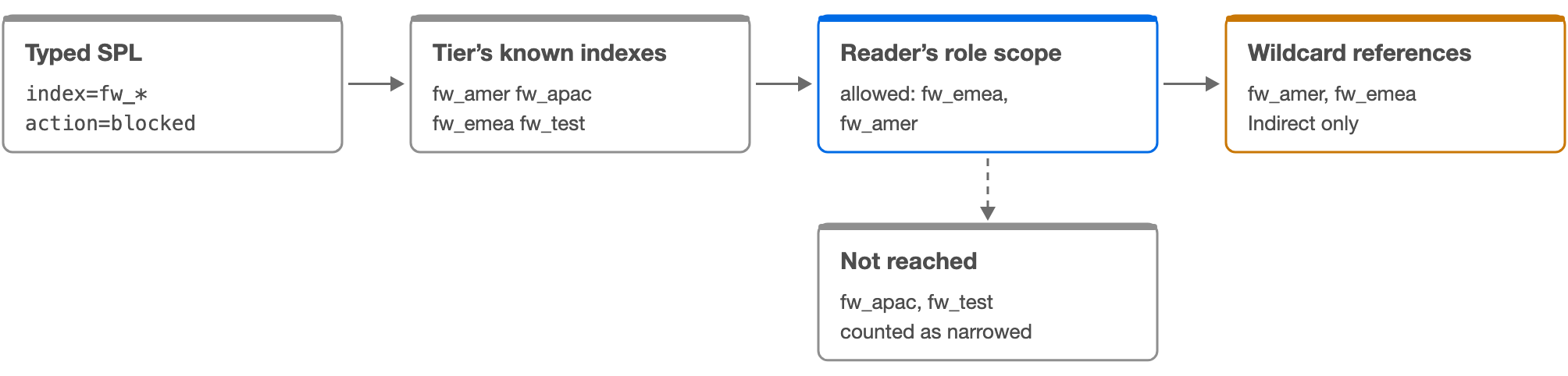
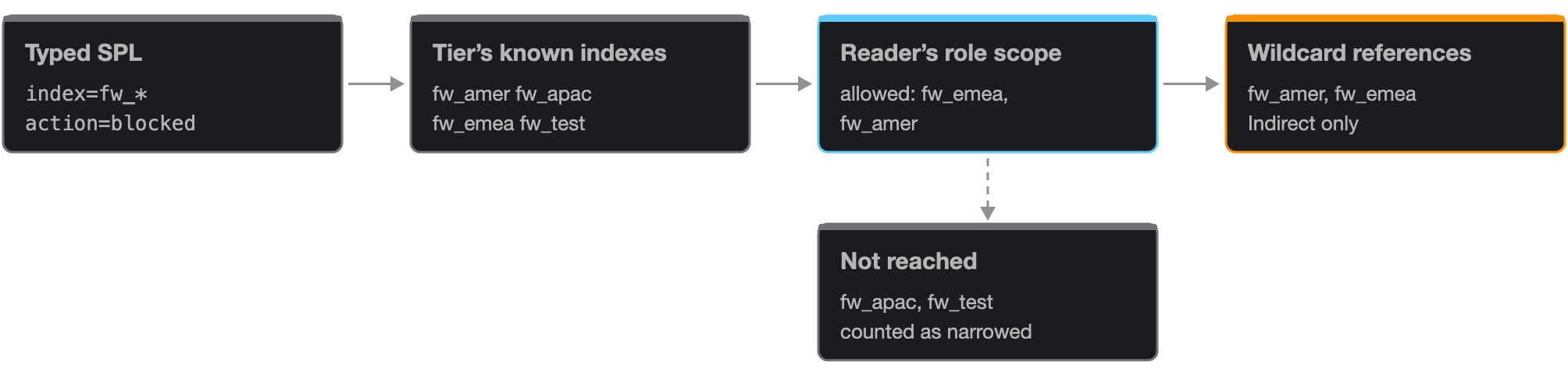
A wildcard term (index=fw_*, index=*, index IN (fw_*, web)) is kept in the
facts as the pattern itself. The collector never knows which indexes matched it, and does not try.
When the map is read, the pattern is matched against the indexes known for the same search head tier: the tier’s index catalog, listed by the Inventory tracker, plus any index a linked VOL or DSM tenant or a published knowledge object names for that tier. A new index is matched as soon as one of these sources names it: an index only the catalog will know is matched after the next catalog listing, while one a linked tenant or a published object already names is matched right away.
The matches are then narrowed to the reader’s role scope, per account: the same pattern typed by two accounts can reach different indexes. Every remaining match receives one wildcard reference (the Indirect column); the matches the reader could not search are left out and counted in Evidence as wildcards narrowed.
A wildcard is a reference, not a read, because Splunk does not report which of the matched indexes held events in the searched range. Splunk searches every allowed index that matches; whether one of them supplied data is not in the audit.
Every pattern, typed or from a role (allowed, disallowed, filter and default indexes), is matched with
Splunk’s index pattern rule: case-insensitive, * as the only wildcard, and * never matching an internal
index (a name starting with _) unless the pattern itself starts with _. Internal indexes are hidden from the
view unless Include internal is on; with it on, index=* still does not reach them, while
index=_* does.
When the source tier of a fact is unknown (its emitter does not map to a single tier), the pattern is kept as recorded, unexpanded, and never assigned to another tier’s indexes.
Worked examples
Search or case |
What Data usage records |
|---|---|
|
By an account allowed fw_emea and fw_amer: wildcard references on fw_emea and fw_amer only. fw_apac and fw_test are not reached (one wildcard narrowed, two matches removed). |
|
By an account whose roles allow *: a wildcard reference on every non-internal index of the tier. |
|
Wildcard references from fw_*; fw_emea is also a late reference, which is not a read. |
|
With Include internal on, by an account whose roles allow _*: wildcard references on the internal indexes. |
Limits
An account whose role scope cannot be established keeps every match in the catalog (see Role search restrictions).
The expansion is bounded per request (3 CPU seconds of the reading thread, 200,000 joint rows). Past the bound the answer is partial (expansion_limit) and candidates are withheld.
Why Wildcard only is never a verdict of non-use


An index reached only by wildcard references has the verdict Indirect only and the value class Wildcard only. It is not proven used: a broad pattern reaches it whether or not it held events. It is not proven unused either: the search may have returned its events. So Data usage keeps it as a review candidate, in a group of its own, and never folds it into No reader.
The role scope is an upper bound. A field term of the search or of the role search filter
(sourcetype=…, host=…) can leave an allowed index without any event, and only the
events would show it. Data usage never evaluates field terms per index.
Worked examples
Search or case |
What Data usage records |
|---|---|
|
A wildcard reference on every allowed index, although only the indexes holding cisco:asa events returned anything. |
Limits
Accesses (the Overview weight) add wildcard references to named reads: one
index=*search adds one access to every index it reaches. Read the Wildcard only share before judging a much-accessed index.
Role search restrictions
What it means. Splunk searches only what the account’s roles allow. A wildcard reaches only the indexes its account could search, and a search naming an index its roles do not allow returned nothing: it is counted as denied, never as a read. A search naming no index can reach the indexes its role search filter names, else its default indexes, within what its roles allow: shown as context on the unresolved searches, never attributed (an index-free command reaches none).
Where it comes from. The published users and roles catalogs of each search head tier: the roles an account holds and imports, their allowed and disallowed indexes, and the index terms of their search filters. Splunk enforces these silently: the audit keeps the search as typed.
What it cannot establish. This is what the roles allowed, an upper bound: a field filter such as
sourcetype=… can still empty an allowed index. The current roles apply to the whole period. An
account or role missing from the catalogs, or a tier whose listing saw only its own account, keeps every
wildcard match.
What to do next. Check Evidence for how many accounts were resolved. Before acting on an index reached only by wildcards, compare its readers’ roles with the index; a denied read is an index the account asked for and could not read, even when the same search read other, allowed indexes.
How an account’s role scope is built


Splunk restricts every search to its account’s roles and records none of it: the audit keeps the SPL as typed, the search head appends the roles’ search filter to the search it sends the indexers, and the indexers apply the allowed indexes without a message or an error. Data usage rebuilds the restriction from the users and roles catalogs UAM publishes for each search head tier.
The scope of an account is: the union of the allowed indexes of its roles and of every role they import (followed transitively); minus every disallowed index, which wins over any allowance; narrowed by the index terms of the roles’ search filters.
Search filters combine as Splunk combines them. An empty filter is ignored, and a role without a filter does
not open what another role’s filter closes. Filters of several roles are joined with OR. Only positive index
terms of a filter narrow the indexes (index=…, index::…, index IN (…)); a
negation, a field term or a filter that cannot be read restricts no index.
Patterns are matched as Splunk matches index patterns: case-insensitive, * only, and * never matches an internal index.
The scope is computed when the map is read, from the catalogs as they are now, and applies to every fact of the period. Nothing is written on the facts.
Worked examples
Search or case |
What Data usage records |
|---|---|
Roles: analyst (allowed fw_*, disallowed fw_test) imports base (allowed web) |
Scope: fw_* and web, without fw_test. |
Roles: analyst (allowed *) with search filter |
Scope: fw_emea and fw_amer. |
Roles: analyst (allowed *, no filter) and auditor (allowed *, filter |
Scope: audit_* only: the unfiltered role does not lift the other role’s filter. |
Limits
An upper bound: a field term of the filter (
sourcetype=nginx:*) can still empty an allowed index.Splunk’s roles endpoint does not return srchFilterSelecting, so every filter is read as selecting (joined with OR). An eliminating filter (joined with AND in authorize.conf) is widened, never narrowed.
No scope is established, and every wildcard match is kept, when: the audit did not report the account; the account is not in the users catalog; one of its roles is missing from the roles catalog or was listed before this version; the tier’s users and roles listing saw only its own account; the catalogs are not published yet; or the roles catalog holds more than 5,000 roles.
The current roles apply to the whole period: a role changed last week rewrites the view of the weeks before. A role change also takes a few minutes to reach the indexers (knowledge bundle replication), during which Splunk applies the previous definition.
Denied by roles


A literal index that the reader’s role scope does not allow is counted as a denied search on that index (the Denied by roles tile of the index detail), with the accounts that asked. It is never a read and changes no verdict: Splunk served nothing.
Only reads are checked. A write (collect) and a late filter keep their own meaning. An indexer confirmation of a denied index is not counted either.
Worked examples
Search or case |
What Data usage records |
|---|---|
|
By an account whose roles allow fw_*: one denied search on hr_payroll, no read. |
|
By the same account: a denied search on hr_payroll and a named read of fw_emea. |
Limits
A denial follows the roles’ definition. It is not corroborated by the search’s completion (a zero scan count is also what an empty time range gives).
A denied search means that the denied index term returned nothing for its account, not that the whole search failed: the same search can read other, allowed indexes (the second example). It is a hygiene signal, never a use of the denied index.
Role filter terms in what the indexers received
Splunk appends the role search filter to the search the indexers receive. When the filter names indexes, the indexers’ log shows index terms the account never typed. A served index term equal to one of the reader’s own filter patterns is dropped as the role’s, not the search’s, and counted in Evidence as served filter terms.
Worked examples
Search or case |
What Data usage records |
|---|---|
Typed: error · role filter: |
The served fw_* is the role’s filter: dropped. The typed search stays index-less. |
Limits
The match is exact, pattern for pattern, after lower-casing.
Macros, event types, saved searches and data models
What it means. A search can name its indexes through a knowledge object. Data usage resolves the object from the catalogs of the search head tier and records the indexes its definition names, with the object as their path.
Where it comes from. The macros, event types, saved searches and data models catalogs UAM publishes for each tier. The collector pins the published catalog generations at the start of a run, so a run reads one consistent version of them.
What it cannot establish. An object the catalog cannot see (a private object of another owner, an app not listed) stays unresolved. Tags and custom commands are not expanded. The definition is the one published when the facts were written.
What to do next. Open the index detail’s paths to see which objects lead to an index, and the Knowledge objects view for what each object declares and ran.
Resolution from the catalogs
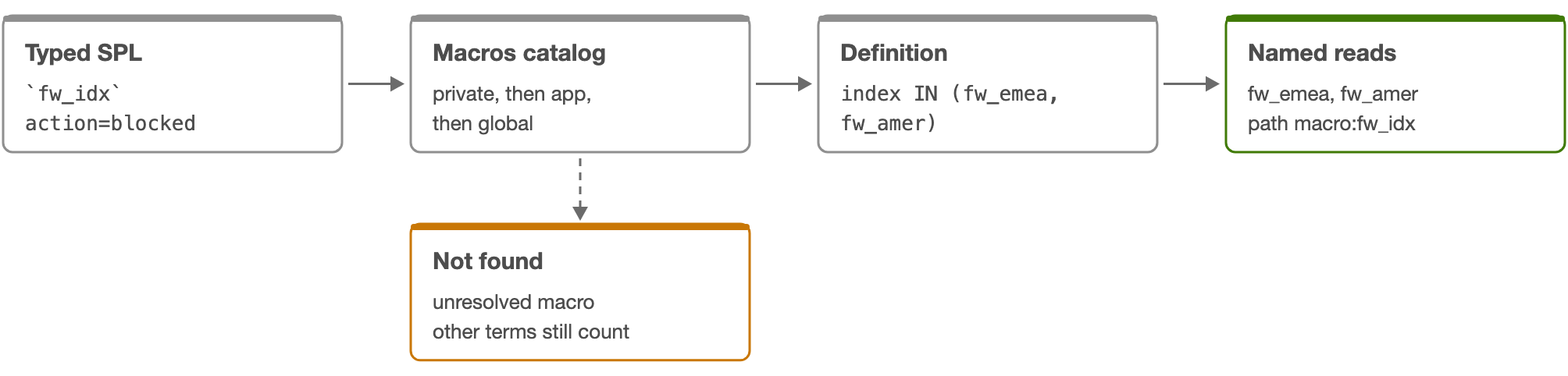
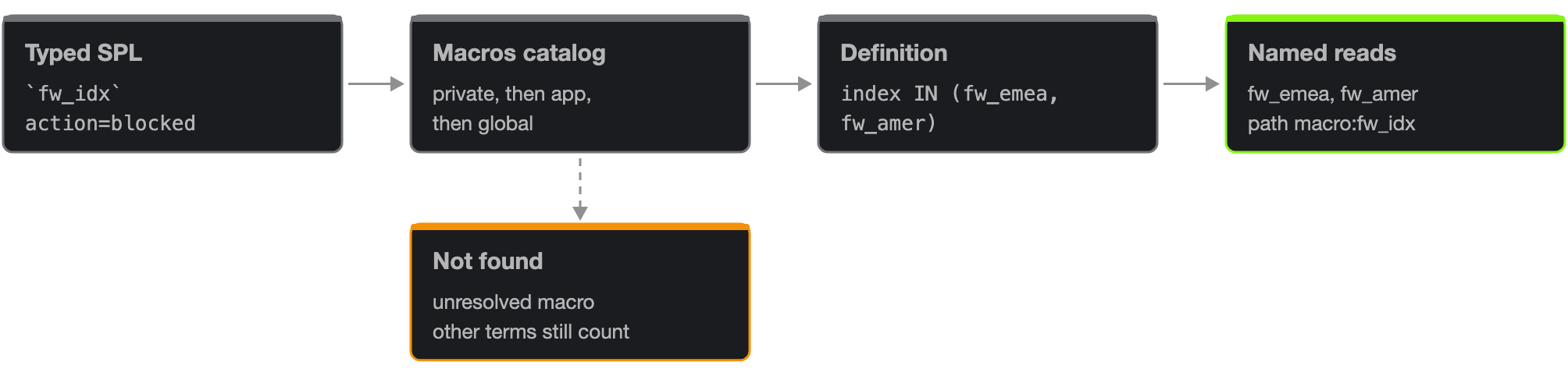
A macro call (`name` or `name(arg1, arg2)`) is looked up by name and argument count, with
Splunk’s namespace order: the search owner’s private object in the search’s app, then an object shared in
that app, then objects shared globally from other apps. Two candidates of the same rank leave the macro
unresolved. Arguments replace their exact $arg$ tokens. The definition is then extracted like typed SPL,
recursively.
eventtype=name is resolved to the event type’s search. | savedsearch name, | loadjob
savedsearch=”owner:app:name” and | from savedsearch:name are resolved to the saved search’s SPL; the loadjob
owner syntax does not open another owner’s private object.
A data model reference (| tstats … from datamodel=Model.Object, | datamodel Model Object search, | from datamodel:Model, | pivot Model Object) is resolved to the root constraints of the model: the constraint of the object’s own root dataset (BaseEvent, BaseSearch or BaseTransaction), or of every root when no object is named. Child constraints never widen the scope.
The indexes found are named reads or wildcard references as they would be typed. Their path is the first object of the chain: a macro calling another macro is recorded as macro:<first>.
A macro used inside a command whose arguments are not a search (macro_context), a missing object, a cycle, or a resolution beyond its limits is recorded as an unresolved part of the search; the other index terms of the same search still count.
Worked examples
Search or case |
What Data usage records |
|---|---|
|
Named reads of fw_emea and fw_amer, path macro:fw_idx. |
|
A named read of web, path eventtype:web_errors. |
|
A named read of web, path datamodel:Web. |
|
A named read of web, and an unresolved part macro:undefined_macro. |
Limits
Resolution limits (Settings → Data usage): depth 128 (1 to 256), 256 resolution attempts per search (1 to 4,096), 64 nested subsearches (1 to 128), and 65,536 characters of SPL (1,024 to 262,144). Reaching one records an explicit diagnostic.
Tags (
tag=…) are not resolved; a data model constraint that holds only tags names no index.map, foreach, dashboard tokens ($token$) and eval-built index values are dynamic: never resolved.
Custom commands that run their own searches are not expanded; their inner searches are audited and extracted separately.
Index-less and unresolved searches
What it means. UAM observed searches with an unresolved part: missing source scope, a definition it could not expand, incomplete text or conflicting context. The same search can still have identified source indexes, counted separately. Unknown search head tier is a separate attribution problem.
Where it comes from. Examples include searches with no explicit source index, dynamic expressions or unsupported syntax. Role search defaults use the latest retained snapshot for each reference group, as context only. When the account’s roles are resolved, a search naming no index shows what they could let it reach instead: the indexes its role search filter names, else its default indexes its roles allow.
What it cannot establish. An unresolved search may have used an index in your candidate list. Defaults do not tell us which index actually supplied data.
What to do next. Investigate the account and search syntax, and review collection diagnostics. Do not interpret an unresolved search as proof that an index was unused.
Searches that name no index


A search whose base search reads data but names no positive index term (sourcetype=nginx
status=500, error OR fail*, | tstats count where sourcetype=x) is index-less: its scope is
unresolved and its path is role_default. Splunk searched the indexes the account’s roles give it, and the
audit does not say which.
When the account’s role scope is established, the unresolved accounts’ Role scope column shows what an index-less search could reach: the indexes its role search filter names, when the filter names some (Splunk then searches those, not the default indexes), else its default indexes, always within what its roles allow, and only among the tier’s catalog indexes. The table lists three names and counts the rest; the investigation dialog lists up to 50 with the total.
When the scope cannot be established, the default indexes recorded with the facts are shown instead (the latest snapshot per account and app). A default * is flagged as a wildcard default.
This is context only. An index-less search is never attributed to an index, so it never makes an index Searched and never removes one from the review candidates. A searched verdict is always provable from a named term.
A search that starts with a command reading no index (| rest, | inputlookup, | makeresults) makes no index claim at all and is not counted here.
Worked examples
Search or case |
What Data usage records |
|---|---|
|
Unresolved, index-less. Role scope: the role filter’s indexes, else the default indexes the roles allow. |
|
A named read of web from the subsearch; the base search stays index-less (a subsearch cannot supply its scope). |
|
No index claim: not counted. |
Limits
An index-less search may have read an index in your candidate list: the unresolved count is a reason to investigate before acting on an absence.
The indexers never see the default indexes: an indexer confirmation cannot resolve an index-less search.
Other unresolved parts
A search is also unresolved, wholly or in part, when its SPL builds index values dynamically (map, foreach,
$token$, eval index=…), names a macro, event type, saved search or data model the catalogs cannot
resolve, holds a cycle or exceeds a resolution limit, has unbalanced syntax, or was truncated. Its path is
dynamic. Index terms identified in the same search still count, separately.
A search whose extraction failed (extraction_failed) or whose text the audit did not carry (search_text_unavailable) is counted as unresolved, never dropped.
Each unresolved account keeps up to five sample searches with the reason of each part, so Fetch SPL examples shows what could not be resolved.
Limits
The reasons are counted per reference group, not per distinct search.
Late filters, subsearches and negations
What it means. Where a term appears in the pipeline decides what it means. Only base searches select data; later index terms filter results, and negated terms exclude.
Where it comes from. The extraction splits each search into its stages and subsearches. The first stage of a pipeline is its base; every later stage is late; a subsearch has its own base.
What it cannot establish. Syntax is read, never executed: Boolean expressions are not simplified, and a late term after a stats command filters a field, not a dataset.
What to do next. Use the late references of an index detail to find searches that filter on an index without reading it, and Fetch SPL examples to check the pipeline.
Late filters


An index term after the first pipe (| search index=web, | where index="web") filters
results that the base search already read. It is recorded as a late reference: shown in the index detail,
never counted as a read, never a verdict.
An index counts as late only when every term naming it in that search is late. index=web | search
index=web is a named read.
A late filter never closes an unresolved base: an index-less base followed by | search index=web
stays index-less.
Worked examples
Search or case |
What Data usage records |
|---|---|
|
Wildcard references from |
|
Index-less (unresolved) and a late reference of web. |
Limits
A late reference can be the strongest hint of interest in an index, but the base search decided what was read.
Negations
NOT index=web, index!=web and an index term inside a NOT ( … ) group are negated: never
counted as use. A negated term of an index also cancels a positive term of the same index in the same branch
of the search, since the extraction does not simplify Boolean SPL.
Worked examples
Search or case |
What Data usage records |
|---|---|
|
Wildcard references from |
|
No read of web. |
Limits
The expansion of
index=*does not subtract the negated index: an expansion is a reference, not a computed set.
Write references
What it means. The search writes to an index: a collect destination in its SPL, for example | collect
index=summary, or a saved search whose summary indexing or Log event alert action writes its
output to an index.
Where it comes from. UAM extracts collect destinations from observed SPL, and reads the summary indexing and Log event targets from the saved search’s published definition. Each is recorded with the direction write, separately from source reads.
What it cannot establish. This is evidence of a write reference, not confirmation that events were successfully indexed. A destination can have writes and no observed reads.
What to do next. Inspect SPL examples to understand the producer. Use Splunk ingestion evidence to confirm successful indexing and assess its volume.
collect and mcollect destinations


The index argument of | collect and | mcollect is recorded as a write reference of that index, in the Write references column. A write is never a read: an index only written to has no read from it and stays No reader (or Wildcard only) unless something else reads it.
collect’s sourcetype argument labels its output; it is not a read filter and is not recorded. A macro used as collect’s arguments keeps its meaning: its index term stays a write.
Worked examples
Search or case |
What Data usage records |
|---|---|
|
A named read of web and a write reference of summary_web. |
|
A named read of metrics (metric) and a write reference of metrics_rollup. |
Limits
outputlookup and outputcsv write lookups and files, not indexes, and tscollect writes namespaces: none is a write reference. Splunk’s summary indexing and Log event actions are covered in the next case.
A write reference is what the SPL asked for, not proof that events were indexed.
Summary indexing and the Log event alert action


A saved search can write its output to an index without any collect in its SPL: with summary indexing enabled (action.summary_index, target action.summary_index._name) or with Splunk’s built-in Log event alert action (action.logevent, target action.logevent.param.index). The audit keeps only the saved search’s SPL, so neither write appears in the search text.
UAM reads both settings from the saved search’s published definition. Each run of that saved search records a write reference of the target index, on the summary_index or log_event path, and the saved search declares the same write in Knowledge objects. Splunk reports the effective target, including a default inherited from alert_actions.conf; when it reports none, the shipped defaults apply: summary for summary indexing, main for Log event.
Worked examples
Search or case |
What Data usage records |
|---|---|
Saved search “Hourly errors”: |
Each run: a read of _internal and a write reference of summary_errors (path summary_index). |
Alert “Failed logins”: |
Each run: a read of auth and a write reference of main (path log_event). |
Limits
A run records the write the action is configured to make. Splunk writes only when the action fires: a summary search with no result or an alert whose condition is not met writes nothing.
The target is the one Splunk reports for the saved search at the catalog’s last listing, including a default inherited from alert_actions.conf. Only when Splunk reports none do the shipped defaults (summary, main) apply.
Custom alert actions can write anywhere and are not predictable: they are never recorded.
Indexer confirmations
What it means. The search the indexers received, after Splunk expanded its macros, event types and saved searches. Its named index terms confirm reads the search head side could not resolve.
Where it comes from. Each search peer logs Streamed search connection closed in remote_searches.log, with the search it received. The Data usage run reads these lines after its audit windows, up to the audit cursor.
What it cannot establish. Only distributed deployments log them. The indexers never see a role’s default indexes, so an index-less search stays unresolved. A served fact never adds to the search head counts.
What to do next. Use the Indexers received column to find indexes read through private macros, apps the catalogs cannot see or dynamic SPL.
What the indexers received
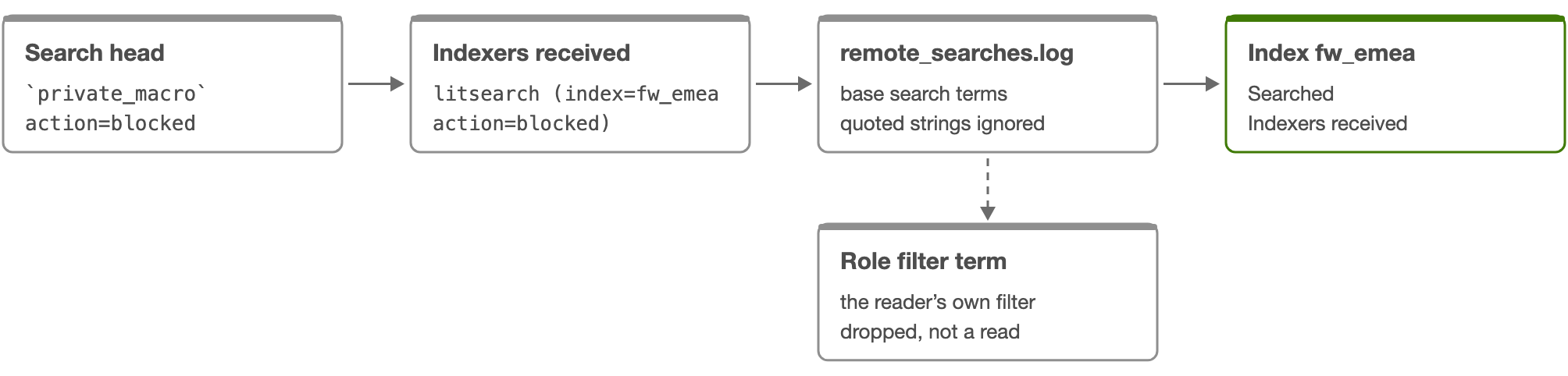
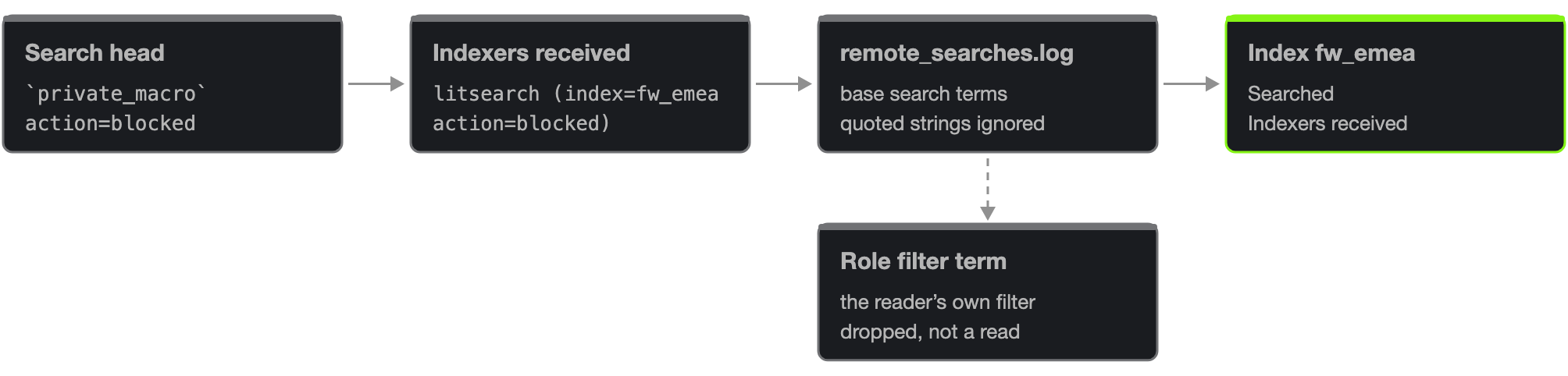
Splunk expands a search’s macros, event types and saved-search references on the search head and sends the indexers the expanded search. Each indexer logs it when the connection closes, with the search head, the origin search id, the account, the app and the origin.
Only the base search counts (the text before the first pipe): a later search index=… filters
results. A quoted string is never an index term. One fact per search head and origin search id.
If the received text holds a wildcard index term, every explicit index term of that text may be Splunk’s own
expansion of it, so only the patterns are recorded, as wildcard confirmations. A negated index term (NOT
index=…, a term in a NOT ( … ) group, or a NOT group nested deeper than three levels) voids the
terms of that search.
A served named term makes an index Searched when the search head side has no named read of it, with the verdict text “Named in the search the indexers received”. It removes the index from the review candidates: it is the backstop for private macros, apps the catalogs cannot see and dynamic SPL. It is never added to the search head counts.
Served facts follow the reader’s role scope like the others, and a served term that is the reader’s own role filter is dropped.
Worked examples
Search or case |
What Data usage records |
|---|---|
|
Search head side: unresolved macro. Served: a named confirmation of fw_emea, which makes it Searched. |
|
A wildcard text: only |
Limits
A standalone search head usually has no indexers logging what they received.
A received line cut before its end is marked truncated; the terms of the text it kept stand.
A search whose indexers log in two adjacent read ranges counts once per range.
The access timeline shows search head accesses only: served facts are not in it.
Declared references
What it means. The published knowledge objects that name an index: saved searches, macros, event types, dashboards and data models. A declaration says an object names the index, not that anybody ran it.
Where it comes from. Each time a tier’s knowledge object catalogs are published, their definitions are extracted with the same grammar as typed SPL and reduced per index: objects, writes and unresolved objects.
What it cannot establish. Declarations never make an index Searched and never remove it from the candidates. Wildcard declarations are not expanded onto index rows. Unscheduled and disabled objects remain declarations.
What to do next. Use the declared objects of an index detail, and the Knowledge objects view, to find who to ask before acting on an index nobody reads.
Definitions that name an index


The definitions read are: the search of saved searches and event types, the definition of macros, the search and query bodies of dashboards (Simple XML and Dashboard Studio), and the root constraints of data models. A dashboard query with tokens, or a chained search, is dynamic.
Each index row carries its declared objects (objects naming it, objects writing to it, unresolved objects); the index detail lists up to 50 sampled objects per tier with their app, owner, sharing, schedule and disabled state.
The Knowledge objects view compares what each object declares with what it ran in the period.
Worked examples
Search or case |
What Data usage records |
|---|---|
Saved search “Daily firewall report”: |
A declared wildcard reference fw_* (not expanded onto index rows). |
Macro web_idx: |
A declared reference of web, one object. |
Limits
Private objects the catalog cannot see are not declarations.
A collect in a saved search’s SPL, and its summary indexing or Log event action, are declared writes.
A declaration is the definition at the last publication, not at the time of a run.
Incoming data and review candidates
What it means. By default, candidates have positive linked VOL or DSM ingestion evidence in the selected period, but no named source reads. Wildcard-only references remain candidates because they do not establish that each matching index supplied data.
Where it comes from. Value & cost compares the linked incoming-data observations with the retained search references of every monitored tier. Account, app, class and path filters from Index activity do not apply to it.
What it cannot establish. This does not mean never used or safe to delete. Retention, incomplete collection, unresolved searches and excluded activity can hide usage. Write references may still exist. Volume and cost come from the linked VOL tenant: without one, no volume or cost is shown.
What to do next. Choose a representative period, check coverage and unresolved searches, then consult owners and ingestion or storage measurements. Treat the list as candidates for investigation, not an automatic deletion recommendation.
Incoming data from VOL and DSM


Each search head tier can be linked to one VOL tenant and up to 20 DSM tenants (Settings → Data usage). Without an explicit link, the map matches them automatically when it is read: exactly one eligible VOL tenant, and every eligible DSM tenant up to 20, among the tenants you can read whose collection route is the tier’s account. Several VOL matches, or more than 20 DSM matches, select nothing and say so.
An index is receiving when its latest ingestion observation lies in the selected period: for VOL, the last time its licensed volume was positive; for DSM, an entity with a positive event count and a last ingestion time. Incoming data is evidence that data arrived, never that it was read.
Volume is VOL’s 30-day average of complete days (or the last 24 hours while the index has no complete day), with the cost of VOL’s license view. The same index seen through two links is one volume: the larger.
Links grant no access: every read rechecks that you can read the linked tenant, that it is enabled and that its route still matches.
Limits
These are latest observations: an index that stopped receiving before the period does not count as receiving, and an older period cannot be reconstructed.
A linked tenant that could not be read completely leaves the candidates in place but withholds their volume and cost totals.
How a review candidate is decided


An index is a review candidate when no search head tier reads it by name and no indexer confirmation names it, it is not one of TrackMe’s own indexes and, with Active data on (the default), it receives data. An index read on another tier is never a candidate.
Wildcard only and Excluded apps only indexes remain candidates and are shown apart: a broad pattern, or a TrackMe tracker reading an index, is not use of its data.
TrackMe’s own indexes are never candidates: the global index settings, every tenant’s index overrides and this UAM tenant’s own indexes. They are written and read by TrackMe.
Candidates, and their volume and cost, are withheld while the evidence cannot support an absence of reads: when the fact read was incomplete, when no Data usage run read the audit trail in the period, or while the collection covers less than the period and less than seven days of it (Collecting, with the date the list will be available).
Limits
A candidate is an index to investigate, never a recommendation to delete it: retention, collection gaps, index-less searches and excluded apps can hide reads.
Verdicts and value classes
What it means. Each index has a verdict for the selected tier (Searched, Indirect only, No observed reads) and a value class on the indexing layer (Read by name, Wildcard only, No reader, Excluded apps only, TrackMe’s own).
Where it comes from. The verdict comes from the named and wildcard reads, on the search head side or served. The value class adds the excluded apps’ reads and TrackMe’s own indexes, and is taken on every tier together.
What it cannot establish. No verdict claims an absence of use: No observed reads and No reader describe the evidence held for the period, nothing more.
What to do next. Use the verdict to investigate a tier, the value class to weigh volume and cost against reads.
Verdicts and value classes, in order


Verdicts. Searched: at least one named read on the search head side, or a named term in the search the indexers received. Indirect only: reached by wildcard references only. No observed reads: neither. Late filters, writes, denied searches, index-less searches and declarations never decide a verdict.
Value classes, decided in this order. TrackMe’s own: an index TrackMe writes to for a tenant, whatever reads it. Read by name: Searched on any tier. Excluded apps only: only the excluded apps read it by name (TrackMe and the CIM acceleration app by default), even if wildcards also reach it. Wildcard only: reached only by wildcard references. No reader: no read of any kind.
Reads by excluded apps are shown, never counted: the verdict text says “Read only by excluded apps: … (N searches)”. Only their literal reads count there (no wildcard, write or served fact).
Accesses, the Overview weight, are an index’s named reads (or its served named reads when the search head side has none) plus its wildcard references. Low use marks the quarter of the Read by name indexes with a volume read the least per GB/day, when there are at least four of them.
Limits
With a tier selected, a verdict describes that tier; an index read on another tier says so in its detail.
Before seven days of collection, the counts describe the evidence collected so far, dated “since collection began”.
Paths, origins and source types
What it means. Path explains how a dataset was referenced. Origin reports where the search was dispatched. Sourcetype is the source type named in the observed search, when it can be established.
Where it comes from. Literal means a direct source term; macro, eventtype, savedsearch and datamodel identify a definition UAM resolved. A wildcard is a kind of term, matched against the catalog when the map is read. UI:Search and UI:Dashboard identify dispatch provenance reported by Splunk.
What it cannot establish. A later SPL field filter is only a reference, not a source read. Role defaults describe possible scope and never count as observed usage. Missing app, origin or sourcetype values are unknown, not inferred.
What to do next. Use the joint detail rows rather than combining separate totals. Open the account to investigate its activity, and fetch SPL examples to inspect the syntax.
The values you can meet
Paths: literal (a term typed in the search, a wildcard pattern included), macro:<name>, eventtype:<name>, savedsearch:<name>, datamodel:<name> (the first object of a resolution chain), role_default (an index-less search), dynamic (any other unresolved part) and served (received by the indexers).
Origins: UI:Search, UI:Dashboard:<view>, scheduler, rest, rest:jobs, summary_director, subsearch:…; other UI origins are grouped as UI:*, and a missing one is N/A.
Index totals give one unit per search to each index. Path and sourcetype rows count references: one search through two paths counts once on each path, so their sum is not a number of searches.
Limits
A sourcetype is recorded only for a search whose base names one literal index and whose extraction is complete: the sourcetypes its completion counted, else the sourcetype terms of its base search. Any other search records none.
Coverage and uncertainty
What it means. The selected range bounds the retained facts used for this answer. Retained facts dates show the evidence returned, not proof that every moment or index was observed.
Where it comes from. The map reads tenant-scoped evidence, collection receipts and index catalogs using your access. The catalog describes the monitored search head tier; it is not proof of which indexer served a search.
What it cannot establish. Missing or stale catalogs, collection gaps and read limits can make an answer partial. Even a complete response cannot establish lifetime non-use. An active Exclude TrackMe setting also narrows usage evidence.
What to do next. Check Collection health and the selected tier and period before interpreting missing reads. Data usage stays still until you change the selection or use the global Refresh button; the workspace health indicator can update independently.
What bounds an answer


Retention: the facts live in the tenant’s evidence index. A period longer than its retention holds only what remains. A new tenant reads the audit trail from where its collection began (and, with a backfill, from the backfill depth, never before the oldest audit event held).
Collection start: until the collection covers the period, or seven days of it, the counts are dated “since collection began” and the candidates are withheld (Collecting).
Runs: a run that stopped on its time budget carries its range over to the next run (carried, nothing lost). A run that could not extract (incomplete) makes the period partial (extraction_coverage).
Catalogs: a tier’s index catalog older than 48 hours is stale; a missing one leaves wildcards unexpanded. A catalog still being listed on a new tenant is pending, not a fault.
Reads: at most 50,000 fact keys and 10,000 catalog indexes per tier are read. Past a bound, or when a search failed or was cut, the answer is partial and the candidates are withheld. Facts written before the rollup key existed are reported and not counted.
Roles: the current users and roles catalogs apply to the whole period.
Limits
Even a complete answer covers the evidence held for the period, never a proof of lifetime non-use.
Exclusions (Settings → Data usage, and the Exclude TrackMe switch) narrow the evidence counted, never collection.