AI Agents automation
Overview
Every specialised AI Advisor can run unattended on a nightly schedule, in addition to the interactive on-demand path. The automated batch selects eligible entities for a tenant, invokes the relevant advisor (typically in act mode) against each, and records the outcome — all scoped by per-tenant policy that you control.
Automation is configured from Artificial Intelligence > Manage AI Agents automation and observed from Artificial Intelligence > Review Scheduled AI Advisor activity.
Important
Automation is disabled by default for every tenant. Nothing runs unattended until you explicitly enable the ML Advisor and/or the Components Advisor for a tenant and pin them to a provider. The decommission guard (the ability to disable entities automatically) is also off by default.
Note
The AI Concierge has no automated path — it is interactive-only by design. Automation applies to the five specialised advisors only.
Note
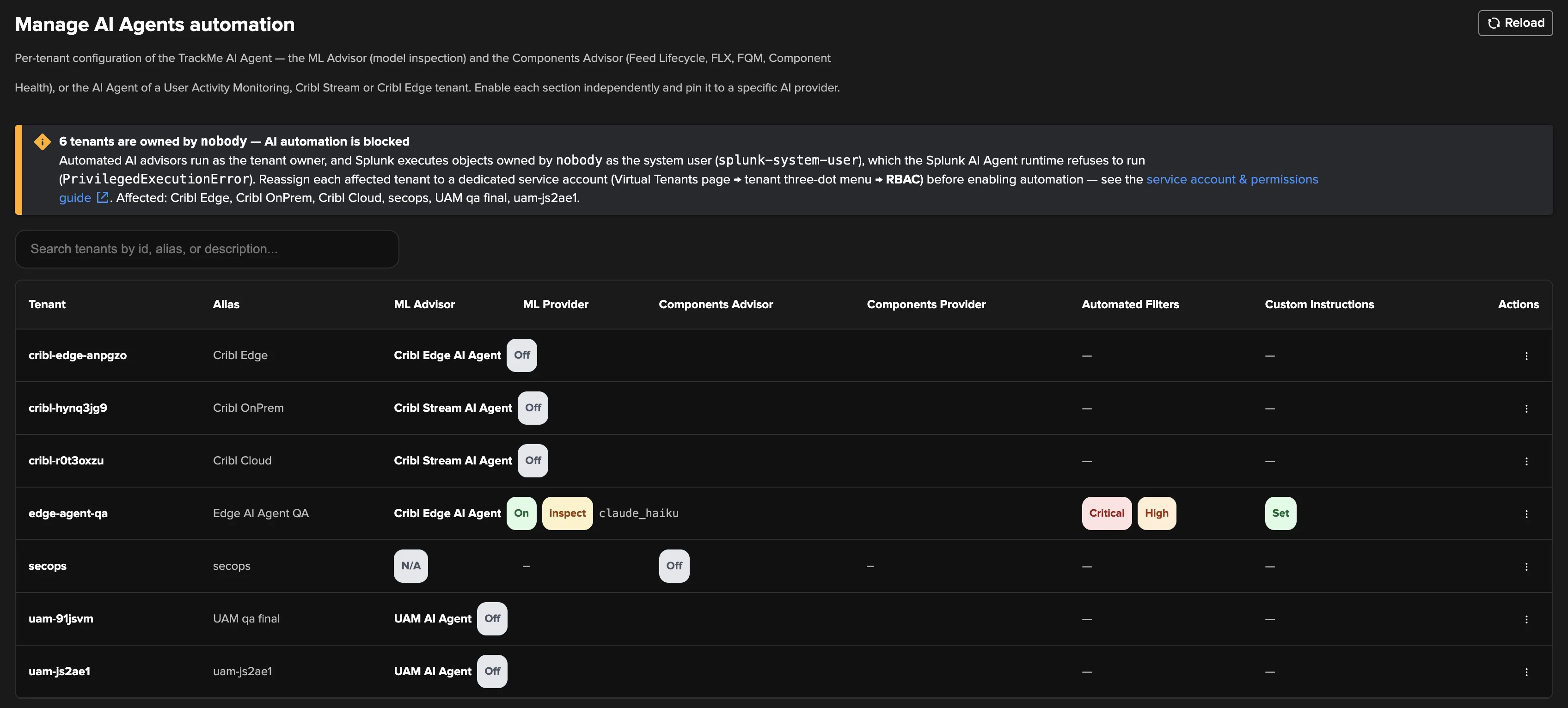
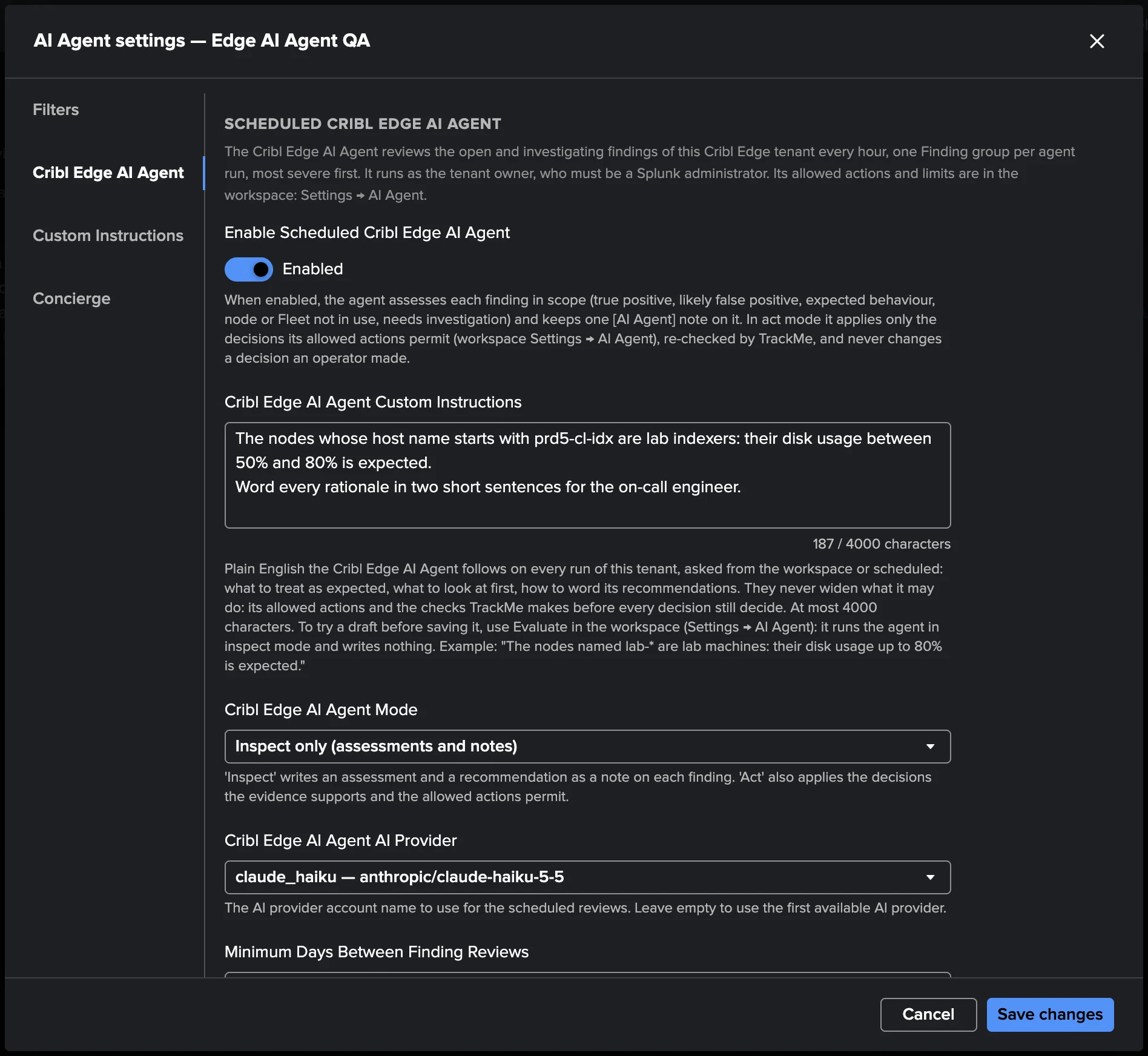
The AI Agents for findings of User Activity Monitoring, Cribl Stream and Cribl Edge have their own hourly scheduled triage, configured in the workspace of each tenant (Settings → AI Agent). They also appear on the Manage AI Agents automation page: a findings tenant shows its own agent (UAM AI Agent, Cribl Stream AI Agent or Cribl Edge AI Agent) in place of the ML and Components advisors, with its enable toggle and a tab for its core settings (mode, provider, review interval, runtime and the agent’s own custom instructions); the decisions the agent may take stay in the workspace. The shared scope filters of this page (priority filter, filter expression) apply to them too, with the finding severity as the priority; the shared Custom Instructions of this page apply to their scheduled runs only, while the agent’s own custom instructions apply to every run.
Managing automation per tenant
The Manage AI Agents automation page lists every tenant with its automation state. Two families of automation are configured independently:
ML Advisor — the model-inspection advisor, with its own enable toggle and pinned provider. It reviews the ML outlier models of every component that has them (DSM, DHM, VOL, FLX, FQM, WLK).
Components Advisor — the unified configuration advisor covering Feed Lifecycle (DSM/DHM), FLX Threshold (FLX), FQM Advisor (FQM), and Component Health (WLK/MHM), with its own enable toggle and pinned provider.
Each row also shows the Automated Filters (the scope of eligible entities) and any Custom Instructions in effect.


Opening a tenant’s AI Agent settings reveals the per-section configuration across tabs — Filters, ML Advisor, Components Advisor, Custom Instructions, and Concierge. The Components Advisor tab, for example, enables the automated review and lets you scope which components are eligible.


Scoping and cost control
The batch honours a set of per-tenant gates — the same gates are the primary cost-control knobs for billed providers:
Gate |
What it does |
|---|---|
Master switches |
|
Eligible components list |
|
Priority filter |
|
Freshness window |
|
Per-entity opt-out |
|
Decommission guard |
|
Runtime cap |
|
Tip
The priority filter and the freshness window compound multiplicatively. Tightening from
critical,high + 30 days to critical + 60 days typically cuts the token bill by 6–10×.
Schedules are staggered across advisors so a tenant does not fire every batch at once and exhaust
provider rate limits.
Reviewing scheduled activity
The Review Scheduled AI Advisor activity dashboard answers one operational question: is the
automation actually firing for every tenant? Every panel filters to scheduled (automated=true)
runs only — interactive runs appear in the Review AI Advisor activity dashboard
instead.


It surfaces KPI cards (total scheduled runs, success / error rate, total tokens, average run duration, active tenants), breakdowns by advisor / status / tenant / provider-model, runs-over-time charts, an MCP tool-call leaderboard, and the recent scheduled runs — so you can confirm, for example, that the ML Advisor’s nightly cron is firing in the expected hours and that no tenant’s automation has gone silent.


Each nightly batch produces a per-entity terminal audit event per advisor run, all the per-tool-call
events, one [AI Agent] audit comment per write, and a batch summary — exactly the same audit
surface as interactive runs, marked with automated=true. See Auditing AI activity.