Creating a tenant
Tenants are created from a guided wizard in the Virtual Tenants UI (and, for automation, through the REST API). The wizard adapts to the component type you choose, but every path ends with the same access-control step.


Important
The Splunk indexes a tenant uses (summary, audit, metric, notable) must already exist before you create the tenant. The wizard references them; it does not create them.
Identity (all tenant types)
Every tenant begins with its identity:
Tenant identifier (
tenant_id) — unique and immutable. Lowercase letters, digits, and underscores, up to 40 characters.Tenant alias — optional human-readable display name (editable later).
Description — optional free text.
Creating a splk-feeds tenant
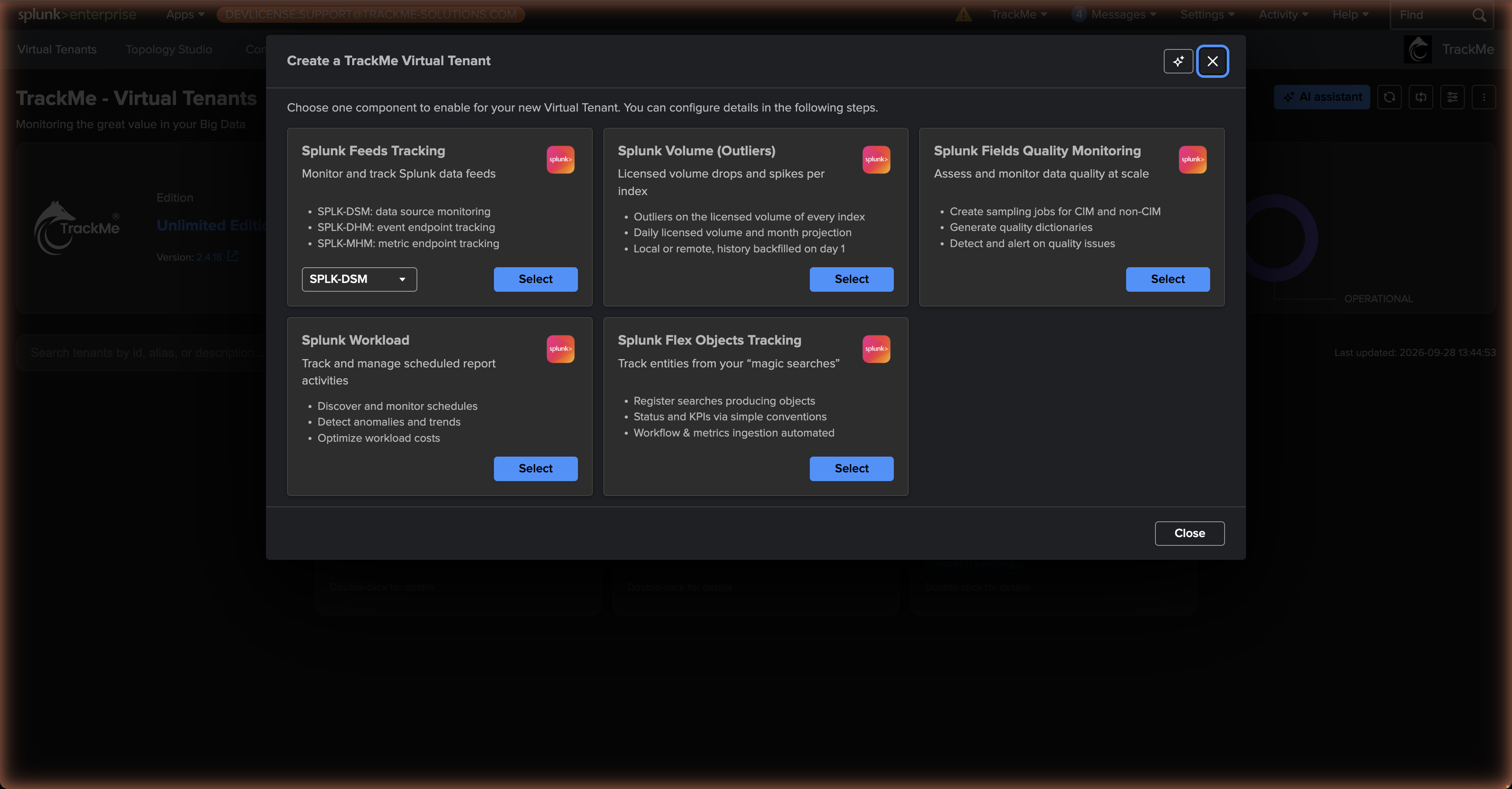
The feeds wizard is the richest, because it configures live discovery of your data. You choose which feeds components to enable — DSM, DHM, MHM — and, per component, set:
Create tracker now — optionally create a tracker during creation (this produces a Hybrid Tracker; you can also add trackers later from inside the tenant).
Splunk deployment — whether the data is local to this Splunk, or on a remote Splunk deployment (see Integrations & Remote Deployments).
Splunk root search constraint — the base constraint that governs which entities are discovered and maintained.
Restrict indexes discovery — narrow the scope further with explicit and wildcard index patterns.
Advanced options — Hybrid-tracker settings plus component-specific options.
Test now — run a preview search against your settings and confirm entities are found before committing.
Component nuances:
Component |
What you configure |
|---|---|
DSM |
Tracks data feeds by |
DHM |
Tracks sourcetype activity per endpoint. The endpoint defaults to the |
MHM |
Tracks metric-category availability per endpoint. The endpoint defaults to |
Creating a splk-vol tenant
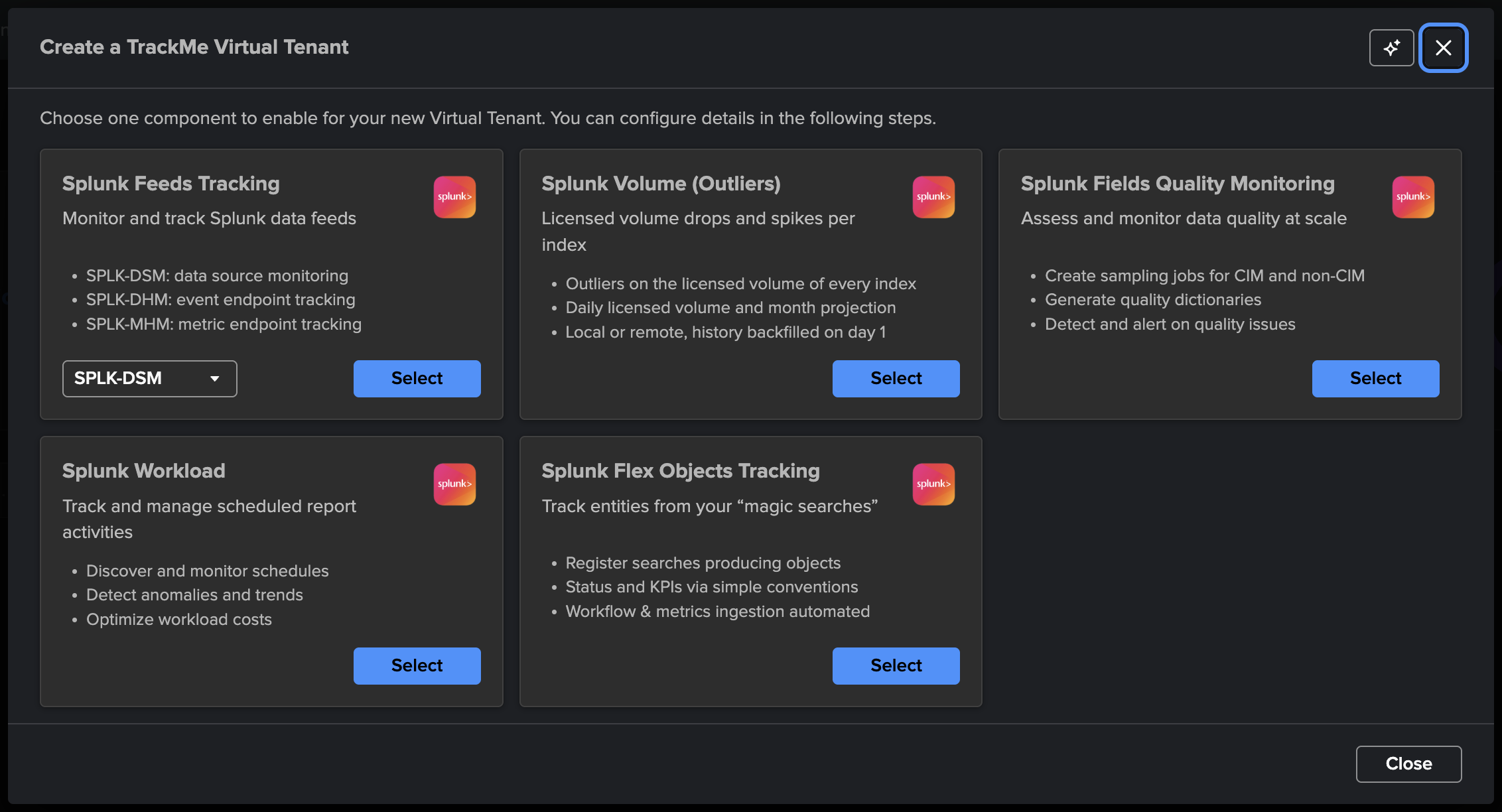
The Splunk Volume (Outliers) card creates a Volume Outliers tenant: one entity per Splunk index, fed by the license usage log, with ML outliers on the licensed volume (drops and / or spikes), inactivity detection, the daily licensed volume, a trend and a month projection. One tenant covers a whole Splunk deployment; there are no use cases to pick. VOL is available on the Foundation edition as well as Enterprise and Unlimited.
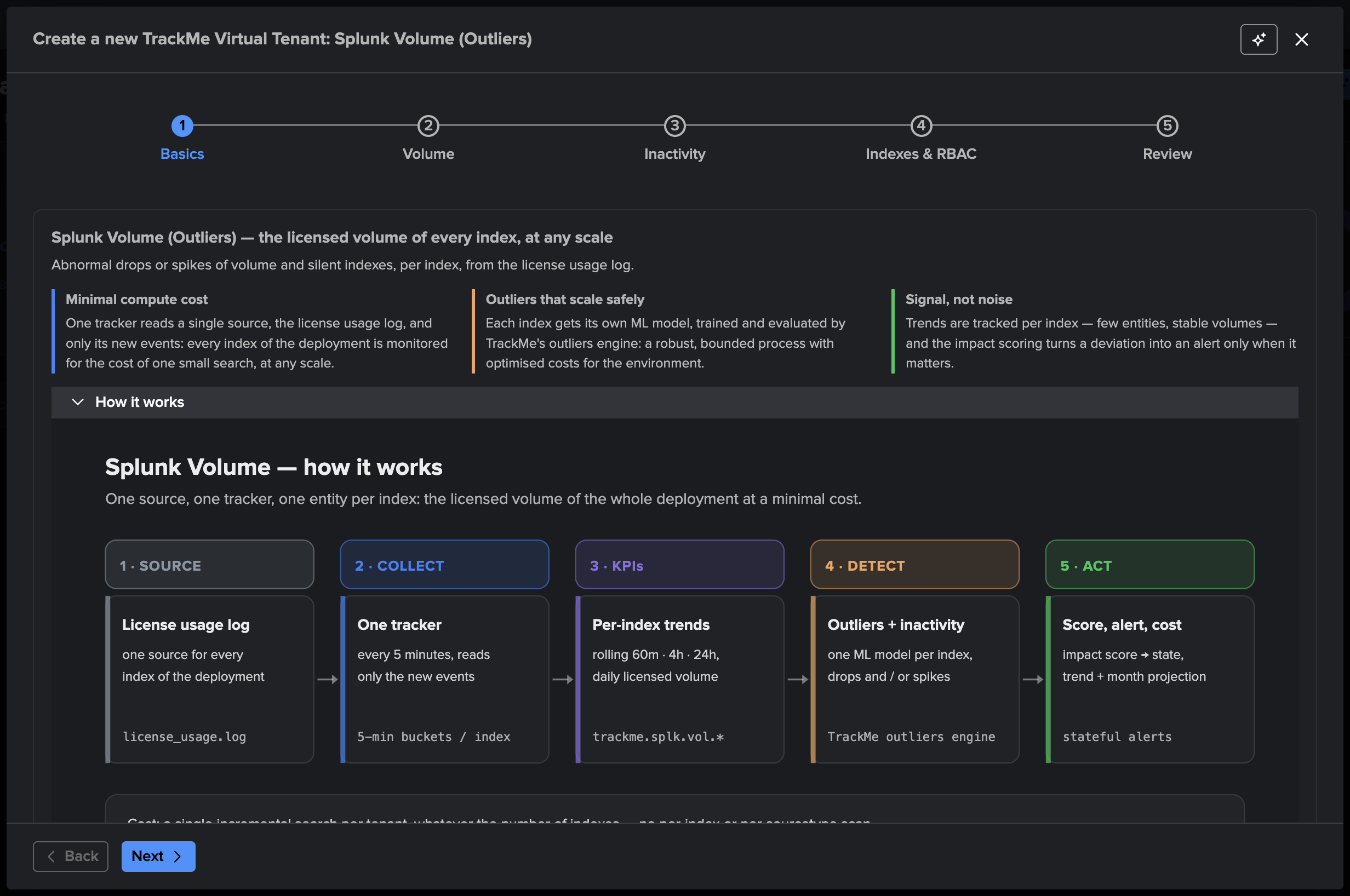
The wizard has five steps:
Basics — the tenant identifier, alias and description, with an optional impact score configuration. Expand How it works for the pipeline in one picture.
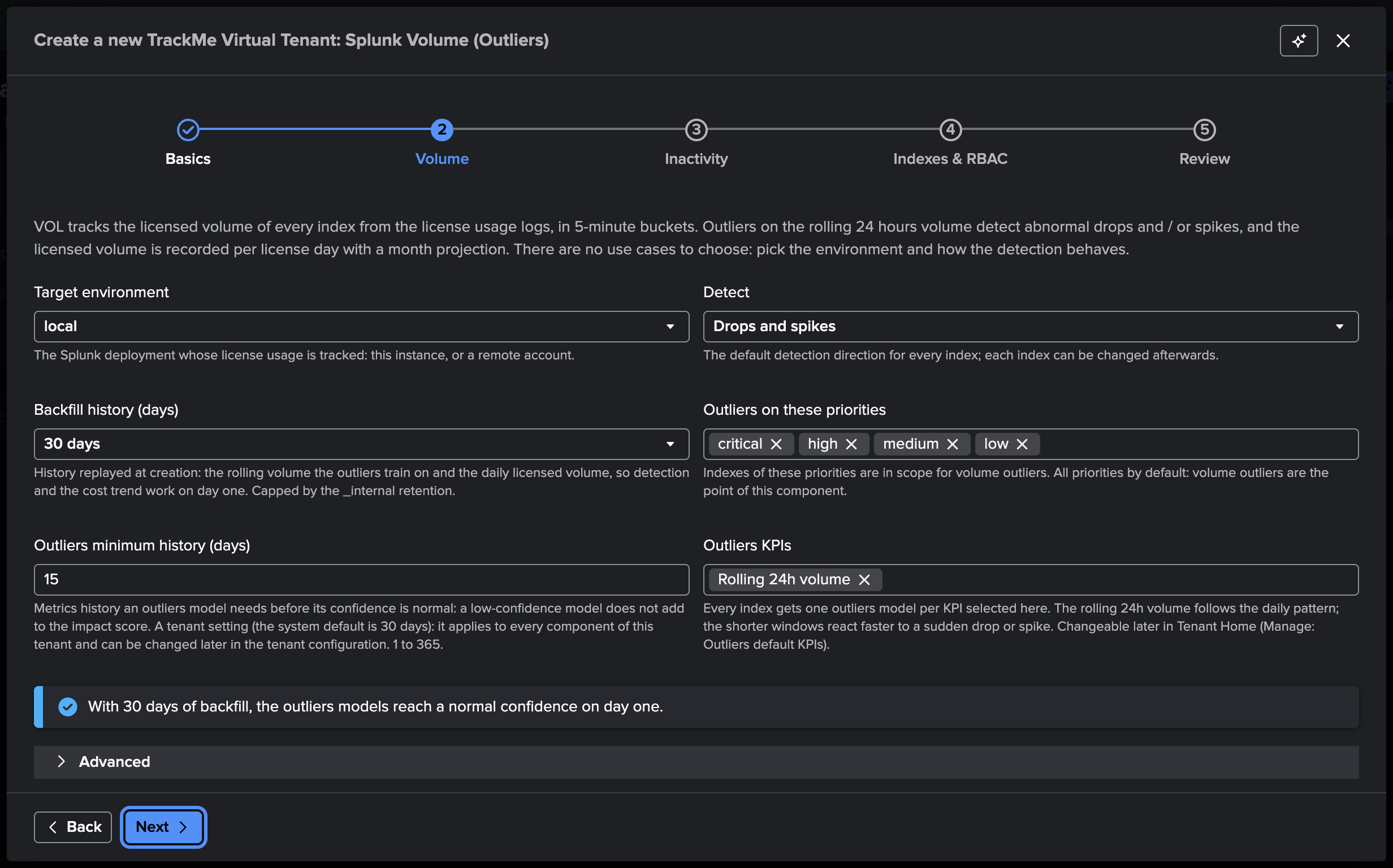
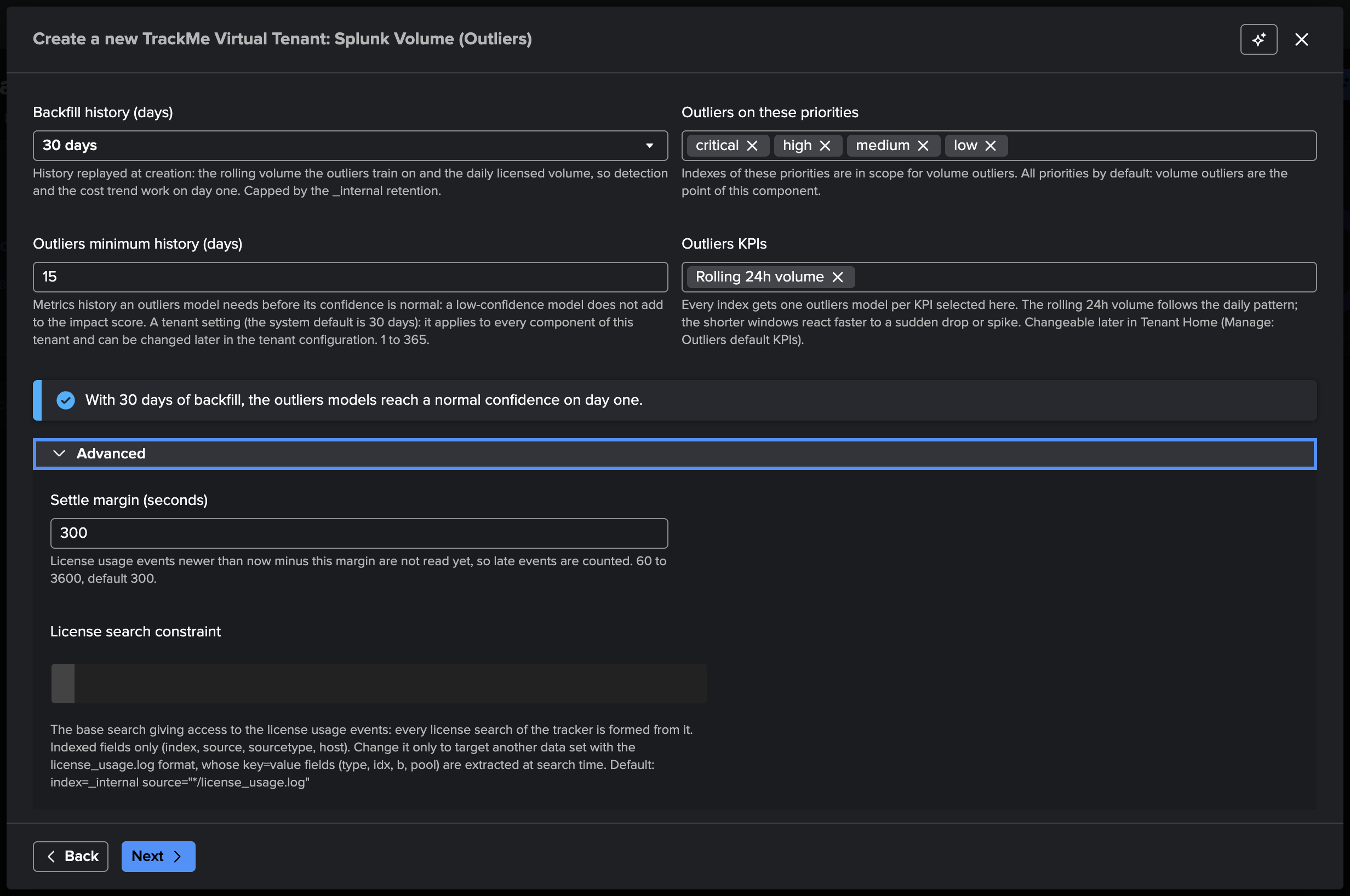
Volume — how the volume is collected and how the detection behaves:
Target environment — this Splunk deployment (
local), or a remote account whose license usage is collected; a remote target runs the connectivity check.Detect — the default detection direction of every new index: drops and spikes, drops only, or spikes only. Each index can be changed afterwards with one click.
Backfill history (days) — no backfill, 7, 14, 30 (default), 60 or 90 days, or Custom… for any number of days up to 400, replayed at creation and capped by the retention of the license usage log; the step shows the reachable span and the metric-licensing estimate.
Outliers on these priorities — the priorities in scope for volume outliers, every priority by default (volume outliers are the point of this component).
Outliers minimum history (days) — the history a model needs before its confidence is normal (15 by default on a VOL tenant); the step tells you whether the backfill covers it.
Outliers KPIs — the rolling KPIs every new index gets a model on (the rolling 24 hours by default).
Advanced — the license search constraint (leave the default,
index=_internal source="*/license_usage.log", unless the license usage events live elsewhere — see The license search constraint (advanced)) and the settle margin before a 5-minute bucket is read.
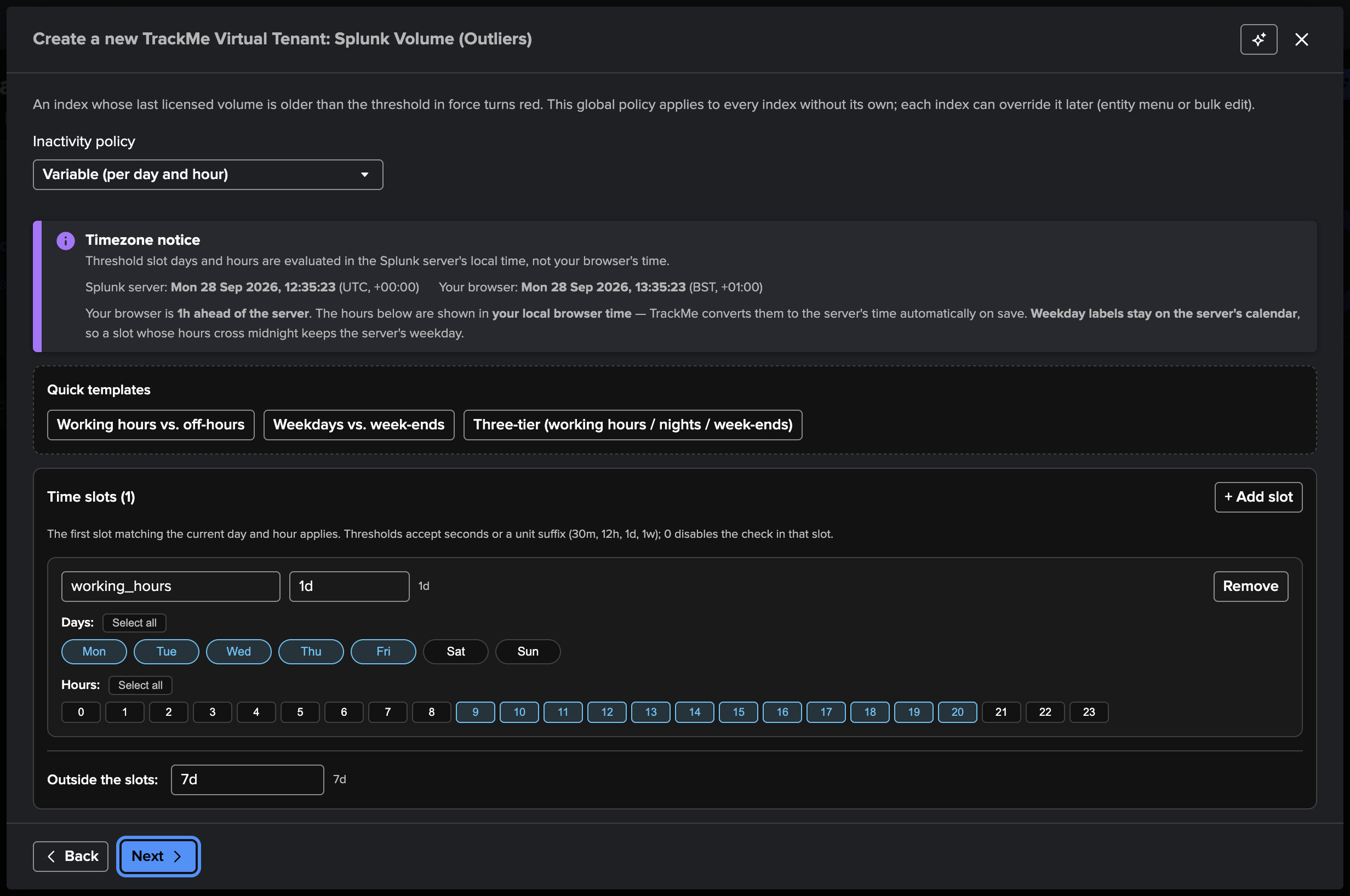
Inactivity — the tenant’s inactivity policy: after how long without licensed volume an index turns red. The default is variable: 1 day during working hours (Monday to Friday, 08:00–19:59 server time), 7 days for nights and week-ends. Quick templates, a static threshold, or your own day / hour slots.
Indexes & RBAC — the access-control and indexes step common to every tenant.
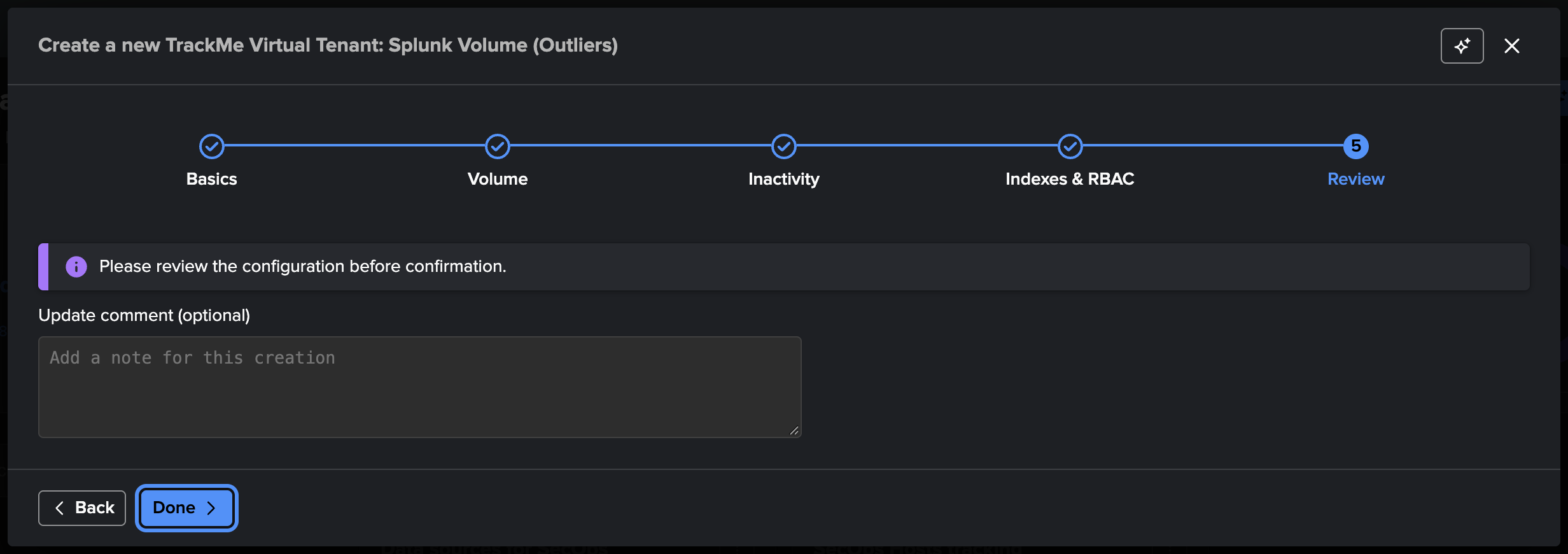
Review and create. The first collection runs immediately; the backfill job plans itself at its first hourly run, and the tenant card reads Backfill pending until then, then Backfilling N %.
Tip
A single VOL tenant per Splunk deployment is the natural shape: the license usage log already covers every index. Monitor several deployments from one TrackMe with one VOL tenant per remote account.
Creating a splk-uam tenant
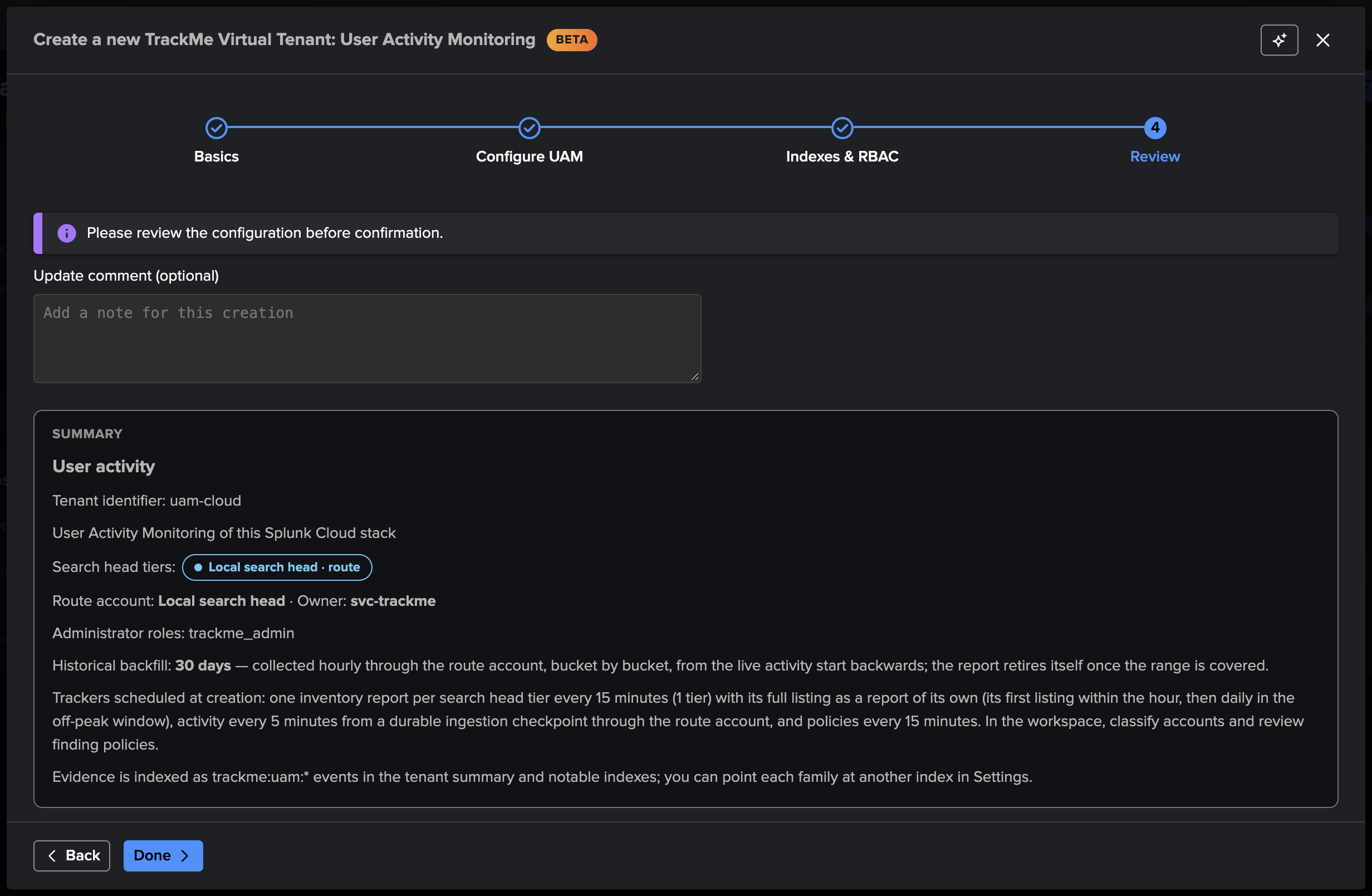
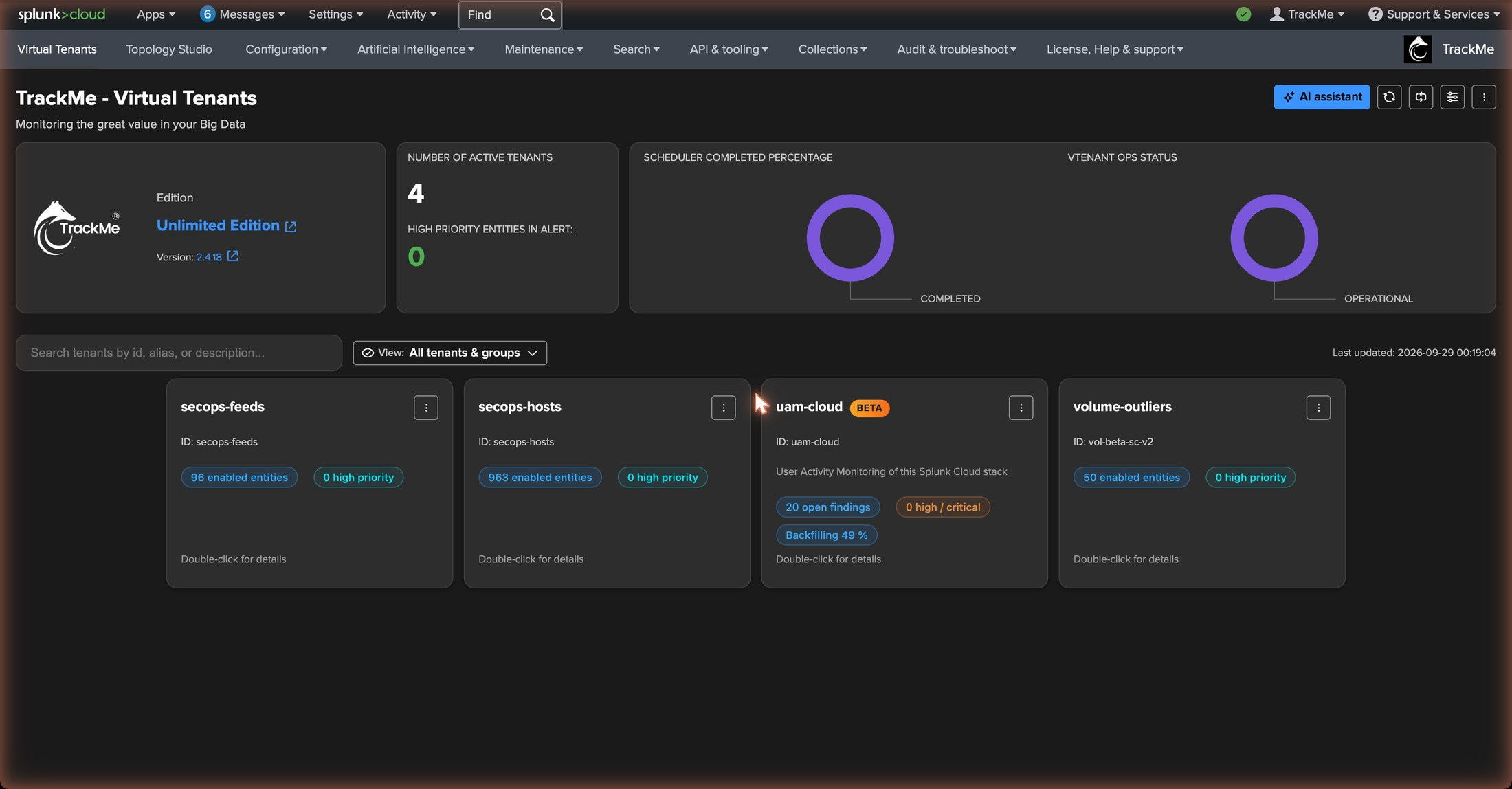
The User Activity Monitoring card (the last card of the chooser) creates a UAM tenant: a dedicated tenant type — no entity component can be added to it — that inventories the scheduled searches, users and roles of one or more search head tiers, reads the search activity and the resource usage of the shared indexing layer, classifies the accounts and raises findings from a catalogue of policies. UAM is available on the Enterprise and Unlimited editions, the Unlimited trial and the Developer license; the card is refused on the Foundation edition and the Foundation trial.
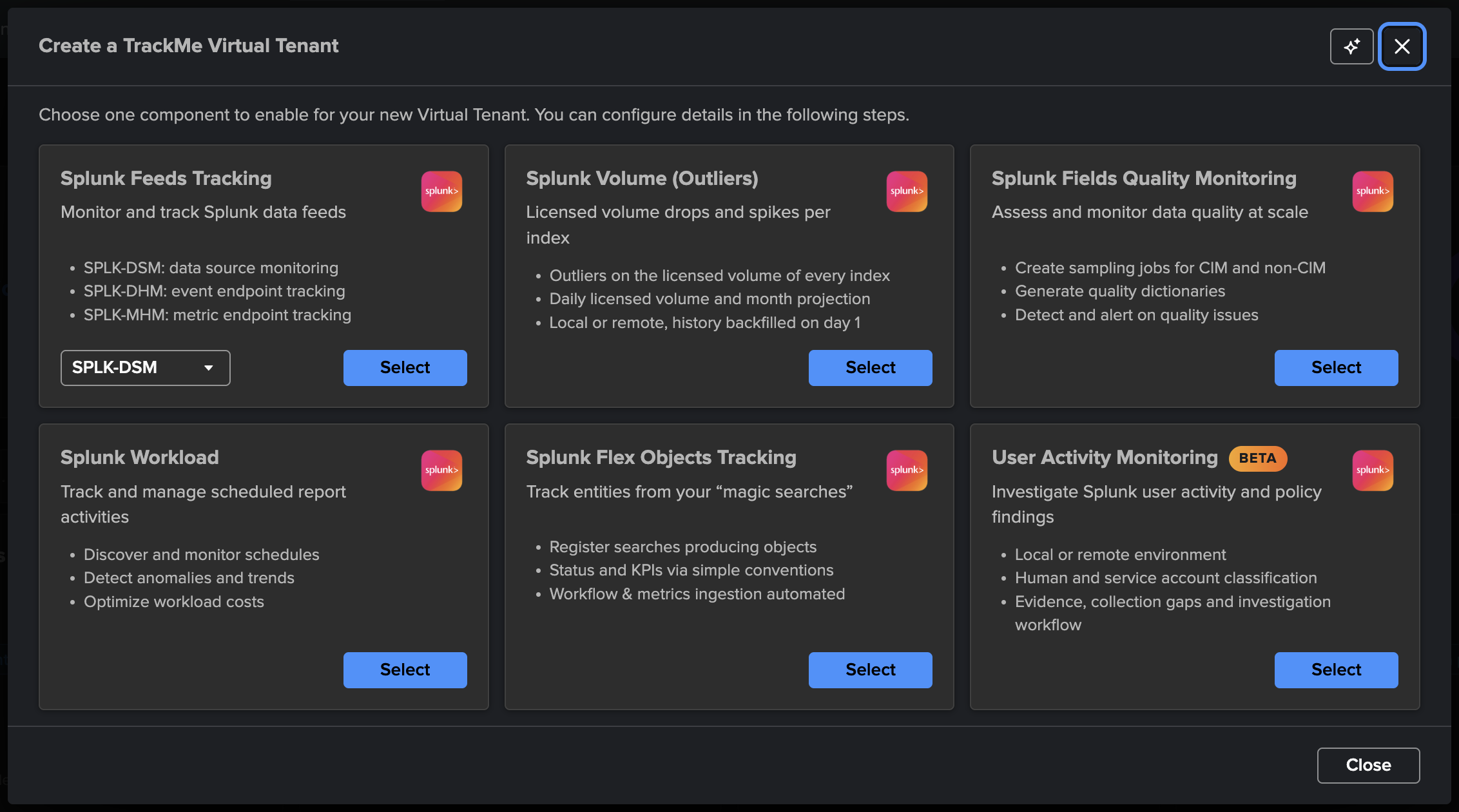
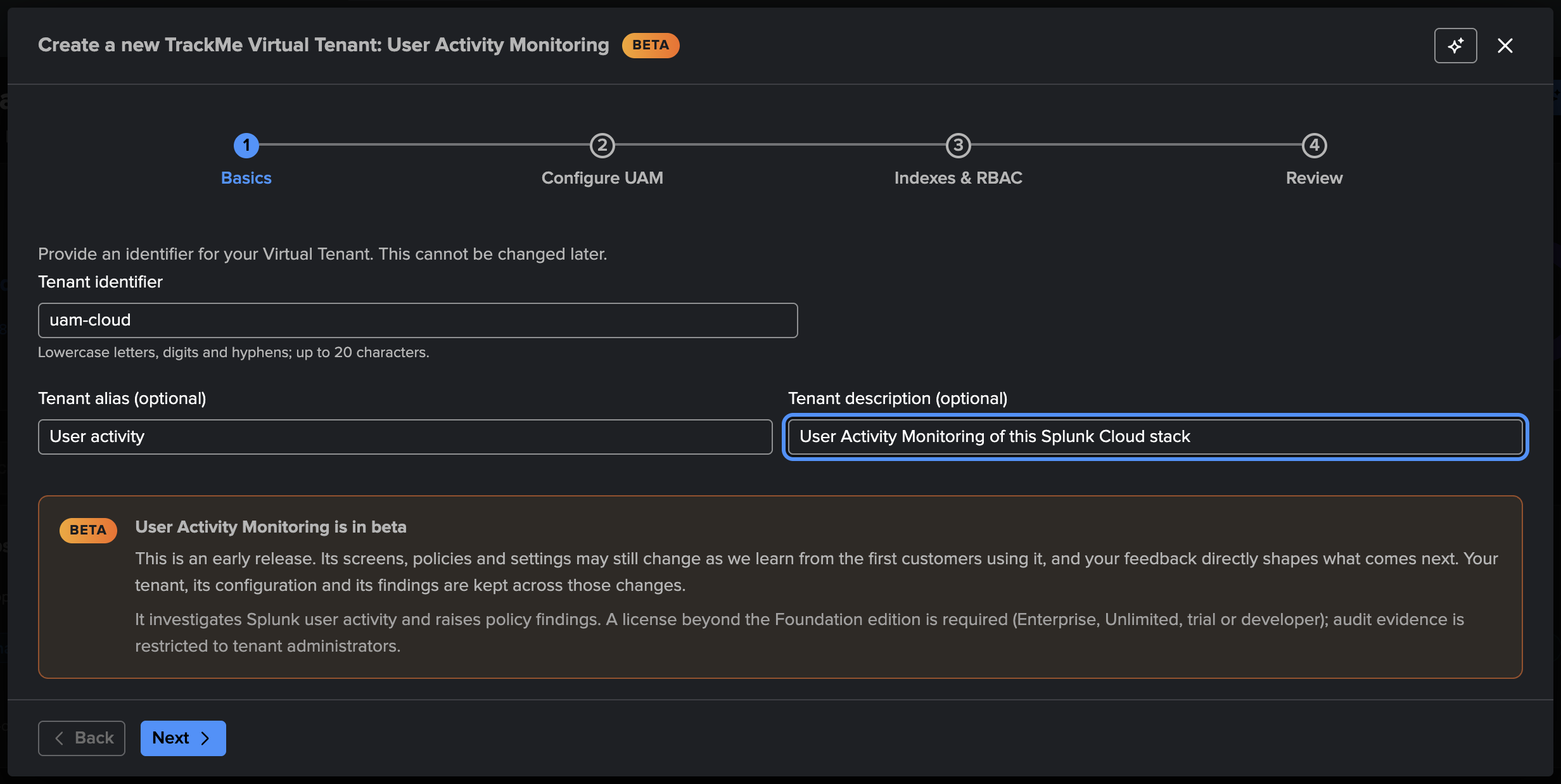
The wizard has four steps:
Basics — the tenant identifier (lowercase letters, digits and hyphens, up to 20 characters for a UAM tenant), alias and description.
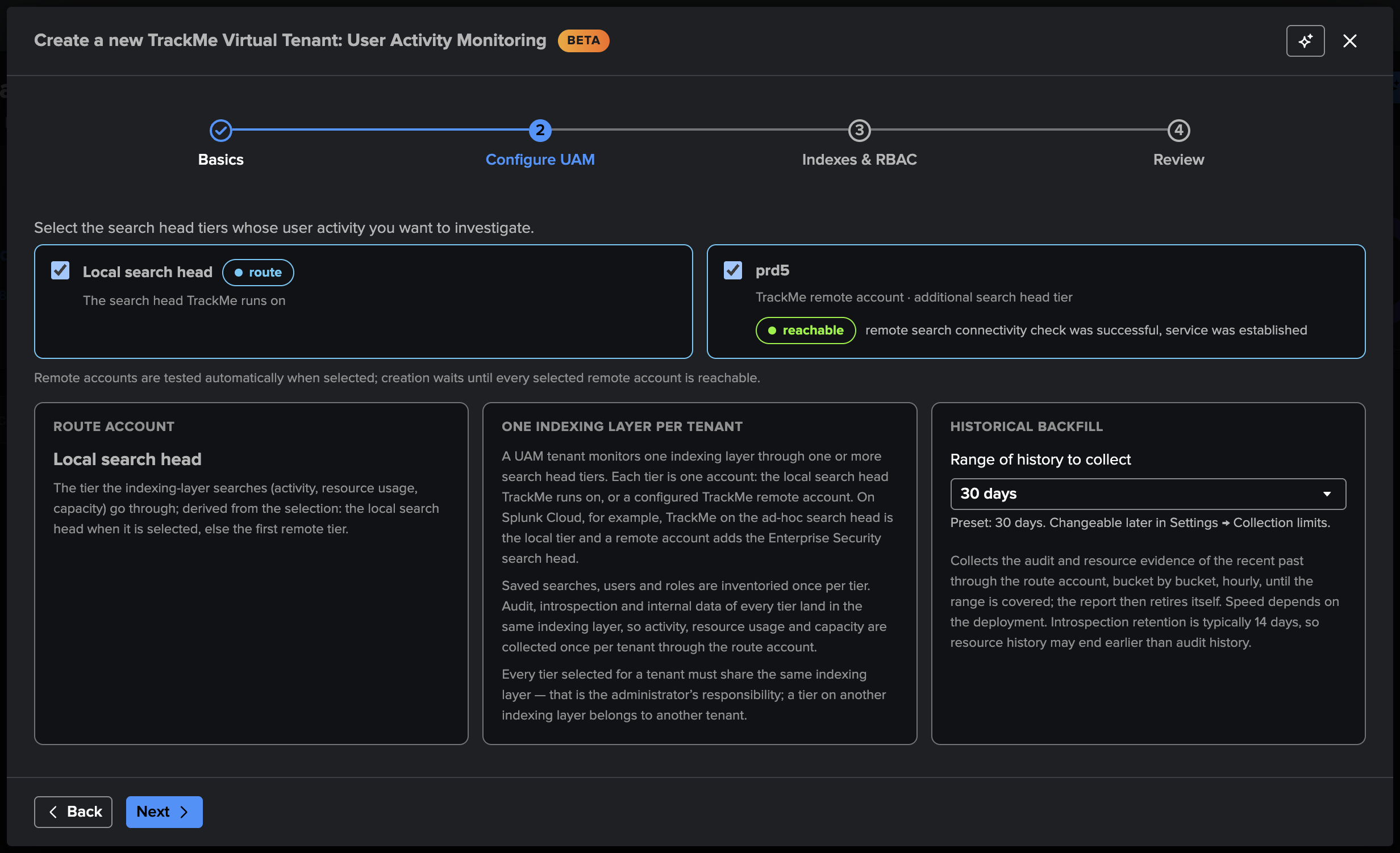
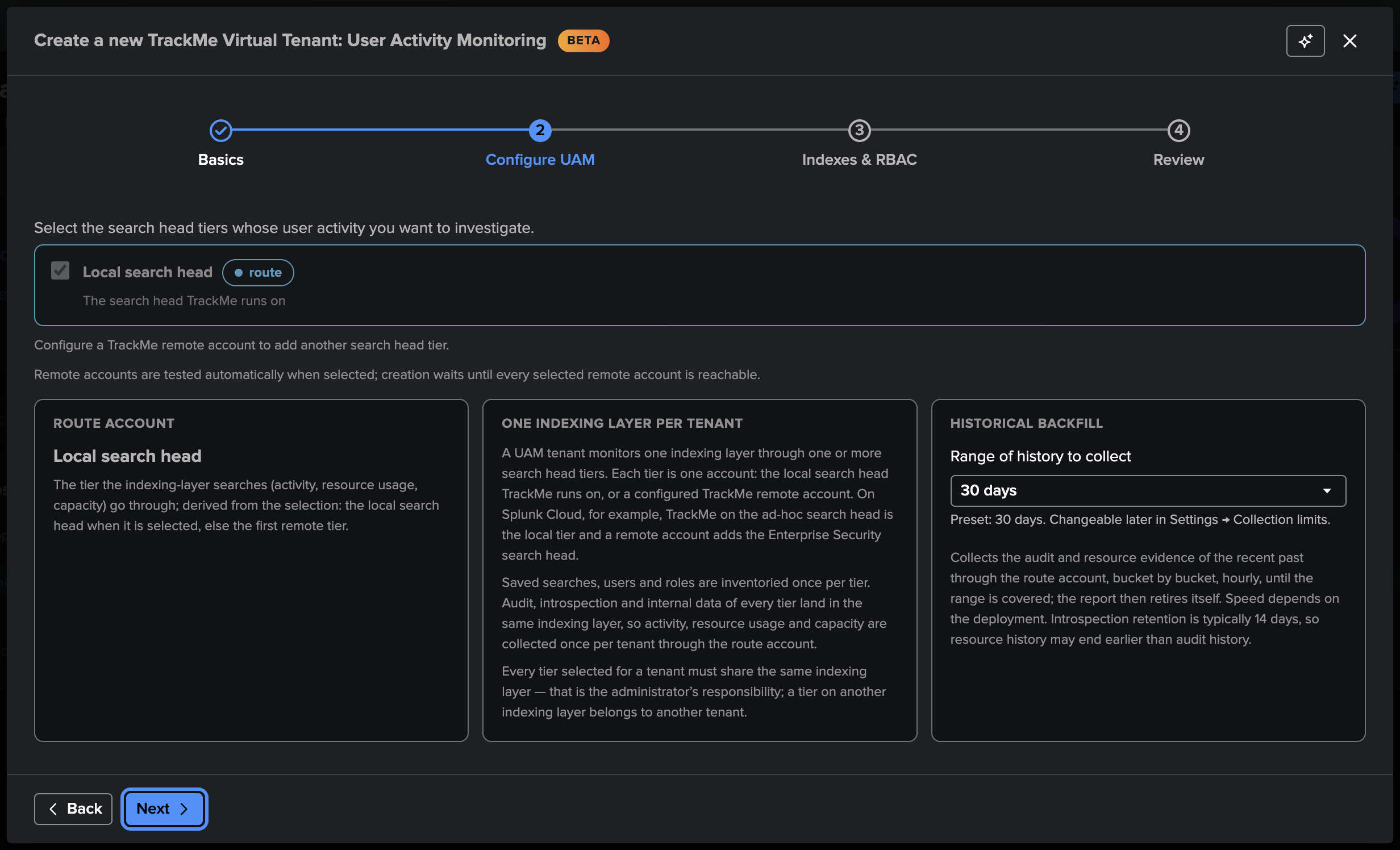
Configure UAM — the shape of the tenant:
Search head tiers — the local search head and / or remote accounts, every selected account feeding the same indexing layer (one remote account per tier of that layer). Every remote tier runs its connectivity test and must pass it before the creation is allowed. The route account of the indexing-layer searches (audit activity, resource usage, capacity, account signals) is derived: the local search head when selected, else the first tier.
Historical backfill — the range of audit and resource history collected before the live start, hourly in 5-minute buckets, until covered: none (the default), 7, 14, 30, 60 or 90 days, bounded by the retention of the sources (the introspection retention is typically shorter than the audit one). Changeable later in Settings → Collection limits.
Activity scope (advanced) — optional search head hostname patterns to include or exclude, written into the base searches so that the indexers return only the activity of the search heads in scope.
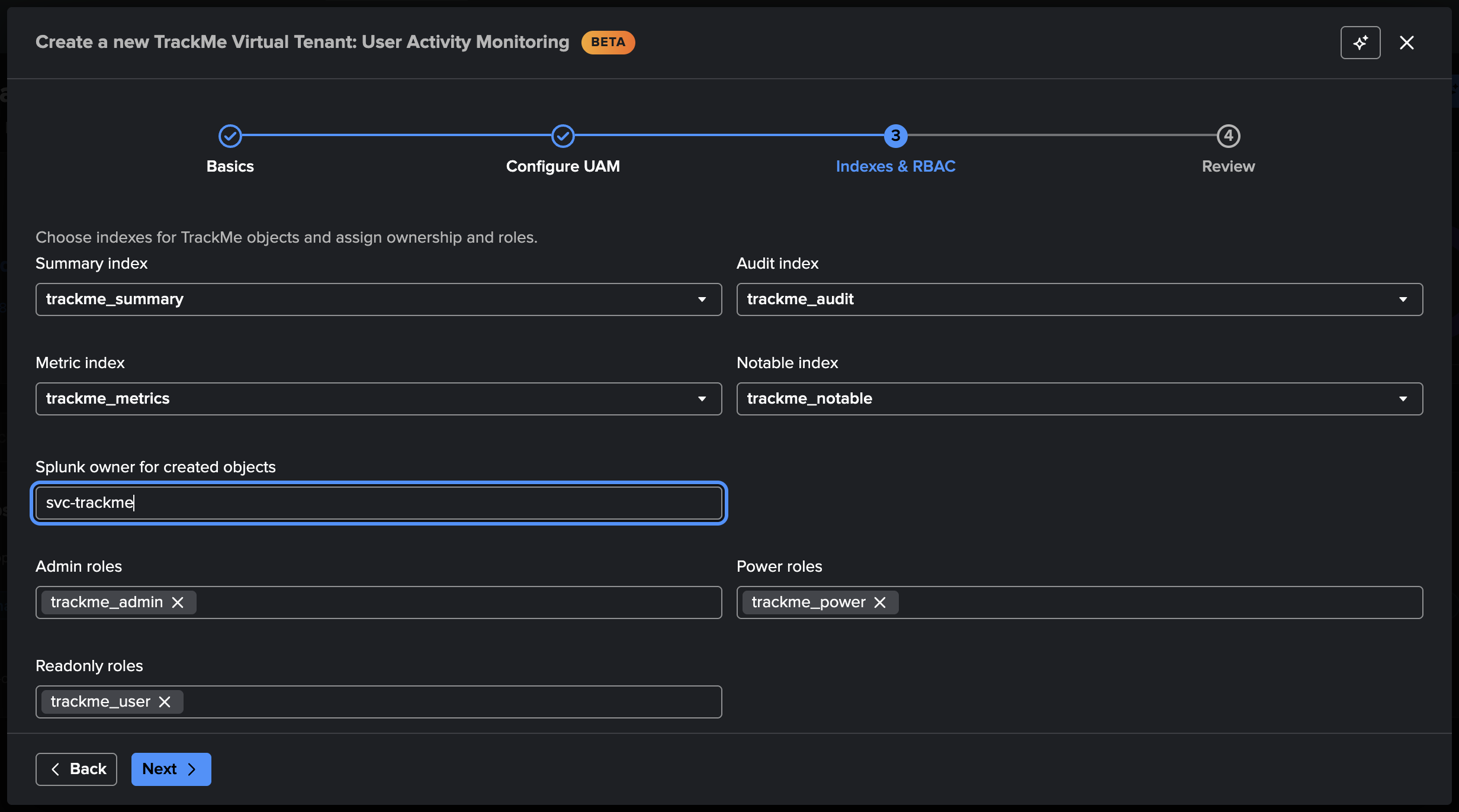
Indexes & RBAC — the access-control and indexes step common to every tenant. Prefer a dedicated service account with administrative rights as the owner (
svc-trackme, for instance): the trackers and the scheduled AI review run as the owner, who must administer the tenant. Classify that account and the administrators as system in the workspace afterwards, so they never appear in the findings.Review and create. The trackers are scheduled immediately — one inventory report per tier every 15 minutes with its full listing as a report of its own (the first within the hour, then daily off-peak), the audit activity and the resource usage every 5 minutes from their durable checkpoints, the account signals and the policies every 15 minutes — and, when a range was chosen, the backfill plans itself at its first hourly slot.
Several search head tiers. When the deployment has more than one search head over the same indexing layer — on Splunk Cloud the ad-hoc search head cluster and an Enterprise Security cluster, on Splunk Enterprise any search head with a TrackMe remote account — tick every tier in the Configure UAM step. Each remote account is tested as soon as it is selected and the creation waits until every selected account is reachable; the inventory then runs once per tier while the audit activity, the resource usage, the capacity and the account signals are collected once through the route account.
Through the REST API, the same creation is POST /trackme/v2/vtenants/admin/add_tenant
with tenant_uam_enabled=true and no other component flag, plus an optional
uam_config object holding any subset of the tenant options — the wizard sends tiers, scheduled and
backfill_days:
| trackme url="/services/trackme/v2/vtenants/admin/add_tenant" mode="post"
    body="{'tenant_name': 'user-activity', 'tenant_desc': 'User Activity Monitoring',
           'tenant_roles_admin': 'trackme_admin', 'tenant_roles_user': 'trackme_user',
           'tenant_owner': 'svc-trackme', 'tenant_idx_settings': 'global',
           'tenant_uam_enabled': 'true',
           'uam_config': {'tiers': ['local'], 'scheduled': true, 'backfill_days': 30}}"
Tip
One UAM tenant per indexing layer: add every search head tier of that layer to the same tenant, so a user present on several tiers is one account and the activity is collected once. Monitor another deployment with another UAM tenant.
See also
User Activity Monitoring — what UAM tracks, the workspace and the policies.
User Activity Monitoring — reference — the tiers, the trackers, the evidence and every
uam_configoption.Who is doing what on your Splunk? User Activity Monitoring (UAM) — a UAM tenant from its creation to its first decisions, on a live Splunk Cloud deployment.
Creating a Cribl Stream or Cribl Edge tenant
The Cribl Stream and Cribl Edge cards create a dedicated Cribl tenant: no entity component can be added to it, and its objects are Cribl objects monitored through findings. Both need a Cribl connection declared beforehand, and an Enterprise, Unlimited, trial or Developer license.
Each wizard has four steps — the identity of the tenant, the connection with its Worker Groups (Cribl Stream) or Fleets (Cribl Edge), the indexes and roles, and a review — and is described step by step in its guide:
Cribl Stream — create a Cribl Stream tenant, then explore its workspace.
Cribl Edge — create a Cribl Edge tenant, then explore its workspace.
Cribl Stream & Cribl Edge — which Cribl tenant to use, and the Cribl connections.
Creating a Splunk HEC tenant
The Splunk HEC card creates a dedicated tenant that monitors the HTTP Event Collector endpoints of one Splunk deployment: no entity component can be added to it, and its endpoints, pools and tokens are monitored through findings. It needs no connection: its source is this search tier or a TrackMe remote account to the search tier that sees the endpoints’ internal indexes, and an Enterprise, Unlimited, trial or Developer license. The wizard has four steps — the identity of the tenant, the source with the discovered endpoints and their pools, the indexes and roles, and a review — described step by step in Splunk HEC.
Creating a splk-wlk tenant
The Workload wizard walks through:
Deployment type — for example Splunk Cloud, which creates a tracker for SVC consumption summary metrics.
Deployment target — local or a remote account (searches switch transparently to the remote deployment).
Root search constraint — optional filters for the introspection, scheduler, and SVC searches (by app, or by
host/splunk_server).ML Outliers — auto-create and train ML models when entities are discovered (trains against the
elapsedmetric by default).Inactive entities — auto-purge scheduled entities that have been inactive beyond a configured period; this is handled by the Workload tracker named
inactive_entities.
Tip
Multiple search head tiers: restrict the root constraint so it targets only the
intended members (for example host=sh1 OR host=sh2). The simplest, most robust
pattern is one tenant per search head tier.
Creating splk-flx, splk-fqm, splk-cim tenants
These wizards are minimal — you provide the identity, description, and the access-control step. The actual entity configuration happens later, inside the tenant UI, once it exists.
Access control, ownership & indexes (all tenant types)
Every creation path finishes with the same step:
Roles (RBAC) — choose which Splunk roles administer the tenant (admin / power) and which have read-only access (user). See Roles & access control for the full model.
Owner — the Splunk user that owns the tenant’s knowledge objects and runs its trackers. Future objects are auto-assigned to this owner.
Indexes — select the (already-existing) Splunk indexes the tenant will use.
Tip
You can preset the default owner and roles that the creation UI proposes, under Configuration → General → RBAC, so every new tenant starts from sensible defaults.
What happens when you target a remote deployment
Choosing a remote target triggers an automatic connectivity and authentication test, and the result is shown before you can continue. Creation also checks that your license edition allows another tenant and that you are permitted to use the chosen remote account.
Automating with the REST API
Everything the wizard does is also available through the REST API — useful for scripting
tenant creation or managing it as code. Browse the full endpoint list and options under
API & Tooling → TrackMe REST API Reference in the UI. Tenants are created by posting to
/services/trackme/v2/vtenants/admin/add_tenant; for example, a splk-dsm tenant:
| trackme url="/services/trackme/v2/vtenants/admin/add_tenant" mode="post"
    body="{'tenant_name': 'mytenant', 'tenant_desc': 'Demo tenant',
           'tenant_roles_admin': 'trackme_admin', 'tenant_roles_user': 'trackme_user',
           'tenant_owner': 'admin', 'tenant_idx_settings': 'global',
           'tenant_dsm_enabled': 'true'}"
The body carries the same choices as the wizard — identity, RBAC roles, owner, indexes — and
a per-component enable flag: tenant_dsm_enabled / tenant_dhm_enabled /
tenant_mhm_enabled for feeds, tenant_vol_enabled for Volume Outliers (its options —
vol_account, vol_backfill_days, vol_default_direction, the inactivity policy… —
can be set in the same body, see Volume Outliers — in depth), and tenant_flx_enabled
/ tenant_fqm_enabled / tenant_wlk_enabled for the other tenant types. Set the flag(s) for the component(s) you
want; the minimal tenant types (flx, fqm, cim) need only the identity, RBAC, and that flag.
A UAM tenant is created with tenant_uam_enabled alone — it is a dedicated
tenant type and cannot be mixed with a component flag — and an optional uam_config
object (see Creating a splk-uam tenant). A Cribl Stream or Cribl Edge tenant is
created the same way with tenant_cribl_stream_enabled or tenant_cribl_edge_enabled
alone and a cribl_config object, by a TrackMe administrator (the
trackmeadminoperations capability, see Creating a Cribl Stream or Cribl Edge tenant). A Splunk HEC
tenant is created with tenant_splunk_hec_enabled alone and a hec_config object, by a
TrackMe administrator too (see Creating a Splunk HEC tenant).
See also
Managing tenants — operate the tenant after creation.
Integrations & Remote Deployments — remote Splunk deployments.
Monitoring Components — what each component tracks.
Volume outliers on the Splunk license usage with Volume Outliers (VOL) — a Volume Outliers tenant, from creation to the first alert.
Who is doing what on your Splunk? User Activity Monitoring (UAM) — a User Activity Monitoring tenant, from creation to the first decisions.