Incremental baseline training
Outlier detection depends on a definition of normal. With the factory-default full training mode, TrackMe rebuilds that definition from the model’s current calculation window and replaces the previous baseline. Incremental training is an opt-in alternative that retains a bounded, representative sample across successful training cycles and refits the model from that accumulated evidence.
The purpose is continuity: an older but still valid operating pattern does not disappear merely because it fell outside the latest calculation window. At the same time, new completed observations enter the retained sample, so the baseline can evolve rather than remaining frozen.
Important
Incremental does not mean that TrackMe blindly appends every point forever, nor does
it mean online partial_fit. TrackMe keeps a bounded, seasonality-aware reservoir
sample and performs a complete density-function refit from that sample after each
successful update.
Why choose incremental?
Incremental training is useful when:
a rolling calculation window is too short to retain infrequent but legitimate operating regimes;
replacing the complete baseline on every training run makes boundaries move more than the underlying service behavior warrants;
you want a model to accumulate evidence across many training cycles while keeping memory, model size and fitting cost bounded;
you want explicit operational evidence of what was retained, how many observations were seen, and whether a run bootstrapped, updated or did nothing.
Examples include business processes with rare month-end activity, low-frequency batch patterns, or stable services where a short-lived lull should not erase knowledge of normal high-volume periods.
It is not automatically the better choice. Full training remains preferable when the most recent window is deliberately the source of truth, when old regimes should be forgotten quickly, or when a KPI changes meaning often enough that long-lived historical evidence would be misleading.
Full and incremental behavior
The two modes change training memory, not monitoring:
Question |
Full |
Incremental |
|---|---|---|
What data defines normal? |
Every point in the current calculation window. |
A bounded sample of all observations accepted since the last bootstrap. |
What happens on the next train? |
Refit the current window and replace the previous baseline. |
Accept newer completed points, update the retained sample, then refit. |
What happens to older behavior? |
It is forgotten when it leaves the calculation window. |
It remains eligible for retention, subject to reservoir sampling. |
How quickly does a new regime dominate? |
As quickly as it fills the rolling window. |
Gradually, as the new regime becomes a larger share of all accepted observations. |
Is detection different? |
No. Monitoring applies the fitted boundaries to the current KPI. |
No. Monitoring applies the fitted boundaries to the current KPI. |
Default |
Factory default. |
Opt-in at system or model level. |
How incremental changes your understanding of the data
The most important difference is the time horizon represented by the fitted distribution:
A full model answers: What has been normal inside this calculation window?
An incremental model answers: What has been normal across the accepted history since the last bootstrap, represented by a bounded sample?
This has several consequences:
More history is not the same as guaranteed improvement. The model has more evidence about recurring valid regimes, but it can also retain unrepresentative incidents if they are allowed into training.
There is no recency weighting. Within each seasonality group, every accepted observation has an equal chance of being represented in the reservoir. Recent data does not automatically receive more weight.
Adaptation becomes progressively steadier. A few new points normally have limited influence on a long-lived model. A sustained change gains influence as more observations are accepted.
The model still learns distributions, not labels. It does not know that a point was a confirmed incident simply because monitoring once classified it as an outlier.
Seasonality remains fundamental. Retention is stratified by seasonality group, so Monday at 09:00 does not crowd out Saturday at 02:00.
What “continuously improve” means
TrackMe continuously refreshes its statistical estimate from a broader retained evidence set. It does not receive correctness labels and does not optimise toward a known answer. Whether the broader history is more useful depends on the KPI and on keeping known bad periods out of the training evidence.
One incremental update
The first incremental run bootstraps from the configured calculation window. Later runs can safely search overlapping windows because TrackMe:
excludes the newest, potentially incomplete KPI span;
deduplicates observations by seasonality group and
_time;accepts only timestamps newer than the watermark for that group;
updates a deterministic Algorithm-R reservoir for every active group;
refits all active groups and, with distribution mode
auto, repeats distribution selection;validates and applies the candidate in memory before atomically replacing the stable model.
An overlap-only run is a no-op: it does not refit, write the model, increment the update
counter or age seasonality groups. Groups with too little data remain
insufficient_data and mature automatically as later cycles add observations.
When the model starts over
Incremental memory is valid only while the meaning of the model remains the same. TrackMe computes a configuration signature and bootstraps again when a signature-bearing setting changes, including:
KPI metric, aggregation method or KPI span;
seasonality factor;
calculation earliest or latest boundary;
algorithm or storage backend;
density thresholds and distribution parameters;
period exclusions.
State version, feature or grouping changes also trigger a bootstrap. Corrupt retained state
is discarded and safely rebuilt from the current window. The last reset reason is visible
in model diagnostics, for example initial_bootstrap,
training_signature_changed or state_corrupt.
Note
Changing a signature-bearing option is intentionally a reset, not an incremental update: observations retained under the old interpretation may no longer be comparable with the new one.
Configuration and precedence
The factory default remains full. Configure the deployment-wide behavior under
Configuration → System Options → splk-outliers-detection:
Setting |
Factory default |
Meaning |
|---|---|---|
|
|
Effective mode for models whose per-model mode is |
|
|
Total retained observations per model; accepted range |
Each model has a Training mode:
inherit— resolve the current system default at training time;full— always rebuild this model from the calculation window;incremental— always retain bounded incremental state for this model.
An explicit model value wins over the system default. Changing the system default therefore
changes only inherited models; it never overwrites a model-level exception. Legacy models
without a training_mode field behave as inherit.
Configure it in the UI
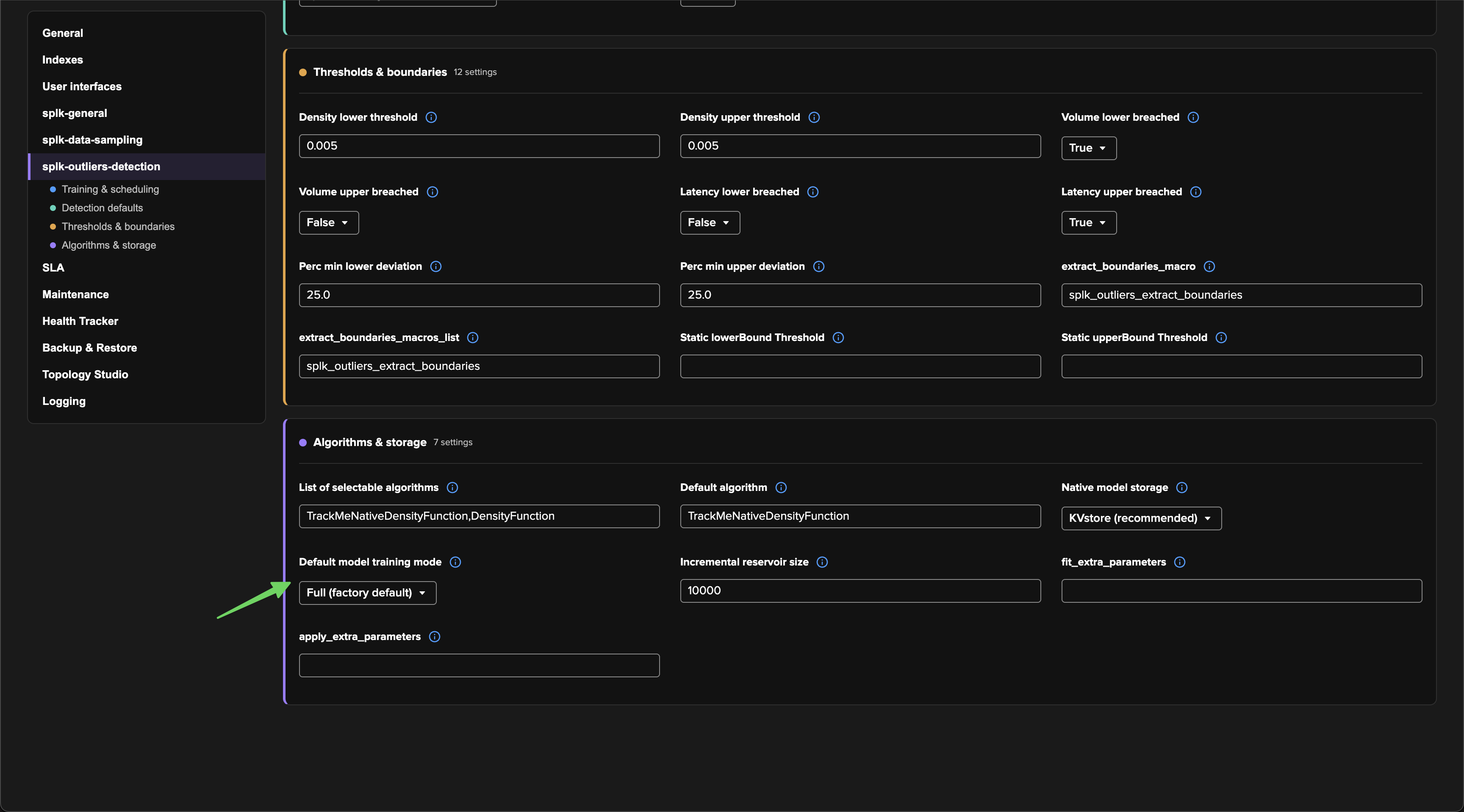
Deployment-wide default. Go to Configuration → System Options → splk-outliers-detection → Algorithms & storage. Set Default model training mode and the Incremental reservoir size. The default applies at training time to models whose training mode is Inherit system default.
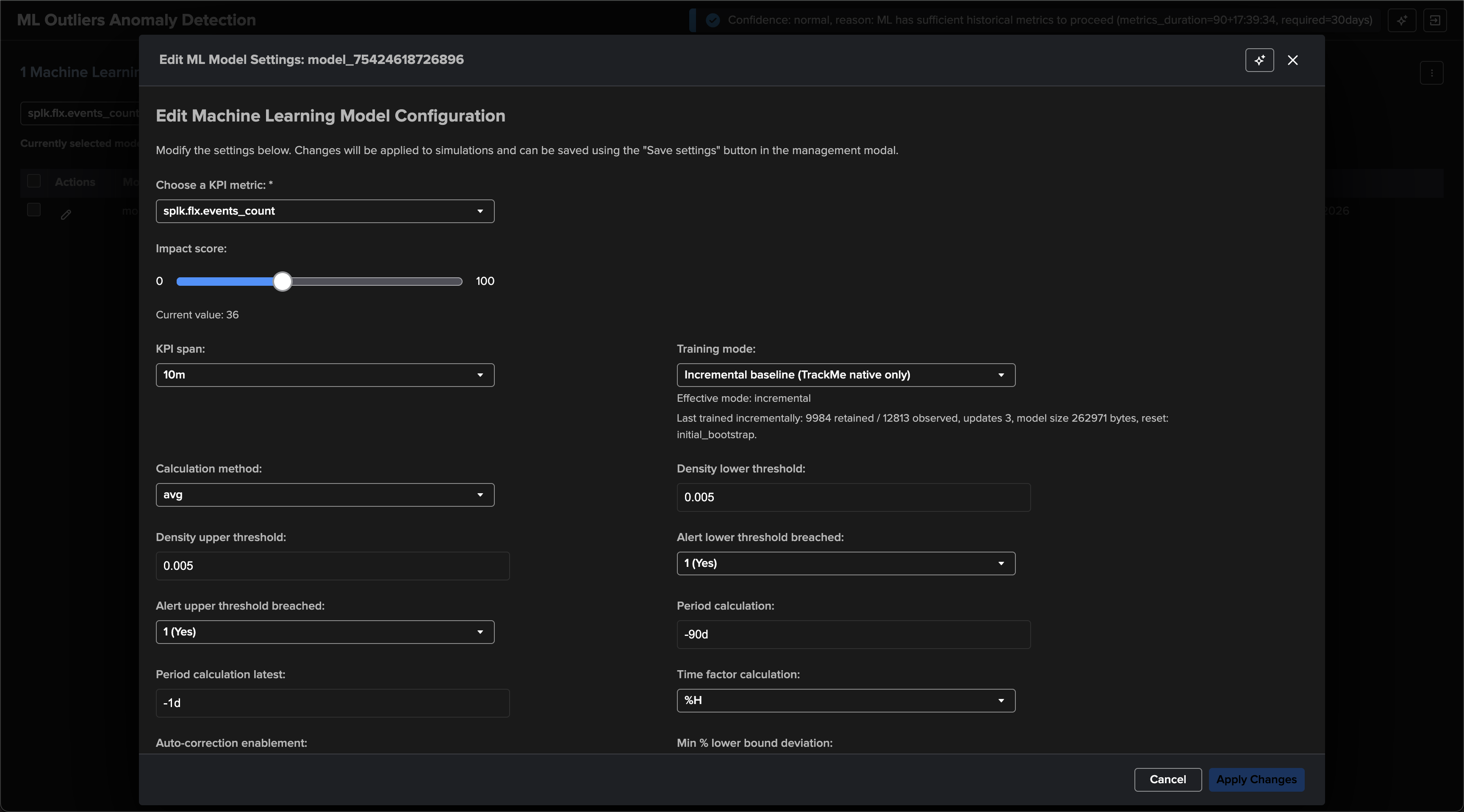
One model. Open Manage outliers detection, edit the model, and choose its Training mode. The editor displays both the configured choice and the resolved effective mode. For an incrementally trained model it also shows the retained and observed counts, update count, serialized size, and most recent reset reason.
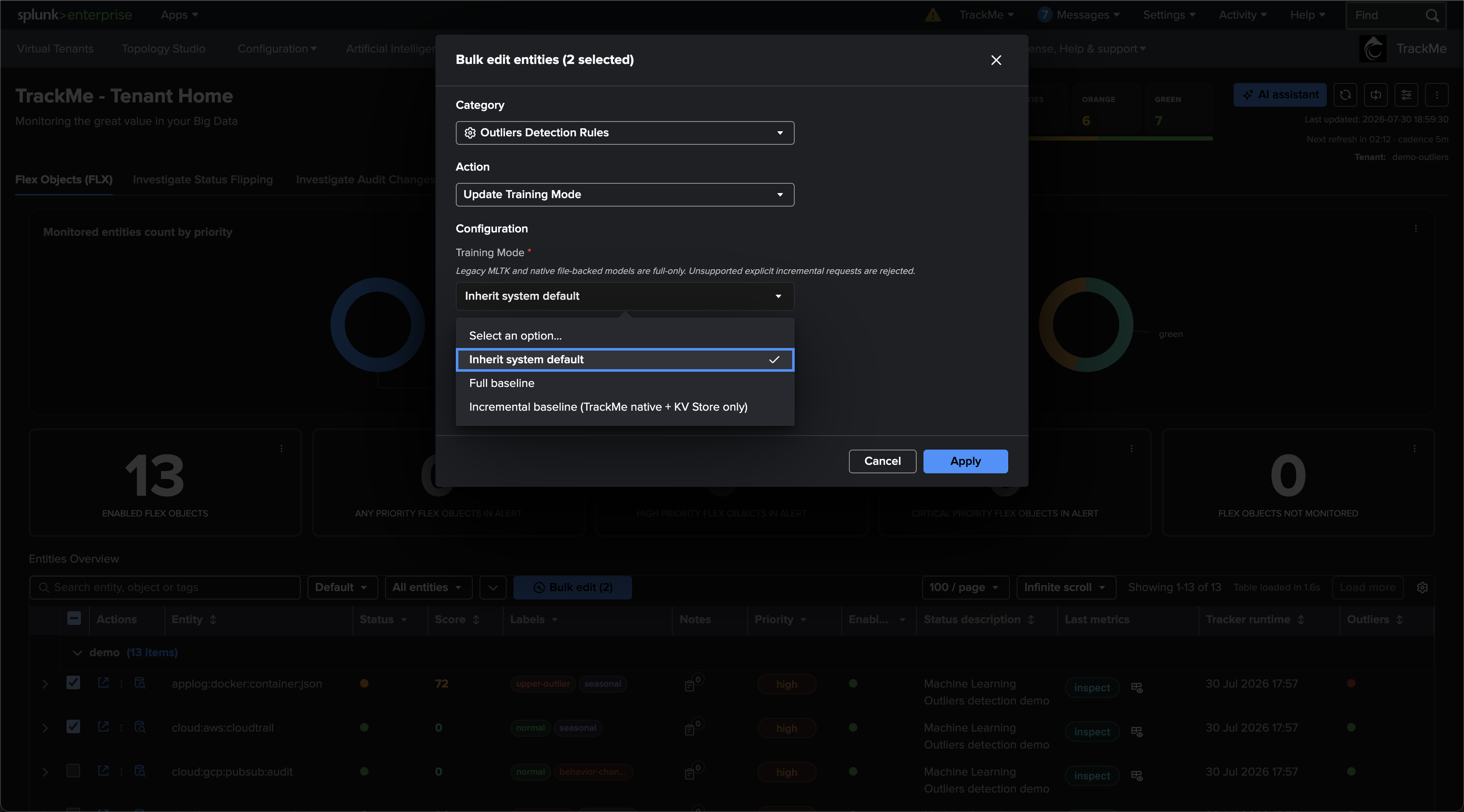
Many entities. From the Tenant Home entity table, select the entities and choose Bulk edit. Select Outliers Detection Rules → Update Training Mode, then choose Inherit system default, Full baseline, or Incremental baseline. An explicit bulk choice updates the selected entities’ outlier rules without changing other entities.
Tip
Start with the system default on full and select a small number of representative
models explicitly as incremental canaries. Enable the system default only after their
boundaries and anomaly rates have been observed across several business cycles.
Compatibility and reservoir sizing
Incremental training is supported only for:
TrackMeNativeDensityFunction;KV Store model storage.
The legacy MLTK DensityFunction remains available for full training, but incremental
and MLTK partial_fit are intentionally unsupported. Native file-backed models are also
full-only. The UI disables an unsupported incremental choice, and REST clients receive an
explicit validation error.
The reservoir must hold at least 10 samples for every possible seasonality group. TrackMe validates the group cardinality against the KPI span before training:
Seasonality |
KPI span |
Maximum groups |
Minimum reservoir |
|---|---|---|---|
hour of day ( |
|
24 |
240 |
weekday × hour ( |
|
168 |
1,680 |
weekday × hour/minute ( |
|
1,008 |
10,080 — above the factory 10,000 |
weekday × hour/minute ( |
|
2,016 |
20,160 — above the V1 maximum |
An unsafe explicit incremental model is rejected. An inherited model whose system
default resolves to incremental falls back safely to full and reports
seasonality_budget_fallback_full.
Contamination, drift and late corrections
The reservoir contains accepted training observations, not observations proven to be clean. This makes operational discipline more important than in a short rolling window:
Add period exclusions for incidents, maintenance, migrations and known abnormal regimes before those timestamps are accepted.
Confirmed outliers are not automatically removed from the reservoir.
Reservoir history does not decay automatically.
Corrections arriving at timestamps already behind a group watermark are intentionally ignored.
To remove contaminated history or incorporate late corrections, add the appropriate exclusion and trigger a clean bootstrap by changing a signature-bearing setting, or switch to full and retrain before enabling incremental again.
If the true behavior has permanently changed, choose deliberately:
retain incremental mode when old and new regimes are both valid and should coexist;
bootstrap incremental state when the old regime is no longer meaningful;
use full mode when normal should follow a recent rolling window quickly.
Safety and failure behavior
TrackMe never deletes the stable model before building its replacement. Incremental training uses a per-model, TTL-protected lock and validates the complete candidate before an atomic KV Store write. Lock contention, ownership loss, fit or boundary failure, corrupt state that cannot be rebuilt, excessive seasonality cardinality, oversized serialization, or persistence failure all leave the last good model active and fail the training search visibly.
The retained record is bounded by the configured reservoir and an 8 MiB serialized-record safety ceiling, below Splunk’s 16 MiB KV Store record limit.
Simulation remains stateless: it always performs full training under a simulation-only model key and never reads or changes live incremental state.
Verify a canary
The model editor shows the configured and effective modes together with persistent runtime diagnostics:
Effective mode: incremental
Last trained incrementally: 9984 retained / 12808 observed,
updates 2, model size 262952 bytes, reset: initial_bootstrap.
A healthy canary satisfies:
runtime mode is
incremental;observed count is greater than or equal to retained count;
retained count is at or below the configured reservoir;
update count increases only when completed, newer observations are accepted;
model size remains below 8 MiB;
overlapping history appears as rejected old/duplicate points rather than being counted again.
Use the dedicated trackmefit log to distinguish each training action:
index=_internal sourcetype=trackme:custom_commands:trackmefit
"Incremental fit result for model"
| rex field=_raw "Incremental fit result for model \"(?<model>[^\"]+)\": (?<incremental_json>\{.*\})$"
| spath input=incremental_json
| table _time model action reset_reason accepted_count duplicate_or_old_count
        retained_count total_seen serialized_size preserved_groups pruned_groups
| sort - _time
Expected actions are:
bootstrap— initial state or an intentional/reset recovery;incremental_update— newer points were accepted and a candidate was persisted;no_new_data— a safe no-op because the searched timestamps were already known.
For a practical qualification, run a bootstrap, a later update with completed new buckets,
and an immediate overlapping rerun. The later update should accept new points; the
overlapping rerun should report no_new_data without changing the persistent update
counter.
Rollback to full
Changing the configured mode selects how the next training run learns the baseline. To complete a rollback, change the mode and then retrain the affected model or entities:
One model: edit the model, select Full baseline, apply the change, and train it.
Selected entities: select them in the Tenant Home entity table, choose Bulk edit → Outliers Detection Rules → Update Training Mode → Full baseline, and apply the change. Then use the Outliers bulk-training action for those entities.
All inherited models: set
splk_outliers_training_mode_default = fulland retrain the inherited entities. Models explicitly configured asincrementalremain incremental until changed individually or through bulk edit.
On each successful retraining, the standard full candidate replaces the incremental model and removes its retained incremental state. Switching that model back to incremental later performs a fresh bootstrap.
See also
Outlier detection — the readable introduction to outlier detection, seasonality, confidence and scoring.
Outlier detection — in depth — model management, backend scheduling, all system and per-model options, and troubleshooting.